How to Stop Spam Calls A Guide to Reclaiming Your Peace
By Josh C.
If it feels like your phone is under constant siege from unknown numbers, you're not imagining things. The best way to fight back is with a multi-layered defense—a combination of your phone's built-in tools, what your carrier offers, and a smart AI call screener. Just blocking numbers as they come in won't cut it anymore; scammers simply switch to a new one in a heartbeat.
Why Are You Getting So Many Spam Calls?
That constant flood of unwanted calls isn't personal. It’s the result of a massive, automated industry designed to interrupt your day. Think about the last time an important meeting or a quiet family dinner was shattered by a robocall about your car's extended warranty. That frustration is a shared, daily experience for millions of us.
This relentless barrage is fueled by surprisingly simple and cheap technology. Scammers use powerful autodialers that can blast out thousands of calls every minute, churning through huge lists of phone numbers. They also lean heavily on a deceptive trick called caller ID spoofing.
The Technology Behind the Annoyance
Spoofing is how criminals mask their real number and make a fake one appear on your caller ID. You've probably seen it in action with "neighbor spoofing," where the incoming call has your same area code. It’s a clever tactic designed to trick you into thinking it's a local business or someone you might know, making you far more likely to pick up.
These two technologies create the perfect storm for scammers. They can operate anonymously and hit an incredible number of people at once. The moment you answer, your number gets marked as "live," and it often gets sold to other scammers, which just invites even more unwanted calls.
The sheer scale of this problem is staggering. In the US alone, we get hammered with 2.8 billion spam and unwanted calls every single month. That breaks down to about 8 spam calls for every person. Over the last year, this added up to a collective 196 million hours of our time completely wasted. You can dig into more of these stats over on Truecaller.com.
More Than Just an Annoyance
Beyond the lost time, this constant digital noise takes a real psychological toll. It breeds distrust, making you second-guess every call from a number you don't recognize. Is it the pharmacy with your prescription? A delivery driver who's lost? Or another scam?
The personal data that fuels these operations is often scraped from online forms you've filled out or stolen in data breaches. You can learn more about how to protect your digital footprint by understanding privacy policies. Since scammers can generate an endless stream of new numbers, it becomes crystal clear that blocking them one by one is a losing game. To truly get your peace and quiet back, you need a smarter, multi-layered strategy. Let's dive into what that looks like.
Your Phone’s Built-In Defenses
Your smartphone already has some surprisingly powerful tools baked right in to fight spam calls. These are your quickest wins, and you can turn them on right now to get some immediate relief without downloading a single app. Let's walk through how to find and activate these defenses on your iPhone or Android.
For iPhone: Silence Unknown Callers
Apple gives iPhone users a straightforward, powerful feature called Silence Unknown Callers. Just like it sounds, it automatically sends any call from a number that isn't in your contacts, recent outgoing calls, or Siri Suggestions straight to voicemail. Your phone won’t even make a peep.
This is a fantastic way to reclaim your peace and quiet. The only catch? It's an all-or-nothing approach.
You have to be mindful that it could silence important calls you might be expecting from a new doctor's office, a delivery driver, or a recruiter. The call will still show up as a missed call and go to voicemail, but you'll need to be diligent about checking.
How to Turn It On:
It only takes a few seconds to enable this feature.
- First, open your iPhone’s Settings app.
- Scroll down and tap on Phone.
- From there, find and select Silence Unknown Callers.
- Just flip the toggle switch to the ON position.
Here's what that screen looks like, so you know exactly what to look for.
Once that’s done, any call from a number your phone doesn't recognize will be sent quietly to your voicemail without ever disturbing you.
For Android: Smart Spam Protection
Android’s approach, especially on phones using Google's Phone app, is a bit more nuanced with its Caller ID & spam protection. Instead of a blanket silence, it leans on Google’s massive database to identify and flag calls it thinks are spam.
When a suspicious call comes in, you’ll often see a big red warning on your screen like "Suspected spam caller," giving you a clear heads-up to ignore it. You can even take it a step further and have it automatically block these calls so your phone never rings in the first place.
This built-in protection is a great first step, but it’s not foolproof. It relies on databases of known spam numbers. Scammers are smart and are constantly churning through new numbers, so some calls will inevitably slip through before they get flagged.
How to Turn It On:
- Open your Phone app.
- Tap the three-dot menu icon (usually in the top corner) and go into Settings.
- Look for an option called Caller ID & spam (sometimes just "Spam and Call Screen") and make sure it’s on.
- For the best results, you’ll also want to enable the Filter spam calls option.
These native phone settings give you a solid baseline of defense. If you find you're still getting bombarded, it might be time to look at more advanced screening tools and fine-tune your protection settings to build a stronger wall. Think of these built-in features as the first layer in a multi-layered strategy to stop spam calls for good.
Your Carrier Can Be Your Best Ally in the Spam Fight
While tweaking settings on your phone is a great first step, the real power play is using the tools your mobile carrier provides. Think of it this way: your phone's settings are like a lock on your front door, but your carrier’s tools are the security guard at the front gate. They can stop a spam call at the network level, long before it ever gets a chance to ring on your device.
This is all thanks to a technology framework called STIR/SHAKEN. It’s a fancy name for a simple concept: carriers now have a way to verify that a caller ID is real and hasn't been faked—a trick known as "spoofing." It’s essentially a digital handshake between networks that confirms a call is legitimate, which is a huge step in weeding out the fakes.
Comparing Major US Carrier Spam Protection Tools
The big three—Verizon, AT&T, and T-Mobile—have all built their own spam-fighting apps around this technology. Each offers a free version that does a pretty good job, with paid upgrades available if you want more control. Let's break down what you get.
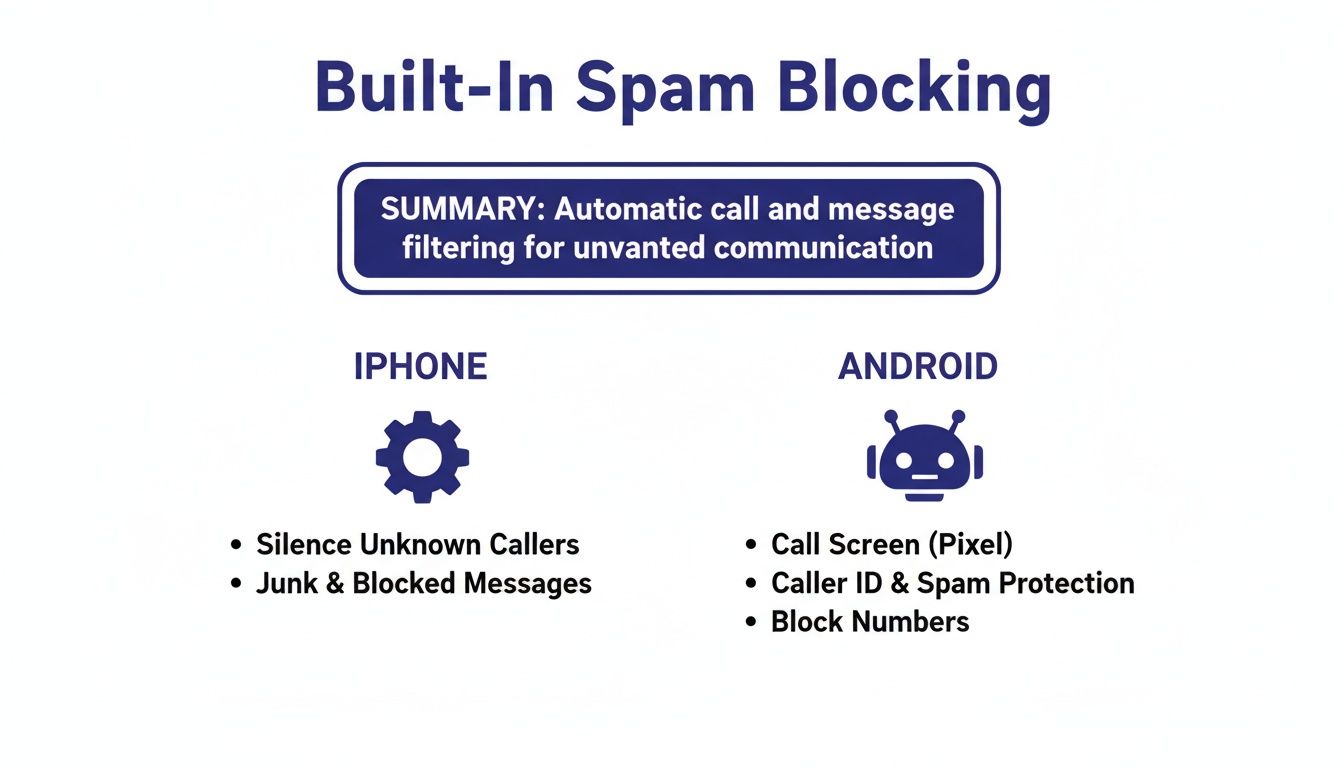
While the built-in features shown above are your first line of defense, pairing them with a carrier app creates a much more formidable barrier.
Here’s a side-by-side look at the free and premium features offered by Verizon, AT&T, and T-Mobile to help you block spam calls at the network level.
Comparing Major US Carrier Spam Protection Tools
| Feature | Verizon Call Filter | AT&T ActiveArmor | T-Mobile Scam Shield |
|---|---|---|---|
| Free Service | Spam Detection, Filtering, and Reporting | Spam & Fraud Call Blocking, Nuisance Call Alerts | Scam ID, Scam Block, and Caller ID |
| Paid Features | Caller ID, Spam Look-up, Personal Block List | Advanced Caller ID, Reverse Number Lookup | Voicemail-to-Text, Personal Number Blocking |
| Best For | Customers wanting a solid baseline of free protection. | Users seeking a broad security suite beyond just calls. | Individuals who want aggressive, default-on scam blocking. |
| Unique Aspect | Provides a spam risk meter for incoming calls. | Includes mobile security features like public Wi-Fi protection. | Offers a free "proxy" number to use online instead of your real one. |
As you can see, the free versions from all three are quite powerful. Verizon Call Filter, AT&T ActiveArmor, and T-Mobile Scam Shield are all worth downloading from your app store, as they provide an immediate and noticeable reduction in junk calls.
You're Part of the Solution
Here’s something most people don’t realize: using these apps isn’t just about protecting yourself. It’s about helping everyone. When a spam call inevitably slips through the cracks, take a second to report it within the app.
Think of it as being a neighborhood watch for the entire mobile network. Every number you report helps the system learn faster, making the filters smarter and more effective at blocking new scam tactics for everyone, not just for you.
This is a team effort. Scammers burn through numbers and change their tactics constantly, so the fight is ongoing. By reporting junk calls, you’re feeding real-time intelligence back to the network, strengthening the defenses for millions of other people. You’re not just a victim of spam calls; you’re an active part of the defense against them.
Taking Official Action to Fight Back
It’s easy to feel like you’re on an island fighting this battle alone, but there are official channels you can use to push back against the relentless flood of spam calls. When you use them, you’re doing more than just venting frustration—you're turning your experience into valuable data for law enforcement. This helps them connect the dots and take down the massive operations behind these calls.
The National Do Not Call Registry: What It Really Does
The first thing that comes to mind for most people is the National Do Not Call Registry. It's crucial to understand what this tool is for, and just as important, what it's not for. The registry was set up to stop sales calls from legitimate businesses. Once your number has been on the list for 31 days, those companies are legally required to leave you alone.
But here’s the catch: the registry works on an honor system. Scammers and illegal robocallers couldn't care less about this list. Following the law isn't exactly part of their business model.
So, is it even worth it? Absolutely. Signing up is a one-and-done task that takes less than a minute at donotcall.gov. It effectively filters out the legitimate telemarketers, which helps you instantly recognize that any remaining unsolicited calls are almost certainly scams.
How to File a Complaint That Actually Helps the FTC
When a scammer inevitably ignores the Do Not Call list, your next move is to report them to the Federal Trade Commission (FTC). This is where you go on the offensive. Think of each complaint as a breadcrumb. Individually, it might seem small, but collectively, these reports allow investigators to see patterns, identify the culprits, and build solid cases.
For your report to have real impact, details are everything. Scammers count on being anonymous, and your specific information helps investigators tear that anonymity away.
What to Include in Your FTC Complaint:
- The exact date and time you received the call.
- The number that showed up on your caller ID, even if you know it’s fake or "spoofed."
- The phone number they called (your number).
- A quick summary of what the call was about. Was it a phony car warranty, a Social Security threat, or a fake debt collector?
Don't think these reports disappear into a black hole. Current events prove they work. In a major 2024 enforcement action, the FTC announced a record-breaking $162 million judgment against a massive robocall operation responsible for billions of illegal calls, a case built directly on consumer complaints.
Filing is simple. Just go to reportfraud.ftc.gov and lay out the details. While it might not stop the very next call you get, it’s a powerful step in the collective, long-term fight to dismantle these fraudulent networks for good.
How AI Call Screening Outsmarts Scammers
Let's be honest, traditional methods for stopping spam calls feel like a losing battle. Blocking numbers and silencing unknown callers are purely reactive. You’re essentially playing defense against an opponent who can generate millions of new numbers at the push of a button. It's like trying to bail water out of a sinking ship with a thimble.
It's time for a different strategy—one that puts you on the offense. This is where AI-powered call screening completely changes the game. Instead of just blocking known bad numbers, this technology acts as an intelligent gatekeeper, figuring out a caller's intent before they ever have a chance to bother you.
Going Beyond the Block List
Picture a service like Gini Help as a personal receptionist whose only job is to handle calls from numbers not in your contacts. When one of these calls comes in, your phone stays silent. The AI assistant picks up for you and starts a real-time conversation.
It asks the kind of questions a human would, like, "Who's calling?" or "What's this about?" This simple interaction is enough to understand the caller's purpose. The AI can instantly tell the difference between a real person—say, a delivery driver needing directions—and a robocall launching into its tired script. If the caller is legitimate, they get forwarded to you. If not, they're stopped cold.
This proactive screening is the key. The AI isn't just checking a number against some static, outdated database. It’s analyzing live language, tone, and conversational patterns to make an intelligent decision in the moment. Your phone only rings when it's a call you actually want.
This shift to intelligent, real-time analysis is happening across the entire security industry. As scams get more sophisticated, we need smarter tools to fight back. It’s no surprise the robocall mitigation market is projected to skyrocket from USD 6.3 billion in 2025 to over USD 22 billion by 2035. This growth is being fueled by the demand for AI-driven tools that leave simple blocklists in the dust. You can learn more about these market trends and advancements from Future Market Insights.
Real-Time Protection for Calls You Answer
So, what about the calls that do get through, or when you decide to take a chance on an unknown number? The best AI screening services have a safety net for that, too, often called Live Call Analysis.
Think about this scenario: you answer a call that sounds fine at first, but then the caller starts pressuring you or asking for sensitive information. Live Call Analysis works quietly in the background, listening for the tell-tale phrases and vocal patterns that are red flags in scam scripts.
It can display a real-time safety score right on your screen, giving you a heads-up if the conversation is heading into dangerous territory. This acts like a security advisor whispering in your ear, giving you the confidence to hang up before any harm is done.
A Unified Defense Against All Threats
The most effective modern tools recognize that scammers don't just stick to phone calls. They'll hit you from every angle—phishing links in texts, malicious attachments in emails, you name it. A truly effective defense has to protect you everywhere.
This is why the leading AI services bundle protection into a single, comprehensive solution:
- Phone Calls: Screening unknown callers so only real people get through.
- SMS Texts: Automatically identifying and filtering out smishing attacks and spam links.
- Emails: Scanning your inbox (whether it's Gmail, Outlook, or iCloud) for phishing, malware, and other common scams.
When you bring all of this under one roof, you create a much stronger shield. The intelligence from a blocked email scam can help the system recognize and block a related text message. It creates a smarter, interconnected defense that learns and adapts to new threats as they emerge. This is how you finally stop playing whack-a-mole with scammers and reclaim your peace of mind.
Common Questions About Stopping Spam Calls
As you start putting these strategies to work, a few questions always seem to come up. Let’s tackle some of the most common ones to clear up any confusion and make sure you’re set up for success.
Will the Do Not Call Registry Actually Stop Robocalls?
Honestly, not really—and it's important to understand why. The National Do Not Call Registry was built to keep legitimate, law-abiding telemarketing companies from calling you. Scammers and illegal robocall outfits? They couldn’t care less about that list. They're already breaking the law, so ignoring the registry is no big deal to them.
You should still absolutely register your number. Think of it as a basic filter. It gets rid of the legal-but-annoying calls, which makes it much easier to assume that any unsolicited sales call that still gets through is probably a scam.
If I Block a Number, Can the Same Scammer Call Me Again?
Yes, and they almost certainly will. This is exactly why blocking numbers one by one feels like a losing battle. Scammers use a sneaky trick called caller ID spoofing, which lets them change the number that shows up on your phone every single time they call.
They can even make it look like the call is coming from your own area code, a technique often called "neighbor spoofing." Trying to block each number is like playing a game of whack-a-mole you can never win. It's frustrating and, ultimately, a waste of your time. For more deep dives into topics like this, feel free to explore our digital safety blog.
The fundamental flaw with manual blocking is that it’s a reactive measure against a proactive threat. You're always one step behind. A truly effective solution must be able to identify and stop threats based on their behavior, not just their phone number.
Are AI Call Screening Services Safe and Private?
When you choose a reputable service, yes, they are designed with privacy at their core. A good AI assistant acts as a personal gatekeeper, stepping in to handle unknown callers for you. You never have to directly engage with a potential threat.
The AI listens to the caller, analyzes the conversation for tell-tale signs of a scam, and figures out what they want—all without ever revealing your personal information. It’s far safer than answering an unknown call yourself. This adds an intelligent, protective barrier between you and the outside world, keeping your data locked down.
Ready to stop scammers before your phone even rings? Gini Help uses advanced AI to screen your calls, texts, and emails, creating a powerful shield against fraud. Reclaim your peace of mind and try it today at https://ginihelp.com.