What Is Family Protection for Shared Safety
By Josh C.
Family protection is a layered household system of shared threat checks, consent, and rapid verification so a suspicious call, text, or email doesn't become a household loss. With adults aged 60 and older reporting more than $7.7 billion in internet-enabled fraud losses in 2025, it means more than physical safety or parental monitoring.
A useful plan makes asking for help ordinary, not embarrassing. It gives each person a way to pause an unfamiliar request without surrendering their privacy or control over everyday decisions.
What Family Protection Means Beyond Physical Safety
The FBI's 2025 Internet Crime Report recorded 201,266 complaints from people aged 60 and older, with reported losses exceeding $7.7 billion. Those figures describe reported incidents, not every attempt a household encountered.
Consider an everyday situation: the person who usually handles the bills is home alone. A text appears to come from their child, explaining that their phone broke and they need money urgently. Nothing about the front door, smoke alarm, or home insurance helps them decide whether that message is genuine.
Family protection fills that decision gap. It connects the person receiving the request with agreed checks and appropriate support across calls, texts, and email.
Protection is a shared decision process, not a shared inbox.
That distinction matters. A household doesn't need everyone reading everyone else's conversations. It needs a reliable answer to a smaller question: when a request could put money, identity, or account access at risk, what happens before anyone acts?
Protecting everyday life and long-term plans
The phrase “what is family protection” can also lead readers toward insurance, estate planning, or physical security. Those are related responsibilities, but they aren't interchangeable.
For example, the Law Office of Bryan Fagan, PLLC explains how family trusts protect your legacy. That's a useful resource for thinking about longer-term arrangements, while a communication-safety plan addresses the suspicious request arriving today.
A practical household definition includes:
- Shared awareness: People recognize requests that deserve another look.
- Clear responsibility: Someone knows who can help verify a concern.
- Personal boundaries: Assistance doesn't automatically grant access to private messages or accounts.
- Permission to pause: Nobody has to send money because a caller demands an immediate answer.
Urgency, payment requests, secrecy, and impersonation are useful warning signals. They aren't proof that every contact is fraudulent, but they're reasons to slow down.
The aim isn't to make relatives suspicious of every conversation. It's to make a pause feel normal when a conversation suddenly carries financial consequences.
The Resilience System Behind Family Protection
A family's ability to stay safe also depends on what happens when income stops, illness interrupts work, or essential expenses become difficult to meet. A scam-prevention plan is useful, but it sits inside this wider picture of household resilience.
Think of resilience as a safety net rather than a single barrier. Different strands help a household absorb different kinds of shocks.
The public safety net
The World Bank identifies three social-protection pillars: social assistance, social insurance, and labor-market programs. Its State of Social Protection 2025 report reports that coverage in low- and middle-income countries rose 10 percentage points, from 41% to 51%, between 2010 and 2022; programs reached approximately 4.7 billion people, while about 2 billion remained uncovered or inadequately covered, including more than 1 billion in Africa and South Asia; coverage was roughly 25% in low-income countries, 42% in lower-middle-income countries, and 82% in high-income countries.
Those pillars have practical household meanings:
- Social assistance: Cash, food, or other support can help when a household can't meet essential needs.
- Social insurance: Pensions, unemployment support, and disability benefits can provide support when earnings change or a qualifying event occurs.
- Labor-market programs: Employment services help people find pathways back to work and income.
The purpose isn't just to replace lost money. It's to help families avoid decisions that undermine their future, such as taking children out of school or selling tools they need to earn a living.
The household layer
Private family arrangements serve a different role. They don't replace public benefits, employment support, or emergency assistance, and families shouldn't assume those services are equally available everywhere.
For digital safety, the household layer connects early detection with agreed action and recovery support:
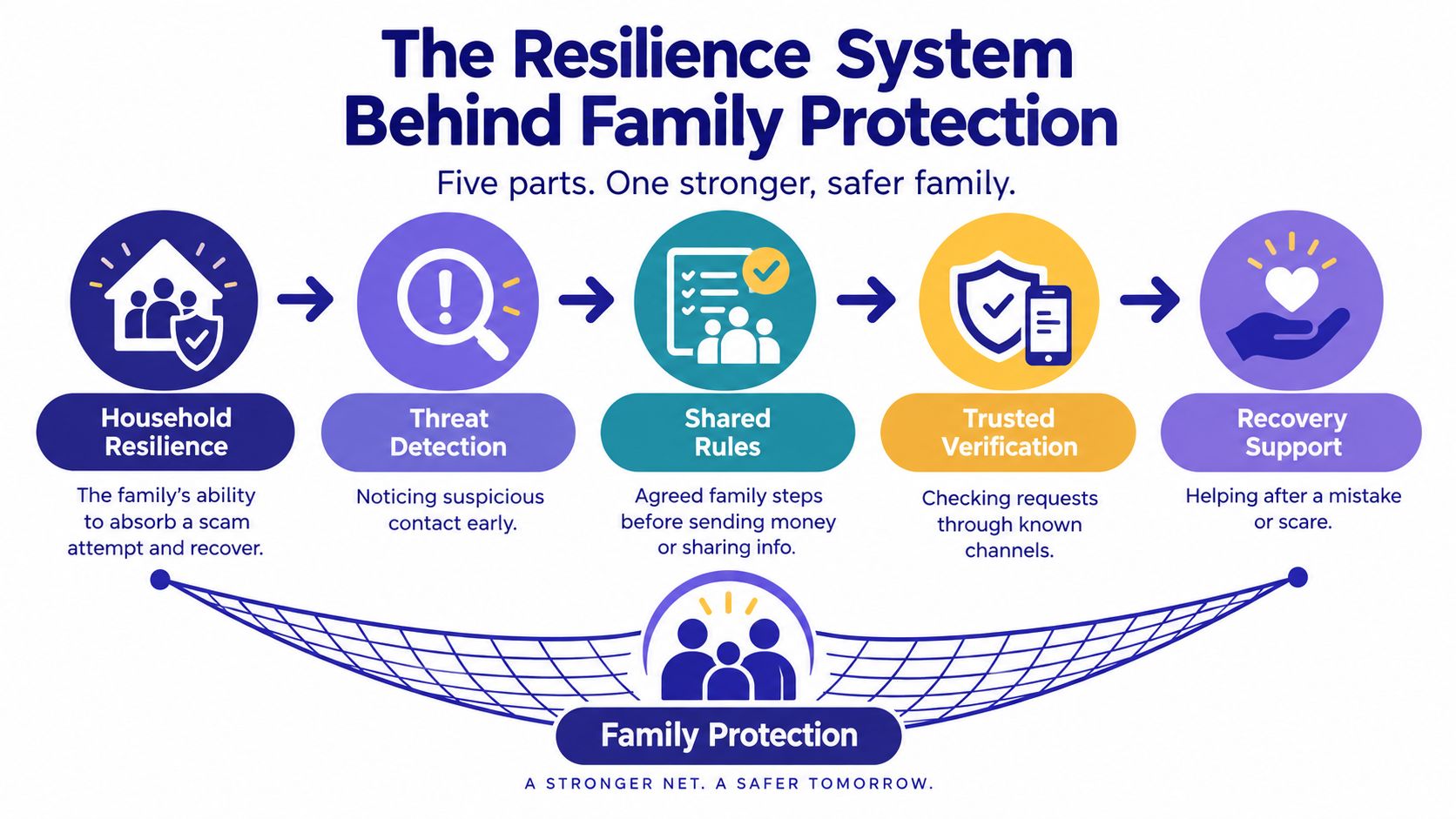
The public-policy pillars and the household practices in this diagram aren't competing definitions. One concerns social-protection systems; the other translates resilience into everyday communication decisions.
A useful planning question is: If something goes wrong, what helps this household remain stable? The answer might include access to benefits, a trusted person to call, a way to stop a pending payment, and practical help restoring account access.
That broader view prevents a common misunderstanding. Family protection isn't merely avoiding danger. It's preserving people's ability to continue their lives after a disruption.
How Shared Threat Intelligence and Controls Work
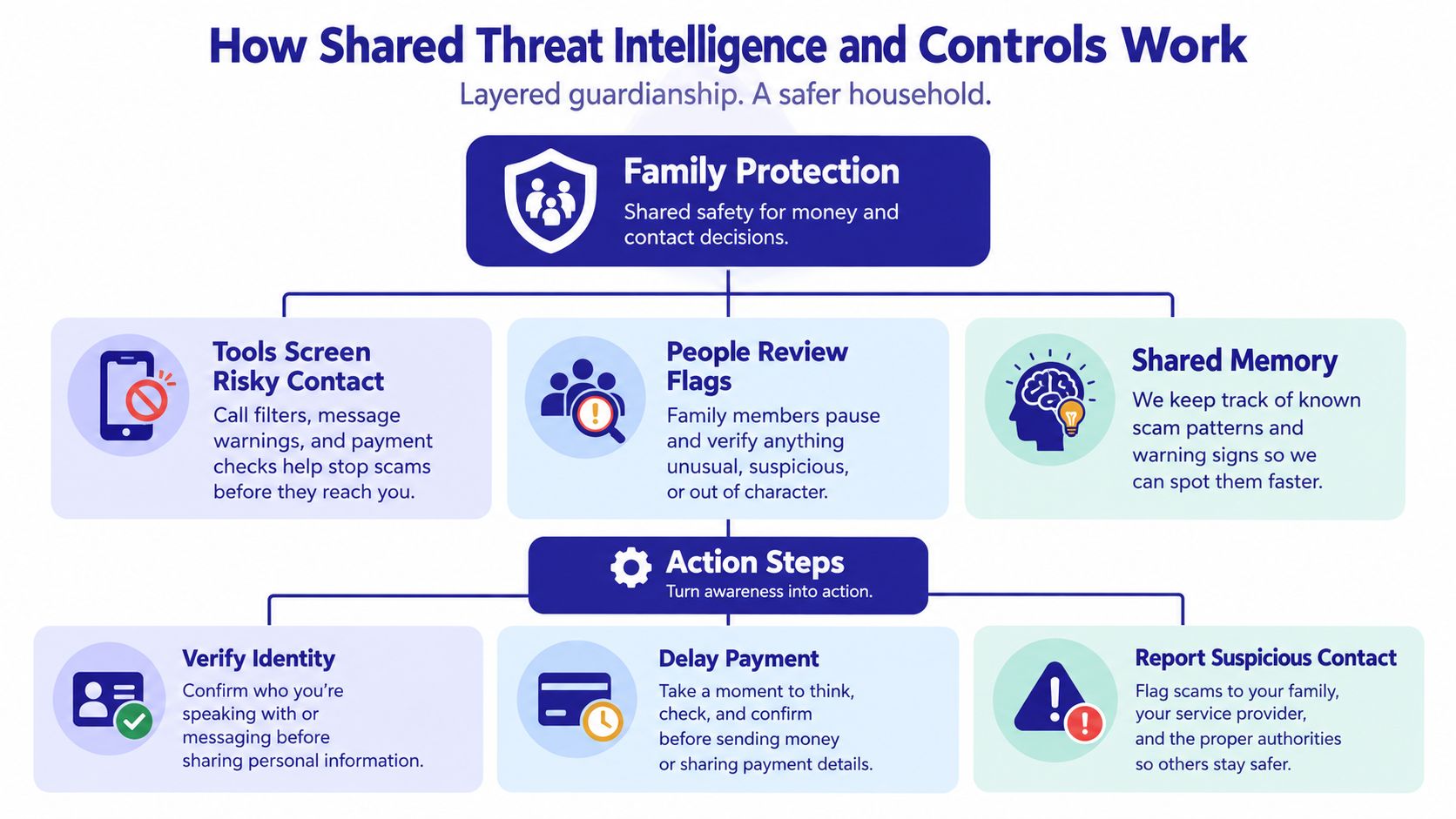
A scam can cause harm before money moves. A person may first be pressured to share a password, reveal personal details, or install software that gives someone access to a device. Family protection works best as layered guardianship: technology can flag suspicious contact, while an agreed person helps assess the request before the recipient acts.
Research on technological and social guardianship for older adults identifies relative impersonation, information leakage, and “guess who I am” schemes as recurring patterns. Its approach pairs screening and secure networks with password management, antivirus, family verification, and discussion of suspicious contact.
Break the attacker's control of the conversation
A scammer may try to keep the recipient inside a conversation where urgency and reassurance come from the same person. Independent verification interrupts that pressure. For example, if a caller claims to be a relative and asks for a payment, the recipient can end the call and contact that relative using a number already saved.
A household can agree on a simple response:
- Flag the request: Identify what the person is being asked to do, such as send money, share credentials, or allow device access.
- Share relevant context: Tell the agreed contact what raised concern, without forwarding unrelated private messages.
- Verify independently: Use a stored number, a prearranged code phrase, or another appropriate contact, not details supplied in the suspicious message.
- Record the outcome: Note whether the request was confirmed, rejected, or remains unresolved.
A blocklist can stop some known unwanted numbers, but it cannot judge every request. A familiar-looking contact may still be compromised, and a new number may be legitimate. Treat the nature and urgency of the request as reasons to verify, especially before sharing information or approving access.
The relationship between technical screening and human review is shown here:
Share warnings without sharing everything
Shared threat intelligence means giving relevant people useful information about a threat, not giving them unrestricted access to someone's communications. A warning can name the impersonation attempt and the requested action while leaving unrelated messages private.
The research also discusses agreeing on connected devices, using multifactor authentication, enabling automatic updates, choosing strong passwords, and keeping smart-home devices separate from other network activity. For family accounts and devices, least-privilege access means each person receives only the permissions needed for their agreed role. Review those permissions with the account holder, and make clear how access can be withdrawn.
Gini Help's guide to integrated threat intelligence explains how warnings can be connected instead of treating each contact in isolation.
Support should not become surveillance. Arrangements for a child and an adult are different: for an adult, agree on the purpose, make permissions visible, and provide a clear way to review or withdraw access. A trusted relative can help check a suspicious request, but family ties alone do not make someone safe to grant access to.
Choosing a Family Protection Approach That Fits
The right approach depends on where a household needs help: setting a rule, reducing unwanted calls, or getting an early warning during a risky interaction. These options can work like layers of a home's security, but each has limits and different privacy costs.
Family Protection Approaches Compared
| Approach | What it catches | What it misses | Privacy demand | Best fit |
|---|---|---|---|---|
| Talk-only family rule | Requests the recipient recognizes and brings to someone's attention | Contact the person doesn't question or disclose | Little technical access, but boundaries still matter | Households comfortable asking for help |
| Traditional blocklist | Numbers already identified as unwanted | Fresh numbers and risks within apparently legitimate conversations | Requires call-related permissions appropriate to the service | People primarily seeking fewer nuisance calls |
| Real-time screening | Suspicious features in contact as it arrives or unfolds | Anything the service fails to recognize; it can't establish every real-world fact | Requires careful review of communication access and handling | Non-technical users or caregiving households wanting an earlier warning layer |
A talk-only rule relies on the person noticing a concern and choosing to ask for help. A blocklist shifts some work to software, but known-number lists cannot judge every new caller's purpose. Neither approach guarantees that a risky request will be caught before someone shares information or sends money.
Real-time screening adds an earlier layer. An AI screener can answer an unknown call, assess the conversation, and decide whether to connect it. Unlike a blocklist, it considers features of the interaction, not just whether a number is already listed. It still cannot confirm every real-world detail, so a warning should prompt a pause and an independent check, not automatic trust in the tool.
A concrete screening option
Gini Help is one service in this category. Its product information describes protection for calls, SMS, and email accounts from Gmail, Outlook, Yahoo, and iCloud, along with Live Call Analysis, risk scores, haptic warnings, and family-plan threat sharing. The service launched in December 2025 and lists a subscription of $5.99 per month. It focuses on adults 50 and older and describes the fraud problem as exceeding $12.5 billion annually.
These are product details, not proof that every scam will be stopped. Before choosing a service, ask what it can access, which relatives can see alerts, and how the protected person can review or withdraw consent. Support should make it easier to pause and check, not give family members a reason to monitor private communications without agreement.
For a household mainly bothered by spam, fewer nuisance calls may be the priority. In a caregiving household, clear alerts, usable controls, and consent may matter more than a long feature list. Keep financial planning separate from communication screening. Wealth Collective's guide can help you assess your family's insurance needs as a complementary planning task.
Buying rule: Choose the least intrusive approach that addresses the household's actual risk, then check whether everyone can use it comfortably.
Real Family Protection Examples Before Money Moves
A useful protection plan creates a pause between a suspicious request and an action. These examples are illustrative, not reported case studies. Each shows how a person can check independently before sharing information, granting access, or sending money.
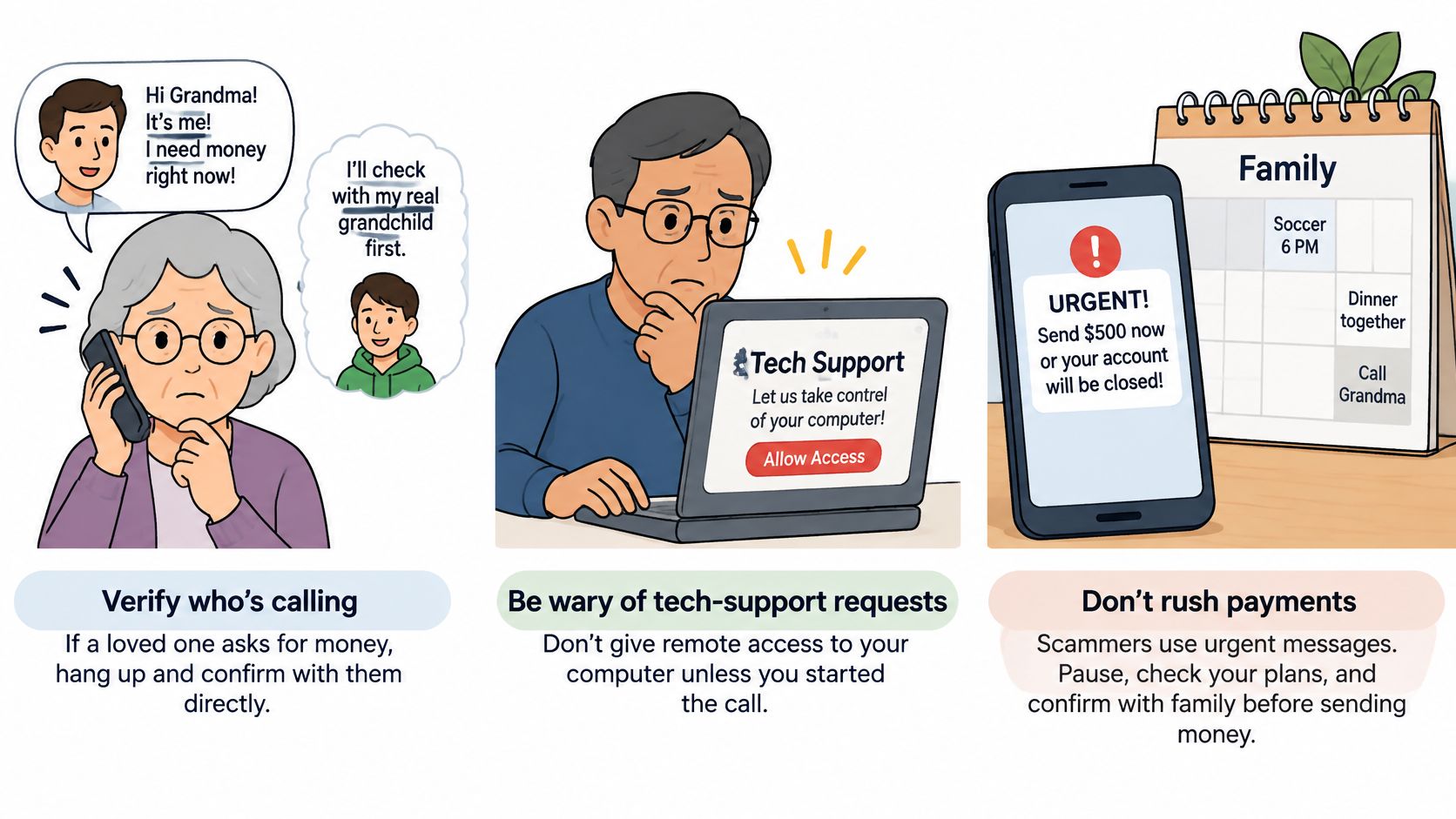
This graphic highlights common warning situations and ways to respond:
A relative needs money urgently
A caller claims to be a grandchild in trouble and asks the recipient to keep the call secret. Before paying, the recipient calls the grandchild using a saved number. A relative can offer to help with this agreed check, without shaming the person or taking control of their accounts.
Tech support wants remote access
A caller says the computer has a serious problem and asks the owner to install remote-access software. The owner stops before granting access and contacts their usual support provider through a known contact method. A warning is useful here because it arrives before a stranger can view or control the device.
An investment pitch becomes a transfer request
A persuasive contact offers an investment, then urges the recipient to move funds immediately. Before transferring money, the recipient can ask an independent person to review the request. Keep the promoter out of that conversation so the review is not shaped by the person applying pressure.
The stakes can be uneven. A review of FBI-based elder-fraud figures and FTC loss concentration describes approximately $7.748 billion in reported losses and an average near $38,500 in 2025. It also reports that 6% of older fraud victims with losses of at least $100,000 accounted for 70% of reported losses, alongside 3,143 AI-related complaints and $352.5 million in associated losses.
These reports rely on voluntary reporting and may understate harm. The figures describe reported cases, not what any particular household will lose. For more guidance on financial fraud prevention, focus on steps that interrupt a request before money moves.
For another discussion of scam awareness, watch the video below:
A government-looking email demands action
An email uses official-sounding language and asks the recipient to pay or provide identity information. Rather than clicking its payment link, the recipient contacts the relevant office independently using contact details they already trust. A family member can support that check with the person's consent, while leaving the decision and private information in their hands.
Why Family Access Is Not Automatically Trustworthy
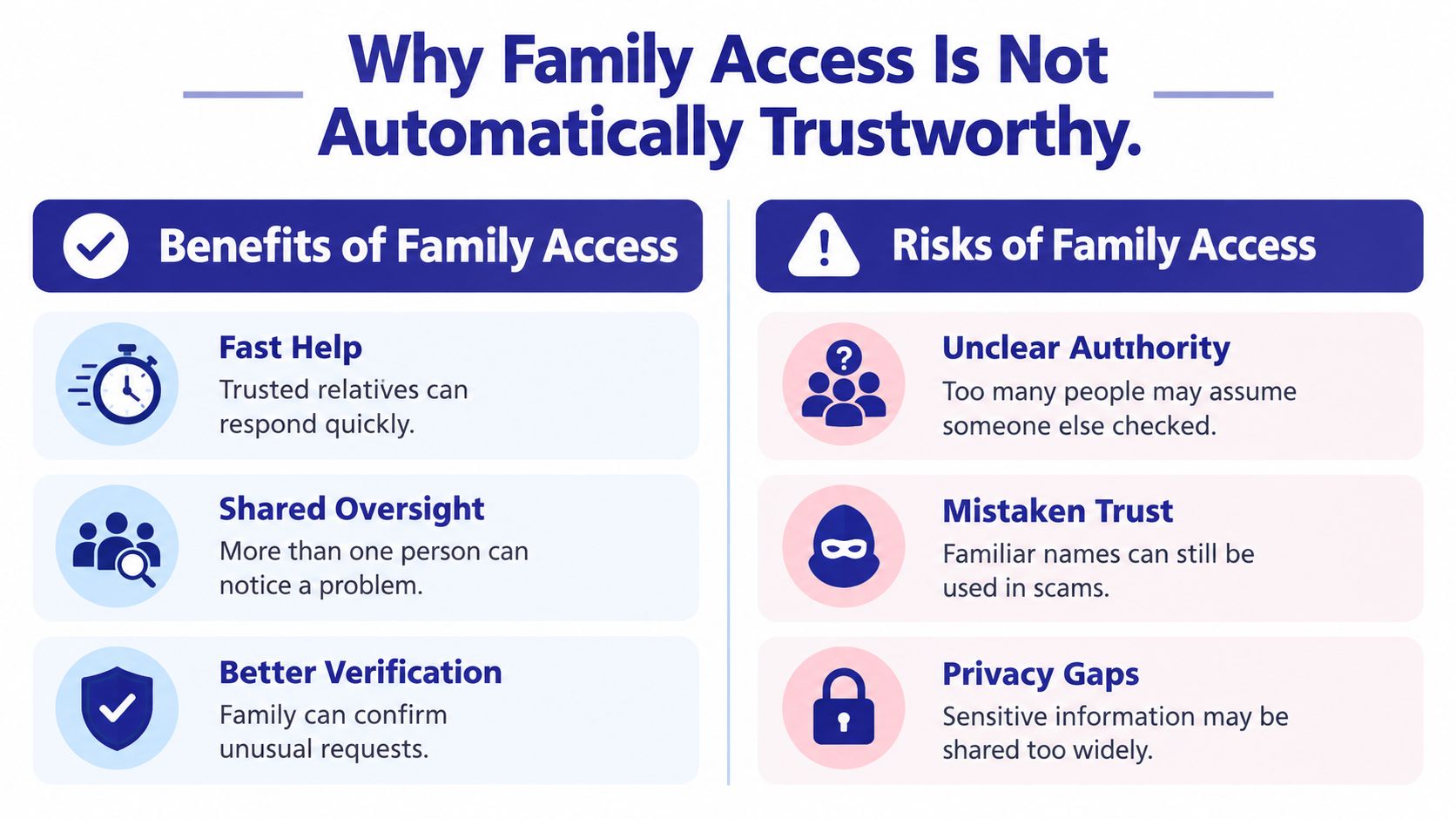
A relative may be trying to help and still have too much influence over another person's money or private life. Family protection works like layered guardianship: each layer should interrupt a risky request while preserving the protected person's control. Trust is a reason to discuss access, not proof that unrestricted access is safe.
An analysis of elder-abuse hotline data reported that nearly 47% of financial-abuse incidents involved family members, while medical caregivers accounted for another 13%. Those figures describe incidents in that analysis, not all families or caregivers. They are a reminder to set safeguards around roles, including the roles of people who are close.
Write down the boundaries
A family safety agreement should explain the support in terms the protected person understands. Installing an app does not establish consent, and good intentions do not settle what information someone may see.
Record the decisions clearly:
- Alert permissions: Name who receives warnings and what each warning reveals.
- Decision ownership: State which choices remain with the older adult.
- Access limits: Separate help checking a request from permission to use or manage accounts.
- Review arrangements: Ask more than one trusted person to review significant activity and permission changes.
- Withdrawal and exceptions: Explain how consent can change and how genuine emergencies will be handled.
An alert that says a request needs checking shares less than continuous access to messages or accounts. The difference matters: support should give someone a chance to pause a risky action, not become surveillance.
Plan for disagreement before it happens
If relatives disagree, pause any proposed expansion of access and ask the older adult what they want. Check whether a person involved could benefit financially from the decision. Disagreement alone is not permission to take control.
When a caregiver may benefit from a transaction, ask an independent trusted person to review it. If serious risk is visible and the person declines help, seek qualified local safeguarding or legal guidance rather than assuming family status grants authority.
Understanding how a power of attorney works, through the Law Office of Bryan Fagan, PLLC, can help distinguish informal help from legal authority. A family safety agreement does not replace appropriate legal advice.
Privacy boundary: Concern about a suspicious payment does not give anyone permission to inspect every private conversation.
Relatives can learn social engineering defense to recognize manipulation and help check a request, without treating every disagreement as evidence that someone needs supervision.
Respectful support leaves room for choice. Someone may welcome help checking a message and still decline continuous monitoring.
When to Use Family Protection and Start Today
Reported fraud losses for adults aged 60 or older rose from about $600 million in 2020 to about $3 billion in 2025, according to the FTC's report on protecting older adults. The report highlights tech-support, prize, romance, government-impersonation, and friend-or-family-impersonation scams. It also discusses CFPB-reviewed cases cited by AARP in which more than two-thirds involved a suspected family member, with losses often higher when the victim knew the perpetrator.
Start protection before a loss is confirmed. It can help when an older adult wants support, someone manages money for others, or a request creates pressure to act without checking. Family protection works like layered guardianship: one person can flag a concern, another can verify it, and agreed controls can pause a consequential action before money or account details are shared. Familiarity alone is not proof of safety.
Act on the request, not just the caller
Pause and verify requests involving:
- Payment: Especially a transfer described as urgent.
- Credentials: Passwords, verification codes, or account access.
- Remote access: Permission to view or control a device.
- Secrecy: A request to hide the interaction from the usual contact.
- Urgent impersonation: A claim that a relative or official needs immediate action.
Agree on a confirmation rule in advance. Assign distinct roles for receiving alerts, checking requests through a separate channel, and reviewing consequential activity. Keep consent explicit, and make logs available only for oversight the household has agreed to. No single person should control every step.
Make the first conversation manageable
Ask what help feels useful, what would feel intrusive, and whom the person wants contacted if something seems wrong. Agree that reporting a suspicious interaction will prompt calm verification, not blame or automatic loss of independence. Support should make it easier to stop before disclosure or payment, without turning into continuous monitoring.
If call, text, and email screening fits that agreement, download Gini Help from Google Play or the App Store. Write a one-page family safety agreement covering alerts, verification, privacy, and emergency contacts. Review who can see alerts and what happens when a request is disputed before setting up protection.