How to Find No Caller ID Numbers and Unmask Private Calls
By Josh C.
Figuring out who's behind a "No Caller ID" call isn't just about satisfying curiosity. It’s about taking back your peace of mind and securing your phone line. While you can use special dial codes or call your carrier for help, the best defense these days often comes from a smart call screening app that can filter out these mysterious callers before they even get a chance to bother you.
Why Finding Out Who Is Behind "No Caller ID" Matters
We’ve all felt it—that little jolt of suspicion when "No Caller ID" pops up on the screen. Is it the hospital with test results? A job interview callback? Or is it another scammer hoping you'll pick up? Playing this guessing game every day is more stressful than it needs to be.
What used to be a minor annoyance has turned into a real security risk, especially for older family members who might be more trusting. Scammers love hiding their numbers because it makes them nearly impossible to block, report, or trace.
The Rise of Anonymous Call Threats
The tricky part is that you can't just ignore every single private call. Plenty of legitimate places, like doctors' offices, government agencies, and even some businesses, have phone systems that show up as blocked or anonymous. This puts you in a bind—answer and risk a scam, or ignore it and risk missing something important.
And the problem is huge. In the second quarter of 2025 alone, there were an estimated 13.7 billion suspected spam calls globally. That’s about 150 million junk calls every single day, according to the Global Call Threat Report from Hiya. A big chunk of those hide behind "No Caller ID" to get around the call-blocking tools we all use. Current events, like the rise of AI-powered voice scams that can mimic a family member's voice, make answering unknown calls even more dangerous. Research shows these sophisticated scams are on the rise, making it critical to have a strong defense.
The real problem with "No Caller ID" is how it shifts the power. The caller knows exactly who they're reaching, but you're left completely in the dark. Scammers use this one-sided anonymity to create a false sense of urgency or trust, pushing people into making bad decisions.
Your Options for a Real Solution
The good news is you don't have to just sit back and take it. The best way to regain control is to use a few different strategies together. We'll walk through several of them, including:
- Tools from Your Phone Carrier: Most providers offer services like Anonymous Call Rejection or call tracing features.
- Third-Party Caller ID Apps: These are the classic apps that check incoming calls against massive databases of known numbers.
- Modern AI Call Screeners: A newer, smarter approach where an AI assistant screens the call for you.
For the strongest protection available, an AI-powered screener like the Gini Help app acts like a personal receptionist. It answers calls from unknown numbers on your behalf, figures out who is calling and why, and only puts legitimate people through. This stops scammers cold before your phone even rings. We always suggest downloading the Gini Help app from the Google Play Store and the App Store.
Before you download a single app, it's a good idea to see what tools your phone company already gives you. Most of the major carriers have free or low-cost services designed to stop anonymous calls in their tracks. People often forget these exist, but they can be a surprisingly effective first line of defense.
The most powerful of these hidden tools is often called Anonymous Call Rejection. It does exactly what the name suggests: it automatically blocks any call that comes in with a hidden or private number.
When you flip this feature on, anyone trying to call you from a blocked number simply can't get through. They’ll usually hear a recorded message telling them you don't accept anonymous calls. This forces legitimate callers to unblock their number if they genuinely need to reach you.
Turning On Anonymous Call Rejection
Getting this feature working is usually pretty simple. For most phone services, both landline and mobile, it’s just a matter of dialing a quick code.
- Dial *77: This is the magic number for most carriers. Just dial it and hang up to turn the service on.
- Dial *87: If you ever change your mind, this code will turn the feature off.
These codes are standard, but they can sometimes differ from one provider to another. If *77 doesn't do the trick, a quick search on your carrier's website for "anonymous call rejection" or a call to customer service will get you the right code. It's a small step that can make a big, immediate difference.
When Blocking Isn't Enough: Using Call Trace
Sometimes, a call is more than just annoying—it’s harassing or even threatening. In those serious situations, you need more than a simple block. This is where a Call Trace service comes into play.
The moment a disturbing call ends, hang up and immediately dial *57. You'll hear a confirmation that the call has been successfully traced. This action flags the call and logs the hidden number in your carrier's official system.
It's crucial to understand that dialing *57 won't show you the number. Its purpose is to create an official record that law enforcement can use. Carriers often charge a small fee for each successful trace, and you'll likely need to trace at least three separate harassing calls before the police can get a subpoena to reveal the caller's identity.
For more on this, check out our guide on how to stop spam calls for a deeper dive into reporting strategies.
Your Carrier's Own Blocking Apps
Beyond star codes, the big carriers also provide their own dedicated apps to give you more control over who can ring your phone.
Verizon's Call Filter: This app comes standard on most of their Android phones and is available for iPhones. The free version is great for detecting and filtering spam, while a paid upgrade gives you more refined control over what gets blocked.
AT&T's ActiveArmor: AT&T's security app automatically blocks known fraud calls and gives you a heads-up on suspected spam. You can also create your own personal block list and send any number you don't recognize straight to voicemail.
T-Mobile's Scam Shield: This is T-Mobile’s free answer to robocalls. It identifies and blocks scams and even gives you a proxy number to use online, keeping your real number private. They also offer a premium version for those who want even more security.
While these tools from your carrier are a solid start, they can't catch everything. Scammers are constantly changing their numbers to slip past these filters. For more complete protection, an AI-powered screener like the Gini Help app is the next logical step. We always suggest downloading the Gini Help app from the Google Play Store or the App Store.
The Power of AI Apps in Identifying Unknown Callers
Carrier tools can offer a first line of defense, but let's be honest—they often fall short. Determined scammers know how to slip right past those basic filters. When you need a truly robust shield against anonymous calls, third-party apps are the next logical step. These tools go far beyond simple blocking and offer a much smarter way to handle those frustrating hidden numbers.
There are really two generations of these apps: the older database lookup services and the newer AI-powered call screeners. While they both want to identify unknown callers, how they do it—and how well they work against 'No Caller ID' calls—is night and day.
The Old Way: Database Lookup Apps
You've probably used or heard of traditional caller ID apps. They were the original solution, working off a massive, crowd-sourced list of phone numbers that others have flagged for spam or fraud. When a call comes in, the app cross-references the number with its database and warns you if it's a known offender.
It’s a decent concept, but it has a huge blind spot. Scammers churn through phone numbers like they’re disposable, using technology to spoof new ones constantly. They're always a step ahead of the blocklists, which means a number that was perfectly fine yesterday could be part of a massive scam campaign today. This makes the whole database model reactive, not proactive.
The New Way: AI Call Screeners
This is where artificial intelligence completely flips the script. Instead of relying on a static list of "bad" numbers, an AI call screener acts like a personal assistant for your phone. It doesn't just check a number; it actively engages with the caller to figure out what they want in real time.
For instance, when a 'No Caller ID' call tries to get through, an AI assistant like Gini Help answers it for you. Your phone doesn't even make a sound. The AI has a natural, quick conversation, asking who's calling and why. Based on what the caller says and how they say it, the AI can tell if it's a legitimate call—like a doctor's office confirming an appointment—or just another scammer.
Only if the caller is verified as legitimate will the call be passed on to you, usually with a handy little summary of who it is and what they need. It’s an approach that makes it virtually impossible for scammers to bother you, no matter how many times they switch numbers.
"The core advantage of an AI screener is its ability to analyze intent, not just identity. A database app asks, 'Have I seen this number before?' An AI asks, 'Is this person trustworthy right now?' That's a fundamentally more secure approach."
Why AI Is a Superior Defense
The effectiveness of AI boils down to one word: adaptability. Scammers are always changing their scripts and tactics, but a static blocklist just can't keep up. An AI, on the other hand, learns from every single call, getting smarter and more precise over time.
This real-time analysis is what makes all the difference. Scammers use 'No Caller ID' to exploit our uncertainty, knowing their anonymity makes them hard to report. And it's a massive problem—a recent report found that 57% of adults worldwide were targeted by scams in the past year, leading to an unbelievable $442 billion in losses. With phone scams being a primary attack vector, the failure of old-school blocking methods shows why a more advanced solution is so urgently needed. You can dig into more of the shocking statistics in the 2025 Global State of Scams Report.
Introducing Gini Help: Your AI Guardian
For anyone looking for the highest level of protection, Gini Help offers a complete answer to anonymous and fraudulent calls. It’s built not just to block, but to intelligently screen every single call that doesn't come from one of your saved contacts.
Here’s how it fundamentally changes your phone's security:
- Proactive Screening: Gini Help's AI picks up unknown calls on your behalf, so your phone only rings when it's someone you actually want to hear from. The constant interruptions finally stop.
- Intent Analysis: The AI has a quick chat with the caller to understand their purpose. It can easily tell the difference between a delivery driver with your package and a robocall about your car's extended warranty.
- Real-Time Protection: Because it analyzes calls as they happen, Gini is effective against brand-new scam numbers that have never been seen or reported before.
- Peace of Mind for Families: This is a game-changer for protecting older adults, who are so often targeted by phone scams. Gini acts as a vigilant, 24/7 guard for their phone line.
Think of it this way: traditional call blocking is like putting a simple lock on your door. An AI call screener is like having a dedicated security guard who vets every single person who approaches. To get a better sense of how this technology works, check out our guide on the benefits of a smart call blocker.
Ready to stop guessing who's behind those 'No Caller ID' calls and finally silence scammers for good? We always suggest downloading the Gini Help app today.
- Get it on the Google Play Store
- Download on the Apple App Store
When It’s Time to Call the Police About Harassing Calls
There’s a big difference between an annoying sales call and a call that’s genuinely meant to scare you. Most 'No Caller ID' calls are just junk, but sometimes they cross a line into harassment, threats, or even stalking. Knowing when to stop seeing it as a nuisance and start treating it as a crime is key to staying safe.
If a caller starts using threatening or obscene language, or if they call so often that it’s disrupting your peace of mind, it’s time to get the authorities involved. It's a serious step, for sure, but it’s the right one when you feel unsafe. The whole point is to create an official paper trail that can be used to unmask the person on the other end.
Build Your Case: Document Everything
Before you pick up the phone to call the police, you need to have your ducks in a row. A single weird call isn’t something law enforcement can do much with. But a detailed log showing a pattern of harassment? That gives them the evidence they need to take you seriously.
Grab a notebook or open a new document and start logging every single harassing call. Be meticulous.
- Date and Exact Time: Get it down to the minute. This is the most critical piece of information for the phone company's trace.
- What They Said: Write down their exact words, especially any threats or disturbing comments. The more detail, the better.
- The Caller's Voice: Make notes on anything you can—gender, an accent, their tone (were they angry, calm, whispering?), and any background sounds like traffic or music.
- How It Made You Feel: Briefly note your reaction. Did you feel scared, anxious, or threatened? This helps establish the real-world impact of their actions.
Keep this log somewhere you can easily find it. A consistent, detailed record is the strongest tool you have when you file a report.
How to File a Police Report
Once you've documented a pattern of harassing calls, it’s time to call your local police department’s non-emergency number. Please don't call 911 unless you are in immediate danger.
When you go to file the report, bring your call log with you. It’s your most powerful piece of evidence. The officer will take down all the details you’ve collected, so be clear and stick to the facts. The report creates a legal document that law enforcement can use to get a subpoena for the phone carrier’s records. Without it, carriers simply won't release any information on a 'No Caller ID' caller.
Unfortunately, this is getting harder to do. A big reason it’s so tough to unmask these callers is that only 44% of registered voice providers have fully implemented the STIR/SHAKEN caller ID authentication system. That gap is a massive loophole for scammers and harassers, contributing to the 2.56 billion robocalls Americans received each month in early 2025—a six-year high. You can read more about this problem and the need for better protection in this caller ID reputation report.
What to Expect After Filing a Report
Filing a report kicks off a legal process. The police can use it to request a subpoena, which is basically a court order that forces the phone company to hand over the records for the calls you logged. It's often the only surefire way to get the real number behind the 'No Caller ID' mask.
Be prepared, though—this can take time. While the system does its work, you still need to protect yourself. This is where a tool like the Gini Help app can be a lifesaver. It can act as a digital shield, automatically screening out all anonymous callers so they never even ring your phone. It provides immediate relief while the legal process moves forward.
We always suggest downloading Gini Help for robust, real-time protection and getting your peace of mind back.
- Get it on the Google Play Store
- Download on the Apple App Store
Proactive Strategies to Stop No Caller ID Calls for Good
Playing defense against anonymous calls is exhausting. The real win is stopping them before your phone even rings. It’s about taking back control and creating a shield so that only the people you want to hear from can get through.
Instead of just blocking numbers after the fact, a little proactive setup can make all the difference. This is especially crucial for protecting older family members, who are so often targeted by these relentless scam calls.
Silence Unknown Callers on Your Device
One of the simplest and most effective lines of defense is already built into your smartphone. Both Apple and Android offer features to automatically silence calls from numbers that aren't saved in your contacts.
- On an iPhone: Just head to Settings > Phone > Silence Unknown Callers. Flip the switch, and any call from a number not in your contacts, recent calls, or Siri Suggestions goes straight to voicemail. You won't be disturbed, but you can still see who called.
- On an Android: The steps can vary slightly, but you'll generally open your Phone app > Settings > Blocked numbers. From there, look for an option like "Block calls from unidentified callers" or simply "Unknown."
Think of it as a digital velvet rope. Friends and family get right in. Strangers are politely asked to leave a message. It’s a game-changer for cutting down the daily noise.
Report Unwanted Calls to Federal Agencies
Making your phone a fortress also means reporting the attackers. When you file a complaint with the Federal Trade Commission (FTC), you're not just venting—you're providing valuable data that helps them spot trends and go after illegal call operations.
You can file a report right on the FTC's complaint website. While you’re at it, make sure your number is on the National Do Not Call Registry. Sure, scammers ignore it, but legitimate telemarketers don't, which helps reduce the overall volume of unwanted calls.
Filing a report is about more than just your own frustration. It provides federal agencies with the data they need to identify large-scale scam operations, helping to protect countless others from becoming victims.
If the calls become truly harassing, knowing your options is key. This flowchart outlines the path from simply documenting the problem to taking more serious legal steps.
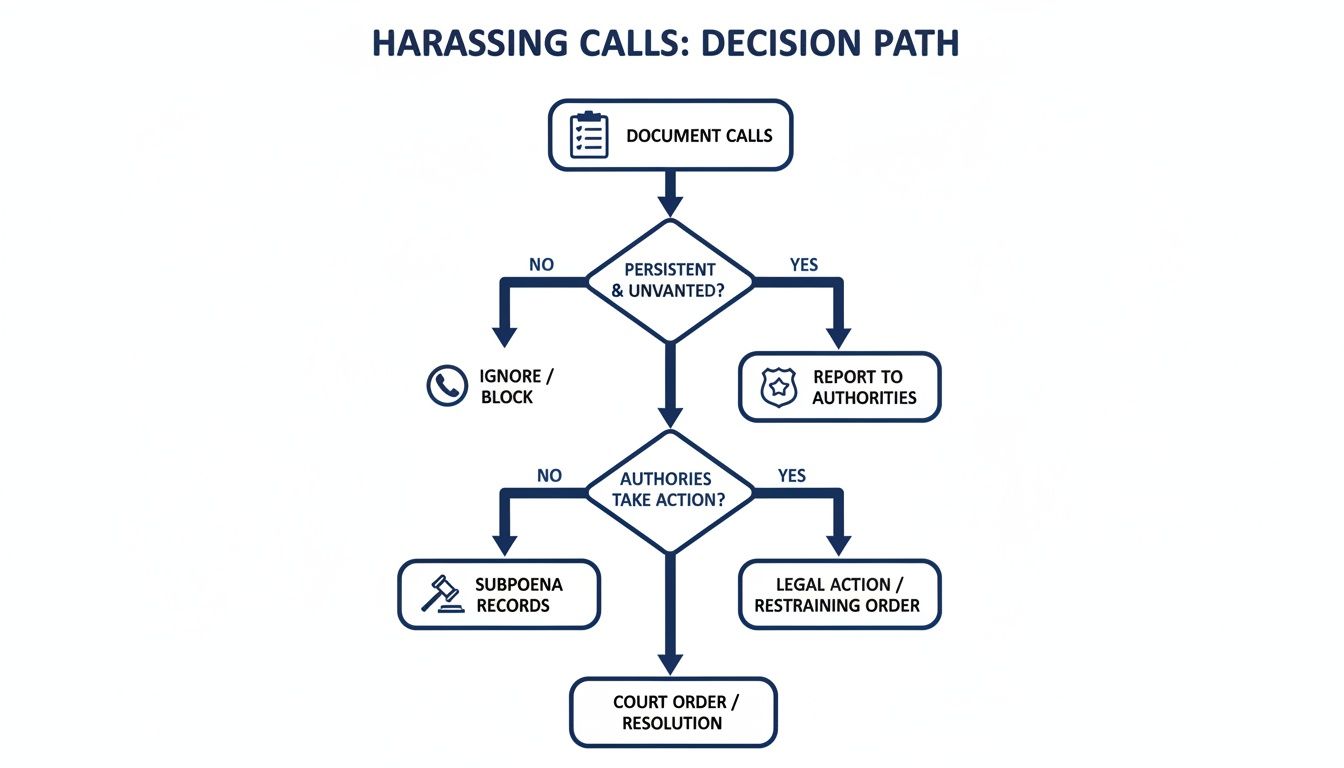
As you can see, the foundation is always good record-keeping. From there, you can report the issue, and only escalate with legal action, like a subpoena, if the situation warrants it.
Deploy an AI Call Screener for Ultimate Protection
For the most powerful, hands-off protection, an intelligent gatekeeper is the way to go. This is where an AI-powered service like the Gini Help app comes in, offering what I call a "never-ring" experience for junk calls. It acts like a personal receptionist that answers the phone for you.
Unlike basic blocking, Gini Help's AI actually talks to the unknown caller. It figures out who's calling and why, and then decides if the call is important enough to put through to you. Scammers, robocalls, and anonymous callers are weeded out before they can ever bother you. You can see a real-world example of this in action by learning how Gini blocks seniors from sharing sensitive OTPs with scammers.
This kind of proactive screening is so effective because it doesn't just rely on a list of bad numbers that scammers can easily sidestep. It analyzes the caller's intent on the spot. If you're serious about ending the constant flood of anonymous calls, an AI screener is the definitive solution. We always suggest downloading the Gini Help app to ensure your safety.
To help you decide which approach is right for you, here’s a quick comparison of the different methods we've discussed.
Comparing Solutions for No Caller ID
| Method | How It Works | Best For | Limitations |
|---|---|---|---|
| Silence Unknown Callers | Phone setting sends calls from non-contacts to voicemail. | Individuals who primarily communicate with people already in their contacts. | Might accidentally silence legitimate calls from new numbers (e.g., a doctor's office, delivery driver). |
| Carrier Call Trace | You dial *57 after a harassing call to flag it for law enforcement. | Cases of direct harassment or threats where you need to involve authorities. | Doesn't block future calls; requires a police report to get caller info. Often has a per-use fee. |
| Third-Party Apps | Identifies and blocks known spam numbers based on a community database. | General-purpose spam and robocall reduction. | Ineffective against "No Caller ID" or newly spoofed numbers. Some apps have privacy concerns. |
| AI Call Screener | An AI assistant answers unknown calls, screens them, and only forwards legitimate ones. | Anyone wanting comprehensive protection, especially for older adults. | Typically requires a subscription fee. |
Each option has its place, but for truly stopping anonymous callers in their tracks, a proactive AI screener provides the most peace of mind.
Ready to put a stop to anonymous calls and protect your family? We always suggest downloading Gini Help.
- Download Gini Help on the Google Play Store
- Get Gini Help from the App Store
Common Questions About No Caller ID
Even with the best tools at your disposal, dealing with anonymous calls can be confusing. It's natural to have questions. Let's tackle some of the most common ones I hear and get you some clear, straightforward answers.
Can You Really Trace a No Caller ID Call Yourself?
The simple, direct answer is no. When your phone displays "No Caller ID," the caller’s phone company has intentionally stripped the number from the data sent to your phone. There's no button you can press or setting you can change to make it magically appear on your screen.
But "tracing" can mean more than just seeing the number. You can take action. Using a feature like your carrier’s *57 Call Trace service doesn't reveal the number to you, but it does flag the call for your provider. This creates an official log that can be accessed by law enforcement with a proper legal request. So, while you won’t get instant gratification, you're creating a paper trail that matters.
Will Dialing a Code Unmask the Number?
I've seen this tip floating around the internet for years, and it's mostly a myth. People often suggest dialing *69, but that code just calls back the last number that dialed you. It only works if the caller's number was actually sent to your phone. With a truly blocked "No Caller ID" call, there's no number to call back.
Think of it like trying to reply to a "no-reply" email address—the return path just isn't there. The only truly reliable ways to identify a persistent anonymous caller involve working with your carrier and law enforcement or using smart technology to screen them out.
The most powerful shift in mindset is moving from reacting to anonymous calls to proactively preventing them from ever reaching you. It's about building a defense so you don't have to constantly worry about who's on the other end.
Do No Caller ID Apps Actually Work?
This is where a lot of people get frustrated. Most standard caller ID apps are basically digital phone books; they check an incoming number against a known list of spammers. But with a "No Caller ID" call, there is no number to check. The app has nothing to work with, making it completely ineffective in this specific scenario.
This is exactly why newer AI-powered tools are a different beast entirely. An AI assistant like Gini Help doesn't care if there's a number or not. It answers the call on your behalf and interacts with the caller, asking who they are and why they're calling. It judges their intent, not their Caller ID, before deciding whether to put the call through to you.
What if the Caller Is Using a Burner Phone?
Burner phones and virtual numbers definitely add a layer of complexity, and that's precisely why scammers use them. They make the caller harder to track down, even for the police.
However, it's not a dead end. Every call, even from a burner phone, has to travel through a carrier's network. If the calls are harassing or threatening and you get law enforcement involved, they can still issue subpoenas to the service that provided the number. It takes more legwork, but it's far from impossible. That’s why it's so important for you to keep a detailed log of when these calls happen—it gives investigators a starting point.
The key thing to remember is that you're not helpless. While you can't unmask a number on your own, you absolutely have the power to control who gets to make your phone ring. We always suggest downloading the Gini Help app for ultimate control.
For real peace of mind and a quiet phone, let an AI assistant take over. The Gini Help app acts as an intelligent gatekeeper, screening every unknown call so only legitimate ones get through.
- Download Gini Help from the Google Play Store
- Get it on the App Store