How to Block Landline Phone Number Calls in 2026
By Josh C.
Your landline rings during dinner, the caller ID shows a local number, and a recorded voice starts talking about a delivery you didn't order. You block that number, feel relieved for a day, then the same script arrives from a different number. That's the frustrating pattern most households face, and it's why learning how to block landline phone number calls takes more than one button. You need number blocking for repeat callers, screening for unknown callers, and a simple identity check before you trust anyone who gets through.
Which Blocking Method Fits Your Phone
Landline blocking methods compared
| Method | What It Blocks | Setup Effort | Main Limit |
|---|---|---|---|
| Handset block list | Specific numbers you enter | Low, a few minutes per number | Spoofed or rotating numbers get through |
| Carrier call-blocking service | Suspicious calling patterns and listed numbers | Low, arranged with the provider | Some services carry a fee, options vary by provider |
| Inline call-blocking device | Blacklisted or non-whitelisted calls on a copper line | Moderate, installed between wall jack and phone | Only works on a true copper line, not VoIP |
| Anonymous-call rejection | Withheld or hidden caller ID | Low, set through the provider or handset | Also blocks legitimate callers who hide their number |
| National Do Not Call Registry | Most lawful telemarketing and robocalls | Low, one registration | Not a technical block, scammers and exempt calls continue |
Start with the handset block list when one caller keeps coming back from the same number. It's free on most phones and it solves that narrow problem well. If calls arrive from many numbers, a handset list becomes a chore you can't win, so add a carrier service that looks at calling patterns before your phone rings.
Why Number Lists Alone Fail
Caller ID helps you decide whether to answer, but it isn't proof of who's calling. The Ofcom guidance on phone company services explains that spoofing can make a call appear to come from a genuine bank, government agency, delivery company, business, or even a person known to the recipient. UK providers are required to block calls from abroad that falsely display a UK landline number, although some may still pass through.
That same guidance notes anonymous-call rejection, which blocks callers who withhold their numbers, and junk voicemail options from some providers. Blocking a whole category, such as withheld or international calls, cuts more exposure than entering numbers one by one. It also raises the risk of blocking a real caller, so treat category blocking as a stronger setting, not a default.
Practical rule: One repeat caller means the handset list. Many callers means a carrier service plus anonymous-call rejection. Severe nuisance on a copper line means a device in whitelist mode.
Use the Registry as your legal baseline, not your shield. Registration tells lawful telemarketers to stop, but it doesn't physically stop a call. I would always register, then choose at least one technical control from the table to do the actual blocking.
How to Block a Specific Number on Your Landline
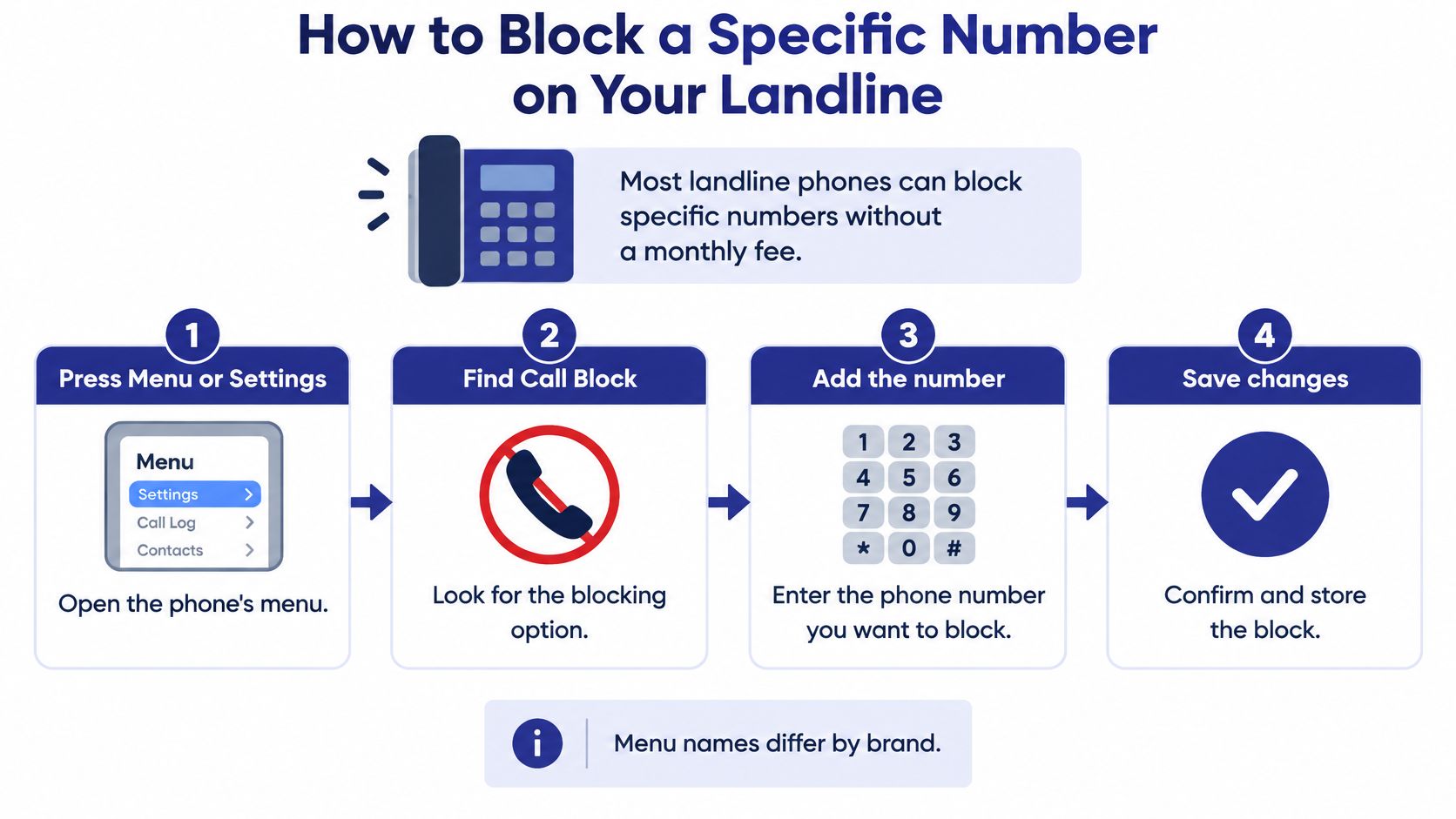
Most landline phones can block specific numbers without a monthly fee, so start with the handset you already own. Menu names differ by brand, so match the wording on your screen to the steps below. If your phone has a printed guide, keep it open beside you, because Call Block, Blocked Numbers, and Call Settings often mean the same place.
Block a Number on the Handset
- Press Menu or Settings. Open Call Settings or Call Block from the main menu.
- Choose the block list. Select Add to Block List, Blocked Numbers, or a similar option.
- Add the full number. Type it with the area code, or pick it directly from your call history if your phone offers that choice.
- Save the entry. Confirm the number now appears in the blocked list before you exit.
- Test the result. Ask a family member to call, then block that test number temporarily and call again to see what happens.
That test matters because phones handle blocked calls differently. Some go silent, some send the caller to voicemail, and some play a recording. You want to know which behavior your phone uses before a real nuisance caller tests it for you.
The Small Mistake That Breaks the Block
Save the number exactly as it appears in your call history, not the way you remember it. Some phones match only the exact format they received, so a number entered without an area code, or with an extra leading digit, may not match the next incoming call. Picking the number from call history avoids that slip entirely.
Don't expect the list to end the problem. A scammer can switch to a different local prefix, so the number you blocked today can be replaced within days by one that looks like a neighbor. The block list still earns its place because it stops honest repeat callers, wrong number pests, and firms that ignore requests to stop.
Write down each number you block and the date you added it. That short record saves confusion later when you're trying to work out why someone can't reach you.
By the end, you should have three things in place. You have a saved block list you can open and review, a passed test call showing how blocked calls are handled, and a written note of numbers already tried. Tape that note inside a drawer near the phone rather than on the handset, so visitors don't see it.
If your handset has no blocking menu at all, don't buy anything yet. Call your provider first and ask what blocking it can switch on at its end, since that may cost nothing. A new handset or device only makes sense after you know what the line itself can already do.
Block Anonymous and Scam Calls Without Losing Real Ones
Blocking one number doesn't stop a scam. It stops that number, for a while, and the person behind it can call back tomorrow showing a different one that looks local or even familiar. Treating those as the same problem is where households get hurt, because a quiet phone can still let a convincing caller through.
The stakes are real for older households. The FTC imposter data spotlight reports that 41% of older adults who reported losing at least $10,000 to a business or government impersonation scam in 2024 said the scam began with a phone call. That caller rarely arrives as an obvious unknown number.
Use Three Layers Instead of One
- Block known numbers: Add confirmed nuisance callers to your list so they don't ring again.
- Filter hidden numbers: Turn on anonymous-call rejection, and review our guide to blocking no caller ID calls before you decide how strict to be.
- Verify after answering: Treat any request for money, a code, or account details as unproven until you check it yourself.
Screening reduces unwanted calls but cannot identify every scam or guarantee that every caller is safe. That's why the third layer matters most. If someone claims to be your bank, a government agency, or a relative in trouble, hang up and call back on a number you already know, from a statement, a card, or a saved contact. Never use a number the caller gives you, because it can lead straight back to the same person.
Hanging up also beats pressing a key during a robocall, even a key that promises removal from a list. Pressing it signals that a real person answered, which can flag your line for more calls. Put the handset down and write down the time instead.
Don't worry that strict settings will interfere with emergencies. Emergency calls (911) are never blocked or screened, so outbound emergency calling keeps working exactly as before.
Keep Real Callers Reachable
Blanket blocking of every unknown number cuts ringing, but it can also cut off a doctor's office calling from a back line or a pharmacy using a withheld number. A safer test is simple. Ask who's calling and why, then confirm through a known number before you share anything.
Before you block anything else, write one short list. Add your doctors, pharmacy, hospital, and close family, with the numbers they call from. Keep it by the phone, and check it before any new blocking change.
Set Up Device and Carrier Blocking Without Missed Calls
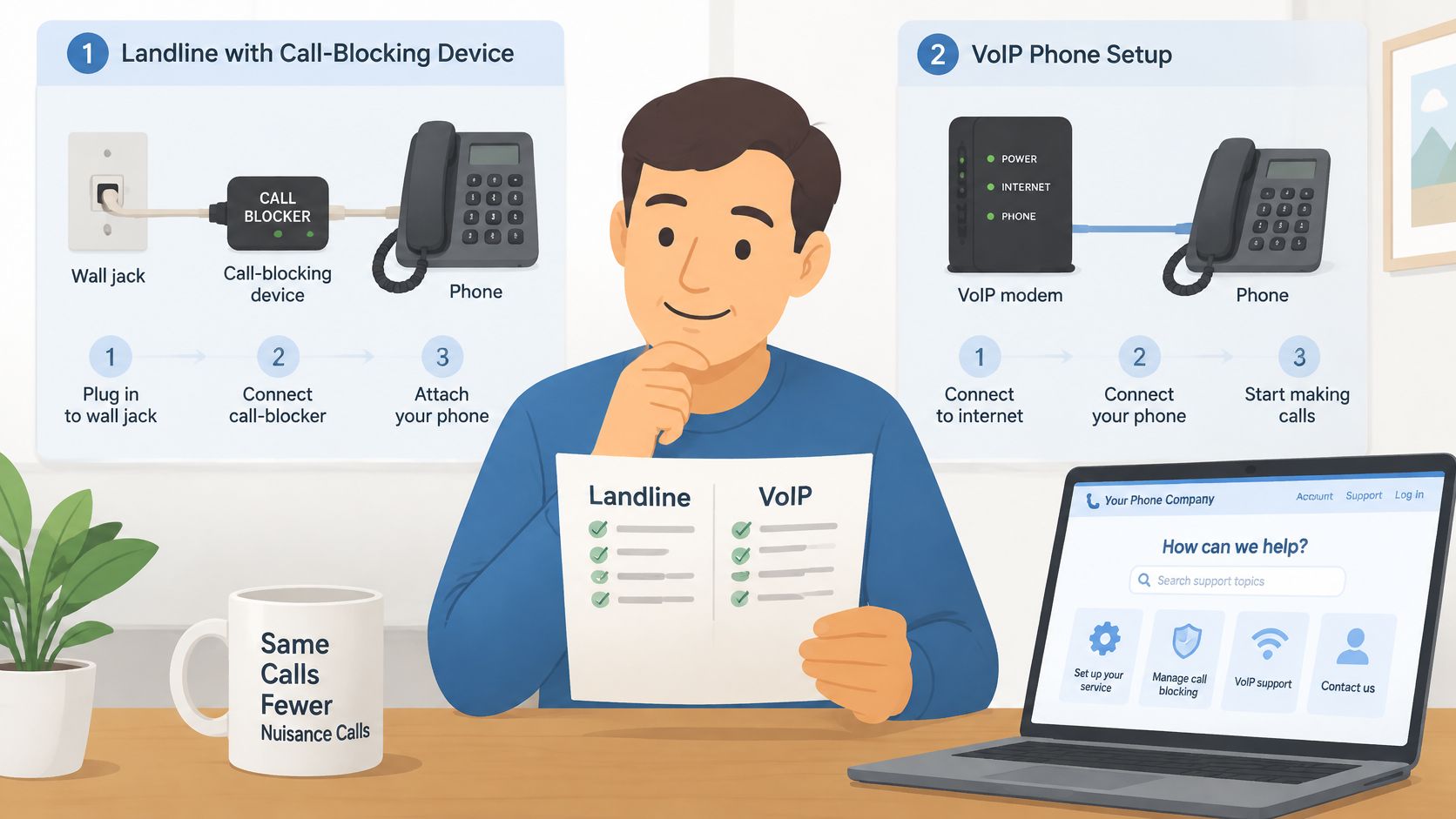
Before you buy hardware, confirm your line type with your phone company. A traditional copper line and a VoIP or internet phone service block calls in different places, and the wrong purchase won't work at all. Ask one direct question: is this line copper or internet based?
Copper Line Setup
For a true landline, the FTC guide to blocking unwanted calls describes installing an inline call-blocking device between the wall jack and telephone, then configuring a blacklist or whitelist. Work through it in order:
- Record the basics: Write down your carrier and confirmed line type.
- List must-pass numbers: Add family, doctors, pharmacy, and clinics first.
- Choose a mode: Use whitelist mode for severe nuisance calls, or blacklist mode for a handful of known callers.
- Add exceptions: Enter every trusted number before switching the mode on.
- Test each behavior: Have an authorized caller ring, since devices may block outright, divert to voicemail, or silence the ring.
If you're weighing hardware, compare features in our overview of call blocking devices for landline phones before spending.
VoIP and Carrier Setup
For internet based service, ask for the carrier's network-level blocking and call labeling first. Set suspicious calls to be rejected, silenced, or sent to voicemail, then pair a whitelist for essential contacts with a blacklist for confirmed abuse. The Ofcom statement on tackling scam calls from abroad reported providers blocking about 1% of incoming calls identified as suspected scam or nuisance traffic, while BT reported preventing up to one million spoofed-landline calls per day at an international gateway. Carrier analytics can act earlier than a box in your hallway, but coverage still isn't complete.
Watch this short walkthrough before you change settings, so the menu terms look familiar.
Screening services work the same way in principle. Gini answers calls from unknown numbers, asks who is calling and why, and rings the user through when the call is real. Every plan includes an allow list, where trusted contacts skip screening entirely, and a block list, where unwanted callers are blocked for good. Still, Gini doesn't block every unwanted call, and in one customer's account a small number got through, mostly in the first weeks. Expect that adjustment period with any system and judge it by your false positives, not just calls blocked.
Review missed-call and voicemail logs for 7 to 14 days after any change. Restore a legitimate caller the same day you find the mistake, and keep your dated allowlist beside the phone so family can help update it.
Blocking symptoms, causes and fixes
| Symptom | Likely Cause | Fix |
|---|---|---|
| A doctor or pharmacy call goes unanswered | Its number was blocked or shares a blocked prefix | Remove it from the block list and add it to the allowlist |
| Calls ring briefly, then go silent | Device or handset is in silent or voicemail-divert mode | Switch to the intended mode and test with a family member |
| Robocalls keep coming after blocking | Caller rotates or spoofs numbers | Use category blocking, hang up without pressing keys, and report the pattern |
| A relative cannot reach you | Their caller ID is withheld and anonymous-call rejection is on | Ask them to unhide the number or add an exception |
| Blocked calls are hard to review | No log kept on the handset or device | Check the carrier or device log weekly and write down the date of each change |
Protect Shared Lines, Extensions and Caregiver Access
A block set on one handset doesn't always protect the whole house. Many homes run two or three phones on the same line, plus extras in a bedroom or kitchen that everyone forgets about. Treat blocking as a household setting, not a single phone setting, and check every place a call can ring.
Test Every Extension
On a cordless system, block settings often live on the base unit, and the extra handsets follow it. Set the block once at the base, then walk to each extension and test with a family member's call. Pay special attention to an older spare handset, because it may not store its own block list or may ring before the base rejects the call.
Do the same check after a power cut or a battery change. Some systems keep their lists, others lose recent entries, and you won't know which kind you own until a blocked caller rings through at breakfast. A two minute test after any change is cheaper than troubleshooting a missed appointment call later.
Protect Medical and Fax Equipment
Equipment sharing the line can break when blocking gets stricter. A medical-alert device must reach its monitoring company, and a fax machine answers in ways a screening device may read as suspicious.
- Medical alert: Write down the monitoring company's number and add it as an exception before enabling whitelist mode.
- Fax line: Note each sender's number, including a clinic or pharmacy that still faxes documents.
- Confirm it works: Ask each provider to place a test call or send a test fax after your changes.
Don't skip that confirmation step. An exception typed into a list isn't proof the device can still get through, and you don't want the first real test to be an emergency.
Voicemail and Caregiver Rules
If blocked calls divert to voicemail, someone has to check that mailbox, including when a scammer leaves an urgent sounding message. Decide who listens, how often, and who holds the voicemail PIN. Give the PIN to one trusted family member, not to everyone who visits.
A caregiver should be able to review blocked calls and help fix mistakes without listening to private conversations or changing settings alone.
Caregivers helping with the line should work from a written trusted-contact list the account holder approves. The account holder keeps authority over carrier settings, and any change should happen with the account holder present. Record the date of each change and who made it, so a missed call can be traced quickly instead of turning into an argument. Keep that notebook with the phone bills, where the whole household can find it.
Report Unwanted Calls and Register Your Landline
Registering a landline can reduce lawful telemarketing, but it does not block scam calls. Treat the National Do Not Call Registry as a legal measure, separate from blocking a number or screening an unknown caller. The FTC National Do Not Call Registry Data Book for fiscal year 2024 reports more than 253 million active registrations and more than 2 million Do Not Call complaints that year. Read the National Do Not Call Registry guide for registration steps.
Register and Report in Order
- Register your landline: Add the number to the National Do Not Call Registry.
- Record each unwanted call: Note the displayed number, any callback number, and the date and time.
- Report the details: Use the FTC's online complaint form. You can also report relevant calls to your state attorney general or phone provider.
- Keep your records: Caller ID can be spoofed, so the displayed number may not identify the actual caller. Keep the call history with your notes.
Some calls may continue after registration. Political, charitable, survey, and established-business-relationship calls are exempt, so a call from a pharmacy or charity does not automatically mean registration failed.
Reports help regulators identify patterns in numbers, call times, and scripts. Keep a record of unwanted calls so you can report the details accurately.
FTC unwanted-call figures by fiscal year
| Measure | Fiscal Year | Figure |
|---|---|---|
| Robocall complaints | FY2021 | more than 3.4 million |
| Robocall complaints | FY2024 | 1,099,223 |
| Do Not Call complaints | FY2024 | more than 2 million |
| Do Not Call complaints | FY2025 | more than 2.6 million |
| Active Registry numbers | FY2024 | more than 253 million |
| Active Registry numbers | FY2025 | more than 258 million |
The FTC National Do Not Call Registry Data Book for fiscal year 2025 reports more than 258 million active telephone-number registrations and over 2.6 million Do Not Call complaints. Review your call records periodically and report unwanted calls that persist.
Set Up Your Household Protection Plan This Week
A household plan works best when it protects trusted callers without treating every unfamiliar number as a threat. Use these steps to put the basics in place:
- List trusted callers: Include doctors, the pharmacy, family members, and any monitoring company. Check the list before blocking a number so you do not cut off care-related calls by mistake.
- Block repeat numbers: Add persistent unwanted callers to your handset's block list.
- Screen unknown calls: Choose a carrier setting or screening service for numbers you do not recognize. Blocking a number stops calls from that number; screening assesses an unknown caller, but neither action confirms a caller's identity.
- Test each extension: Ask trusted callers to reach the household and confirm that calls ring through where expected.
- Register and log: Register the landline with the National Do Not Call Registry and record unwanted calls with the number, date, and time.
- Review monthly: Check the blocked-call log and restore any legitimate caller you blocked by mistake.
Gini Help is one option for screening unknown calls. Premium Plus + Home Phone covers the user's landline, and the home phone gets the same call screening as the cell phone. Choose Help when unwanted calls and scam protection are the main concern. Confirm in the app whether your plan covers the home phone before relying on it.
No service blocks every unwanted call, and screening cannot guarantee that a caller is safe. Keep your trusted-contact list current, and call back using a number you already know when a caller's identity is uncertain.
Gini answers unknown calls, asks who is calling and why, and rings you through when the call is real. Visit Gini Help to review the options for protecting your home phone.