What Is Anti Spam? How Email, SMS and Call Protection Work
By Josh C.
Your phone buzzes with a local number while the kettle boils, and you are already wondering whether to pick up. That hesitation has a reason behind it. Scams that begin online now account for more reported consumer losses than contact that arrives through calls, texts, and emails.
That gap is why anti-spam has shifted from a junk-mail chore into a point-of-contact problem. You are in the kitchen. A text says a parcel is waiting. An email looks like your bank. A caller says he is from your grandson's school. None of those contacts asked whether you wanted them.
Sorting has to happen before you answer, the way airport security screens a bag before anyone boards. For an older adult who picks up the phone out of habit, and for the caregiver who cannot stand beside them, the live moment of contact is where protection has to work.
What Anti Spam Means Across Email, Texts and Calls
Anti-spam is the set of technical, behavioral, and legal measures used to identify, filter, block, or reduce unsolicited email, texts, and calls before they reach a person. Screening belongs at the door. Once you are already talking, reading, or tapping a link, the cheap part of the attack is over and the expensive part is yours.
The pattern is old. On May 3, 1978, Digital Equipment Corporation marketing executive Gary Thuerk sent an unsolicited promotion over ARPANET, a precursor to today's internet. The message reached approximately 400 recipients, about 40 people attended demonstrations, and Thuerk later estimated more than $12 million in sales, as Britannica's account of the first spam email records. Administrators complained and reprimanded him the same day. Sending was nearly free. Recipients paid in time and attention. That split never went away. It only grew once commercial email, texts, and automated calls became everyday tools.
Three doors, three kinds of screening
Anti-spam is three channels, and each has its own entry point. A mailbox waits until you open it. A text lands on a lock screen. A call demands a decision while you are holding groceries.
| Channel | Typical Unwanted Contact | Main Anti Spam Controls |
|---|---|---|
| Bulk ads, phishing links, malware, impersonation | Sender authentication (SPF, DKIM, DMARC), content filters, user reporting | |
| SMS | Promotions, fake delivery notices, smishing links | Carrier filtering, sender registration, opt-out rules for wireless messages |
| Phone calls | Robocalls, debt-reduction pitches, impersonation of banks and agencies | STIR/SHAKEN caller-ID authentication, call screening, live conversation analysis |
Email controls lean on who is allowed to send for a domain and on what the message contains. Text controls lean on the carrier and on whether a commercial sender honors an opt-out. Call controls have to judge a voice in real time, because the harmful request often arrives only after you say hello.
Unwanted is not the same as dangerous
Spam is unsolicited communication. A scam is a deceptive attempt to get money, credentials, access, or compliance. One message can be both. A bulk ad for discount sunglasses is spam. A text saying a parcel is held until you pay a small fee through a link is spam plus a scam. Vigil Security's spam and phishing comparison spells out the email version of that split, including how a phishing note pretends to be someone you already trust.
Practical rule: Ask two questions. Is this message wanted, and does it ask for money, credentials, access, or secrecy?
If the second answer is yes, treat it as a scam even when you are not sure about the first. Keyword filters were built for sunglasses ads. They struggle when the note uses your name, a fresh number, and a story that changes if you hesitate.
How Anti Spam Systems Spot Unwanted Contact
The phone rings at nine in the evening. The number looks local, the voice is calm, and within a minute the caller is asking for gift cards to help a grandchild. No list of reported numbers can warn you here, because this number may have never been used before. What helps is a system that judges the contact as it happens.
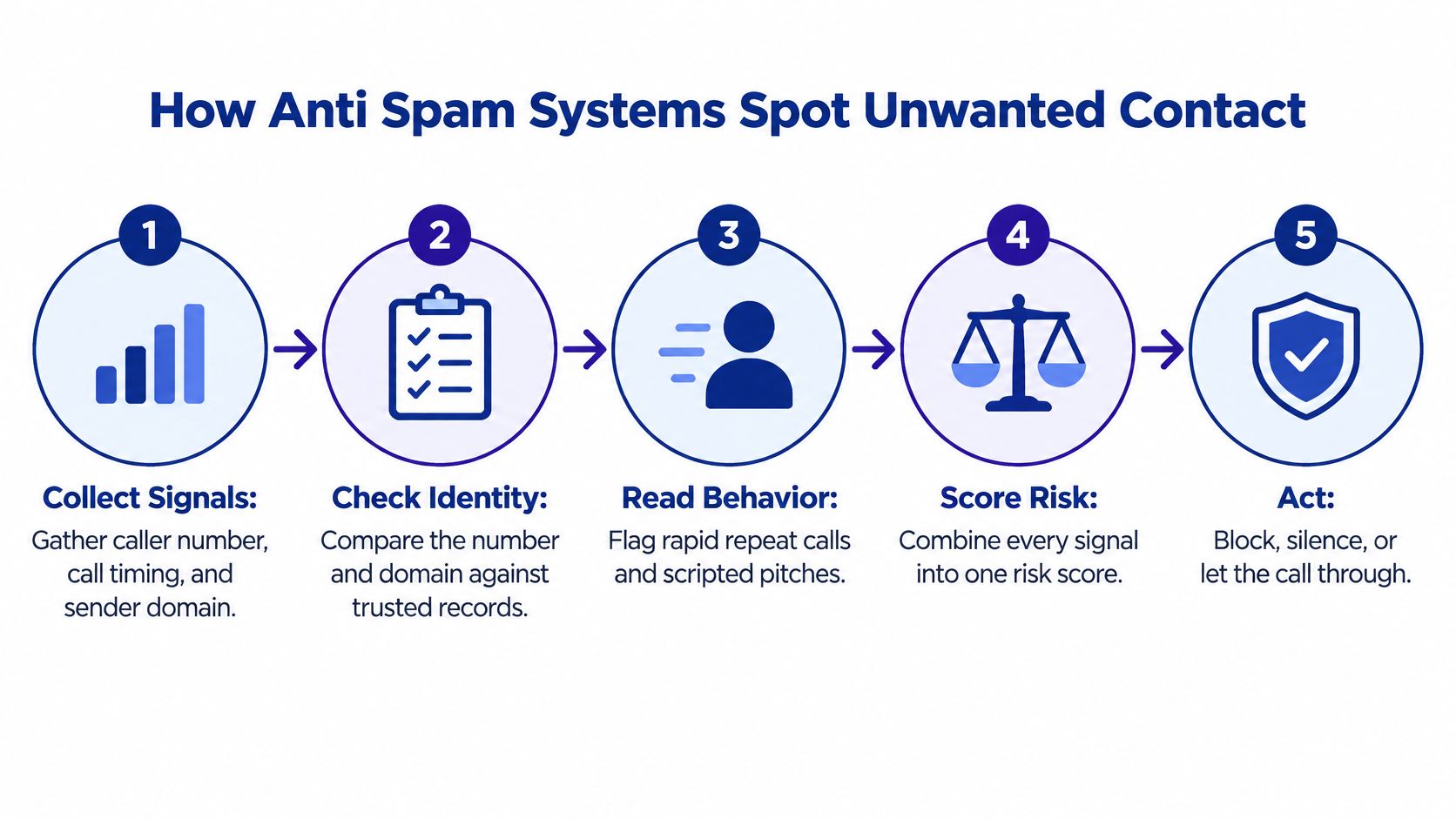
A useful anti-spam system works the way a careful bouncer does: the name on the list is only the first glance, and the ID, the hour, and the way the person talks all count. The picture above shows the same job in five beats: collect signals, check identity, read behavior, score risk, then act. In practice those beats collapse into three decisions.
Three decisions, in order
- Collect signals as the contact arrives. For email that means the sending domain, authentication results, links, and attachments. For a call it means the number, the timing, and what the caller starts asking for. Nothing is judged from a single clue.
- Score the risk from content, sender, metadata, and behavior. Metadata is the envelope around the letter: when it was sent, how often this sender appears, and whether the path looks normal. Behavior is the ask itself. Money, secrecy, gift cards, and remote-access software raise the score faster than a clumsy sales pitch.
- Choose a proportionate action. Deliver, warn, quarantine, challenge, or block. Deletion stays the last resort, because a wrong block can hide a lab result or a school closure.
What each signal is looking for
| Signal | What It Checks | Red Flag Example |
|---|---|---|
| Sender reputation | Sending history of the domain, number, or account | Domain registered days ago sending thousands of emails |
| Authentication | SPF, DKIM, and DMARC for email; STIR/SHAKEN attestation for calls | Email claims to be from a bank but fails DMARC checks |
| Content and urgency | Wording that pushes fast action | Your account closes in two hours, so act now |
| Links and attachments | Destination domain, file type, redirects | Login link leads to an unfamiliar domain |
| Conversation behavior | Requests for money, secrecy, gift cards, or remote access | Caller asks you not to tell family and to buy gift cards |
That last row is where point-of-contact screening earns its place. The four rows above it can all pass while a caller is still steering the conversation toward payment.
Email filters often mix older methods such as Naive Bayes with support-vector machines, neural networks, and feature ensembles. The engineering trade-off has two names. Precision means you avoid locking up legitimate mail. Recall means you catch as much spam as possible. A 2021 comparative study reported 97.0% precision and 92.0% recall for an SVM model. Both figures can be true at once, and a high headline accuracy still hides mail that was wrongly held and spam that slipped through.
Scores also age. A model that looks excellent on last year's sample can sag once attackers change their wording. That is why anomaly detection systems matter alongside blocklists: they watch for behavior that breaks a person's normal pattern, even when the exact phrase has never been reported.
A warning or a challenge costs far less than deleting a doctor's appointment reminder.
Staged actions give you the final say. Quarantine holds the message where you can still see it. A challenge asks the sender to prove they are real. For an older parent, that gap matters, because a held message can be reviewed together later, while a deleted one is gone for good. You stay in control when the system is unsure.
Blocklists, Rules and AI Screening Compared
A blocklist is a guest list of known troublemakers. It is fast, and it is cheap. It also fails the moment the caller uses a number nobody has reported yet. Scammers treat phone numbers like sticky notes. They rotate through them, so yesterday's block does nothing for this morning's call.
| Approach | How It Decides | Main Strength | Main Weakness |
|---|---|---|---|
| Blocklists | Matches caller or sender against reports of known bad numbers | Fast and inexpensive | Scammers rotate numbers, so new numbers pass |
| Keyword and rule filters | Matches known phrases, patterns, or links | Easy to configure | Misses reworded or conversational scams |
| STIR/SHAKEN caller-ID authentication | Checks that caller ID matches a carrier-verified number | Stops many spoofed calls | A verified number does not reveal intent |
| AI and LLM conversational screening | Answers, asks questions, and scores intent in real time | Catches scams from brand-new numbers | Needs strict privacy handling and false-positive control |
Where each row actually breaks
Blocklists shine on repeat offenders. A debt-reduction robocall that a thousand people already reported should die at the network. A brand-new local number with the same script walks straight past.
Keyword and rule filters catch the lines you have seen before, such as "your package is held" or a link you already marked. Reword the pitch into a calm conversation about "protecting your savings," and the rule has nothing to match. Conversational scams are built for that gap.
Caller-ID authentication is narrower than people assume. The FCC's call authentication rules adopted the STIR/SHAKEN framework in 2020 and required voice providers to implement it on Internet Protocol portions of their networks by June 30, 2021. Providers digitally check whether the caller-ID information matches the caller's real telephone number. Providers also keep robocall-mitigation programs and file plans in the Robocall Mitigation Database, including providers that are not directly implementing STIR/SHAKEN. A pass means the number was not obviously spoofed. It does not mean the person holding that number is trustworthy.
Conversational screening is the row that looks at intent. Gini Help is one example of that approach. Its AI answers unknown calls first, talks with the caller, and connects the call only when the conversation looks legitimate, so the phone does not ring for the rest. On calls you do pick up, Live Call Analysis shows a real-time risk score and haptic warnings. That is a different job from matching a number to a list.
A network can add a separate layer before any of this. DNS protection for guest WiFi networks can stop a device on guest Wi-Fi from resolving a known malicious domain, which helps when the risky step is a link rather than a voice.
Conversational screening has an honest cost. It must limit false positives for genuine callers, including clinics, schools, employers, and relatives. It must also protect transcripts and voice data, because a safety tool that stores intimate conversations carelessly creates a new problem. Stronger intervention belongs where several independent signals agree, not where one odd phrase appears.
A Real Impersonation Call and Who Gets Targeted
Say you are home alone after lunch. The phone shows a local area code, close enough to look like a neighbor.
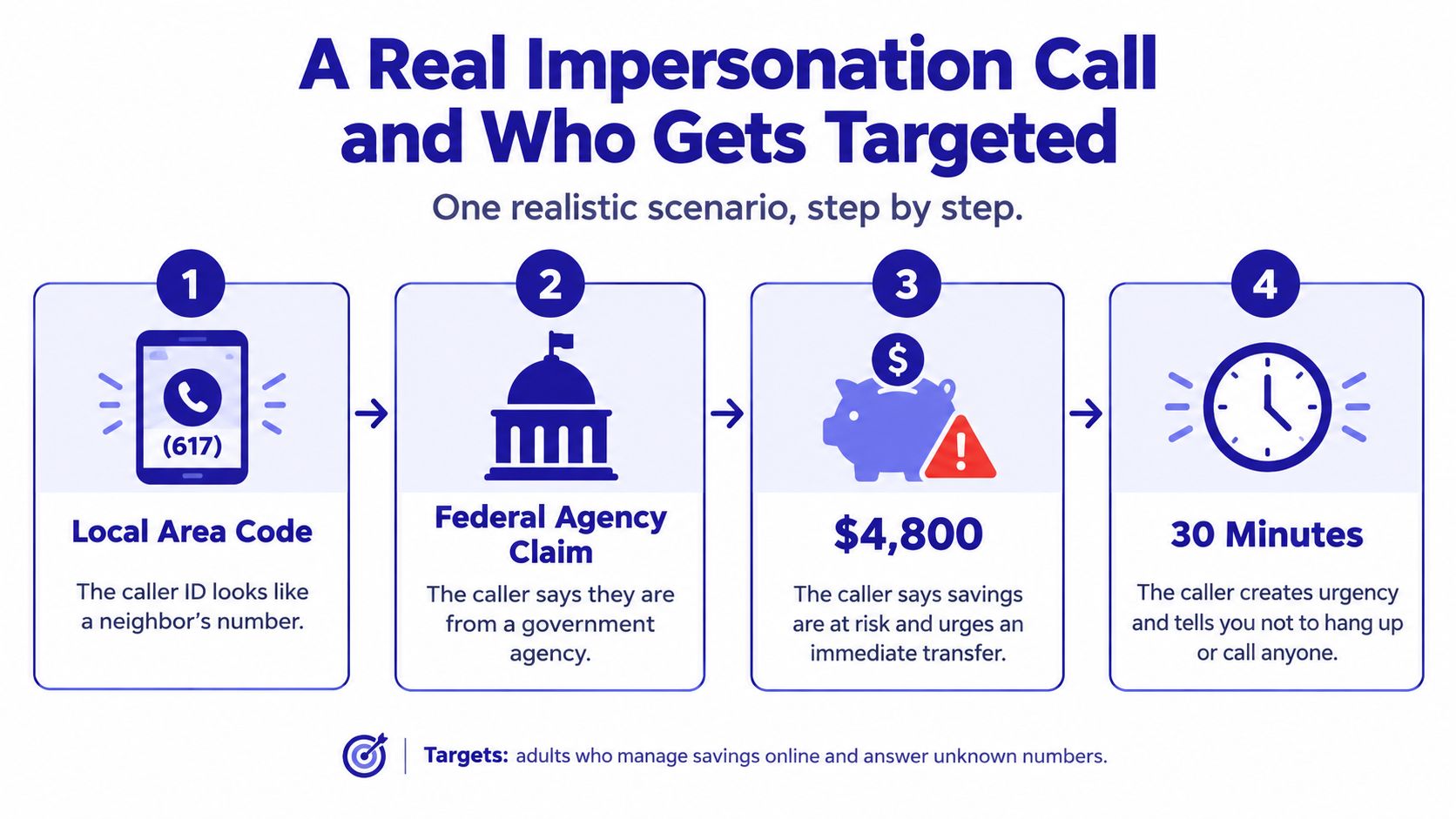
You answer. The caller gives a badge number and says they are from a government agency. That is the authority stage. Nothing has been stolen yet. A live screen can already flag the claim, because a real agency does not open by demanding you stay on the line.
The script, paused at each turn
Next comes urgency. Your savings are supposedly at risk, and you have minutes, not days. Your pulse does the rest of their work. A risk score should climb here even if the number has never been reported, because the content changed from "hello" to "move money now."
Then secrecy. Do not tell your daughter. Do not call the bank yourself. Do not hang up. Secrecy is the tell. People who are actually protecting you want a second person in the loop. A screen that hears "don't tell your family" should interrupt before you walk to the computer.
Last is the transfer. Move the money to a "safe account" so the criminals cannot reach it. The safe account is theirs. This is the moment a pause matters more than a blocked number from last month. A prompt that says stop, hang up, and call the agency on a number you look up yourself arrives while the funds are still in your bank.
A blocklist never sees this shape if the number is new or spoofed. The script is recognizable anyway: authority, urgency, secrecy, transfer. Intent detection watches for that sequence. Number matching only watches for a digit string someone already complained about.
The scene is common enough to show up in national totals. From 2020 through 2024, the combined losses reported by older adults who lost more than $100,000 to scammers impersonating trusted government agencies or businesses increased eightfold, from $55 million to $445 million, according to the FTC's 2025 impersonation figures. Those scams pressure people to move money "to protect it," and the transfer sends the funds to the criminal.
Older adults living alone, and the caregivers who help them, sit in the middle of this. A warning that arrives after someone has already moved money, read a code aloud, or installed remote-access software is a postmortem. The useful interruption happens while the caller is still talking.
Legal Rules and Where Anti Spam Falls Short
Law sets a floor for people who want to stay in business. The U.S. CAN-SPAM Act of 2003 prohibits materially false or misleading header information and deceptive subject lines, requires commercial messages to be identified as advertising, requires a clear opt-out, and requires senders to honor opt-out requests, as the CAN-SPAM Act lays out. The FCC also treats certain commercial messages to wireless devices under that framework. A fuller walk-through of how those wireless rules meet everyday texts sits in this guide to text message spam laws.
Those duties bind legitimate senders. Criminals ignore them. A statute can fine a sloppy marketer. It cannot stop a caller who hangs up and dials from another number. Law supports screening. It does not replace it.
Two beliefs that get people hurt
The first bad belief is that careful people can always spot the trick if they stay calm. Scams are built to defeat judgment under pressure. A cloned voice, a local caller ID, and a story about a grandchild in trouble are designed for the minute when you are scared, not for the minute when you are reading an article. Protection has to reduce how much perfect judgment you need in that minute. Blaming "careless people" misses the design of the attack.
The second bad belief is that blocking everything unknown is the safest setting. It is not. Overblocking hides appointment reminders, pharmacy notices, school alerts, and a relative calling from a hospital phone. A layered setup lets known contacts through, holds the doubtful items where you can review them, and saves the hard block for contacts that ask for money, secrecy, or access.
What no filter fully closes
Some gaps remain even with a careful setup.
- False positives. A clinic, school, or employer can look unfamiliar on a new system and get silenced.
- Voice cloning. A caller can sound like a son or a sister. Familiar audio is not proof.
- New scripts. Detection that has not seen this week's story will be late on the first victims.
- Underreporting. Many people never file a complaint, so official totals are a lower bound.
In 2024, the FBI recorded 147,127 elder-fraud complaints totaling $4.885 billion in reported losses, and both complaints and losses rose sharply from 2023, the FBI's elder fraud briefing notes (complaints up 46 percent, losses up 43 percent). Embarrassment and fear of losing independence keep many cases out of those counts. Screening at the moment of contact is aimed at harm that will never show up in a database.
Set Up Layered Protection for You and Your Family
You can put the layers in place this afternoon. The checklist below is the short version. The steps under it add the family rule and the cleanup if someone has already engaged.
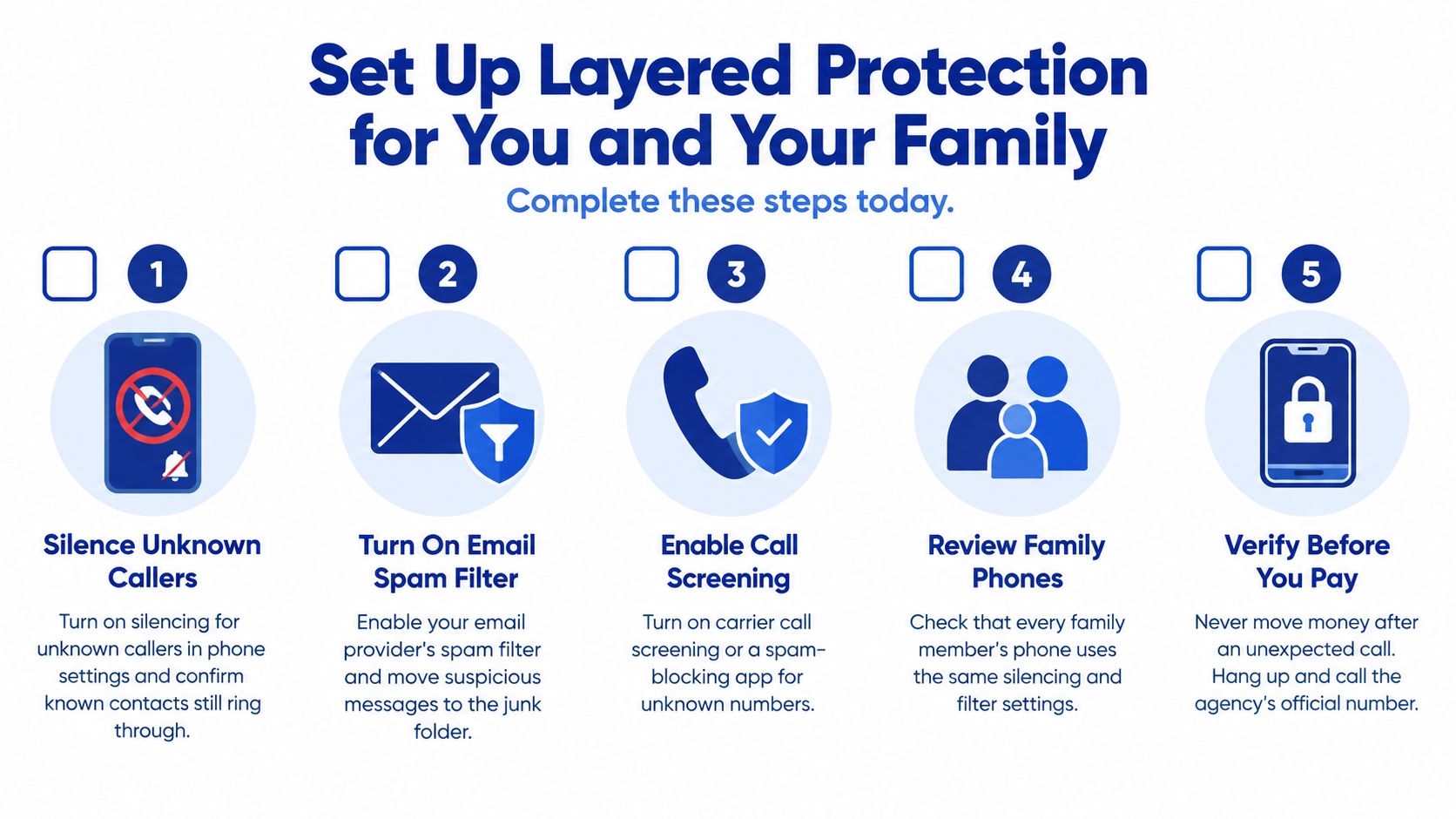
- Silence unknown callers in the phone's own settings. Confirm that saved contacts still ring through, including the clinic and your adult children.
- Turn on your email provider's spam filter. Report phishing instead of only deleting it, so the next similar note is easier to catch.
- Add call, text, and email screening in one app, and finish the prompts. Gini Help is one option that covers those channels together. Install it from Google Play or the App Store, then walk through setup before the next unknown call.
- Agree a family rule out loud. Any request for money, gift cards, or secrecy gets checked by calling back on a number you already trust, never the number that just called.
- Review flagged and blocked items once a month, with permission. Sit with the older adult. Unblock a real sender you both recognize. Leave the rest held.
If you also run a small website, inbox rules will not stop junk that arrives through a public form. You can fight contact form spam with FormBackend so those submissions are filtered before they hit your mailbox.
For caregivers, a shared plan beats a lecture. The Gini Help family protection plan, which starts from $5.99 per month, shares threat intelligence across members. Keep the conversation on support. "We set this up together" lands better than "you should have known."
A short walk-through of spotting the pressure tactics in real calls is worth watching once with the person you are protecting.
If a code, card number, or payment has already been shared, do not wait for a monthly review. Call the bank or card issuer at once, change the passwords on the accounts involved, and report the contact to the FTC at ReportFraud.ftc.gov or to the FBI at ic3.gov. The warning arrived after engagement, so the next move is containment, not another filter setting.
Download the app that matches your phone and finish setup this week, before the next local number lights up the screen.
Gini Help screens unknown calls, texts, and email before they reach you, and it scores live calls you do answer so a pressure script is easier to spot in the moment. That is the point-of-contact job this guide has been describing, especially for older adults and the people who look out for them. Visit Gini Help to see how the screening fits the phones already in your family.