How to Stop Robocalls on a Landline Your Definitive Guide
By Josh C.
Tackling robocalls on a landline isn't about finding one magic bullet. It’s more like building a layered defense, using a mix of your carrier's tools, dedicated hardware, and national registries. The real game-changer, though, is proactive call screening. The best solutions stop the calls before your phone even has a chance to ring, giving you back your peace and quiet.
Why Your Landline Is Ringing Off the Hook
If it feels like your landline is under constant attack, you're not wrong. While smartphones have gotten pretty good at filtering out junk, the good old landline remains a favorite playground for scammers and telemarketers. Scammers often see landline numbers as a direct line to an older, potentially more trusting person, making them a prime target.
Of course, not every automated call is a scam. A reminder from your pharmacy that a prescription is ready or a notification from the airline about a flight change are genuinely useful.
The illegal ones are a different beast entirely. These are the calls designed to trick you, with scammers pretending to be from the IRS, your bank, or even a grandchild in trouble. Their only goal is to get your money or personal information, and the sheer volume is mind-boggling.
The Staggering Numbers Behind the Nuisance
The latest data on robocalls is pretty grim. Research from YouMail, a robocall blocking service, indicates that Americans received over 4.3 billion robocalls in October 2023 alone. That staggering number breaks down to about 1,600 calls every single second. Even with government crackdowns and new technologies, the volume remains stubbornly high, highlighting the persistence of this problem.
A huge chunk of these calls are scams aimed at exploiting trust, especially among seniors, by creating a false sense of panic. The Federal Trade Commission (FTC) frequently issues warnings about emerging scams, such as those impersonating government agencies or tech support, which often target landline users.
This isn't just an annoyance; it's a constant disruption that carries a real financial and emotional weight. Scammers know that many people, particularly older adults, rely on their landline for important calls with doctors and family, and they take advantage of that reliability.
The constant ringing creates a stressful environment where every unknown call feels like a potential threat. This emotional toll is a hidden cost of the robocall epidemic, eroding peace of mind one unwanted call at a time.
So, for anyone trying to figure out how to stop robocalls on a landline, the first step is recognizing what you're up against. This isn't a problem you can solve by just blocking a few numbers here and there. It calls for a modern approach that can outsmart these increasingly sophisticated scams.
Thankfully, powerful tools are emerging. For instance, services like the gini help app use advanced AI to screen your calls before they ever get to you, acting as a smart gatekeeper for your phone line.
- Download gini help on the Google Play Store
- Download gini help on the Apple App Store
Immediate Actions You Can Take for Quick Relief
When the phone rings off the hook with junk calls, you need solutions that work right now. The good news is, you already have some powerful, no-cost tools at your fingertips to start fighting back immediately.
These first lines of defense won’t stop every single robocall, but they can make a real dent in the daily barrage. Think of them as the foundational layer of your defense—simple, accessible, and quick to set up.
First, Get on the National Do Not Call Registry
Your very first move should be registering your landline with the National Do Not Call Registry. It’s free and only takes a minute. You can sign up on the official Do Not Call website or by calling them directly from the landline you want to register at 1-888-382-1222.
Once you're on the list, legitimate telemarketers have to stop calling you within 31 days.
It's important to be realistic, though. This registry is for law-abiding businesses. Scammers couldn’t care less about it. That's why you'll still get those infamous calls about your car's warranty or fake IRS threats. Still, it’s an essential step to weed out the legitimate-but-annoying sales calls.
Master Your Phone’s Built-in “Star Codes”
Believe it or not, your old-school landline has some handy tricks up its sleeve. Using simple "star codes," you can give your phone company direct commands to block certain types of calls before they even make your phone ring.
Here are the two most useful codes you should know:
*60 (Call Block): Just got a call from a persistent scammer? Hang up, pick the phone right back up, and dial *60. An automated voice will walk you through adding that last number to your personal block list. Most phone carriers let you block up to 100 numbers this way.
*77 (Anonymous Call Rejection): Scammers love to hide behind "Anonymous," "Private," or "Unknown" on your caller ID. Dialing *77 tells your phone service to automatically reject any call that comes through without a number. Your phone won’t ring, and the caller will get a message saying you don’t accept anonymous calls.
A Quick Word of Caution: Some legitimate callers, like doctors' offices, might use private numbers. If you're expecting an important call from a number that might be blocked, you can easily turn this feature off by dialing *87.
For anyone fed up with robocalls, these free tools can bring some immediate peace and quiet. The table below breaks down these quick actions.
Quick Actions to Reduce Robocalls
| Method | How It Works | Effectiveness |
|---|---|---|
| Do Not Call Registry | Legitimate telemarketers are legally required to remove your number from their lists. | Good for stopping legal sales calls, but completely ignored by scammers. |
| Star Code *60 | Blocks the last number that called you. You manually add numbers to a block list. | Effective for repeat offenders from the same number, but scammers often switch numbers. |
| Star Code *77 | Automatically blocks all calls that come from private or anonymous numbers. | Very effective at stopping callers who hide their Caller ID, but may block some legitimate calls. |
These steps are a solid start, but they are reactive. Manually blocking numbers can feel like a game of whack-a-mole since scammers are constantly changing them.
For a more proactive approach, many people are now using AI-powered services that act as a virtual gatekeeper. Apps like gini help, for example, answer unknown calls for you, figure out who is calling and why, and then stop the scam calls from ever reaching you. You can find it on the Google Play Store and the Apple App Store.
Put Your Phone Carrier's Free Tools to Work
Most people don't realize that their landline provider probably already offers a powerful set of tools to block robocalls—and you're likely already paying for them. Buried in your account settings are features designed to combat the robocall plague, and turning them on is one of the most effective first steps you can take.
Phone companies are finally getting serious about this problem, partly because they have to. The Federal Communications Commission (FCC) now requires all major voice providers to use a system called STIR/SHAKEN. In simple terms, this technology verifies that the caller ID you see is the real one, stopping scammers from faking their numbers to look like a local call or a trusted business.
This new backbone is what powers the free (or low-cost) call-blocking services that most carriers now provide. Here’s how you can find and flip the switch on them.
Finding and Activating Your Carrier's Spam Filters
Whether your landline is a traditional copper line or a modern VoIP service, you can almost always manage these settings through an online customer portal or a mobile app. Hunt around for settings named "Call Filter," "Spam Blocker," or sometimes "Nomorobo"—a popular third-party service that many carriers have licensed for their customers.
- AT&T: Their service is called AT&T ActiveArmor, which bundles fraud call blocking and spam warnings. You can find these options by logging into your online AT&T account.
- Verizon: For Fios Digital Voice customers, look for Call Filter. It automatically blocks high-risk scam calls and will flag others as "Spam?" on your caller ID. Head to your My Verizon account to activate and adjust its settings.
- Comcast (Xfinity Voice): Xfinity has a built-in blocker that automatically stops calls from numbers their security team has flagged as dangerous. You can also log in to manage your own block list or turn on anonymous call rejection.
Activating these carrier-level tools is more important than ever. Recent data from the FTC shows a significant rise in imposter scams, where robocallers pretend to be from well-known businesses or government agencies. Turning on these free features is your first line of defense.
After signing up for the Do Not Call Registry, the single best thing you can do is log into your phone provider's website and enable every free spam and robocall blocking tool they offer. It takes about five minutes and can slash the number of junk calls you get overnight.
Check Your Handset's Built-in Features, Too
Don't overlook the phone itself! If you have a modern cordless landline, it might have its own powerful call-blocking capabilities built right in. Brands like Panasonic and VTech, in particular, have been adding some really smart features to their newer models.
Many of these phones go way beyond a simple block list. For example, some Panasonic models have a big, red "Call Block" button right on the handset. When an unwanted call rings, you just press it once to add that number to a block list that can often store hundreds of entries. Other phones feature a "Smart Call Block" setting that acts as a bouncer, forcing unknown callers to announce their name before it even rings on your end.
While handset-based tools are great, they're mostly reactive—you block calls after they come in. For a more proactive defense, you might look into a service that screens your calls for you. The gini help app, for instance, uses AI to answer unknown numbers, figure out who's calling and why, and only lets legitimate calls through. You can find it on the Google Play Store or the Apple App Store. This approach works for both landlines and cell phones, and you can get more specific tips in our guide on how to stop robocalls on your cell phone.
Choosing the Right Call Blocking Hardware
If your carrier’s built-in tools and the Do Not Call list aren't cutting it, it's probably time to bring in some dedicated hardware. Think of a call-blocking device as a physical bouncer for your landline—it’s a powerful, one-time setup that can provide a permanent solution to robocall headaches.
These little boxes are surprisingly simple. They plug in between your phone and the wall jack, creating a filter that intercepts incoming calls. The technology ranges from straightforward blocklists to more sophisticated units that screen calls before your phone even has a chance to ring.
How These Devices Actually Work
Call-blocking hardware generally falls into two camps. Figuring out which approach suits you best is the key to picking the right one.
The most common type relies on a blacklist. These devices come pre-loaded with a database of thousands of known scam and telemarketing numbers. When a call comes in, the box cross-references the number with its list. If it’s a match, the call gets zapped before it ever reaches you.
You'll often find a big red "Block" button on these models. It's incredibly satisfying to press it mid-call and know that number can never bother you again. The only downside is that scammers are always churning through new numbers, so you might feel like you're playing a constant game of whack-a-mole.
A more advanced approach uses a whitelist or call-screening method. Instead of just blocking known bad numbers, these devices challenge any caller who isn't already on your approved contact list. When an unknown number tries to get through, the device picks up and asks the caller to state their name or press a key. Only after they prove they're a real person will your phone ring, often announcing who's on the line.
This flowchart can help you map out whether carrier or handset tools are enough before you jump to buying new hardware.
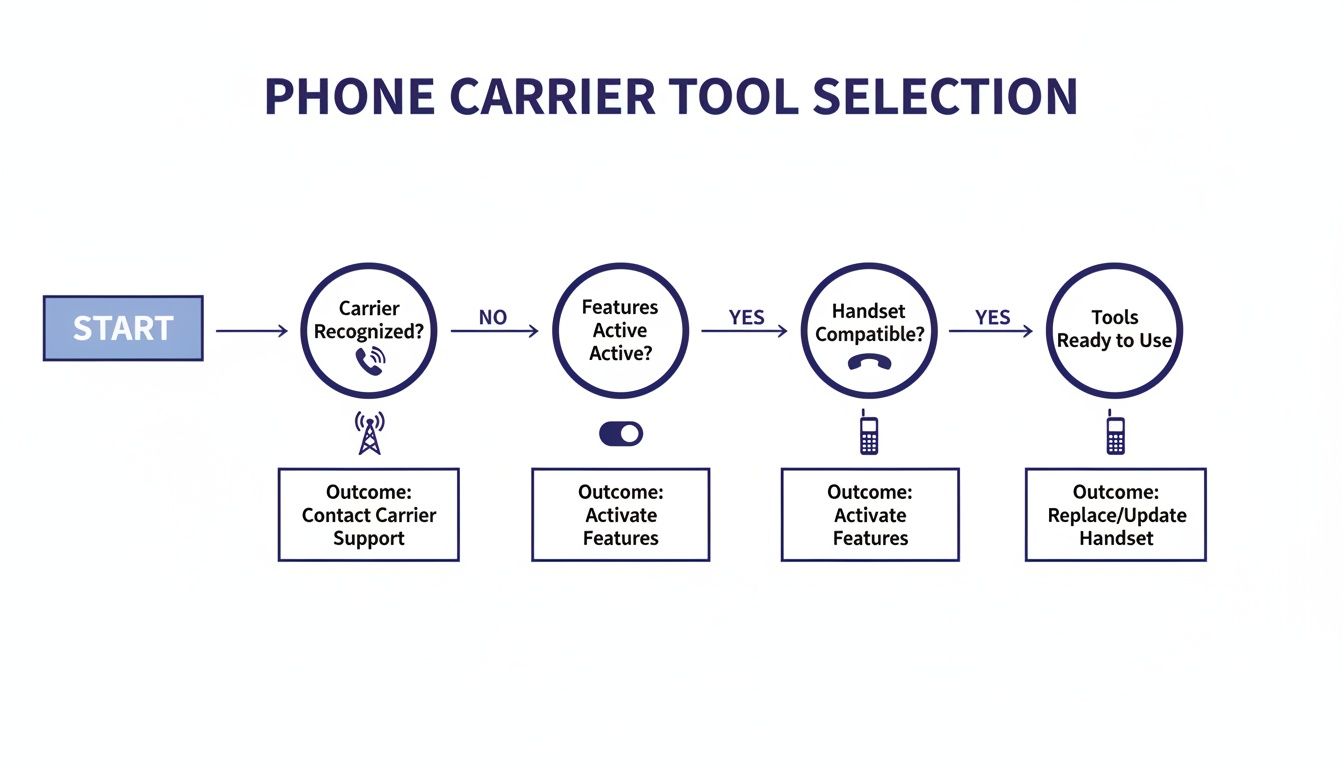
As you can see, the logical path starts with your phone company's tools, then moves to features on your phone itself. Hardware is the next powerful layer of defense.
Selecting a Device That Fits Your Needs
The right device really depends on who you're buying it for. Are you setting it up for an elderly parent who needs something dead simple? Or do you need more fine-tuned control for a landline that doubles as a home office number?
Here’s what to look for:
- Ease of Use: For someone who isn't tech-savvy, a device with a single, giant "Block" button is a lifesaver. The setup is usually just plugging it in, and the operation is totally intuitive.
- Blacklist Capacity: Pay attention to how many numbers the device can block. Some models can store over 10,000 numbers, which is crucial for keeping up with the endless tide of new spammers.
- Screening Features: If you want to stop virtually all automated robocalls, a screener is the way to go. It’s a bit more involved, but it’s brutally effective. If you’re curious about this level of protection, you can learn more about the benefits of a smart call blocker.
Hardware blockers provide a strong physical line of defense, but the smartest solutions are evolving. The most effective strategies today combine robust blocking with intelligent, real-time screening that can adapt to new scammer tactics on the fly.
While a physical device is a fantastic tool, the fight against robocalls is increasingly shifting to AI-powered services that don't require any extra hardware at all. These services offer a much more dynamic defense against the sophisticated scams we see today.
For a solution that brings that advanced screening power directly to your phone line, you might consider an app like gini help. It uses AI to answer and screen unknown callers for you, figuring out who they are and what they want before your phone ever rings. It's a proactive approach that represents the next step in securing your landline.
- Download gini help from the Google Play Store
- Find gini help on the Apple App Store
How AI Call Screening Outsmarts Scammers
Let's look at how AI completely changes the game when it comes to stopping those infuriating scam calls.
Traditional methods for blocking robocalls—whether it's a manual blocklist on your phone or even some physical devices—all share the same critical flaw. They're reactive. A scammer calls, you get annoyed, you block the number, and then you cross your fingers they don't just call back from a different one.
That's a losing battle, and I've seen it frustrate countless people. Scammers use a slick trick called caller ID spoofing to constantly change the number that shows up on your screen. This makes blocking them one by one feel like an endless game of whack-a-mole. As soon as you smack one down, two more pop up.
This is where artificial intelligence steps in and flips the script. Instead of just reacting to known scam numbers, AI-powered services build an intelligent, proactive shield around your landline.
Shifting from Blocking to Intelligent Screening
The next generation of robocall protection isn't just a fancy blocklist. It acts more like a personal receptionist or a smart gatekeeper for your phone. Think of a service like the gini help app. It introduces a brilliant concept: it answers calls from unknown numbers for you.
When a call comes in from a number you don't recognize, your landline doesn't even ring. The AI assistant answers first. It then has a quick, natural-sounding conversation with the caller to figure out what they want.
The AI is sophisticated enough to tell the difference between:
- A real person: Maybe a new doctor's office calling to confirm your first appointment.
- A legitimate automated message: Like the notification from your local pharmacy that a prescription is ready.
- A robocall or scam: That classic pre-recorded nonsense about your car's extended warranty.
Only after the AI has confirmed the caller is legitimate does it patch the call through to you. Your phone finally rings, and you can answer with confidence. All the junk calls are stopped dead in their tracks without ever bothering you. It's a massive shift from trying to block bad calls to only allowing good ones through.
This proactive screening model is so effective because it doesn't care what number a scammer is using. It focuses entirely on analyzing their behavior and intent in real-time, which is something they can't easily disguise.
How AI Figures Out a Caller's Intent
This isn't just a simple answering machine. It's advanced conversational AI that listens, understands, and responds. For example, many robocalls start with a dead giveaway—a long, silent pause or that tell-tale electronic "bloop" before the recording kicks in. The AI is trained to catch these audio cues instantly and hang up.
If it's a live person on the line, the AI might ask, "Who's calling, please?" or "Could you tell me what this is about?" A real person, like a delivery driver trying to find your house, will answer normally. A telemarketer launching into a high-pressure script will immediately reveal their true colors, prompting the AI to end the call.
This is a level of security that older hardware and simple blocklists just can't provide. As you work on securing your phone, it's also smart to think about your home's digital security as a whole. Taking time to unlock home network security best practices can create a stronger overall defense, especially since some modern phone systems connect to your home network.
Why This Is the Future of Landline Security
The hard truth is that scammers are constantly getting more creative. We're now seeing a disturbing rise in AI-powered voice cloning scams, where criminals mimic a loved one's voice to trick family members into sending money. This is exactly why a defense that can think and adapt is no longer a luxury—it's essential.
An AI call screener delivers a kind of peace of mind that older methods simply can't. You know that any call that actually makes your phone ring has already been vetted. This is incredibly important for protecting vulnerable family members who might be more susceptible to a persuasive scam artist's tactics. If you want to dive deeper into how scammers manipulate phone numbers, we have a great article on how phone number masking works.
Getting this advanced protection set up is surprisingly simple. Services like the gini help app integrate this powerful AI screening directly with your phone service, giving you back a quiet, secure line of communication.
You can install this next-gen protection and finally take back control of your landline.
- Download gini help on the Google Play Store
- Download gini help on the Apple App Store
How to Report Robocalls and Fight Back
Blocking calls is your best defense, but reporting them is how you go on the offense. It might seem like a small act, but filing a formal complaint gives government agencies the data they need to hunt down, fine, and even shut down these illegal operations.
Think of each report as a puzzle piece. Your single complaint might not feel like much, but when combined with thousands of others, it helps investigators see the full picture. They can connect the dots between the numbers, the scripts, and the scams, building a solid case against the people behind them.
Filing a Complaint with the FTC
The Federal Trade Commission (FTC) is the main agency responsible for tracking robocalls and telemarketing scams. They run the National Do Not Call Registry and use your complaints to build legal cases against violators.
To give your report the most impact, try to jot down a few details right after you hang up:
- The exact time and date of the call.
- The number that showed up on your Caller ID, even if you know it's fake.
- A quick summary of the scam. Was it about your car's warranty? Someone pretending to be from the IRS? Just a sentence or two is enough.
Once you have that info, head over to the FTC's official reporting website to file your complaint. The form is quick and straightforward, and every detail you provide helps them spot patterns. While this guide is all about landline robocalls, it's also smart to understand broader network security best practices to get a more complete view of how to protect yourself.
Reporting to the Federal Communications Commission
The Federal Communications Commission (FCC) is the other key player. While the FTC focuses on the scam itself, the FCC deals with the technical violations, like illegal caller ID spoofing and other breaches of telecommunications law.
You'll find the FCC’s complaint form online as well, and it asks for similar information. Reporting the same call to both agencies is a great strategy—it covers all the bases and makes the data even stronger.
It's easy to think, "My one little report won't do anything." But that's just not true. Law enforcement absolutely relies on this crowdsourced data. One recent crackdown on a massive scam operation was built on the back of thousands of individual complaints just like yours.
If you're looking for an easier way to handle all this, a dedicated service can make a world of difference. The gini help app uses AI to screen and block scam calls before your phone even rings. It also helps log malicious numbers, which makes the reporting process a whole lot simpler. You can grab it from the Google Play Store or the Apple App Store.
Common Questions About Stopping Landline Robocalls
One of the biggest worries I hear is, "Will I miss an important call from my doctor's office if I use a strong call blocker?" It's a valid concern. The good news is that most modern services, especially the AI-powered screeners, are pretty sophisticated.
They’re designed to tell the difference between a legitimate automated appointment reminder and an illegal spam call. Many use a "whitelist" (a list of your trusted contacts) or challenge unknown callers with a quick prompt. This way, real people get through, but bots get stopped in their tracks.
Is Changing My Number a Good Idea?
People often ask if it's worth the hassle of changing their phone number. Honestly, it's usually a temporary fix at best. Scammers use auto-dialers that just run through every possible number combination, so your shiny new number will eventually land on their list.
You're much better off focusing your energy on solid blocking and screening tools. That’s the real long-term solution.
How Can I Spot a Scam Call?
Learning to recognize the red flags is key. Be immediately suspicious of anyone creating a false sense of urgency—like claiming you’ll be arrested if you don’t pay a fine right now. Another huge giveaway is a demand for payment using gift cards or wire transfers. Legitimate organizations will never ask for that.
And with the rise of AI voice-cloning scams, you have to be extra cautious. If you get an unexpected, frantic call from a "family member" in trouble, don't fall for it. The best thing you can do is hang up and call them back directly on the number you know is theirs.
For a proactive solution that screens calls for you, consider gini help. The AI assistant answers unknown calls, filters out scams, and only connects legitimate callers, giving you peace of mind. Download the app today from the Google Play Store or the Apple App Store.