New Text Message Scams: 2026 Threats and Defense
By Josh C.
In 2024, consumers reported $470 million in losses from scams that started with text messages, more than five times the 2020 level, and the median reported loss reached $1,000 (Consumer Reports). New text message scams aren't a minor annoyance anymore. They're often the first step in a coordinated fraud attempt that can move from SMS to a fake website, a phone call, email, or another messaging app.
The advice “don't click unknown links” still matters, but it isn't enough. Today's messages may mention your local toll system, a delivery you're expecting, a parking issue, or a job application you recently submitted. The safest response is to stop treating the text as a conversation and start treating it as untrusted evidence.
The Escalating Threat of Modern SMS Fraud
Text-message fraud now reaches people through high reach, personal devices, and immediate emotional pressure. A fraudulent alert appears beside messages from family, colleagues, and trusted services, so it can feel urgent before the recipient has time to verify it. Criminals exploit that familiarity with local details, then guide victims through several steps across websites, calls, email, or messaging apps.
The financial trend is clear. Reported losses climbed from $67 million in 2019 to $86 million in 2020, $131 million in 2021, and $330 million in 2022, reaching $470 million in 2024. The FTC said the 2024 total is likely understated because many victims never report fraud.
Survey findings show how widely text-based scams have spread. In a nationally representative U.S. survey of 2,158 adults, 30% of people who experienced a digital scam in the previous year said it began with a text or messaging app, compared with 20% the year before. Among adults aged 18 to 29, the share reached 40% (Consumer Reports).
Why the old defenses fail
Carrier filters and phone spam databases help with known numbers, domains, and repeated wording. They struggle against campaigns that localize the message, rotate contact details, and use AI to produce natural replies. A criminal can send a fresh message from a new number, direct the recipient to a newly registered site, and continue the conversation through another channel before automated filters recognize the pattern.
The FTC reported that the share of text-scam reports involving actual money loss rose from 5% in 2020 to 11% in 2024 (FTC). Each message should therefore be treated as the possible first stage of a coordinated fraud workflow, not as isolated spam.
Practical rule: An unexpected text requesting payment, credentials, or a security code requires the same caution as a stranger asking to enter your home. Verify through an official app, website, or phone number you find yourself.
How Attackers Engineer Convincing Smishing Campaigns
Smishing is phishing delivered through SMS or another messaging service. The attacker impersonates a bank, government agency, delivery company, employer, or other trusted organization, then tries to obtain passwords, card details, PINs, or other sensitive information.
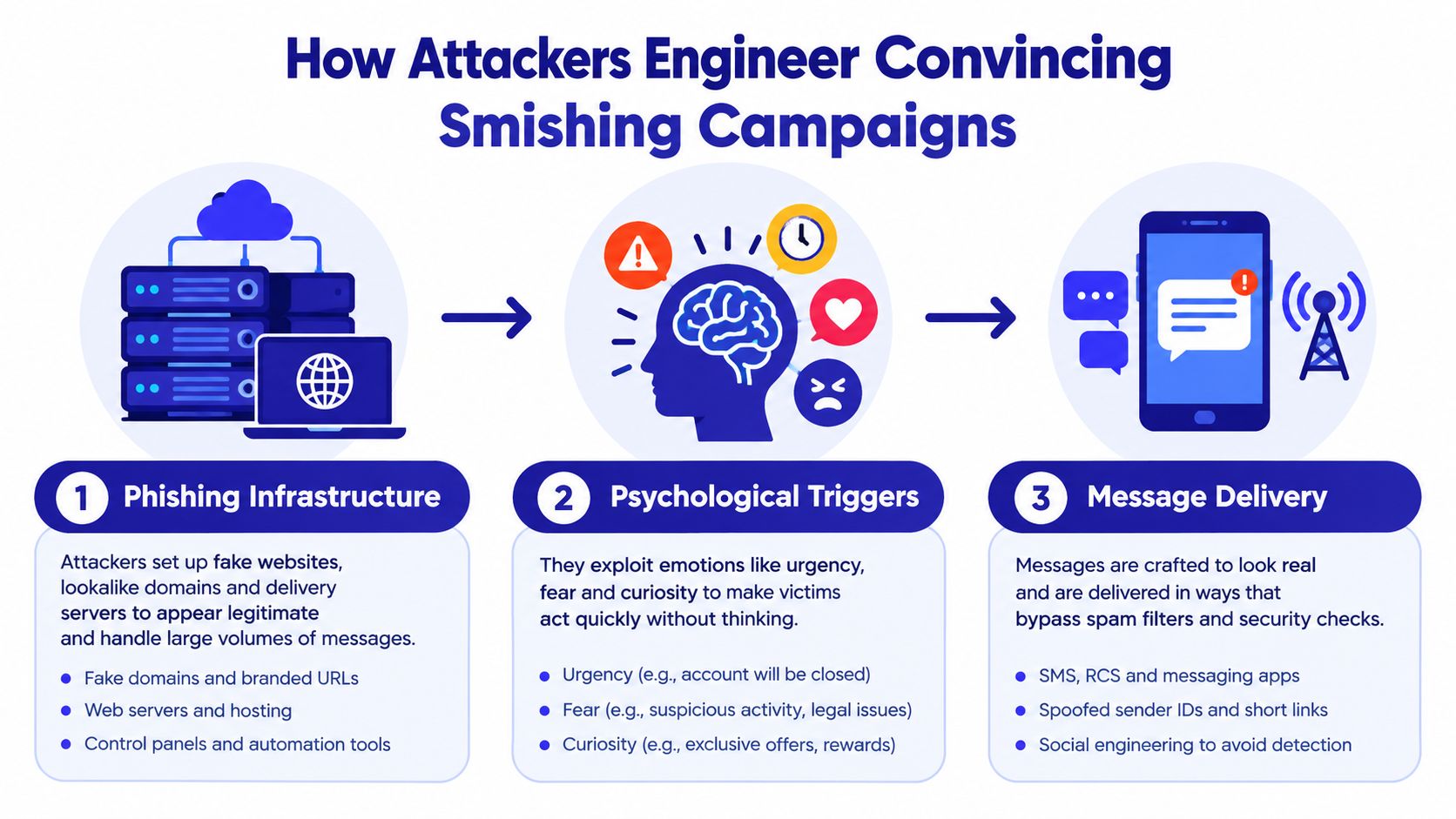
The infrastructure is built to disappear
A modern campaign may use a large collection of short-lived websites rather than one domain. Palo Alto Networks' Unit 42 linked one China-based campaign to 194,345 fully qualified domain names across 136,933 root domains, a scale that shows why static reputation lists struggle (Unit 42).
Attackers rotate domains, hosting providers, sender numbers, and message wording. They may host convincing login pages on mainstream cloud services, then replace the site when filters begin to recognize it. Blocking one address doesn't stop the operation because the operation has been designed around replacement.
That makes device security relevant even when you believe you avoided the trap. A malicious page can attempt to deliver unwanted software or capture information through the browser. Review practical guidance on malware protection for devices before assuming your phone is safe because the message looked ordinary.
The message is only the first move
The strongest campaigns use a workflow, not a single text. The SMS may ask you to confirm an account, then direct you to a website. The website may request a phone number, followed by an automated call or a message from another platform. A criminal may then pose as a fraud investigator and ask for a one-time code.
AI-generated writing and voice content can make that sequence sound polished and personal. The technology doesn't need to be perfect. It only needs to sound credible long enough to keep you engaged.
Read a concise explanation of the smishing attack process to understand why a text should be treated as an entry point rather than an isolated event. Your job is to break the sequence before the criminal moves you to a second channel.
The Most Dangerous New Text Message Scams Today
The most effective new text message scams borrow details from ordinary life. They don't need to invent a bizarre emergency. They need to create a believable problem that you can resolve quickly.
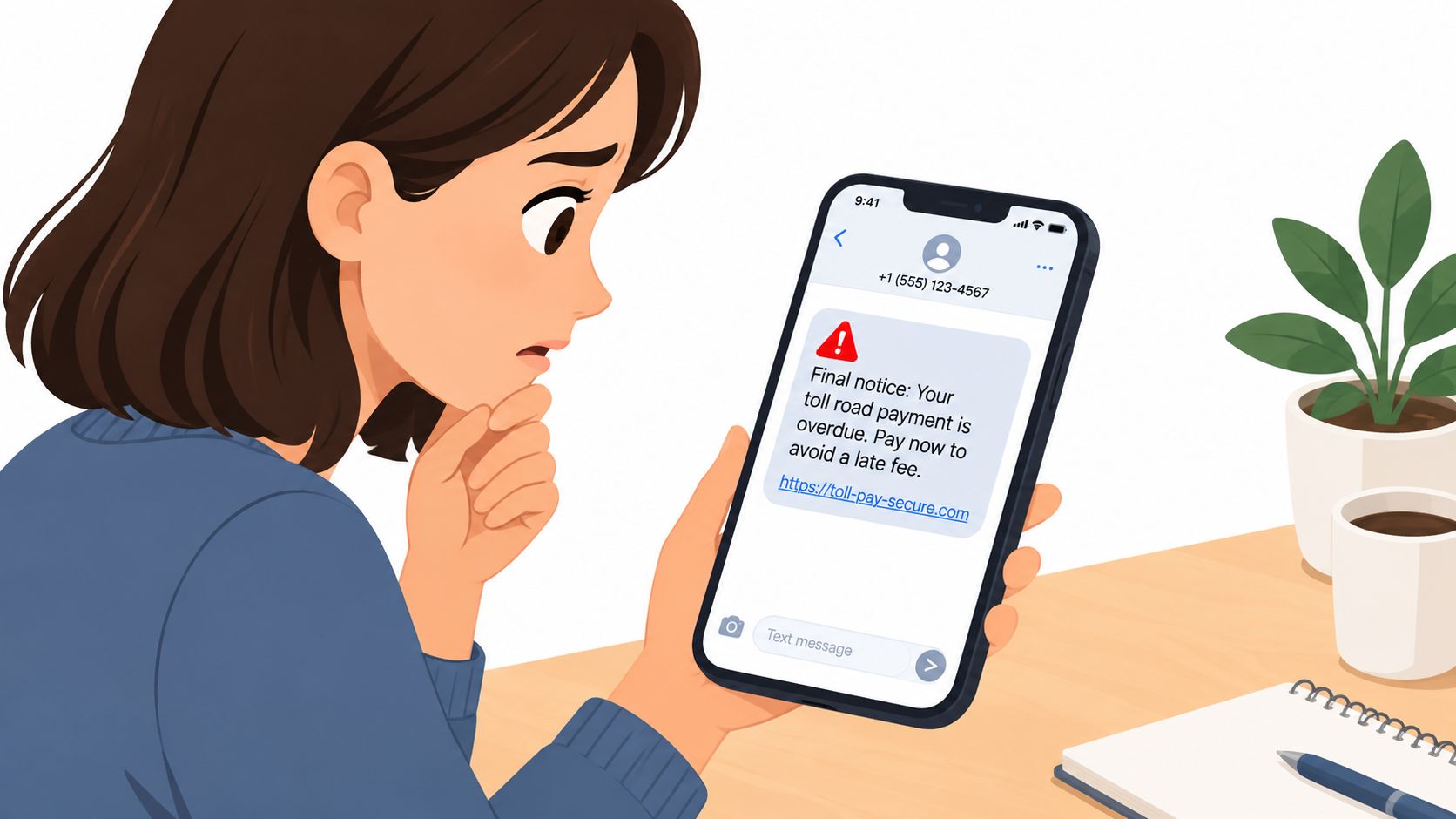
Fake toll and parking demands
A toll message may name a road system used in your region and claim that a small balance is overdue. A parking text may refer to a ticket, vehicle registration, or payment deadline. The criminal wants you to think, “I might have driven there,” before you ask whether the message is authentic.
Independent reporting identified a global fake toll campaign active across 12 countries, with more than 79,000 fraudulent messages detected across 40 SMS scam campaigns since late 2025 (Bitdefender). The messages exploit a routine people already understand: drive, incur a charge, receive a notice, pay it.
Don't use the text's link to check the claim. Open the official toll authority's known website yourself, use its official app, or call a number from a previous statement. If the agency doesn't show the balance through an independent channel, the text has no authority.
Delivery and account warnings
Fake delivery texts work because recipients may be waiting for a package. The message may claim that an address is incomplete, a delivery fee is required, or an account will be suspended unless you act. The link then leads to a page designed to collect card details or account credentials.
The same structure appears in bank alerts, streaming-service warnings, and government impersonation. The sender presents a problem, supplies the solution, and tries to prevent you from checking elsewhere.
Fake job offers and conversational traps
Job scams can begin with a friendly message from someone claiming to be a recruiter. The sender may mention a real company, offer flexible work, or ask you to continue the conversation in another app. Once there, the criminal may request personal information, payment for equipment, or a deposit before explaining the job.
A 2026 FTC warning about fake job texts shows why a professional tone isn't proof of legitimacy. The scammer may not demand money immediately. They may first build trust, ask ordinary questions, and use your replies to tailor the next step.
A message can be locally accurate and still be fraudulent. Verify the organization independently, not through the contact details supplied by the sender.
Red Flags That Reveal a Fake Message Instantly
A convincing text can be locally accurate, personalized, and part of a multi-step attack. Judge the request, not the polish. If a message asks for money, a password, card details, a PIN, or a verification code, stop interacting. Smishing guidance from the Minnesota Attorney General identifies these details as common targets.
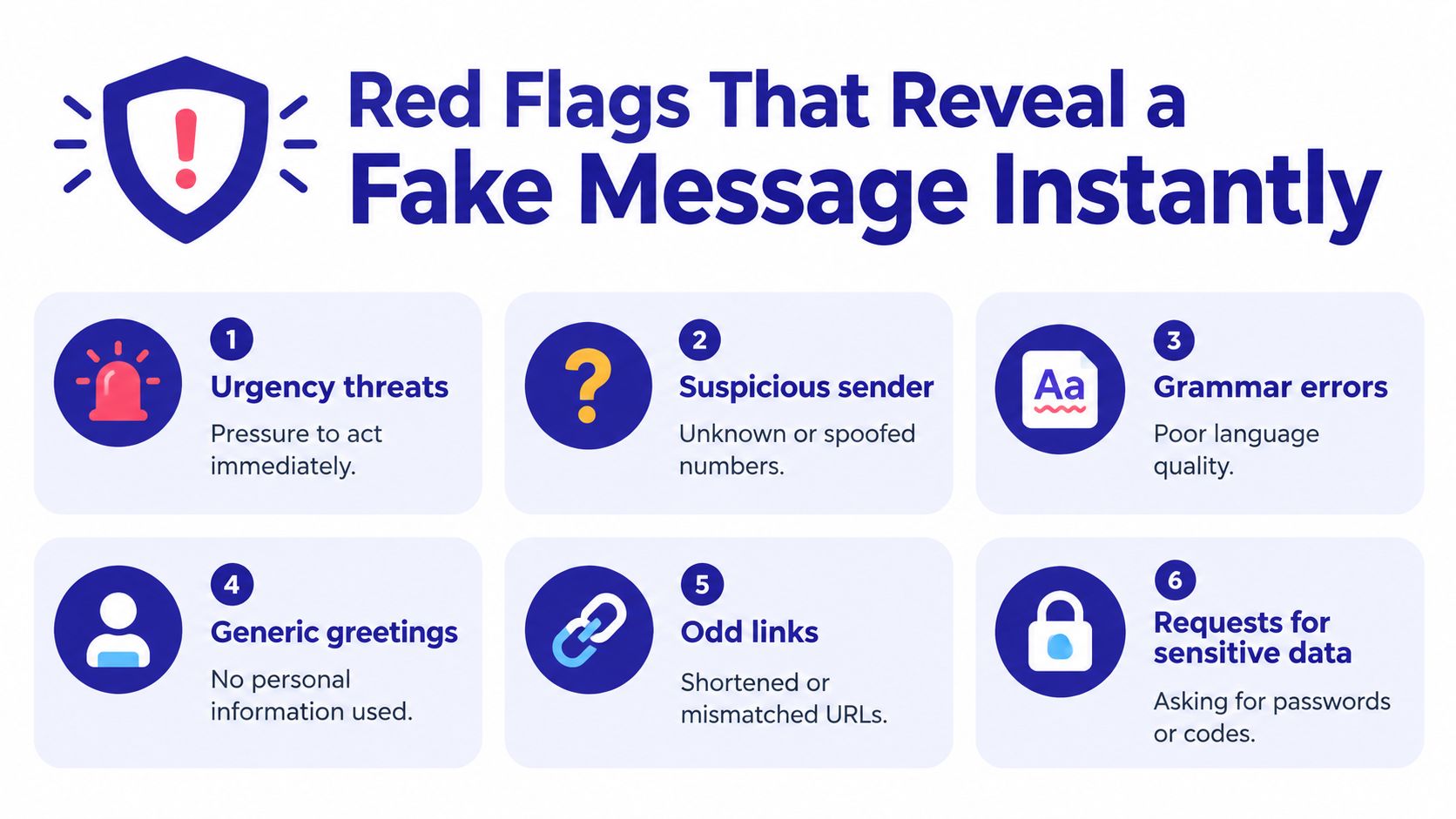
Six signals worth checking
- Urgency threats: Immediate penalties, account closure, missed deliveries, or legal consequences are meant to steal the time you need to verify.
- Suspicious sender: An unknown number, unexpected group thread, or sender name that does not match the organization deserves scrutiny. Sender names can be spoofed.
- Odd links: Shortened URLs, extra characters, misspellings, or a domain unrelated to the claimed organization point to danger.
- Generic or artificial language: Awkward phrasing, unnatural greetings, or wording that sounds generated or translated can reveal a mass campaign. Fluent writing proves nothing.
- Unexpected requests: A text asking you to pay through a link, install an app, or continue in another platform needs independent verification.
- Sensitive-data demands: Do not provide a password, full card number, PIN, or one-time code through an unsolicited text.
AI-assisted campaigns can combine public details about your town, employer, delivery route, or local services with several follow-up messages. A familiar reference does not establish identity. Treat each new request as a fresh security decision.
Verify without touching the message
Do not call the number in the text or reply with “STOP” unless you already know it is a legitimate subscription. Open the organization's official app, use a saved contact, check a previous statement, or type its web address manually. Carrier filtering may miss a campaign that changes wording, numbers, links, and conversation channels.
A matching email or voice call does not confirm the text. Attackers can coordinate multiple channels and repeat the same false story. Trust only confirmation through a channel you chose independently.
The FTC reported more than 1 million imposter-scam reports in 2025, while losses rose by nearly 20% to $3.5 billion. Those figures reinforce a practical rule: pressure plus a request for access or payment warrants immediate verification.
Use the following video as another practical reminder of how phishing messages manipulate attention:
Step-by-Step Recovery If You Clicked a Malicious Link
Clicking a link doesn't automatically mean your accounts or money are gone. The correct response is fast containment, not panic. Stop communicating with the sender and work through the problem in order.
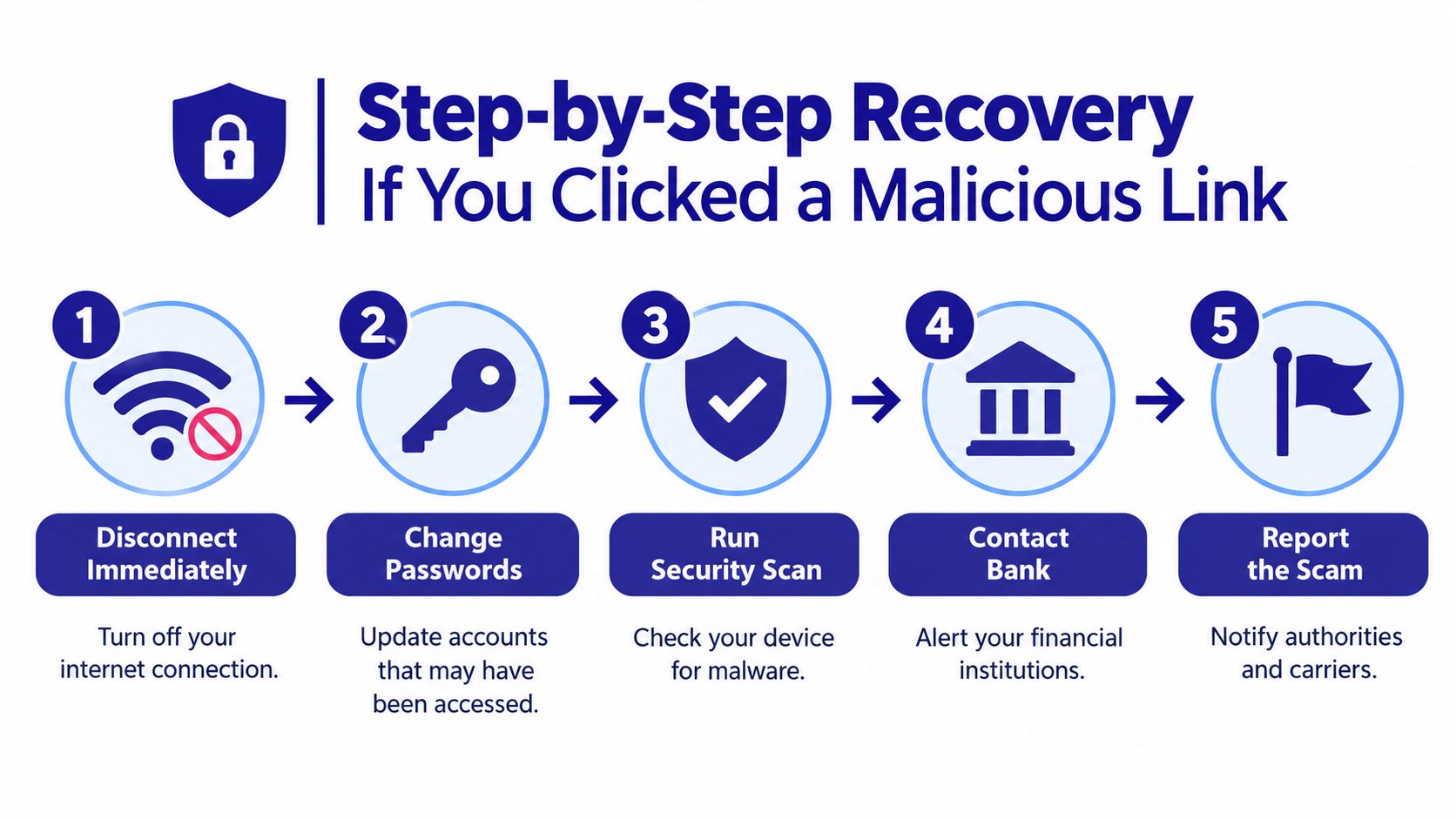
1. Cut off the connection
Close the page. Disconnect from mobile data and Wi-Fi if the page downloaded a file, requested an installation, or behaved strangely. Don't enter more information to “cancel” or secure the session.
If you only opened the page and entered nothing, the risk may be limited, but you should still continue with the checks below. Save the message as evidence before deleting it, but don't reopen the link.
2. Protect accounts
Change the password for any account you entered on the page, using a different trusted device if possible. Change reused passwords elsewhere, then sign out active sessions and enable multifactor authentication.
If you gave away a one-time code, contact the affected service immediately and explain that the code was disclosed during a phishing attempt. Ask the provider to review active sessions, recovery details, forwarding rules, and recent account changes.
3. Secure the device
Run the device's built-in security scan and update its operating system and apps. Remove any application you installed because of the message. If the phone shows persistent pop-ups, unknown accessibility permissions, unusual battery behavior, or unfamiliar apps, get help from a reputable technician or the device manufacturer.
Don't rely on deleting the text. Removing the message eliminates a lure, not necessarily software or account access that may already exist.
4. Lock down finances
Call your bank, card issuer, payment provider, or cryptocurrency exchange through an official number. Tell them you responded to a phishing message and specify whether you entered credentials, card details, account numbers, or security codes.
Ask the institution to review transactions, block compromised cards, reset access, and document the incident. If identity information was exposed, consider placing fraud alerts or a credit freeze through the appropriate credit bureaus.
5. Record and report
Write down the sender, message content, website address, time, information shared, and actions taken. This record helps banks, carriers, and investigators understand the sequence.
Forward the message to 7726, then report it to the FTC and FCC. Reporting won't reverse every loss, but it gives service providers and authorities usable intelligence about the campaign.
Proactive Defense and AI-Powered Protection Tools
Static blocklists can't keep pace with disposable numbers, rotating domains, and messages that change wording for different regions. You still need carrier spam controls, operating-system updates, multifactor authentication, and cautious behavior. But those controls work better when a tool can analyze the message and the surrounding conversation in real time.
Android's 2025 report found that, in the United States, scam activity typically starts around 5 AM PT and peaks between 8 AM and 10 AM PT. The report also identified direct texts from unknown numbers and group-message chains as common delivery methods (Android). That matters because suspicious messages can arrive before you're fully alert, during a busy commute, or inside a conversation that appears to involve several people.
What dynamic screening should do
A useful protection layer should look beyond a single phone number. It should examine wording, links, sender behavior, conversation context, and whether a request matches the supposed organization. It should also help when the scam crosses from text to a call or email.
Gini Help is one available option. Its app screens calls, texts, and emails, and its Live Call Analysis can assess an active call and provide a risk signal while you speak. Family plan features can share threat intelligence across members, which gives caregivers a practical way to support relatives without asking them to become security specialists.
For a deeper look at protective habits, review this guide to text message security. Use any security app as a support system, not a substitute for independent verification.
Install protection before the next message
Download the Gini Help app on Google Play or get it from the App Store. Set it up for the family members most likely to answer unexpected calls or act quickly under pressure, then agree on a simple rule: no one sends money or security codes until another trusted person confirms the request independently.
Reporting Scams and Protecting Your Digital Identity
Report suspicious texts even if no money was lost. Forward them to 7726, which spells SPAM, then report them to the FTC and FCC. These reports help carriers and investigators connect related numbers, websites, and impersonation campaigns, as explained by the Minnesota Attorney General.
If you shared bank details, contact the institution immediately through an official number or app. If you exposed identity information, review account activity and credit reports. Expect follow-up calls or emails that reuse the original story. One disclosure can make the next message sound personal.
Preserve the original text, sender details, links, claimed organization, and payment instructions. Forward the message or attach the original file when a reporting form allows it. Screenshots alone may omit useful evidence. After reporting, block the sender and remove the conversation from your inbox.
Follow this scammer reporting guide for a clear sequence. Change exposed passwords, enable multifactor authentication, and verify urgent requests through a separate trusted channel.
Gini Help screens calls, texts, and emails for suspicious communications. Its Live Call Analysis supports calls you answer, while family-oriented options help relatives respond safely. Visit Gini Help and configure protection before a localized, multi-step, AI-driven scam reaches your phone.