Text Message Spam Bot Explained How to Stop It Fast
By Josh C.
A notification appears while you're waiting for a delivery: “Your package could not be delivered. Confirm your address now.” The message comes from an unfamiliar number, but the logo and wording look convincing. A few minutes later, another text arrives from a different number with a bank alert, a toll notice, or a job offer.
That pattern usually isn't one person typing quickly. A text message spam bot is software that generates, adapts, and sends messages automatically. It can test large ranges of phone numbers, change its wording when filters catch it, rotate sender identities, and guide recipients toward a link or reply.
The scale is no longer a minor annoyance. FCC materials cited estimates that Americans received over 225 billion robotexts in 2022, an increase of 157% from 2021 and 307% from 2020. The same materials reported independent estimates of more than 300,000 robotexts per minute in 2023, or over 3 billion per week (FCC materials on robocalls and robotexts).
You don't need technical knowledge to respond safely. You need a clear mental picture of how the system works, the warning signs that matter, and a short routine for blocking and reporting suspicious messages.
Introduction What a Text Message Spam Bot Really Does to Your Phone
Your phone buzzes with a delivery problem, a bank warning, or a “wrong number” greeting. The sender may be unfamiliar, yet the wording looks believable. A text message spam bot can create that message without knowing your name, habits, or personal story. It may generate numbers from a range, obtain them from a list, or use a bulk messaging service. The software only needs enough convincing replies to find people who will continue the conversation.
The first message often serves as an opening. A delivery notice asks you to correct an address. A supposed bank alert requests verification. A “wrong number” exchange may later become an investment pitch, job offer, or payment request. The initial text may not steal anything. It tests whether you will engage.
The safest first assumption: an unexpected message is untrusted until you verify it through a separate, known channel.
A spam bot is part of an adversarial system, not merely an annoying sender. Operators can mutate words, punctuation, links, and requests when filters detect a pattern, while rotating phone numbers so one blocked sender does not stop the campaign. The same conversation may then move through websites, calls, email, RCS, or other messaging services. Recent reporting describes attackers shifting among messaging channels instead of relying only on classic SMS (reporting on messaging fraud and the shift toward RCS and OTT channels).
That behavior explains why a simple blocklist has limits. A blocklist remembers specific numbers or phrases. Multi-channel AI conversation analysis can examine the meaning, urgency, and changing pattern across a conversation, even when the wording and sender keep changing.
You do not need to identify the person or organization behind the message. Avoid the requested action, check through a trusted app or phone number, and report or block the text using your phone's tools. The next sections explain how these bots reach recipients, evade filters, imitate familiar brands, and operate across channels.
How Text Message Spam Bots Work Behind the Scenes
A spam operation works like an automated mailroom with a harmful goal. It gathers possible recipients, changes the envelope, sends messages in large batches, and watches for signs that someone opened the letter or responded.
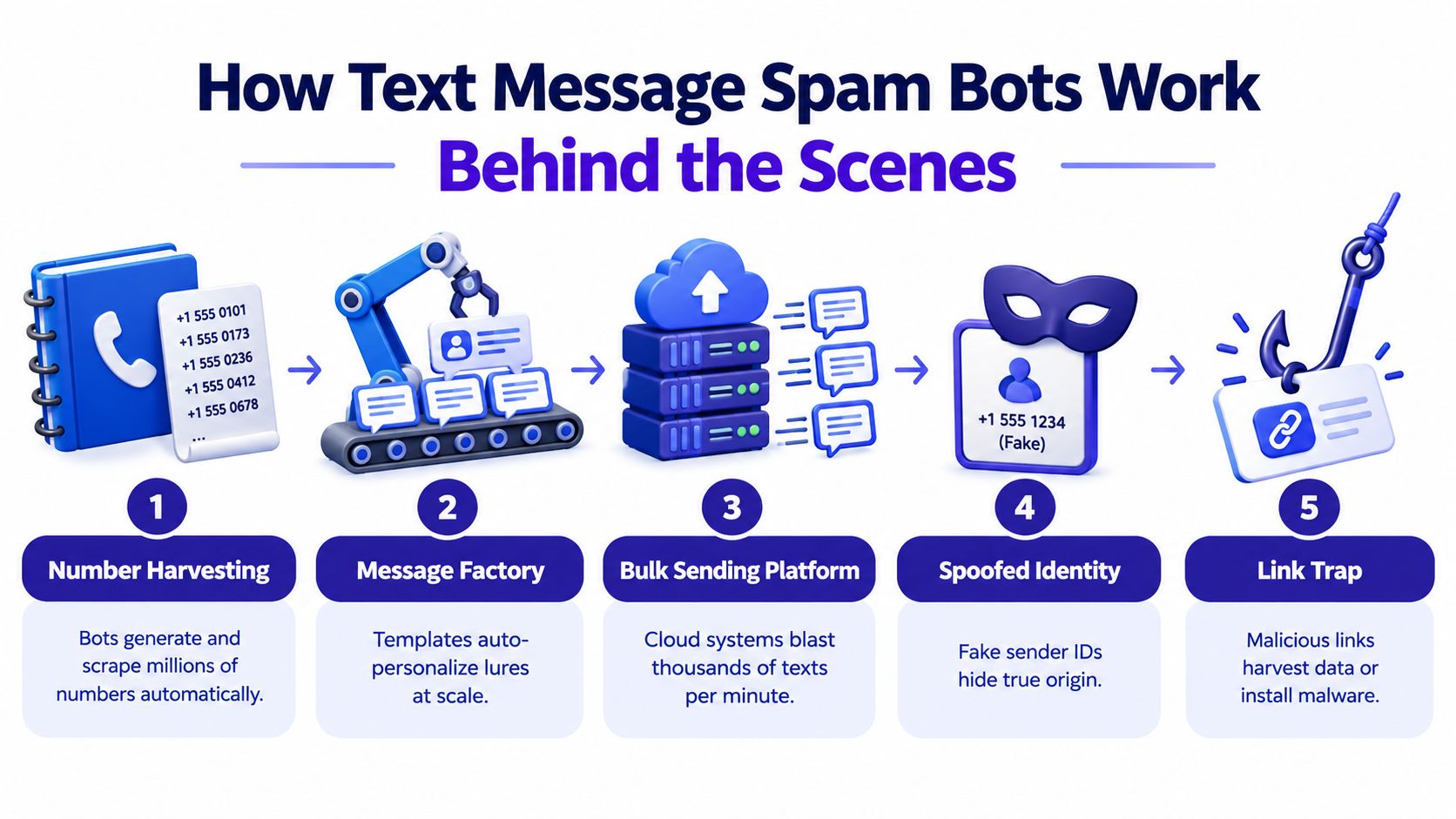
The five-part delivery process
Number harvesting: The bot collects phone numbers from exposed lists, online forms, data leaks, or public sources. It may also generate likely numbers by testing combinations within an area code or exchange range. A field study identified random generation within these ranges as a frequent targeting method (field research on SMS spam campaigns).
Message preparation: Operators build templates with spaces for a name, company, account warning, delivery detail, or short request. Software can vary greetings, wording, punctuation, and links, so each text does not need to be written by a person. These small mutations help the campaign test which versions receive attention.
Bulk delivery: An automated sending platform distributes the messages through its infrastructure. The campaign aims for wide reach. Many recipients will ignore the text, but a smaller group may click, reply, call, or continue the conversation.
Sender rotation: A later message may arrive from another phone number or display identity. Blocking one sender closes one visible entrance, while the campaign can continue through other numbers and channels.
The link or reply funnel: The message often pushes the recipient toward a web page, phone conversation, or ongoing chat. That destination may request payment details, login information, personal data, or a download. Research found that more than 70% of SMS spam used a URL-based call to action, and more than 50% of those campaigns reused the same URL patterns (SMS spam field study).
Separate the sender from the destination. The sender may change repeatedly, while the website, redirect pattern, request, or conversation script stays similar. A filter that checks only known bad numbers therefore sees one piece of the operation.
Anomaly detection systems can examine unusual patterns across messages, senders, and activity instead of treating every text as unrelated. For a non-technical user, the idea is straightforward: a useful filter should consider what the message is trying to make you do, along with who appears to have sent it. That broader view can connect changing texts and numbers across a campaign.
Why Spam Bots Are So Hard to Block and How They Evade Filters
You may receive two texts that look different on the screen but ask for the same action. One spaces out a suspicious word. Another changes a character or adds harmless wording. A text message spam bot is adapting its disguise while preserving the goal.
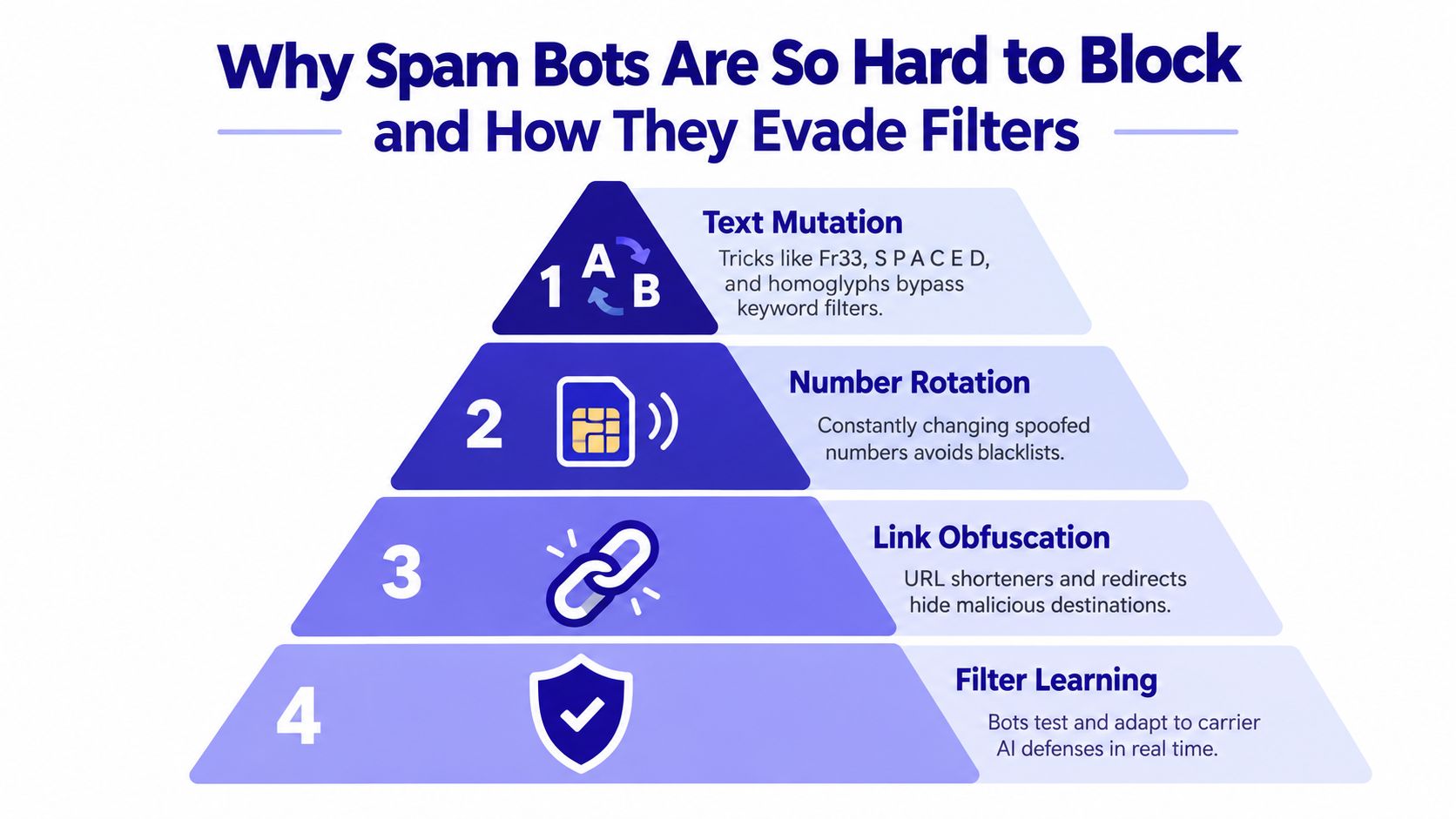
Small changes, same danger
Researchers have examined spacing, deleted characters, swapped or inserted characters, substitutions, and related words as ways to evade spam detection. A bot might place spaces inside a risky term, use a similar-looking character, or insert ordinary words between suspicious phrases. These adversarial tactics are described in a study of adversarial tactics against spam filters.
A literal keyword list can miss the altered version. A filter that compares one familiar sentence can also miss a paraphrase. People usually understand the underlying request anyway, whether it asks them to click, verify, pay, download, or reply.
The sender creates a second challenge. A campaign can rotate through many phone numbers, so blocking one number closes only one visible entrance. Another number can carry a similar message soon after. Reputation-based filtering helps assess sender history, but detection becomes stronger when it also considers meaning, link behavior, and repeated campaign patterns.
Why conversation context matters
The destination may reveal more than the number. Related campaigns can reuse URL structures, redirects, page layouts, or requests for the same type of information. A changing sender can still lead people toward related online infrastructure.
Effective protection therefore works in layers:
- Normalize the text: Account for misleading spaces and character substitutions before judging the message.
- Examine characters and words: Character-level analysis can recognize altered spellings that exact keyword matching misses.
- Inspect links: Check the destination, redirects, domain behavior, and requested action after a click.
- Study patterns: Compare timing, repeated templates, rotating senders, and similar conversations.
- Retrain against evasions: Update detection with examples of the changes attackers deliberately make.
This approach treats spam as an adversarial system rather than a collection of isolated texts. Multi-channel analysis can connect the wording, sender changes, links, and conversation behavior. That broader view is harder for a bot to evade than a blocklist that remembers only a number or exact phrase.
Machine-learning results still depend on the data and message patterns used for testing. One Android SMS study reported nearly 98% precision and accuracy with a stacked classifier. Another reported 99.44% accuracy on 5,574 messages, including 747 spam messages and 4,827 messages classified as not spam (Android SMS spam detection study). These findings do not guarantee correct decisions for every real-world text. They show why training examples, model quality, and testing against deliberate text mutations all matter.
Real Examples of Text Message Spam Bot Scams You Will Recognize
A message can look ordinary and still be part of an automated scam. A text-message bot changes its wording, rotates sending numbers, and adjusts its approach when filters block an earlier version. The result may feel like a personal conversation, even though the system is testing which reply will keep you engaged.
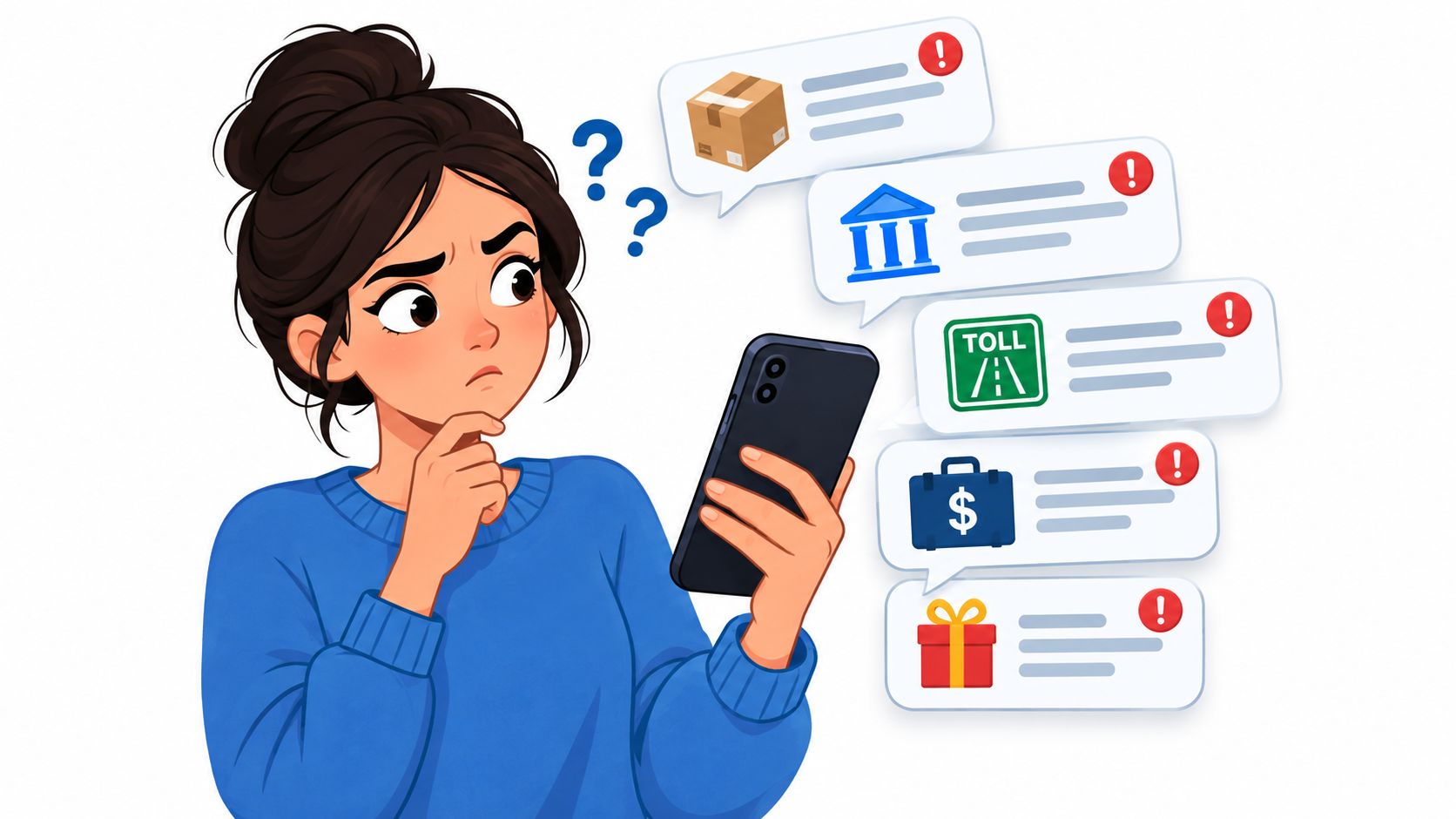
The delivery notice
“Your package is delayed. Confirm your address to avoid a return.”
The situation feels familiar because deliveries are common. The warning signs are an unexpected link, a vague reference to “your package,” and a request for payment or personal details. Check the retailer's official app instead of following the text.
The bank alert
“Your card has been locked. Verify your account immediately.”
A real bank may send alerts, but an unexpected message should not control your next action. Open the bank's official app or type its known website yourself. A genuine problem will usually appear through that trusted channel too.
The toll notice
“Outstanding toll balance. Pay now to avoid additional action.”
Scammers may use official-sounding language, a deadline, and a small payment request. A modest amount does not make the text safe. The first payment can expose card details or start a longer exchange in which the sender asks for more.
The job offer
“Your profile was selected for flexible remote work. Message this recruiter to begin.”
The bot may request a deposit, identity documents, or a move to another messaging platform. Professional wording proves little when the sender is unknown. Verify the employer through contact information you find independently.
A recent U.S. consumer-loss summary reported $470 million in losses in 2024 from scams that began with text messages, more than five times the 2020 level. The same source identified fake package-delivery messages as the most commonly reported type, followed by bogus job offers, fake bank fraud alerts, toll notices, and wrong-number scams (summary of U.S. text-scam losses and common lures).
The wrong-number approach often begins without fanfare. Someone writes, “Is this Maria?” After you correct them, the sender responds warmly and may later introduce an investment opportunity, payment request, or link. A bot can rotate its numbers and rewrite the opening so each attempt resembles a separate conversation. If your number is added to forms or promotions without your clear consent, the consequences of spam signups can include continued nuisance messages and exposure to more risky links.
The same danger can appear through a familiar account. A threat report described malware using WhatsApp Web automation to message contacts from an infected account, showing why a known name or trusted platform does not guarantee safety (analysis of a WhatsApp Web spambot component). Conversation context matters across channels, because a scam may begin as a text and continue through a website, email, or messaging app.
How to Spot Block and Report a Text Message Spam Bot Quickly
Your phone buzzes with a message saying an account, delivery, toll, or payment needs attention. The safest response is a short routine. You do not need to prove the message is fraudulent first. Avoid the risky action, then preserve enough information to report it.
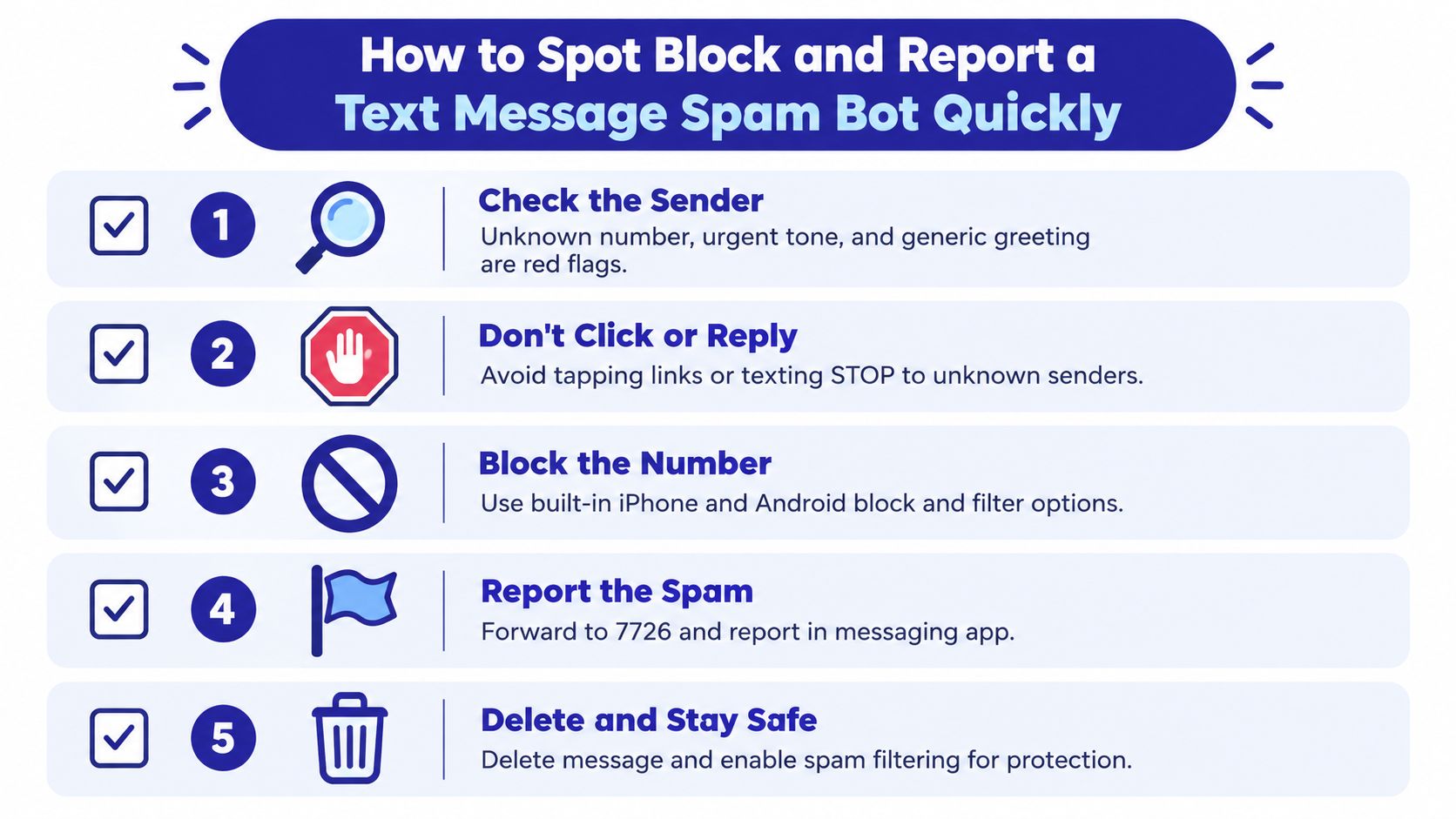
Use this order
Pause before touching the message: Do not click a link, open an attachment, call the number, or reply. Urgent wording is designed to hurry you. Put distance between the alert and your decision.
Check the sender and request: Look for an unfamiliar number, generic greeting, odd formatting, an unexpected problem, or a request for payment, passwords, verification codes, or personal details. A familiar brand name can still be impersonated.
Verify outside the text: Open the organization's known app or type its established website yourself. If the message appears to come from family, call a number already saved in your contacts. Never use contact details supplied by the suspicious message.
Block and report: Use your phone's built-in block and spam-report controls. In the United States, participating mobile carriers let you forward suspicious texts to 7726, which spells SPAM. You can also report scams through the Federal Trade Commission's reporting service and unwanted robotext concerns through the Federal Communications Commission's consumer complaint center.
Delete after reporting: Deleting the message removes the temptation to tap it later. If it may matter for an account or financial incident, save a screenshot first, without opening the link.
On iPhone, use the message's report and block controls, then review filtering options for unknown senders. Android labels differ by device and messaging app, though Google Messages commonly includes spam protection, blocking, and reporting. Follow this guide to reporting a spam text on iPhone for device-specific direction.
Caregiver shortcut: Set one household rule. Nobody uses a link from an unexpected text to fix an account, delivery, toll, or payment problem.
Do not reply “STOP” to an unknown sender merely to unsubscribe. A reply can confirm that your number is active. Legitimate subscription messages are different when you knowingly gave the organization permission to contact you, and you can verify the sender independently.
Legal Protections and Why Blocking Alone Is Not Enough
U.S. regulators and mobile carriers have taken action against unwanted robotexts, but laws and carrier controls operate at a different level from your personal inbox. The FCC addresses unwanted communications and has supported measures intended to reduce illegal robotext activity. Carriers can block patterns across their networks, while messaging apps can identify suspicious content inside their own systems.
National blocking infrastructure shows how large the problem has become. In Australia, telecommunications providers reported blocking more than 897.3 million scam SMS messages during a single reporting period, along with over 2.4 billion scam calls (Australian Communications and Media Authority report). That kind of volume requires network-level defenses, not only individual users blocking senders.
Still, enforcement can't instantly remove every message. Operators can rotate numbers, alter wording, use new domains, and move a conversation from SMS to another channel. A message that avoids one carrier's pattern may be caught by a phone's spam filter, while another may pass through because it uses a different route.
The channel shift creates another gap. Current reporting has emphasized that fraud increasingly involves SMS, RCS, and OTT messaging, as well as links to websites and follow-up calls. A person may receive a text, continue the conversation in a messaging app, and then be asked to install software or share a code. Treating each channel as separate can hide the larger story.
Regulation helps reduce abuse and gives consumers reporting paths. It doesn't replace judgment or layered protection. The expectation is that carriers and regulators can remove some campaigns, while your devices and security tools need to evaluate the messages that still reach you.
Staying Protected with Multi Channel AI Help and Next Steps
A blocklist asks, “Has this number already been reported?” That question is useful, but it struggles against a text message spam bot that rotates numbers. A broader system asks, “What is this contact trying to make me do, and does the conversation behave like a normal trusted exchange?”
Multi-channel AI protection can examine conversation context, suspicious links, identity claims, and requests across calls, texts, and email. That approach is especially helpful when a message uses a real brand, a believable event, or a new sender identity. It can also help caregivers support family members without asking them to become security specialists.
Gini Help is one option that combines protection for calls, SMS, and email in a single app. Its features include screening unknown contacts, analyzing conversations, checking suspicious links and requests, Live Call Analysis with risk scoring and haptic warnings, family threat sharing, and coverage for Gmail, Outlook, Yahoo, and iCloud. Product information says the service can screen fraudulent texts, including delivery alerts, prize scams, and impersonation messages, before they reach the user.
Keep the personal routine simple:
- Verify unexpected requests through an official app or known phone number.
- Never share a one-time authentication code because a text or caller asks for it.
- Treat a familiar logo as an unverified design element, not proof of identity.
- Review privacy and spam-filter settings on every messaging service you use.
- Tell a trusted family member quickly if you clicked, replied, paid, or shared information.
Download Gini Help from Google Play or the App Store, then keep your normal verification habits in place across SMS, RCS, email, and calls.
Gini Help screens calls, texts, and emails for suspicious behavior, helping you respond before a rotating sender or altered message creates pressure. Visit Gini Help to review the app and choose a protection approach for yourself or your family.