Text Message Bank Scams How to Spot and Stop Them
By Josh C.
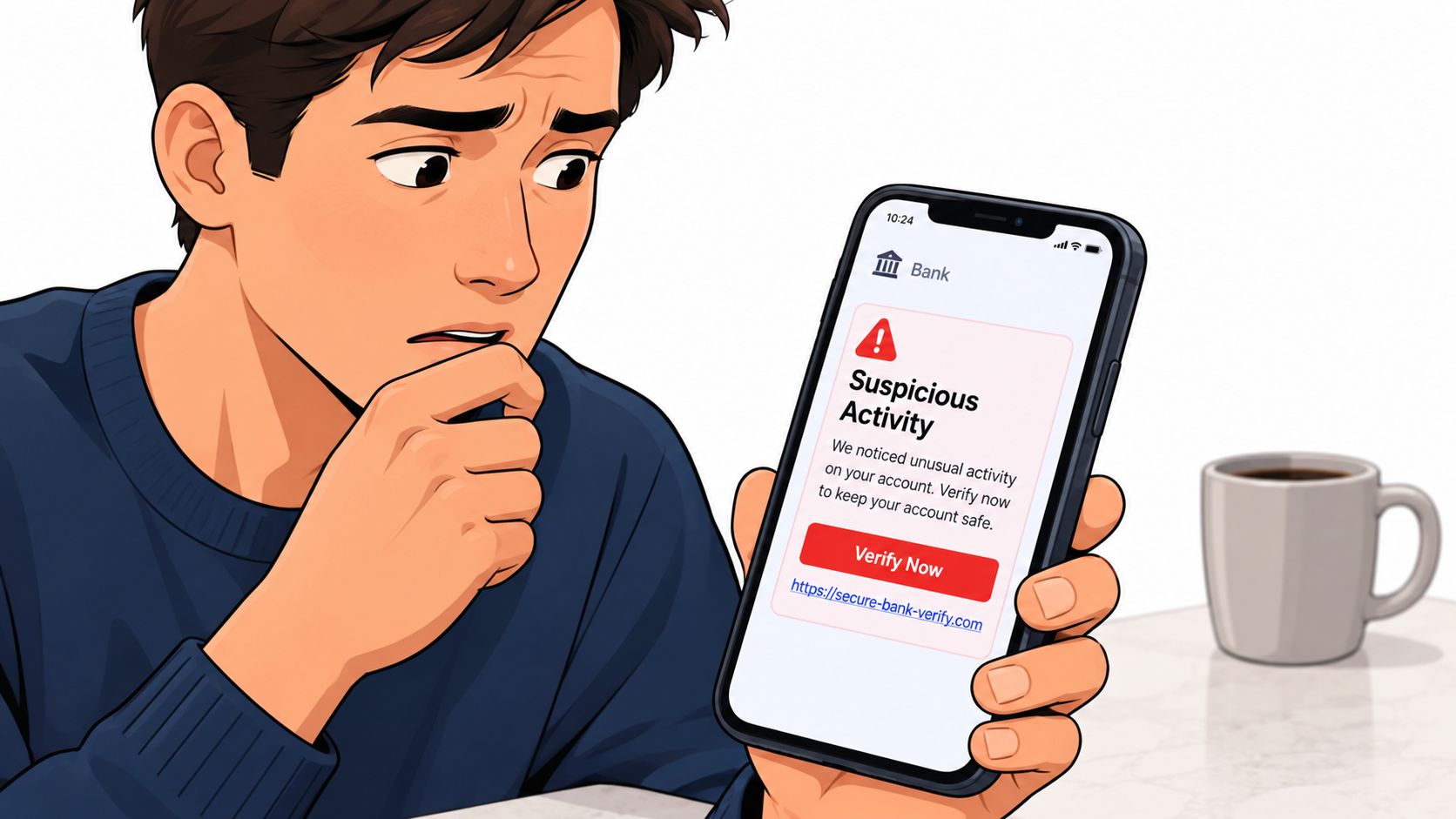
A message arrives while you're making coffee: “We detected suspicious activity on your bank account. Verify now to avoid account closure.” The sender name looks familiar, the warning feels serious, and a link is waiting. For an older adult, a caregiver helping with household finances, or a busy professional checking a phone between tasks, the natural reaction may be to tap first and think later.
That reaction is exactly what text message bank scams are designed to create. The message may use a familiar bank name, a convincing logo, a realistic-looking sender ID, or a warning about a payment you don't recognize. Even the telephone number can appear legitimate because scammers can spoof the identity shown on your phone.
This guide focuses on the part many explanations skip: how to verify a bank text when the sender itself may be fake. You'll learn how these scams work, how common versions differ, which warning signs matter, how to verify a message safely, and what to do if you've already clicked, replied, or shared information. Families can also use these rules as a simple script when helping a parent or relative respond calmly.
The risk is substantial. The Federal Trade Commission reported $330 million in losses from text scams in 2022, with a median reported loss of $1,000 per victim (FTC data on bank impersonation text scams). The practical answer isn't fear. It's a repeatable verification habit, supported by sensible phone settings and carefully chosen tools.
Introduction Why Bank Texts Feel So Urgent
Your phone shows a text saying a transfer looks suspicious, your card payment is unfamiliar, or your account will be locked unless you act now. Within a few words, the message directs you to tap a link, call a number, or reply with a code. That pressure is the scam's first tool.
Banks really do send transaction alerts, login notifications, and security messages, so an unexpected text can seem ordinary. A specific-sounding warning may feel personal even when the sender knows nothing about your account. Treat the message like a note slipped under your door: its appearance does not prove who delivered it.
Older adults may feel greater pressure if the message seems to threaten access to money needed for daily life. Caregivers can face the same urgency while managing payments for a parent or relative. Families should agree on one simple rule: urgency means pause.
The safest first response is no response. Don't tap the link, call the number, reply, or share a code until you've verified the message through a channel you opened independently.
Use your bank's official app, type its website address yourself, or call the number printed on your card or statement. Do not use contact details inside the text. Ask the bank whether the alert is genuine, and check the account there rather than through the message.
Sender labels cannot settle the question. Criminals may spoof the originator or a genuine bank caller ID, making a fraudulent communication appear authentic, as explained in the European Payments Council payments threat report. A familiar name is an appearance, not authentication.
The verification gap is the space between “it looks like my bank” and “my bank confirmed it.” This guide closes that gap, then shows how to document incidents and help relatives follow the same process calmly, without blame.
How Text Message Bank Scams Work
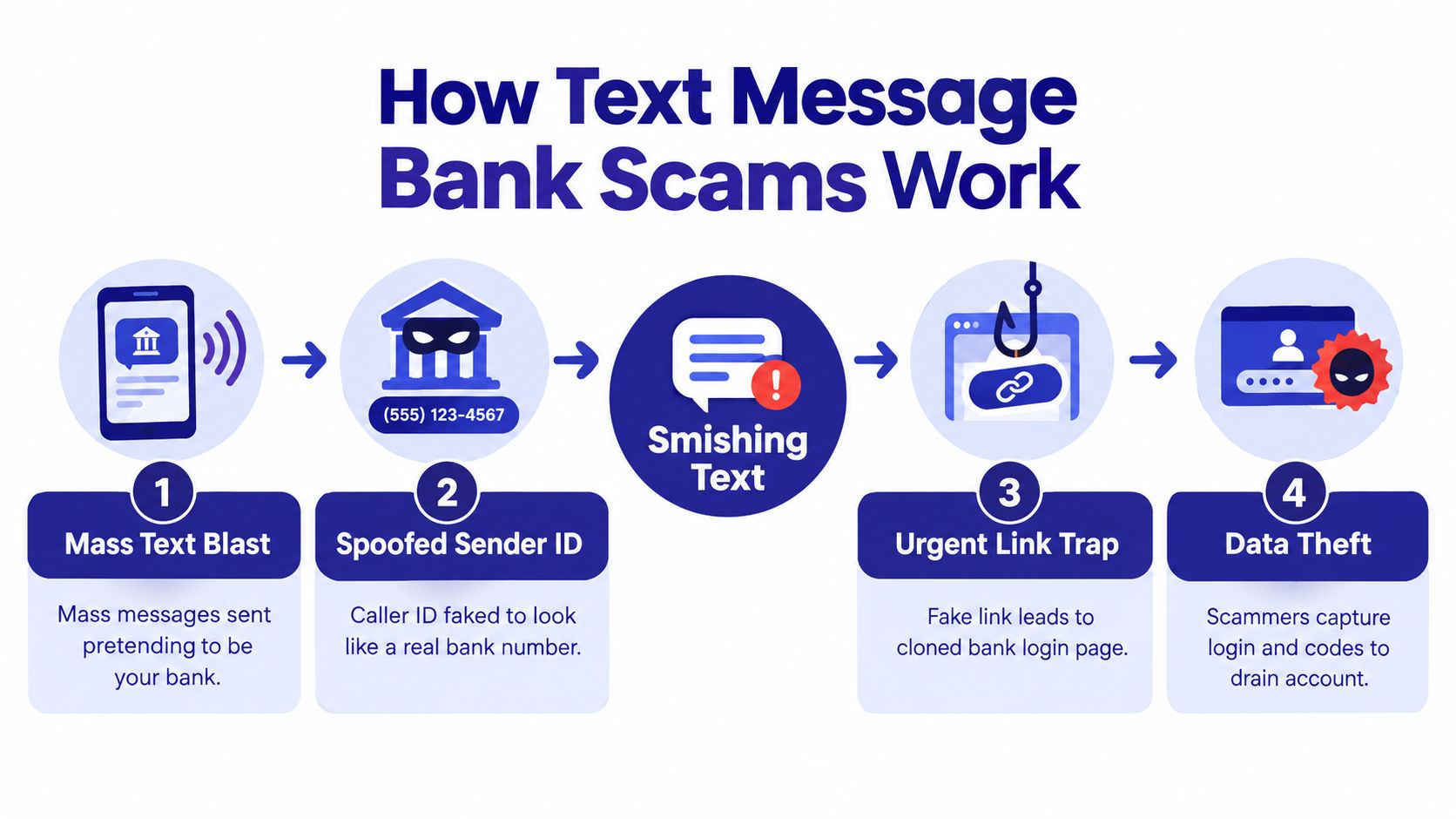
Smishing means SMS-based phishing. A criminal sends a text that pushes you toward one of four outcomes: revealing information, opening a fake website, calling an impostor, or moving money. The message is like a disguised courier showing a bank badge. The badge may look familiar, but it does not prove who sent it. For a plain-language explanation, see this guide to what a smishing attack is.
The first stage is usually a mass campaign. Criminals send many messages, hoping that some recipients use the named bank or feel worried enough to respond. The Federal Trade Commission found that bogus bank fraud alerts were the most common type of text-message scam in a sample of 1,000 reported texts, as described in its analysis of bank impersonation messages.
The second stage creates a believable disguise. The sender name may show the bank's brand, and the wording may imitate familiar alerts. A callback number can also be changed to resemble a genuine bank number. Sender details offer clues, not proof, so verification must happen through the bank's official app, website, or a phone number you already trust.
The trap behind the warning
The criminal tries to replace careful checking with a quick reaction. A fraud warning creates fear, while a short deadline makes independent verification feel unsafe or inconvenient. A link may open a copied banking page that records a username and password. A phone number may connect you to someone posing as a fraud investigator.
The conversation can then continue. The impostor may claim that a one-time code is needed to stop the supposed transaction. That code may approve a login or transaction the victim did not start. Banks do not need customers to disclose security codes to cancel suspicious activity.
Network providers also block scam messages using sender reputation, message patterns, link analysis, and real-time screening. Reporting on network-level scam SMS blocking describes this layered approach. It reduces exposure, but it cannot identify every fake text before delivery.
Families can rehearse the same rule: stop, open a trusted bank channel, and ask whether the alert is real. A caregiver can help an older relative check the account without taking over or blaming them. For broader training ideas, see the CloudOrbis Inc. phishing guide.
Common Types of Bank Text Scams and How They Differ
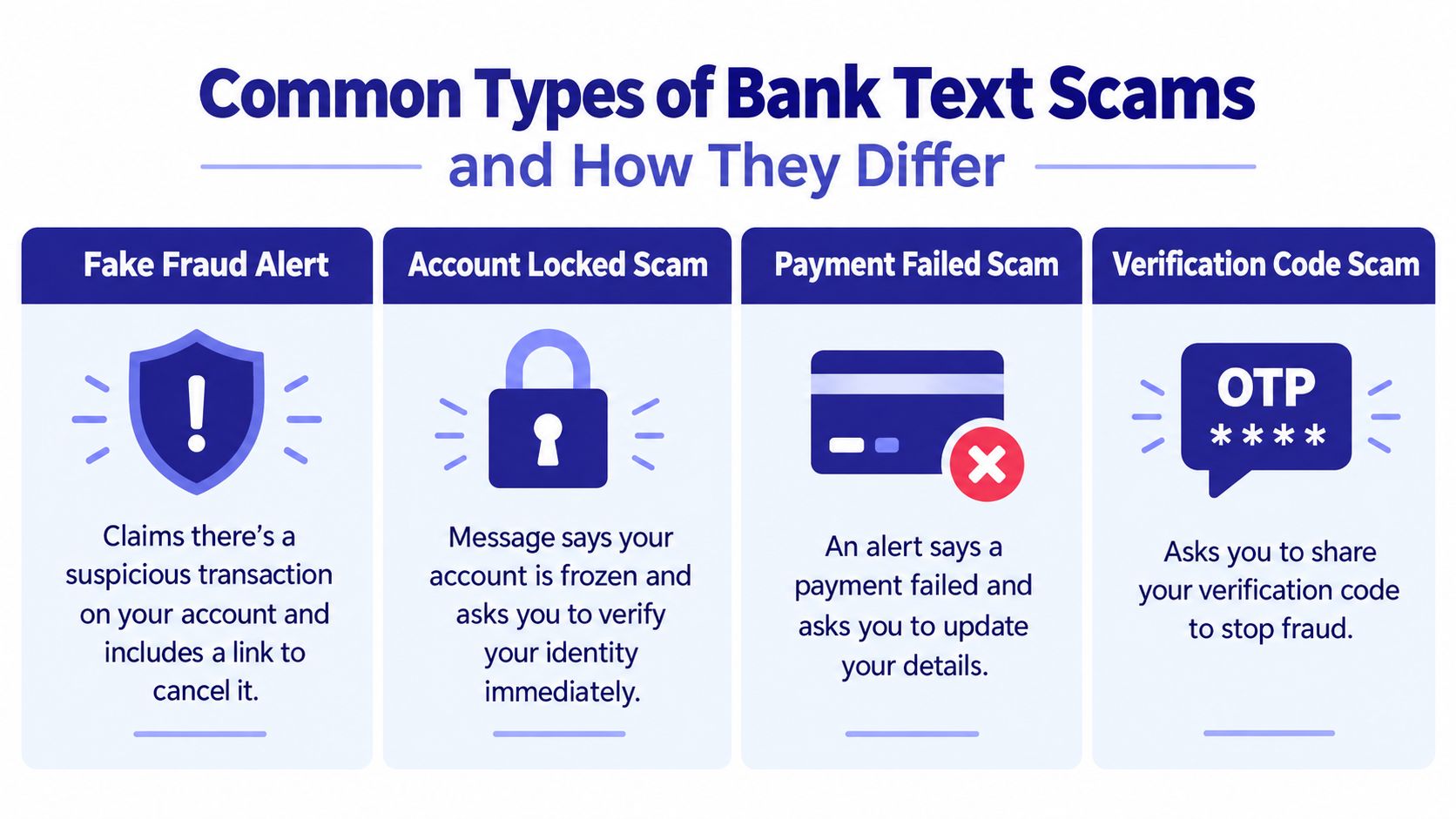
A bank text can look familiar while pushing you toward a very different danger. One message sends you to a fake login page. Another asks you to call an impostor. A third persuades you to move money yourself. The bank name and sender ID are clues, not proof, because criminals can imitate both.
The safest way to compare these scams is to identify the action being requested. Ask, “What does this message want me to do, and can I verify that request through the bank's official app or a trusted phone number?”
Bank Text Scam Variants Compared
| Scam Variant | Typical Lure | What It Asks You To Do | Highest Risk |
|---|---|---|---|
| Fake fraud alert | A suspicious purchase or transfer supposedly needs review | Tap a link or confirm activity | Entering credentials on a cloned site |
| Account locked scam | Your account is supposedly frozen or restricted | Verify identity immediately | Giving away personal or login information |
| Payment failed scam | A payment allegedly failed or a card needs updating | Open a link and update details | Exposing card or account information |
| Verification code scam | A code is supposedly needed to stop fraud | Reply with a one-time code | Helping the criminal authenticate an action |
A safe-account scam uses a different route. After sending a supposed fraud alert, the criminal may call and claim that your balance is in danger. They then instruct you to transfer funds to a “protected” account. The transfer may appear authorized because you made it, yet deception caused the payment.
Sender ID spoofing creates the verification gap many people miss. A text can display a familiar bank name and still be fake. Treat the message as unverified until you open the bank's official app, type the bank's known website yourself, or call the number printed on your card. Never use the link or phone number supplied in the text to prove that same text is genuine.
A legitimate alert may describe activity, but it should not control your next action. Families can use one shared rule: pause, check through a trusted channel, and ask whether the requested action is normal. If a relative receives a code they did not request, this verification code text message scam guide explains why sharing it can help a criminal approve a login or payment.
The strongest warning is a request to move money or disclose a one-time code. A real-looking sender cannot make either request safe.
Real Examples and Red Flags You Can Spot Quickly
Consider a message that says:
“CHASE: Unusual $1245 charge detected. Tap here to review: [short link]”
The apparent bank name doesn't establish authenticity. The generic greeting, unexpected charge, and shortened link create a fast path to a fake login page. Don't open the link to inspect it. A link can be dangerous even if the page looks polished.
Another example might read:
“Wells Fargo: Your account is locked. Verify now to restore access: [misspelled domain]”
The pressure comes first, while the misspelled domain is the technical clue. Criminals often use web addresses that resemble a bank's name but contain extra words, altered spelling, or an unfamiliar ending. A real-looking logo can't correct a false web address.
A third message may say:
“Bank of America: Reply with the verification code we just sent to stop fraud.”
That request is dangerous because the code may belong to a login or payment the criminal initiated. The person on the other end may sound calm and professional, but the requested behavior remains unsafe.
The warning signs that matter most
- Urgency: “Act now,” “verify immediately,” or “your account will close” discourages careful checking.
- Strange links: Shortened addresses, misspellings, or unfamiliar domains should be treated as unsafe.
- Information requests: Banks don't need your password, PIN, or one-time code in a text reply.
- Unexpected instructions: A demand to move money to a safe account is a major fraud signal.
- Sender confidence: A familiar sender label or caller ID can be spoofed.
A bank will never protect your money by asking you to move it to a “safe account.”
The central question isn't “Does this look official?” It's “Can I confirm the underlying event through my bank's official app or independently verified phone number?” That question works even when the sender identity has been forged.
What to Do When You Get a Suspicious Bank Text
Treat the message as unverified until you confirm it independently. You don't need to determine whether it's fake by studying every letter or inspecting the sender. Follow the same sequence each time.
Use this verification checklist
Stop the interaction. Don't tap, reply, call the number, download an attachment, or provide a code. Leaving the message untouched prevents the scammer from guiding the next step.
Open your bank app yourself. Use the app already installed on your phone, not a link from the text. Check recent transactions, alerts, and account notices. If the app shows no matching event, that's useful evidence, although you should still contact the bank if you remain concerned.
Find contact details independently. Use the number printed on your bank card, a paper statement, or the bank's official website entered manually. Don't copy contact information from the suspicious message.
Ask a precise question. Say, “I received a text about suspicious activity. Can you confirm whether it came from the bank and whether there's an actual alert on my account?” A genuine representative can verify the account without asking you to surrender control.
Follow only confirmed instructions. If the bank identifies real fraud, let the representative explain the approved process. Don't transfer money, install remote-access software, or disclose a one-time code because an unsolicited caller says it's necessary.
A family script for older adults
Caregivers can agree on one sentence: “We never act from a bank text. We open the bank app or call the number on the card.” Put that rule near the computer or save it as a phone note. The goal isn't to make a relative feel monitored. It's to make a safe pause automatic when stress makes judgment harder.
If the message is clearly fraudulent, report it through the phone's spam-reporting option and delete it after preserving any evidence you may need. Blocking the sender can help, but it won't replace independent verification because scammers can change sender details.
If You Clicked or Shared Information Steps for Reporting and Recovery
Clicking a link doesn't automatically mean your account has been taken. What matters is what happened afterward. If you entered a password, supplied a code, called the number, installed software, or moved money, act promptly and focus on containment rather than blame.
Secure the account first
Contact the bank through the number on your card or its official app. Tell the representative exactly what you did, including whether you entered credentials, shared a code, approved a transfer, or gave payment details. The bank may secure online access, review transactions, replace cards, or place restrictions on affected accounts.
Change any password entered on the fraudulent page, and don't reuse that password elsewhere. If the same password protects email or another financial service, change those accounts through their official sites too. Email deserves particular attention because control of an inbox can help a criminal reset other accounts.
If card information was exposed, ask the issuer whether the card should be frozen or replaced. Review recent activity and continue monitoring for transactions you don't recognize. If you transferred money, tell the bank that the payment resulted from impersonation and ask what recovery options are available.
Preserve evidence and report
Take screenshots of the text, sender information, link, phone number, and any related messages. Write down the time of contact and what information you shared. Don't continue communicating with the scammer to gather more proof.
In the United States, report the incident to the Federal Trade Commission's fraud reporting service. If money was stolen or the criminal gained access to an account, consider making a police report and follow any instructions from your bank. Reporting helps authorities and service providers identify campaigns, even when an individual message seems small.
Network filtering shows why those reports matter. Australian telecom providers blocked more than 897.3 million scam SMS messages from July 2022 through the end of the January to March 2025 quarter, according to the Australian Communications and Media Authority. Individual reports can contribute to broader detection and blocking efforts.
Staying Protected Long Term With Smarter Habits and Tools
Long-term protection works best as a combination of habits, account controls, and screening technology. Turn on transaction notifications in your bank's official app, review activity regularly, and keep contact details current. Make sure family members know that a bank's genuine alert should still be verified through the app or the number on the card.
Don't rely on sender names or static blocklists alone. The practical guide to SMS phishing protection can help families think about layered defenses across messages and other channels. Phone and carrier spam controls are useful, but criminals can rotate numbers and imitate trusted identities.
Gini Help is one option for broader screening. The app uses real-time analysis across calls, texts, and email, and its Live Call Analysis can provide scam detection during calls you answer, including a risk score and haptic warnings. It's designed to filter suspicious communications before they demand your attention, while independent bank verification remains essential.
Families should also share threat information. If one person receives a fake fraud alert, tell other household members what the message claimed, without forwarding its link. A calm family habit can stop the same campaign from reaching someone who's tired, distracted, or worried about losing access to money.
The most durable rule is simple: a message can claim to be from your bank, but it can't choose your verification channel. You choose the official app, the number on the card, or a trusted website you locate independently.
Gini Help screens calls, texts, and email for suspicious activity and includes Live Call Analysis for calls you answer. Visit Gini Help to learn how it can add another layer of protection against text message bank scams for you and your family.