Phishing Email Detection: How It Works in 2026
By Josh C.
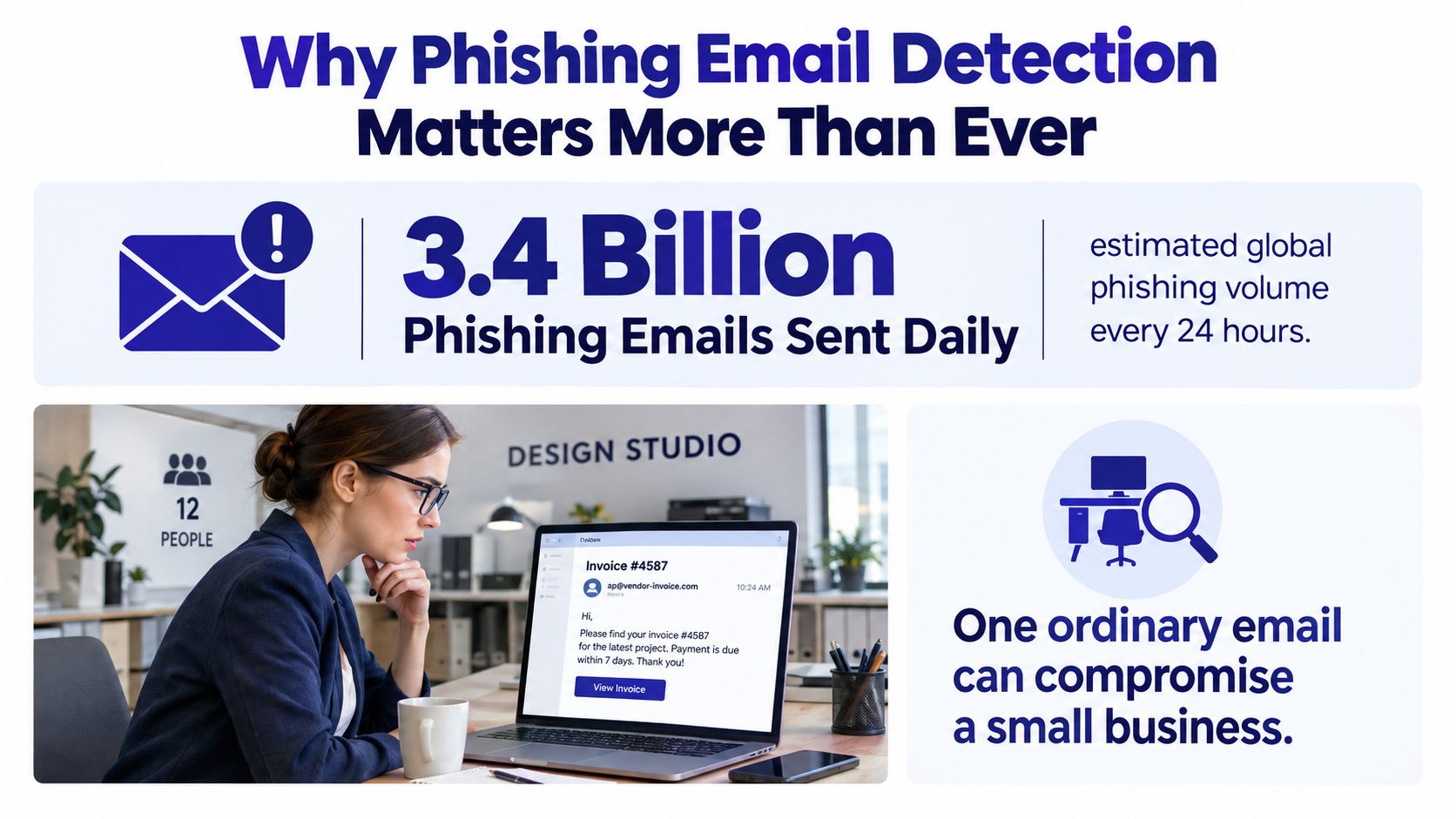
Every day, an estimated 3.4 billion phishing emails are sent worldwide, about 1.2% of all email traffic according to Medha Cloud's 2026 email security statistics roundup. That number changes how you should think about phishing email detection. This isn't a rare, obvious scam problem anymore. It's a high-volume screening problem where attackers only need a few believable messages to get through.
Most advice stops at “check whether the login page looks fake.” That's too late. By the time someone is staring at a convincing sign-in form, several earlier defenses have already failed. Good phishing email detection starts before the click, continues at the email gateway, and keeps working inside the browser and account stack.
Why Phishing Email Detection Matters More Than Ever
A phishing email can be opened, clicked, and acted on in well under a minute. That speed is the problem. By the time someone is studying a fake login page, earlier controls have already missed their chance to stop the attack.
A small business feels this fast. An accountant at a 12-person design studio gets an invoice email that appears to come from a regular vendor. The writing is polished. The logo matches older messages. The sender name looks familiar enough to trust. After one click, the browser opens a sign-in page that does not look suspicious. If the employee reuses that password anywhere else, the attacker may gain access to the mailbox, read billing threads, change payment details, or use the compromised account to target coworkers.
Phishing also changed in ways that break older advice. The old mental model was simple: spot bad grammar, avoid strange links, move on. Current attacks are often written clearly, timed to match real business activity, and suited to a person's role. Some do not even ask you to click a normal link. A QR code can move the victim from email to phone. An AI-written lure can sound like a real manager. A stolen vendor account can send from an address that passed basic checks.
That is why detection has to be treated as a stack, not a single trick.
Why speed matters now
Analysts have repeatedly found that people often click phishing emails very quickly after delivery. In practice, that means a security team cannot rely on a warning message or a cleanup step after the email lands in the inbox. If the first barrier fails, the next one has only seconds to help.
Practical rule: If your protection depends on a busy person slowing down during an urgent request, expect misses.
The layers that decide whether a phish succeeds
Each layer answers a different question.
- User signals: Does the request fit normal work, normal timing, and the normal process for this sender?
- Email headers and authentication: Did the message come from systems allowed to send for that domain?
- Rules engines: Does it match known bad patterns such as lookalike domains, suspicious attachments, or reply-to mismatches?
- Machine learning models: Does the message behave like past phishing based on language, sender history, links, structure, and campaign patterns?
- LLM-based analysis: Does the email contain the kind of social engineering, business context abuse, or intent cues that simpler models miss?
The important part is not that these layers exist. It is where they fail.
A user may trust a real supplier whose mailbox was taken over. Header checks may pass for a compromised account. Rules may miss a new lure with no known indicators. A machine learning model may score a highly targeted message as harmless because it looks clean and contains no malware. An LLM may understand the wording better, but it can still be misled by limited context, privacy restrictions, or unusual internal jargon.
That is the full detection stack this guide focuses on. Spotting a fake login page still matters, but it is only the last visible symptom of a failure that usually started much earlier.
The User-Facing Warning Signs Every Person Should Know
An email takes a simple path. Someone writes it, sending servers hand it off across the internet, and your email provider decides whether it belongs in the inbox, spam folder, or quarantine. If it reaches you, you're the last checkpoint.
That human checkpoint still matters because many phishing emails are designed to look normal to machines and trustworthy to people. Clean grammar doesn't help anymore as a clue. Modern lures often read better than rushed internal emails.
What to check before clicking
Start with the sender identity, not the message body.
- Display name mismatch: “PayPal Support” can be a mask. Open the full sender address and compare the actual domain.
- Reply path mismatch: If the visible sender looks corporate but replies go somewhere unrelated, treat it as suspicious.
- Generic greeting: “Dear user” isn't proof of fraud, but it matters when combined with other signals.
- Urgency or fear: Attackers want you rushed. “Your account will be disabled” or “payment overdue today” is meant to shorten your thinking time.
- Unexpected attachment type: HTML files, ISO files, or password-protected ZIPs deserve extra caution, especially if nobody warned you to expect them.
- Workflow bypass: A request to change bank details, buy gift cards, or re-enter credentials outside your usual process is a major red flag.
Links tell the truth
The safest habit is simple. Hover before you click.
A phishing email may show a button labeled “View invoice,” but the actual destination can point somewhere unrelated, slightly misspelled, or routed through a redirector. On phones, this gets harder because link previews are less visible and people move faster.
Polished writing is no longer a safety signal. Attackers can generate clean, natural language at scale.
Small clues that matter together
One clue alone may mean nothing. Several clues together often mean everything.
- Odd timing: An after-hours request from a colleague who never emails then.
- Tone shift: A vendor suddenly sounds unusually formal or unusually urgent.
- Process change: “Use this new portal” when nobody announced one.
- Credential request: Legitimate teams usually send you to a known app, not a surprise login page from an email.
User-side phishing email detection is fast and free. It also breaks when someone is tired, multitasking, or reading on a phone in line at the grocery store. That's why it has to be only one layer.
How Email Headers and Authentication Reveal Fakes
Headers are the technical paper trail attached to every email. Many users never look at them, but mail systems do. If the visible email is the postcard front, headers are the shipping manifest on the back.
The easiest way to understand SPF, DKIM, and DMARC is with a passport analogy.
The passport analogy
- SPF is the visa list. It says which servers are allowed to send mail for a domain.
- DKIM is the wax seal. It helps show whether the message was altered in transit and whether the sender used a valid signing key.
- DMARC is the border policy. It tells receiving systems what to do if SPF or DKIM checks fail, and whether the visible sender aligns with those checks.
A detection system reads header fields such as Authentication-Results, Received, Return-Path, and DKIM-Signature. Gmail and Outlook both expose versions of this if you open the original message details.
SPF, DKIM, and DMARC at a Glance
| Protocol | What It Checks | Header Signal | Common Failure |
|---|---|---|---|
| SPF | Whether the sending server is allowed to send for the domain | Authentication-Results showing pass, fail, or softfail |
Mail sent through an unauthorized service |
| DKIM | Whether the message carries a valid domain signature | DKIM-Signature plus a pass or fail result |
Missing signature or broken signature after modification |
| DMARC | Whether SPF or DKIM aligns with the visible From domain and what action to take | Authentication-Results plus policy handling |
Third-party sender or subdomain that doesn't align |
What filters actually look for
A clean message often shows SPF pass, DKIM pass, and DMARC pass or alignment success. A spoofed message might show SPF fail, no DKIM signature, and a Return-Path that points to a different domain than the visible From address.
Alignment is where people get lost. Passing SPF alone isn't enough if the domain that passed isn't the same domain the user sees in the From field. DMARC cares about that match.
A technically valid email can still be malicious if it comes from a real but compromised account.
Header analysis is fast and useful because it runs automatically and doesn't depend on user judgment. It also has a hard limit. If an attacker steals a genuine mailbox and sends from it, the authentication checks may all pass. The message is still dangerous.
Automated Detection Techniques From Rules to LLMs
Automated phishing email detection has gone through three broad generations. The job hasn't changed. The tools have.
Researchers reviewing phishing detection techniques from 2007 through 2023 reported an average detection accuracy of 96.14%, a median of 97.13%, and a range from 83% to 100%, with later years averaging about 98%, according to ZipDo's phishing email statistics summary. That same source says Kaspersky blocked 554,002,207 attempts to follow fraudulent links in 2025. The big lesson is progress, not perfection.
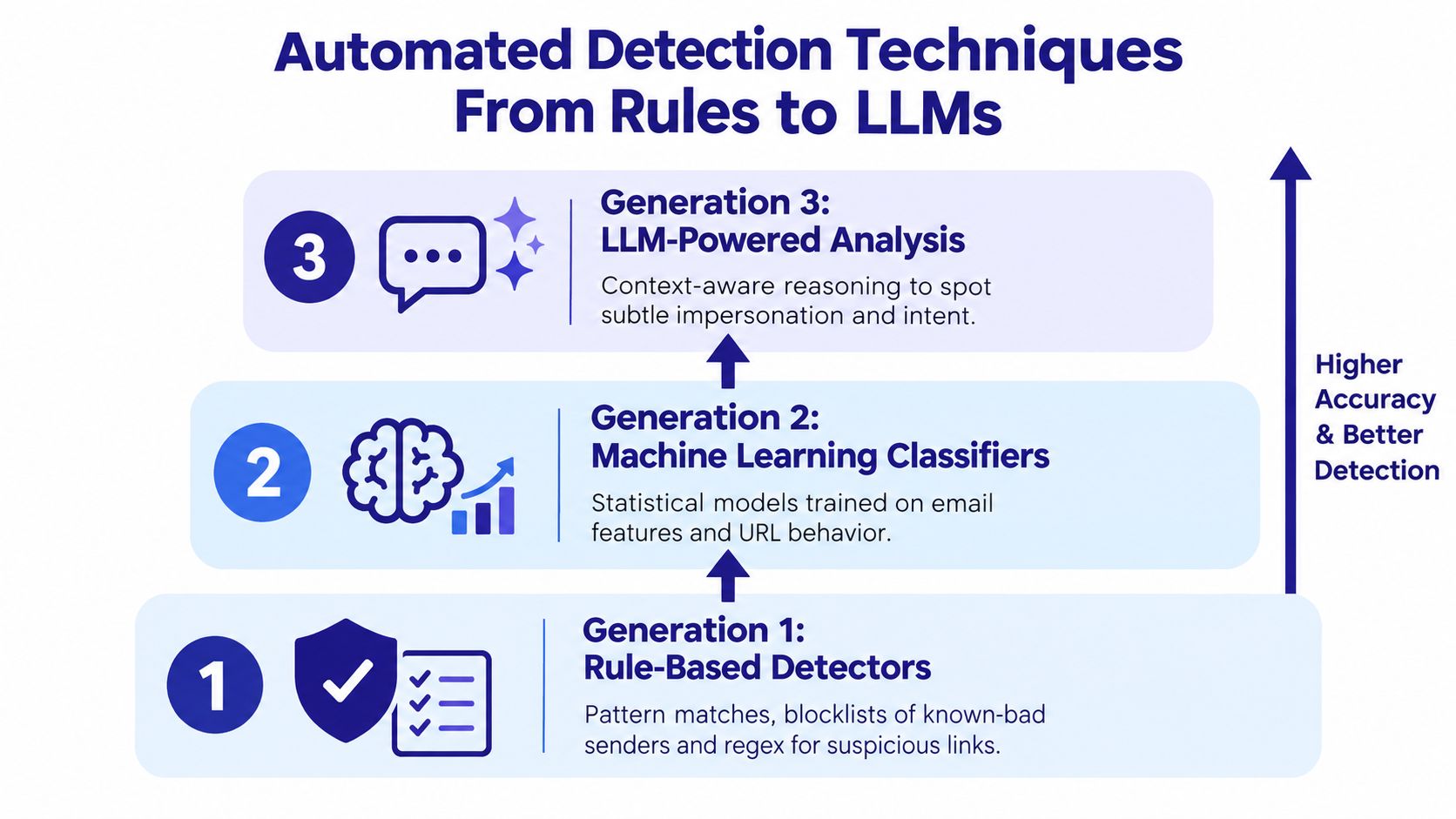
Generation 1, rule-based detectors
Rules are the oldest layer. They look for known patterns.
Examples include:
- Subject cues: “urgent” plus a link to a login page.
- Header mismatches: From and Reply-To domains that don't match.
- Known bad infrastructure: sender domains or URLs already on blocklists.
- Attachment patterns: file types or naming tricks commonly used in scams.
Rules are cheap, fast, and easy to explain. They also age badly because attackers change wording, domains, and delivery paths constantly.
Generation 2, classic machine learning
Machine learning models don't need an exact known pattern. They learn combinations of signals from labeled phishing and legitimate mail.
A study using 208,704 emails found SVM delivered 95.43% F1 and 95.43% recall, while LSTM reached 97.16% AUC. A separate real-time system using Logistic Regression reported 95.41% accuracy, 94.33% F1, and 127 ms average response time, according to the University of Gloucestershire research repository. That's a good example of the tradeoff between raw modeling power and fast operational decisions.
Useful features include sender reputation, URL structure, historical behavior, wording patterns, and whether the request matches normal communication habits. If you want a plain-language overview of where these models overlap with behavioral systems, Gini Help's piece on anomaly detection systems is a helpful companion.
For teams evaluating operations around filtering and triage, Sift AI's guide to automated spam management is also worth reading because the workflow issues are closely related.
Here's a brief visual walkthrough of the progression from fixed rules to context-aware reasoning.
Generation 3, LLM-assisted analysis
LLM-assisted detectors try to understand intent, not just tokens. They can ask, in effect, “Does this request fit what this sender would normally ask for?”
A strong recent example is the DataPhish2025 benchmark. Its corpus contains 12,300 emails, with about 75% LLM-generated and 25% human-written phishing messages. In that benchmark, a two-stage detector combining PHI/PII redaction with retrieval-augmented generation reached 98.2% precision, 99.1% recall, and 0.987 F1, while a first symbolic phase had 93.4% precision but only 20.5% recall. Notably, 79.5% of phishing emails in the test set scored zero in the first phase, and the second phase correctly classified 99.0% of those evaded emails, according to Emergent Mind's DataPhish2025 summary.
LLMs bring new risks too. They can produce overconfident verdicts, cost more to run at inbox scale, and even be manipulated by malicious content inside the email body. The best real-world setups don't replace rules and ML. They stack them.
How Major Email Providers Filter Phishing Today
Microsoft says it detected billions of email-based phishing threats in the first half of 2026, which gives you the scale of the problem before a message ever reaches your inbox, according to Microsoft's email threat report. That volume also explains why no major provider relies on one detector. Gmail, Outlook, Yahoo, and iCloud all use a stack of checks that starts before you open the message and continues if you click a link or download a file.
The easiest way to understand provider filtering is to picture an airport checkpoint with several stations. One station checks who sent the message. Another checks whether the sending domain has behaved badly before. Another inspects links, attachments, and wording. Some systems also compare the message with patterns from account takeovers, lookalike domains, and new phishing campaigns spreading across many inboxes at once.
That layered approach matters because modern phishing changes shape quickly. A fake Microsoft 365 login page is still common, but providers also have to deal with QR-code phishing, messages sent from compromised real accounts, and polished AI-written lures that do not contain the obvious spelling errors older filters used to catch.
Email Provider Phishing Filters Compared
| Provider | Detection Stack | Strength | Key User Setting |
|---|---|---|---|
| Gmail | Large-scale classifiers, sender history, link reputation, account context | Strong at pattern learning across huge mail volume | Turn on advanced phishing protections and show full sender details |
| Outlook | Microsoft Defender protections, impersonation checks, link rewriting, detonation workflows | Strong for business environments with admin tuning | Enable Safe Links and external sender warnings |
| Yahoo | Reputation scoring and link safety controls | Straightforward consumer filtering | Review spam settings and sender details before interacting |
| iCloud | Server-side filtering with privacy-oriented ecosystem controls | Simple for Apple users who want quiet defaults | Check full sender information and keep warnings enabled |
The table hides an important detail. These providers are not just scanning for bad words. They are combining identity checks, reputation systems, behavior analysis, and machine learning. In practice, that means one message might be blocked because SPF and DKIM do not line up, while another gets flagged because the link redirects through a domain tied to earlier abuse, and a third gets warned because its wording matches a fresh credential-harvest campaign.
Barracuda's reporting, based on more than 3.1 billion emails, says attackers are shifting toward URL-based delivery, QR codes, trusted-sender abuse, and account takeover, according to the Barracuda 2026 Email Threats Report. That is where provider filtering starts to show its limits. A provider may stop a clumsy fake invoice from a newly registered domain, yet still have a harder case when a real supplier account has been hijacked and sends a short, believable note with a QR code that moves the attack onto a phone.
This is also why the full detection stack matters more than the login page alone. User warnings help when something feels off. Header and authentication checks help with forged identity. Rules and classic ML help with known patterns. Newer LLM-assisted systems can reason about intent and context. Each layer catches a different failure mode, and each can still miss something.
For homes and small businesses, the practical lesson is simple. Leave provider phishing warnings on. Show full sender details. Turn on link-scanning features if your mail platform offers them. If you use Microsoft 365, enable Safe Links. If you want a side-by-side setup guide before changing your mail controls, Gini Help's overview of email spam filter options for small teams and home users is a useful starting point.
False Positives and False Negatives in Real Life
People talk about false positives and false negatives like they're abstract model metrics. They aren't. They're business choices.
A false negative means the filter misses a phishing email. Someone clicks, credentials get exposed, and now you're dealing with account recovery, payment issues, or downstream fraud. That cost is obvious.
A false positive means the filter quarantines a legitimate email. A supplier invoice never gets seen. A contract update sits in junk. A password reset email arrives too late to be useful. In a small business, enough of those interruptions train employees to distrust security controls.
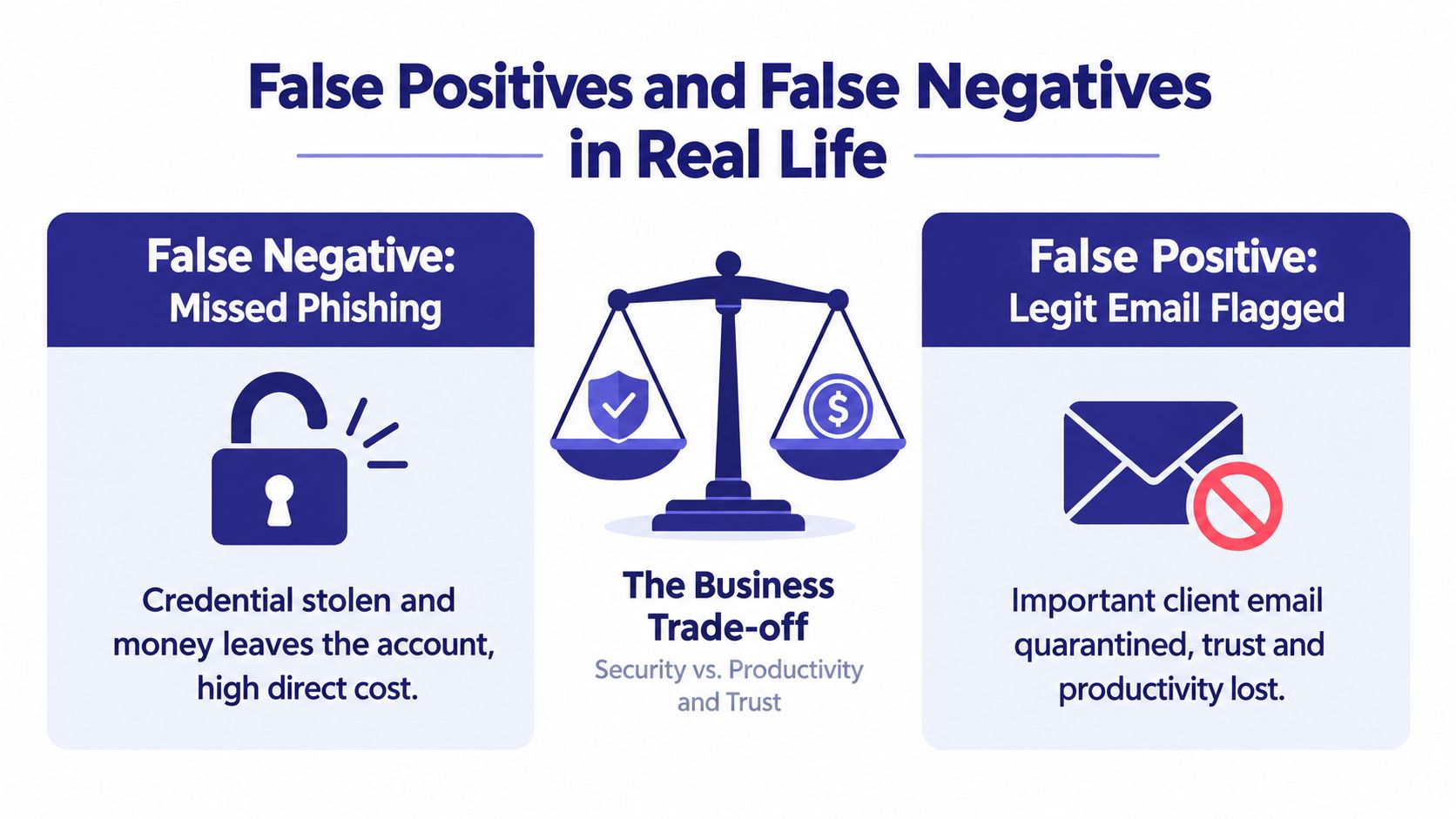
The tradeoff is asymmetric
The losses aren't balanced. One missed phishing email can cause immediate damage. But steady over-blocking damages operations and relationships.
Security teams don't tune filters for elegance. They tune them for the kind of pain an organization can survive.
Consumer inboxes often tolerate more aggressive blocking because missing a promotional email usually isn't catastrophic. Enterprise and small-business mail is different. The same blocked message could halt payroll or delay a client decision.
What practical tuning looks like
- Use a report-phish button: User feedback helps tune the gray area where models hesitate.
- Quarantine selectively: High-risk patterns should isolate fast. Lower-confidence messages may deserve banners instead of blocking.
- Review misses and mistakes together: If you only study successful attacks, you'll over-tighten and break normal work.
- Match policy to role: Finance, executives, and IT admins often need stricter handling than a low-risk shared inbox.
Good phishing email detection isn't the system with zero false positives or zero false negatives. It's the system whose mistakes your team can absorb without chaos.
A Practical Detection Workflow for Homes and Small Businesses
A useful workflow has to work when someone is busy, not just when they're careful. The goal is simple. Catch suspicious emails before the click, reduce damage if a click happens, and make recovery routine instead of improvisational.
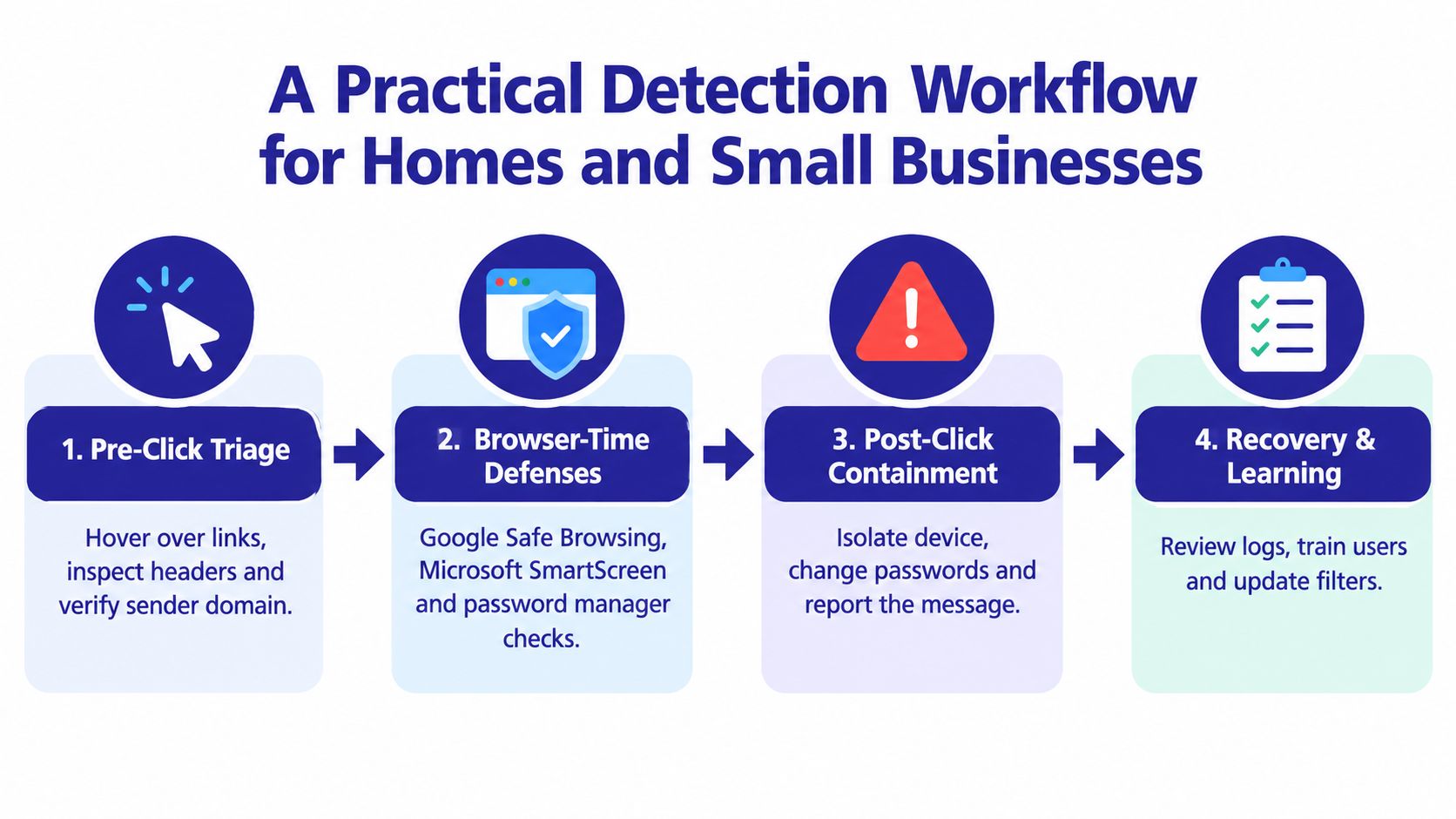
Stage 1, pre-click triage
Before opening links or attachments, check the visible sender, hover over links, and inspect the actual domain. If the message is unexpected, open the original message details and review the authentication summary your provider exposes.
Free tools can help:
- Google Phishing Quiz: useful for training your eye.
- PhishTank: helpful for checking suspicious URLs.
- MXToolbox header analyzer: useful when you want help reading header results.
- Have I Been Pwned: useful after an incident to check whether an email address has appeared in known breaches.
For a broader household checklist, Gini Help's guide to email security best practices covers the settings that matter most.
Stage 2, browser-time defenses
If a click happens, the browser becomes your next safety net. Google Safe Browsing and Microsoft SmartScreen can block known dangerous destinations. Password managers help too. If your password manager refuses to autofill on a lookalike domain, treat that as a warning, not an inconvenience.
Disable automatic loading of remote images if your email app allows it. Turn on external sender banners in Gmail or Outlook. Keep provider phishing warnings enabled.
Stage 3, inbox-level protections
Defaults matter. Authentication checks, provider filtering, and warning banners do the first pass before your eyes ever see the email.
A 2025 survey paper notes that modern systems commonly combine list-based, heuristic-based, machine learning, and deep learning methods, and highlights a newer deep-learning direction that analyzes body text and URL features together rather than relying on a single signal, according to the ICCV 2025 workshop paper on phishing email detection. CISA also treats phishing as a threat to be mitigated by email and web security controls in its current guidance, as noted in that paper's referenced PDF material.
If you want a user-side tool for screening suspicious messages before opening links, you can also download the Gini Help app on the Google Play store or the Apple App Store. It analyzes emails for signals such as suspicious sender addresses, dangerous links, urgency, and requests for sensitive information.
Stage 4, post-click recovery
If someone clicked, don't waste time debating whether it was “probably fine.”
- Change exposed passwords immediately, especially if they were reused.
- Revoke active sessions for the affected account.
- Scan the device with built-in or installed security tools.
- Report the message so others don't get hit by the same campaign.
- Review what bypassed detection and update filters or user guidance.
That loop matters. Every phishing incident should improve the next detection decision.
Building a Layered Defence and What Comes Next
The clearest way to think about phishing email detection is as a checklist, not a product category.
- Verify the sender before clicking anything unexpected.
- Inspect authentication results when a message feels off.
- Leave provider warnings and filtering enabled.
- Train regularly with realistic examples.
- Keep an incident contact and recovery routine ready.
This layered approach matters because no single control catches modern QR-code phishing, callback scams, trusted-sender abuse, or polished AI-written lures. Microsoft Threat Intelligence reported that in Q1 2026 it detected approximately 8.3 billion email-based phishing threats, with monthly volume falling from 2.9 billion in January to 2.6 billion in March. It also said 78% of email threats were link-based, while malicious payloads made up 19% of attacks in January before dropping to 13% in February and March, according to the arXiv-linked source summarizing Microsoft Threat Intelligence data.
The future problem is straightforward. Attackers will keep blending real accounts, better language, redirects, QR codes, and legitimate cloud services in ways that make any one signal less reliable. That's why small teams should treat phishing defense as maintenance, not a one-time setup. Review your email authentication regularly. Revisit settings every quarter. Run a simple tabletop exercise once a year.
For organizations that need proof that training happened and was retained, tools that produce audit-ready security training evidence can help connect awareness work to actual governance instead of leaving it as a vague checkbox.
Good detection isn't measured by promising zero breaches forever. It's measured by how often you stop a bad click, how quickly you recover when one happens, and how many credentials never get handed over.
Gini Help gives people a practical way to screen suspicious emails, texts, and calls in one place, which fits the layered approach phishing email detection now requires. If you want an extra user-side check before opening a risky message or clicking a link, visit Gini Help and see how its AI-based screening works alongside your existing email protections.