Safe Online Communication: What Actually Protects You
By Josh C.
People lost more money to fraud in 2024 even though roughly the same number of people reported it. That's the uncomfortable shift in safe online communication now. Fewer, better scams are doing bigger damage, and they're arriving by phone, text, email, and video, often sounding calm and helpful. You don't need to become a security expert to protect yourself. You need a few repeatable habits that still work when a voice sounds familiar, a logo looks right, and you're tired or rushed.
What Safe Online Communication Really Means in 2026
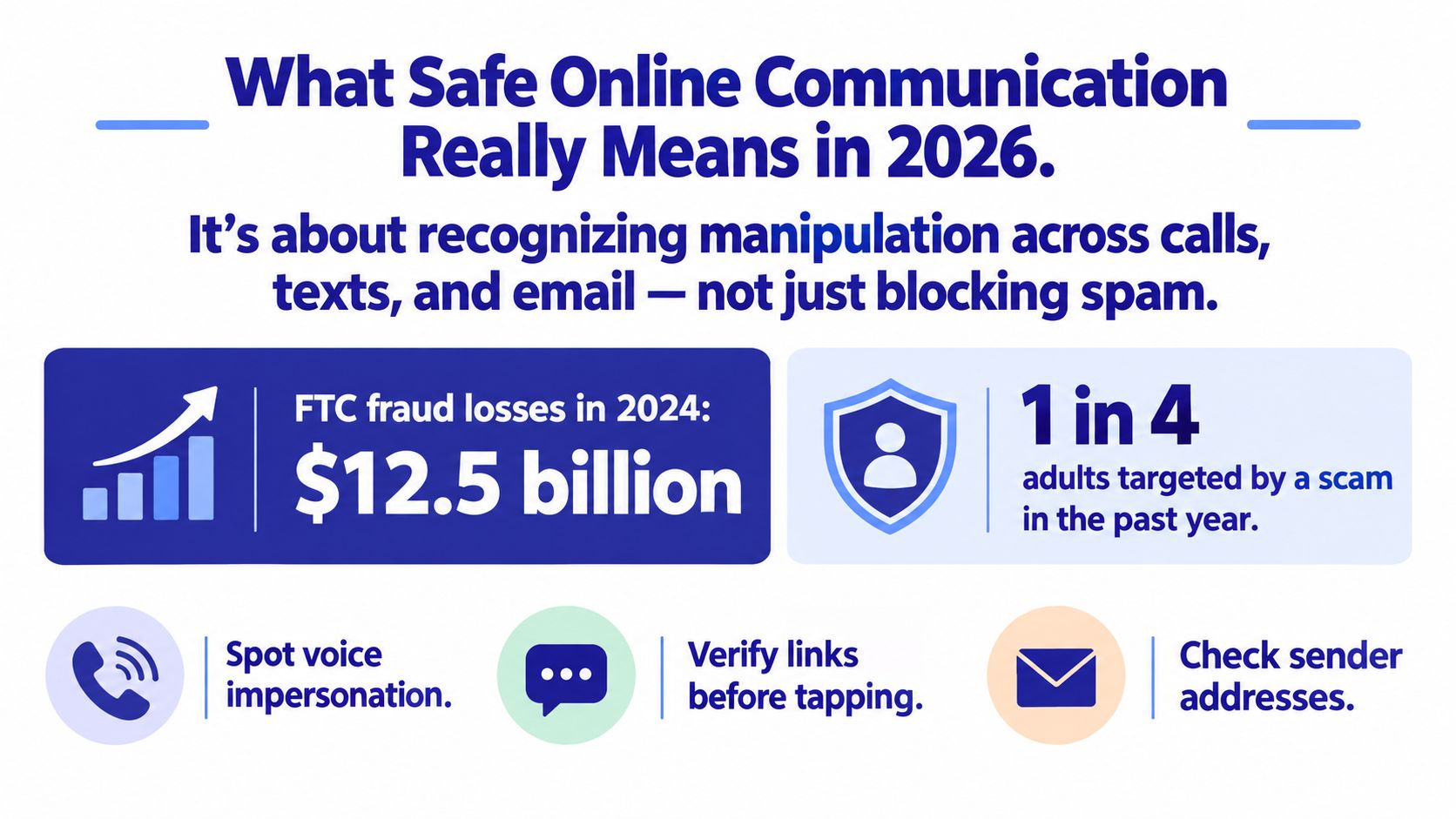
In 2024, U.S. consumers reported more than $12.5 billion in fraud losses, a 25% increase from 2023, even though about 2.6 million people submitted fraud reports, nearly unchanged from the prior year, according to the FTC Consumer Sentinel Network data book for 2024. Read that carefully. Attackers didn't need more victims. They needed each successful conversation to pay more.
That's why safe online communication isn't mainly about blocking nuisance spam. Spam filters help, but they can't sit beside you during a live call when someone says your bank account is at risk. The skill is recognizing manipulation across channels and slowing the moment down before you share a code, move money, or allow remote access.
A Working Definition You Can Use Anywhere
Think of safe communication as a door routine. Anyone can knock. Not everyone gets invited in, and no one gets your keys because they knocked loudly. A message can reach you without earning your trust.
- Phone calls: A live voice can create urgency and authority faster than text.
- SMS and messaging apps: Short messages push quick taps before you've had time to think.
- Email: Polished branding can hide a fake sender, link, or attachment.
- Video calls: A familiar face or company logo can make a request feel verified when it isn't.
Practical rule: Delivery isn't proof. A message arriving, ringing, or looking professional doesn't tell you who's really behind it.
If you want the deeper technical picture behind private systems, encryption, and access control, this secure communication guide for 2026 is a useful companion. For daily life, though, start simpler. Ask what the other person wants you to do, how fast they want it done, and whether you can verify it somewhere they don't control. Those three questions travel well from your inbox to your phone screen.
The Four Threats Behind Most Scams
Picture a smooth bank clerk sliding a form across the counter. The handshake is friendly. The pen is already in your hand. Scams work that way. The message is the handshake, and the pressure is the rush to sign before you read the fine print. The labels change, but the trick underneath stays familiar.
The illustration below separates the four common forms so you can see how they overlap.
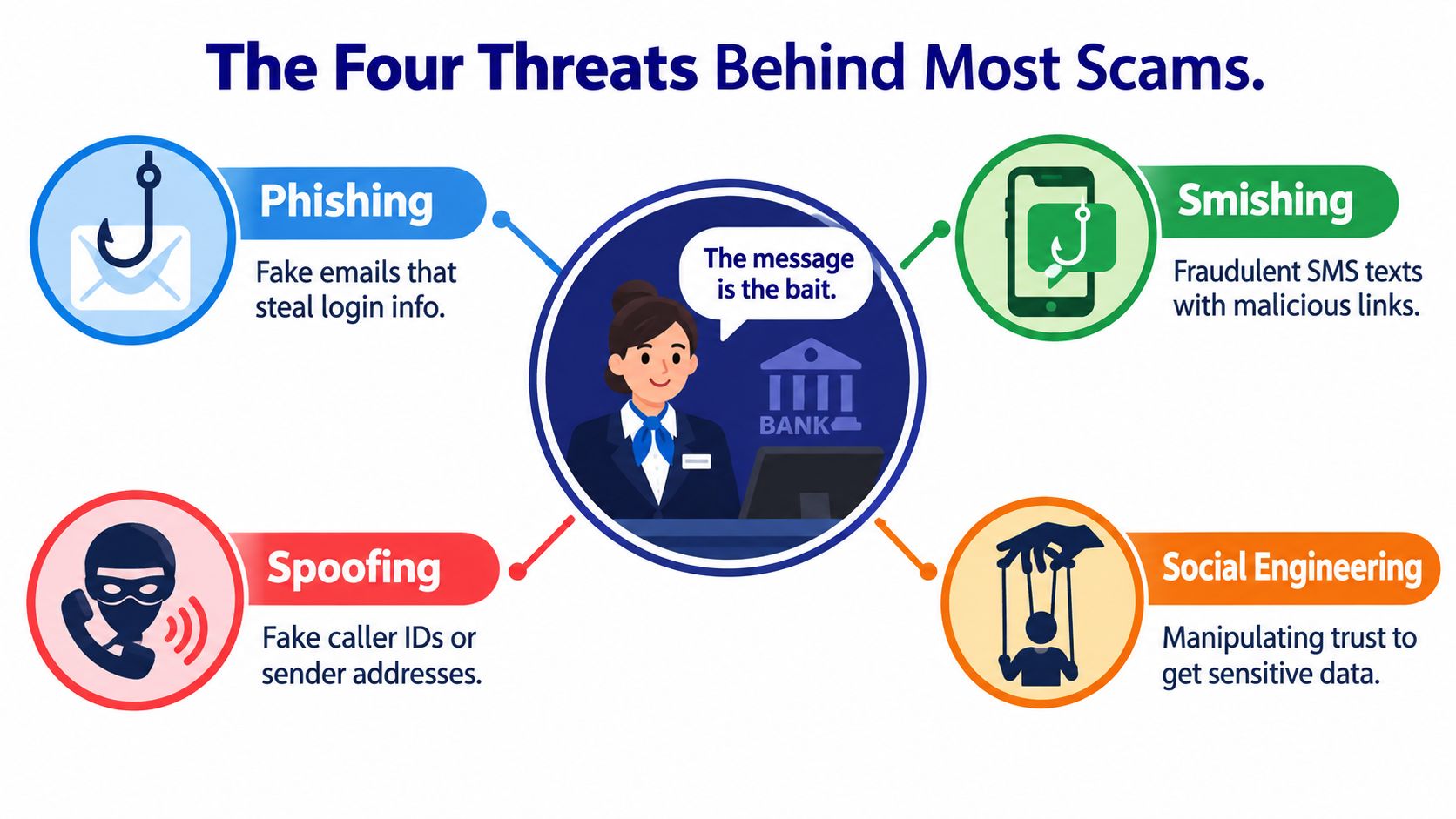
Phishing usually arrives by email. A fake bank alert says your account needs attention and sends you to a convincing login page. The tell isn't always bad grammar anymore. It's the request itself, especially when you're pushed to log in through a link you didn't ask for.
Smishing is the same bait by text. A delivery problem, unpaid toll, or bank warning asks for a quick tap. Because texts feel personal and immediate, people often act while walking, cooking, or half paying attention. That split second is the point.
Then there's spoofing, which is forgery of the return address. Caller ID shows your bank, a text thread looks like your phone provider, or an email name matches your boss. Spoofing doesn't steal money by itself. It lowers your guard so the next request sounds reasonable.
Social engineering ties all of this together. It's the human pressure, the secrecy, fear, kindness, embarrassment, or helpful tone that gets you to bypass your own caution. If you want a plain language breakdown, read this explanation of how social engineering manipulates everyday communication.
The short video below is helpful if you learn better by hearing the pattern described out loud before you see it in your own messages.
Once you see the shared pattern, you don't have to memorize every new scam name. You watch for identity claims plus urgency plus a sensitive action. That combination deserves a pause every time.
Channel-Specific Habits That Actually Work
Phone calls deserve first attention because a live caller can adapt to your answers in real time. In the FTC's 2024 analysis of older adults who lost at least $10,000 to impersonators, phone calls were the initial contact in 41% of cases, compared with 13% for email and 15% for an online ad or pop-up, according to the FTC spotlight on scams stealing older adults' savings.
Phone Calls
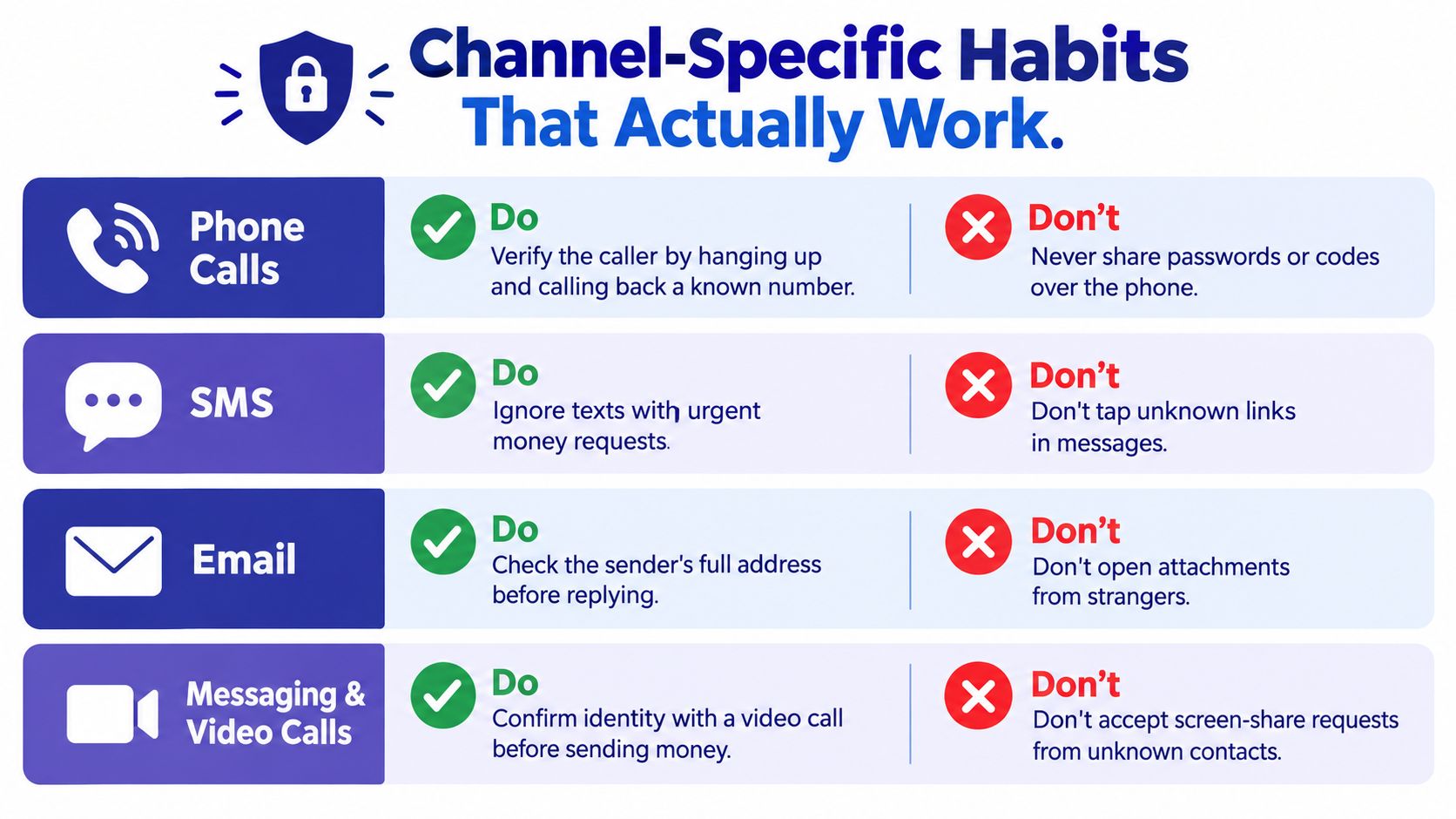
Do end unexpected calls about money, codes, or computer access, then call back using a number from your bank card, saved contacts, or the official website you opened yourself. Don't rely on caller ID, and don't share passwords or one-time codes with someone who called you. A real institution can handle a callback. A scammer needs you to stay on the line.
SMS and Messaging Apps
Treat urgent texts like sticky notes left on your door by a stranger. Useful maybe, trustworthy no. Do go straight to the official app or website to check delivery, payment, or account claims. Don't tap short links about fees, locked accounts, or missed packages. This guide to safer habits for text messages and verification codes goes deeper on message settings and reporting.
Do open the sender's full address before you reply, and compare it with earlier legitimate messages. Hover or long press links where your device allows it, and type known web addresses yourself for banking and shopping. Don't open unexpected attachments, especially invoices, receipts, or files that ask you to enable content after opening.
Video and Screen Sharing
Seeing someone doesn't settle identity, and sharing your screen can expose codes, balances, and messages. Do confirm money requests through a separate known number, even if the person appears on camera. Don't accept screen-share or remote-access requests from unexpected contacts. If your family or small business meets online often, these video conferencing security tips help you lock meetings and control who can join or present.
A warning sign isn't proof by itself. It's your cue to move the conversation to a channel you chose.
A Realistic Scam Scenario Walked Through Step by Step
Margaret is making tea when her phone rings. A young voice is crying and calls her Grandma. He says he's been in a car accident, his phone is broken, and he needs bail money sent right away. Then a calmer man takes over, gives a case number, and warns her not to call anyone else because it could delay the release.
Notice what happens in her body before logic catches up. Her heart is racing. She wants to help, and secrecy now feels protective. That's exactly why this script works. It asks for love, speed, and silence in the same breath.
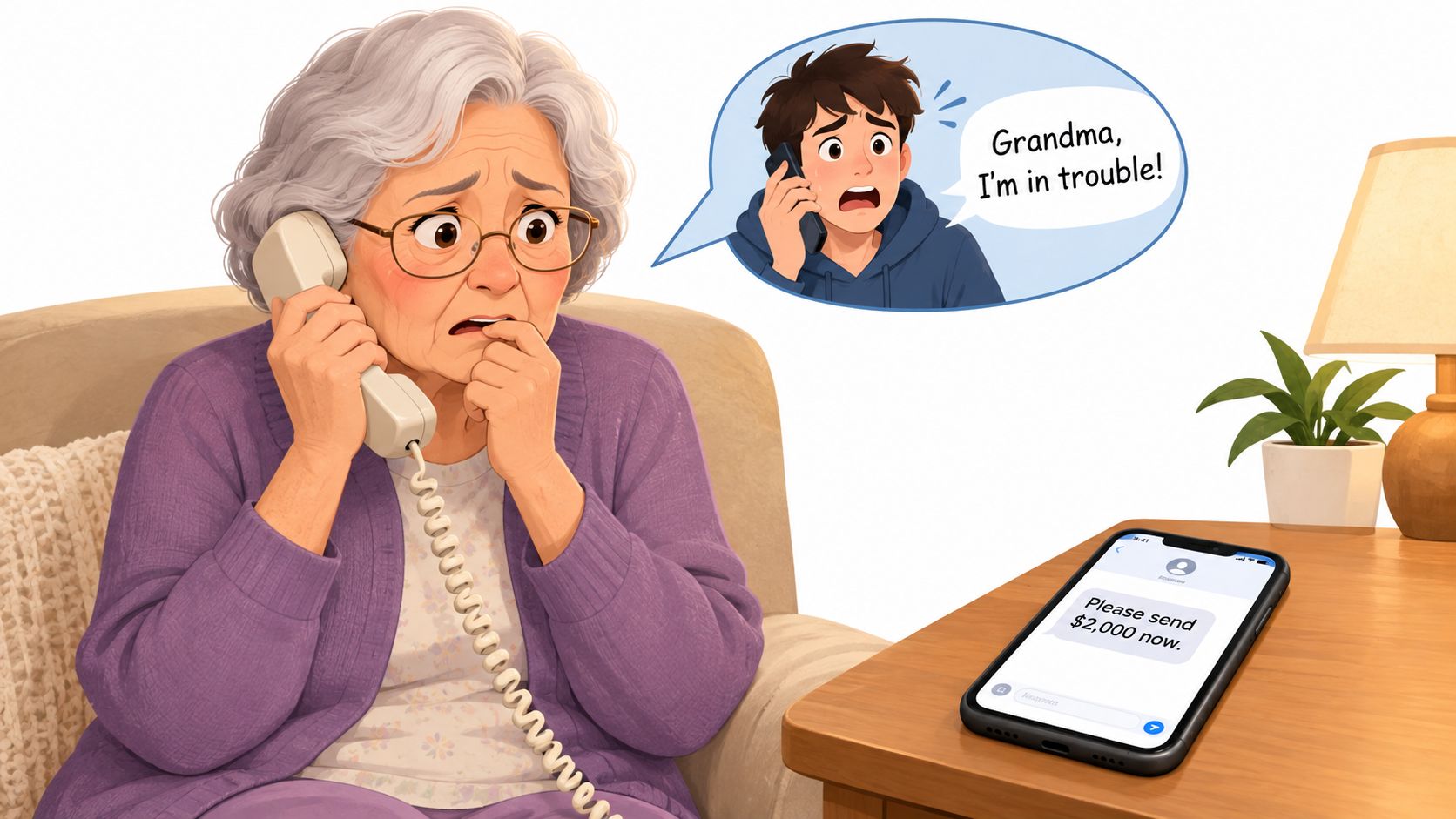
A text arrives with payment instructions. The number isn't saved, but Margaret has already heard a frightened voice, so the text feels like a continuation, not a separate claim that needs checking. That habit changes everything. She says, "I'm hanging up and calling your mother on the number I have." The caller protests. That protest is information.
The Decision Points That Matter
- The emotional hook: A relative in danger makes delay feel cruel.
- The authority figure: A calm second voice adds paperwork language and confidence.
- The channel switch: A follow-up text turns talk into payment instructions.
- The independent check: Calling a known family number breaks the caller's control of facts and timing.
Margaret's daughter answers and says her son is at work. No money moves. Margaret didn't win because she spotted a fake voice. She won because she refused to verify inside the conversation the stranger created.
Stories like this fit the wider pattern in the FBI's 2025 Internet Crime Report, which recorded more than $20 billion in reported losses and 191,561 phishing and spoofing complaints, making deceptive messages and calls the most frequently reported complaint type, according to the FBI Internet Crime Report for 2025. Real emergencies survive a callback. Scams often don't.
Helping Older Family Members Without Taking Over
Families usually mean well, then drift into one of two unhelpful extremes. Some monitor every call and message, which can feel like surveillance and damage trust. Others hand over a list of warnings and hope for the best, which leaves the older adult alone at the exact moment pressure hits. There's a middle path, and it starts with consent.
The need isn't occasional. An NCOA 2026 poll found that 77% of U.S. adults aged 55 and older reported at least one scam attempt in the previous year, 90% of those encountered scams repeatedly, and a separate survey reported phone calls were the most common route into a successful scam at 46%, according to the NCOA 2026 poll on scams affecting older adults. Telling someone to never answer unknown numbers sounds tidy until a doctor's office, pharmacy, delivery driver, or bank uses one.
Three Family Models Compared
- Monitoring-heavy: A relative reads messages and approves decisions. It may catch danger, but it can breed resentment and secret keeping.
- Autonomy-first: The older adult handles everything alone and calls family only when worried. It protects dignity, but shame or urgency may delay that call.
- Shared and graduated: Private warnings come first, and a trusted person is looped in only for high-risk signs the older adult agreed to in advance.
That third model works best because it respects normal independence while adding help where losses become hard to reverse. Agree on triggers together. Examples might include requests for gift cards, cryptocurrency, remote access, secrecy from family, or transfers to a new person. Decide who gets contacted, what information they'll see, and how a false alarm gets cleared.
Language matters too. "You almost fell for it" shuts people down. "That message asked you to keep a secret and pay quickly, so let's check it together" names the behavior without attacking the person. Good warnings do the same. They explain the reason, suggest the next step, and leave room for the adult to disagree after verification.
Protection that humiliates people rarely gets used for long. Protection that explains itself is easier to accept.
Keep the plan light enough for real life. A family code word for emergency money requests, a printed list of trusted numbers near the phone, and a no-blame promise to call before large transfers cover a lot of ground without turning family into full-time monitors.
What to Do in the First 24 Hours After a Suspected Scam
First, stop the bleeding. If money was sent, call your bank or payment provider immediately using a trusted number and ask about recall options, account holds, and new credentials. If you shared online banking details or allowed remote access, say so plainly. Bank staff can't protect what they don't know happened.
Speed matters because losses can grow very large. FTC analysis found older adults' reported losses of more than $100,000 to impersonators rose eightfold between 2020 and 2024, from $55 million to $445 million, according to the FTC report on rising impersonation losses among older adults. Don't wait until morning to see if a transfer clears.
What to Secure and Save
- Call the bank first: Ask for fraud support, a hold on affected accounts, and replacement cards if needed.
- Change passwords from a clean device: Start with email, banking, and any account that shares the exposed password.
- Turn on stronger sign-in protection: Use multifactor authentication where available, preferably an authenticator app or security key.
- Place a credit freeze if personal data was shared: This helps prevent new accounts from being opened in your name.
- Preserve evidence: Save texts, emails with headers if you know how, call logs, receipts, names used, and payment details.
- Report it: File with the FTC and the FBI's IC3, and contact local police if money was taken or threats were made.
For a calmer walkthrough you can follow while stressed, keep this resource on immediate steps after being scammed and what to document where family can find it.
Then take care of the human part. Victims often feel intense shame, and caregivers sometimes respond with anger because they're scared. Try not to. Shame makes people hide later attempts. Say the truest thing available: a professional manipulator designed that interaction, and reporting it quickly was the right move.
Tools and Services That Add a Layer of Protection
Tools help most when they support the pause you'd otherwise have to create alone. They matter because exposure is constant. A 2026 AP-NORC poll found 58% of U.S. adults encountered suspected scam attempts daily and 92% encountered them at least monthly, while AARP reported confidence in identifying online fraud fell from 88% among adults 50 to 64 to 74% among those 65 and older, according to the AP-NORC poll on daily scam attempts.
Layered Protection Stack for Safe Online Communication
| Layer | What It Catches | Main Limitation |
|---|---|---|
| Carrier call screening | Known spam numbers and some suspicious call patterns | Spoofed or new numbers can slip through |
| Email spam and phishing filters | Bulk scams, malicious links, and suspicious attachments | A personal, well-written message may pass |
| SMS filtering | Repeated scam texts and obvious phishing links | New senders and short links can evade lists |
| AI call and message assistants | Real-time impersonation cues, pressure language, and risky requests | Still needs user judgment and a clear appeal path |
Static blocklists chase yesterday's numbers. Attackers rotate numbers, borrow real ones, and write cleaner messages, so behavior during the conversation matters more than reputation alone. Live analysis can flag requests for secrecy, gift cards, remote access, or urgent transfers while you're still able to stop.
Gini Help fits in that assistant layer by screening unknown calls, checking texts and email for scam signals, and warning during live calls when risky language appears. If you want that kind of cross-channel support, you can download Gini Help on Google Play or get Gini Help from the App Store. For readers helping family in French-speaking households, this resource on chiffrement et RGPD pour aidants adds useful context on private messaging and caregiver responsibilities.
The Small Set of Habits That Carry You Forward
You don't need a perfect memory for scam types. You need a boring routine that works on a bad day. Pause. Verify independently. Don't disclose secrets or move money under pressure. Treat warnings as prompts to check, not as automatic proof someone is lying.
That mindset protects you when spelling is clean, caller ID looks right, and a voice sounds familiar. The sender controls the first message, but you control the second step. You choose the number, the website, the family member you call, and the amount of time you take.
Start with one change today. Put trusted numbers for your bank and close family where you can find them fast. Agree on a family code word for emergency requests. Then apply the same pause to every channel, whether it's a ringing phone, a polished email, or a text that wants an answer right now.
If you'd like help putting that pause in place across calls, texts, and email, Gini Help screens unknown contacts and flags risky requests before they turn into rushed decisions. Set it up for yourself or with a parent, agree together on when family should be alerted, and keep the final say with the person receiving the message.