Why Am I Getting Spam Calls and How Can I Stop Them
By Josh C.
If you're constantly asking yourself, "why am I getting so many spam calls?" the answer is both simple and infuriating: your phone number is a hot commodity. It's almost certainly been exposed in a data breach or sold by data brokers, landing it on massive lists that scammers use to power their relentless robocall campaigns.
The Real Reasons Your Phone Won’t Stop Ringing
It’s easy to feel like you’re being personally targeted, but the truth is your number is just one of millions swept up in a massive, low-cost numbers game. Think of your phone number like an email address that's been leaked online. Once it's out there, the junk mail—or in this case, junk calls—starts flooding in.
The scale of this problem is staggering. In April 2024 alone, Americans were hit with nearly 5 billion robocalls. These automated calls are incredibly cheap for scammers to make using modern internet-based phone technology (VoIP), allowing them to blast out millions of calls a day from an endless stream of spoofed or burner numbers.
And it’s only getting worse. Global losses from phone call fraud are projected to soar past $80 billion in 2024, fueled in part by disturbingly realistic AI-generated voice scams. You can discover more spam call statistics here to see the full picture. For real-time defense against these evolving threats, you can download the Gini Help app on Google Play and the App Store.
So, How Did Your Number End Up on Their List?
Your number ending up in a scammer's database is rarely due to a single event. It’s more like a slow leak, where the digital footprints you leave behind every day gradually accumulate, making your number more and more visible to people who want to exploit it.
Here’s a quick look at the most common ways your number gets out there.
Top 4 Ways Your Number Gets on Spam Lists
This table breaks down the usual suspects responsible for exposing your phone number to the world of spam.
| Reason | How It Happens |
|---|---|
| Data Breaches | A company you do business with gets hacked. Your personal info, including your phone number, is stolen and sold on the dark web. |
| Filling Out Online Forms | You enter a contest, sign up for a newsletter, or request a free quote. Buried in the fine print is permission to share your data. |
| Public Records | Your number might be listed in public records like business filings or property deeds, which are easily scraped by data harvesters. |
| Data Brokers | These companies legally collect your information from countless sources and sell it to marketers—and, indirectly, to scammers. |
Each of these events adds another layer of exposure, signaling to spammers that your number is active and ready to be targeted.
Ultimately, every time your phone rings with an unwanted call, it’s because your number has been flagged as active and responsive, making it a prime target. To get back control, you need a solution built for today's threats. An AI-powered screener like the Gini Help app acts as a personal gatekeeper, intelligently filtering scams before they ever get a chance to bother you.
You can download it for your device on the Google Play Store or the Apple App Store to finally quiet your phone.
How Your Phone Number Ends Up in a Scammer's Hands
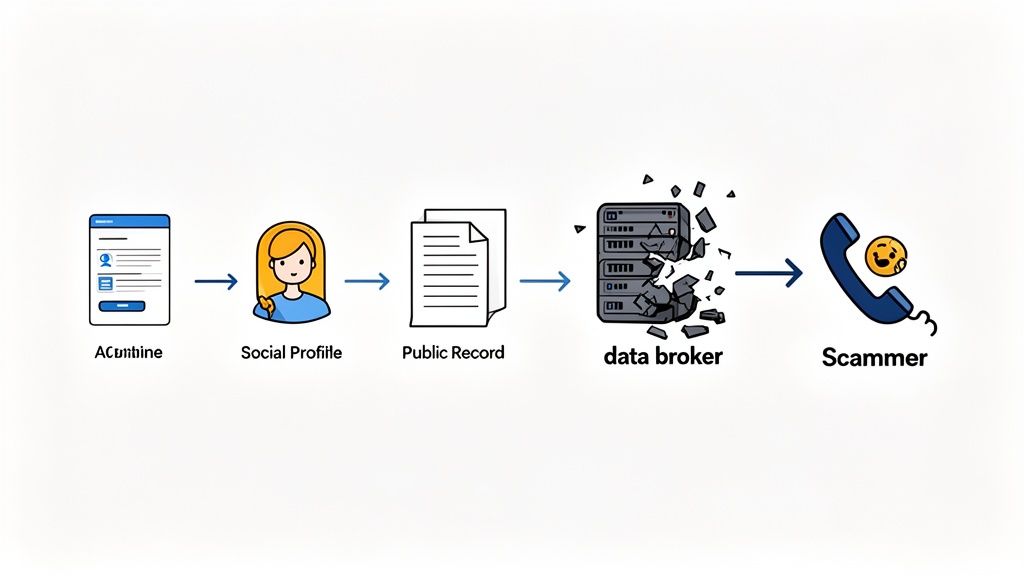
Your phone number doesn’t just fall out of the sky and land on a scammer's dialing list. It gets there through a slow, steady trail of digital breadcrumbs you leave behind every single day, often without a second thought.
Think about it. Every online form you fill out, every loyalty card you sign up for, every contest you enter—each one is a potential leak. It's like you're handing out copies of your house key. Eventually, one of those copies is bound to fall into the wrong hands.
Those "wrong hands" are often data brokers, the shadowy information merchants of the internet. They scoop up data from public records, buy customer lists from businesses, and track your online activity to build a surprisingly detailed profile about you. Your phone number is just one piece of the puzzle they sell to marketers, lead generators, and, yes, scammers.
The Hidden Marketplace for Your Data
Then you have the big one: data breaches. When a company you do business with gets hacked, the personal information of millions—names, emails, and phone numbers—gets dumped onto the dark web for pennies. A frightening number of recent data breaches have involved compromised phone numbers, instantly putting a massive target on people's backs.
Answering even one unknown call can have a ripple effect. It signals to the scammers' automated system that your line is active, instantly increasing your number's value and ensuring it gets sold to even more spam operations.
It’s not just an online problem, either. Your real-world activities can expose your number, too. Ever been in a car accident? Some accident reports are public records. Unscrupulous marketers, sometimes called "ambulance chasers," scan these reports and sell the info to anyone willing to pay, leading to a flood of unwanted calls.
With all these channels, your phone number is likely floating around in hundreds of databases right now. This is why it’s so important to protect your real number whenever possible. You can explore strategies like phone number masking to keep your primary contact details private from the start.
Ultimately, your phone number has become a hot commodity. To really stop the flood of spam calls, a simple blocklist just won't cut it. You need a smarter defense. An AI-powered app like Gini Help acts as your personal gatekeeper, screening calls for you so only the people who matter get through.
Ready to take back your peace and quiet? You can download it from the Google Play Store or the Apple App Store and put an intelligent guardian between you and the scammers.
Inside the Modern Scammer's Playbook
To get a handle on why your phone is blowing up with junk calls, you have to peek inside the modern scammer's playbook. Forget the image of some lone wolf in a basement. We're talking about a massive, global industry that uses sophisticated, cheap technology to blast out millions of calls a day. It’s the vocal equivalent of a phishing email, but with a manufactured urgency that’s much harder to ignore.
One of their go-to tricks is called neighbor spoofing. This is where they manipulate the caller ID to make it look like the call is coming from a local number—maybe one that shares your area code and even the first three digits of your own number. Your brain registers it as familiar, making you far more likely to pick up. After all, it could be a local business, a neighbor, or your kid's school.
The Rise of AI Voice Cloning
Lately, the technology has taken a much darker turn with the rise of AI voice cloning. A scammer can grab a short audio clip of a loved one's voice, often scraped from a video you posted on social media, and use it to create a shockingly realistic synthetic replica. They use that cloned voice to call you in a panic, faking an emergency like a kidnapping or a car accident, all to pressure you into sending money immediately.
This isn't just a minor annoyance; it’s a relentless, multi-channel assault on our time, peace of mind, and financial security.
The scale of this is staggering. Truecaller research shows that spam calls result in a collective loss of nearly 20 billion hours of productivity a year for Americans. On top of that, an unbelievable 19.2 billion spam texts were sent in the US in February 2024 alone. Scammers are clearly throwing everything they have at us.
Targeting the Most Vulnerable
This constant barrage of calls and texts creates a high-stress environment where anyone can make a mistake. What’s particularly disturbing is how scammers zero in on vulnerable populations. Their most calculated and cruel methods are often reserved for things like elder financial abuse, where they exploit trust and stir up panic to cloud a person's judgment.
The sheer volume of these automated attacks is precisely why old-school blocking methods just don't cut it anymore. Scammers churn through phone numbers so fast that a blocklist is outdated the second you add a number to it.
To truly protect yourself, you need a smarter solution that can screen calls before your phone ever rings. This is where an advanced AI-powered service like the Gini Help app comes in. It acts like a personal gatekeeper, answering unknown calls on your behalf, figuring out if it's a scam, and only letting legitimate callers through. You can download Gini Help on the Google Play Store and the App Store to finally get some peace and quiet.
Actionable Steps to Reduce Spam Calls Today
Knowing how scammers operate is the first step, but taking back control of your phone is what really matters. The great news is you don't have to just sit there and take it. You can start putting up a fight right now with a few practical, immediate actions that will make a real difference.
Think of it like building a fortress. Each step you take is another layer of defense, making it that much harder for spammers and scammers to break through to you.
Use Your Phone's Built-in Defenses
Your first line of defense is probably already in your pocket. Modern smartphones come with some powerful, yet often overlooked, features designed to keep unknown numbers at bay.
For iPhone users, the Silence Unknown Callers feature is a game-changer. Flip this switch, and any call from a number not in your contacts, recent calls, or Siri Suggestions goes straight to voicemail. Your phone won't even ring. You can find it under Settings > Phone.
If you're on an Android, you have similar tools, though the name might change depending on your phone's manufacturer. Look for settings like Block unknown/private numbers or Filter spam calls in your phone app's settings. For a more detailed walkthrough on this, check out our guide on how to block No Caller ID calls.
Activate Your Carrier’s Free Protection
Your mobile carrier is also in this fight with you. The major players all offer free apps and services to help you identify and block spam before it ever reaches you. You’d be surprised how effective these can be.
Here’s a quick rundown of what’s available:
- T-Mobile: Their Scam Shield app is a solid tool that offers caller ID, scam reporting, and automatic blocking.
- Verizon: Call Filter is Verizon’s answer. It detects and filters spam, lets you report nuisance numbers, and helps you manage a personal block list.
- AT&T: They offer ActiveArmor, which bundles spam and fraud call blocking with other mobile security features.
These services are free for their basic (and most important) features, so there's really no reason not to activate them.
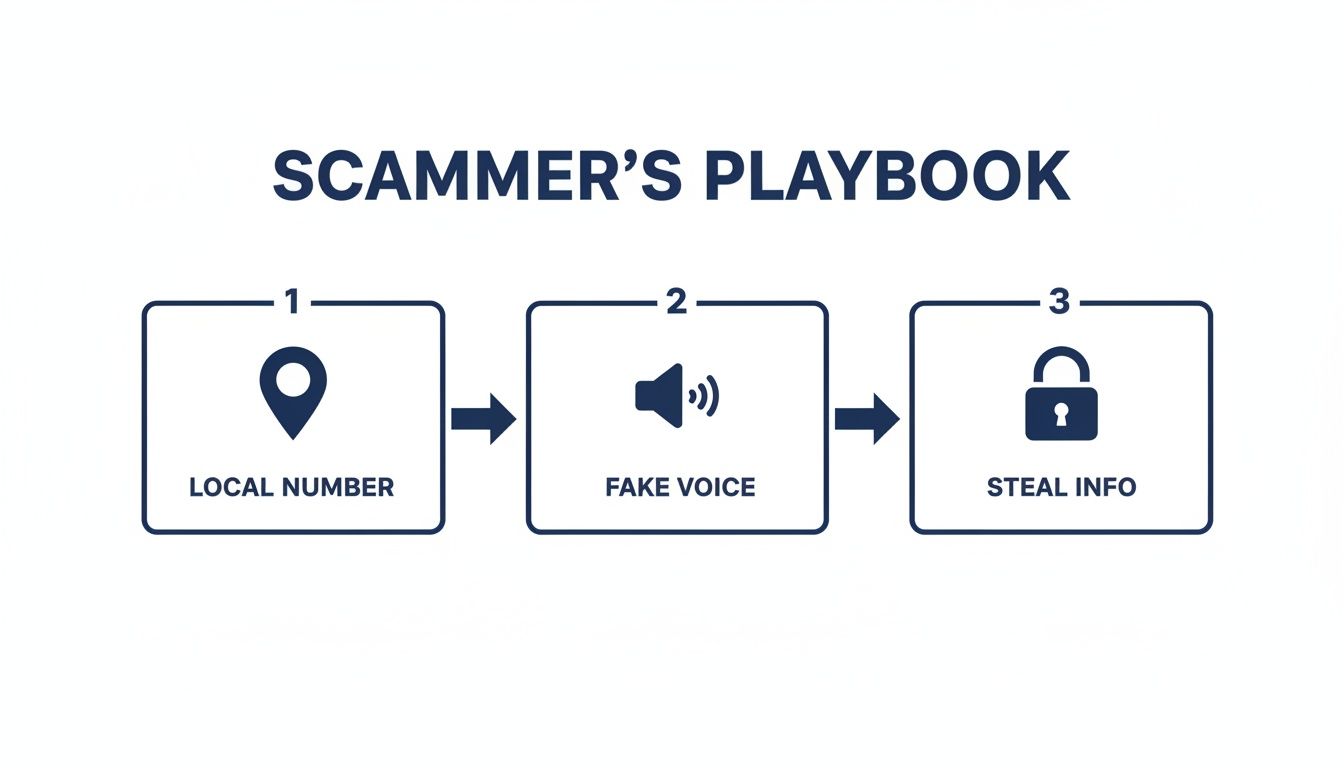
This playbook shows just how methodical scammers are. From spoofing a local number to build instant trust to creating a false sense of urgency, every step is a calculated move to manipulate you.
Spam Reduction Methods Compared
With all these options, it can be tough to figure out which approach is best. This table breaks down the most common methods, how they work, and where they shine (or fall short).
| Method | How It Works | Effectiveness | Best For |
|---|---|---|---|
| Do Not Call Registry | Legally prohibits legitimate telemarketers from calling your number. | Low | Stopping calls from law-abiding businesses, but not criminals or scammers. |
| Phone Settings | Sends all calls from unknown numbers directly to voicemail. | Moderate | Reducing interruptions if you rarely get important calls from new numbers. |
| Carrier Apps | Blocks calls from numbers that have been flagged as spam on the carrier's network. | Moderate-High | Blocking known, high-volume spam operations. |
| AI Call Screening | An AI assistant answers unknown calls on your behalf and analyzes the conversation in real-time. | Very High | Screening sophisticated scams, appointment reminders, and unexpected legitimate calls without blocking them. |
As you can see, layering these methods provides much stronger protection than relying on just one. Each tool has its purpose, but some are clearly more powerful than others.
What About the Do Not Call Registry?
You should absolutely add your number to the National Do Not Call Registry. It’s a worthwhile step, but it’s crucial to have realistic expectations about what it can and can’t do.
Think of it this way: the registry is a law, and it works well for legitimate telemarketing companies that don't want to get fined.
But here’s the thing: scammers are already breaking the law. They couldn’t care less about the Do Not Call list. So, while registering will stop a few annoying sales calls, it won’t do anything to stop the criminals.
These manual steps are a great start. But if you're looking for real, comprehensive protection against today’s smarter scams, you need a smarter solution. An AI-powered screener like the Gini Help app doesn't just block numbers on a list; it actually answers the call for you. It listens, analyzes the conversation for threats in real time, and only lets legitimate, important callers get through.
Ready to take back your peace and quiet? You can download Gini Help from the Google Play store or the Apple App Store.
The Smarter Way to Block Scams with AI
Traditional call blocking is starting to feel like trying to bail out a sinking boat with a thimble. You block one number, and almost instantly, spammers just hit you from a dozen others. It’s a losing battle because those old-school blockers rely on static, outdated lists of known bad guys. That defense is completely useless against criminals who can spin up a new number in the blink of an eye.
This endless game of whack-a-mole is exactly why we need a smarter defense. Instead of just blocking numbers, a newer approach uses AI to actually screen your calls for you. Think of it like having a personal security guard for your phone—one who answers on your behalf, figures out what the caller wants, and only bothers you if it’s someone legitimate. Your phone doesn't even have to ring for a scam call.
Moving Beyond Simple Blocklists
This intelligent screening is a world away from a basic blocklist. A blocklist is purely reactive; it can only stop numbers that have already been reported as spam. An AI screener, on the other hand, is proactive. It analyzes the conversation in real-time to understand the context and intent behind the call.
It’s the difference between a simple gate that only stops known trespassers and a savvy security guard who can spot suspicious behavior from a mile away. This proactive approach is essential for dealing with modern threats like AI voice cloning and tricky social engineering scams. You can learn more about how a smart call blocker changes the game entirely.
Recent research highlights a disturbing rise in scams where criminals use public information, like car accident reports, to target victims with fraudulent calls offering "help." They sound incredibly convincing, but an AI can pick up on the manipulative language patterns they use.
How AI Call Screening Works
This kind of advanced technology isn't just about recognizing bad numbers. It's about understanding human conversation. Here’s a quick rundown of how it works:
- AI Intercepts the Call: When a number you don't know calls, an AI assistant picks it up first. You're not involved yet.
- It Analyzes in Real-Time: The AI listens to what the caller says, looking for tell-tale signs of a scam—things like manufactured urgency, threats, or offers that are way too good to be true.
- It Makes a Decision: Based on its analysis, the AI determines if the call is a scam, a robocall, or a legitimate person. Only then does it decide whether to block the call for good or pass it through to you.
This method stops scammers dead in their tracks before they ever get a chance to bother you. For a powerful, AI-driven solution, consider downloading the Gini Help app. It screens your calls intelligently, ensuring you only connect with the people who actually matter.
Get your peace of mind back by downloading it from the Google Play Store or the Apple App Store today.
Regain Your Peace of Mind with Gini Help
While manually blocking numbers and using your carrier’s tools can catch some spam, it's like playing a constant game of whack-a-mole. You block one number, and two more pop up. Scammers are just too fast and adaptive for these basic defenses.
This is where you need a smarter approach—an AI guardian that screens your calls, texts, and emails. The Gini Help app completely flips the script. Instead of reacting to spam, it proactively screens every unknown call for you.
Think of it this way: instead of you having to answer and figure out if a call is a scam, Gini Help's AI answers first. It talks to the caller, listens to what they're saying, and instantly analyzes the conversation for signs of a scam or robocall. If it's a threat, your phone never even rings. You get to enjoy your day without constant interruptions.
A Proactive Shield for Your Family
This kind of smart protection is a game-changer, especially for older family members who are often the primary targets of convincing, high-pressure scams. We’ve all heard the horror stories about criminals using public information, like a minor car accident, to pose as an insurance agent or lawyer.
Gini Help acts as a personal gatekeeper, making sure those manipulative voices never even get a chance to speak to your loved ones. It’s a powerful line of defense against today's sophisticated fraud.
Imagine a world where only legitimate calls get through. No more guessing games, no more anxiety every time an unknown number pops up on your screen. That’s the real difference an AI screener makes—it provides a real-time defense that old-school blocklists simply can't match.
By filtering out threats before you ever hear them, Gini Help gives you more than just a quieter phone; it delivers genuine peace of mind. It finally stops the problem at the source.
It's time to take back control of your phone. You can download the Gini Help app and put your own AI guardian to work.
- Get Gini Help on the Google Play Store
- Download Gini Help from the Apple App Store
Spam Call FAQs: Your Questions Answered
Even with the best tools, a few questions always pop up. Let's tackle some of the most common ones you might be wondering about.
Will Answering A Spam Call Make Things Worse?
Unfortunately, yes. It's one of the biggest mistakes you can make. When you pick up a robocall, you’re basically raising your hand and telling their autodialer, "Hey, this number is active and a real person answers it!"
That simple action makes your phone number more valuable. They'll likely keep calling you and might even sell your number to other scammers, which just opens the floodgates for more junk calls. The best rule of thumb? If you don't recognize the number, let it go to voicemail.
How Can I Protect My Elderly Parents From Phone Scams?
This is a huge concern for many families, and it requires a gentle but direct approach. The first step is to sit down and talk with them about the kinds of scams going around, especially the cruel "grandparent scam" where fraudsters use cloned AI voices to fake an emergency. The FTC has noted a sharp rise in these highly convincing and manipulative calls.
Stress the importance of never, ever giving out personal information like Social Security numbers or bank details over the phone. But for real peace of mind, an AI-powered screening service is your best bet.
An AI assistant acts as a gatekeeper, answering any unrecognized call first. The scammer talks to the AI, not your parent, which stops the threat dead in its tracks. It's a layer of security that a simple blocklist just can't match.
Taking this one step can make all the difference in keeping your loved ones safe from fraudsters who are getting smarter every day.
Ready for a truly proactive defense that screens calls, texts, and emails before they ever reach you or your family? Download the Gini Help app. Get your peace of mind back by downloading it from the Google Play store or the Apple App Store today.