How to Identify Spam Emails Your Guide to Inbox Security
By Josh C.
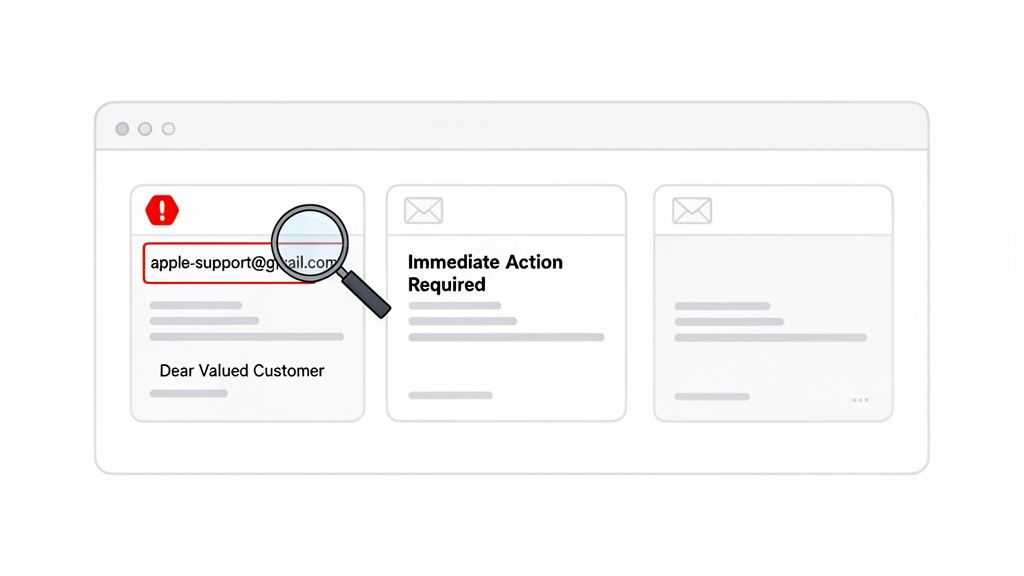
Knowing how to spot spam starts with a quick, critical look at the most obvious parts of the message: the sender, the subject line, and the greeting. Honestly, most malicious emails fail this initial test right out of the gate. They often rely on generic greetings, subject lines designed to make you panic, and sender addresses from public domains like Gmail instead of a real company address.
Mastering this first-glance analysis is probably the single most effective thing you can do to defend against the most common email threats.
Your First Line of Defense: Spotting Obvious Spam
Your inbox is a constant target for scammers, but you don't need to be a security pro to keep it safe. The most blatant spam emails almost always share a few common, easily identifiable flaws. Think of it as building your spam-spotting muscle memory; with a bit of practice, you’ll be able to filter out the worst offenders in just a few seconds.
Scrutinize the Sender Address
Before you even think about opening an email, look closely at the "From" address. This is the number one giveaway. A real company like Microsoft is never going to email you from an address ending in @gmail.com or something misspelled like @micosoft-support.com.
Scammers are banking on you being too busy to notice these small but critical details. Legitimate businesses use their own email domains (like support@microsoft.com), so an address from a public email provider is an immediate red flag.
Beware of Urgent and Threatening Subject Lines
Spammers are masters of psychological manipulation. Their goal is to provoke a quick, emotional reaction so you act without thinking. Subject lines that create a sense of urgency are a classic, time-tested tactic.
You’ve probably seen these before:
- "Immediate Action Required: Your Account is Suspended"
- "Unusual Login Activity Detected on Your Account"
- "You've Won a Prize! Claim It Now!"
These messages are specifically designed to bypass your rational judgment. A real company will almost never threaten you with immediate account closure over email for some minor issue. You should always treat claims like these with a healthy dose of skepticism.
To give you an idea of the scale we're dealing with, the United States alone sends out between 8 to 9.1 billion spam emails every single day. That firehose of junk contributes to a global problem where nearly half of all email traffic is spam. This makes being vigilant more important than ever. Bolstering your defenses with solid phishing attack prevention strategies is a smart move.
Sometimes it helps to have a quick reference handy. This checklist covers the most common red flags you should look for before trusting an email.
Quick Spam Identification Checklist
| Red Flag | What to Look For | Why It's Suspicious |
|---|---|---|
| Mismatched Sender | The "from" name (e.g., Apple Support) doesn't match the actual email address (e.g., apple-support@gmail.com). |
Legitimate companies always send emails from their official corporate domain, not a public one. |
| Urgent Language | Subject lines or content demanding "immediate action," warning of suspension, or threatening consequences. | Scammers create panic to rush you into making a mistake, like clicking a bad link or giving up information. |
| Generic Greetings | The email starts with "Dear Customer," "Valued Member," or just your email address instead of your name. | Companies you do business with know your name and will almost always use it in their communications. |
| Spelling & Grammar | Obvious typos, awkward phrasing, and poor grammar throughout the email. | While not foolproof, professional communications are usually well-edited. Multiple errors are a huge red flag. |
| Unexpected Attachments | An unsolicited email contains an attachment, especially a .zip, .exe, or a document with macros. |
These are common ways to deliver malware. Never open an attachment you weren't expecting. |
Keep these points in mind, and you'll catch the vast majority of junk that lands in your inbox. Trust your gut—if an email feels off, it probably is.
For a more proactive approach, an AI-powered shield can analyze and block these threats for you. Consider downloading the Gini Help app for advanced protection on Google Play or the App Store to stop scams before they can even reach you.
Decoding Deceptive Language and Tone
Alright, so the sender and subject line didn't immediately set off alarm bells. Now it's time to dig into the message itself, because this is where scammers really show their hand. They are masters of psychological tricks, crafting emails designed to make you feel panicked, greedy, or just plain curious so you'll click without thinking.
The oldest trick in the book is manufactured urgency. They want to create a fake crisis to rush you into a bad decision. You’ll see all the classics: "Your account will be terminated in 24 hours," or "Failure to verify will result in immediate suspension." Think about it—when does a legitimate company ever communicate with that level of over-the-top drama in a first email? Almost never.
The Devil Is in the Details
Another massive giveaway? The writing is just... off. We all make typos, but spam and phishing emails are often riddled with glaring errors.
Keep an eye out for:
- Awkward Grammar: Sentences that sound like they were run through a bad online translator.
- Spelling Mistakes: Obvious misspellings of everyday words or even the company's own name.
- Unnatural Phrasing: Language that's either way too formal or bizarrely casual for the situation.
A fake alert from FedEx, for example, might read, "Your parcel has been held up due to incomplete address information, you must to click here for make correction." The strange grammar is an immediate red flag. Real companies have teams of people who make sure their communications sound professional.
A well-crafted phish creates just the right amount of urgency without being over the top. It socially engineers the victim into believing they must act quickly to avoid a negative consequence, bypassing their critical thinking.
Recognizing Emotional Triggers and Unprofessionalism
Beyond simple mistakes, just get a feel for the email's tone. Does that "bank security alert" sound more like a frantic lottery announcement? That’s your gut telling you something is wrong. This is a crucial skill for spotting things like an Apple ID scam, where phishers impersonate Apple with fake security alerts designed to make you panic and hand over your credentials.
The numbers behind these tactics are just staggering. Scammers blast out messages with typos and fake urgency because, on a massive scale, it works. A shocking 96.8% of people have received messages like these. Every single day, a mind-boggling 3.4 billion phishing emails are sent, and these attacks are the driving force behind 80% of all reported cyber incidents.
Recent research highlights the effectiveness of these tactics, with the FBI's Internet Crime Complaint Center (IC3) reporting that phishing was the most prevalent cybercrime in 2023, with over 298,000 victims. If you want to go down the rabbit hole, you can learn more about these eye-opening spam statistics—it really shows why being careful is so important.
To keep yourself and your family safe from these constant threats, an AI-powered shield can be a game-changer. Consider downloading the Gini Help app for advanced, real-time protection on both Google Play and the App Store, stopping sophisticated scams before they ever reach you.
Safely Inspecting Hidden Links and Attachments
The body of a spam email is just the bait. The real trap lies in what you’re meant to click—the payload. Scammers are experts at hiding malicious links and malware-infected attachments behind a wall of convincing text. Mastering the art of inspecting these elements without actually clicking on them is your single most powerful defense.
The best trick I've learned over the years is beautifully simple: just hover your mouse over any link before you even think about clicking it. Don't click, just hover. In most email programs and browsers, the link's true destination will pop up in a small box or appear at the bottom corner of your window. This is your moment of truth.
The Hover Test: A Quick Reality Check
Think about it. An email from your bank should have a link that clearly points to their official domain, like chase.com. A phishing email, on the other hand, will show you the text chase.com but the preview URL will reveal something completely different. You might see a strange address like chase-security-alert.biz or a jumble of random characters.
That mismatch between what the link says and where it actually goes is a giant, flashing red flag. It’s often the only clue you need to confirm you're dealing with a scam.
This quick visual check is one of the most reliable ways to sniff out a malicious email. The process is pretty straightforward.
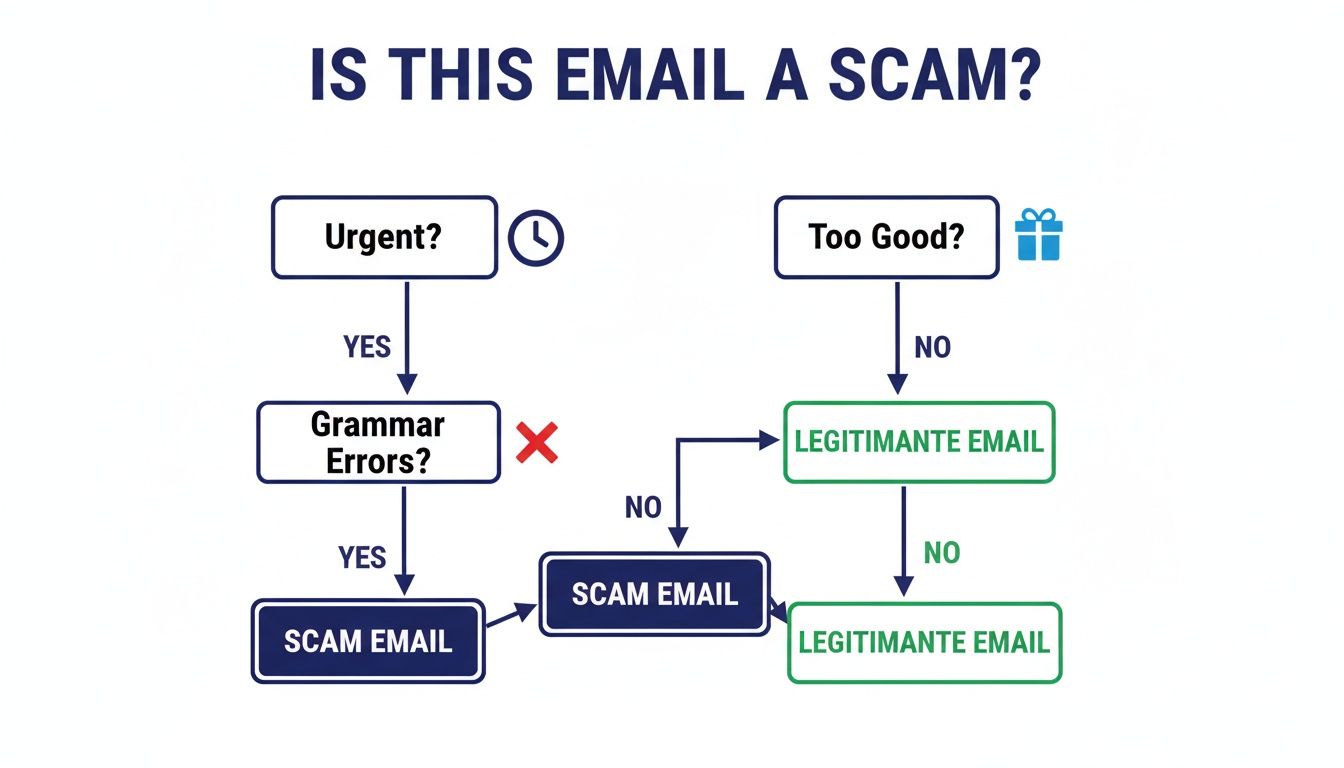
To make this even clearer, let's look at a few side-by-side examples. It’s easy to get tricked when you’re in a hurry, so knowing what to look for is key.
Legitimate vs Malicious Link Comparison
| Service | Legitimate Link Example (What you should see) | Malicious Link Example (What to avoid) |
|---|---|---|
| Netflix | https://www.netflix.com/YourAccount |
http://netflix-support.tv/login |
| PayPal | https://www.paypal.com/signin |
http://verify.paypal.co.uk.291.biz |
| Microsoft | https://login.live.com/ |
http://micrsoft.com/account-update |
| Amazon | https://www.amazon.com/gp/css/order-history |
http://amzn.order-details.info/ |
Notice the subtle (and not-so-subtle) differences? The malicious links use lookalike domains, add extra subdomains to confuse you, or use HTTP instead of the secure HTTPS. These are the details that give them away every time.
Why You Should Never Trust Unsolicited Attachments
Attachments are the other favorite weapon of cybercriminals. They love to hide malware inside files disguised as something you'd expect to see, like a PDF invoice, a shipping confirmation, or a "secure" Word document. Their goal is to create a sense of urgency or curiosity to get you to open it without thinking.
Never open an attachment you weren't expecting. It doesn't matter if it looks like a normal file type. Sophisticated malware, like ransomware or spyware, can be hidden within those seemingly innocent documents.
The scale of this problem is staggering. With an estimated 160 billion spam emails sent every single day, the odds are high that a few will land in your inbox. Attackers are constantly evolving their methods, with recent events showing a rise in "quishing" (QR code phishing) in emails to direct you to malicious sites. A recent breakdown of phishing statistics revealed that the manufacturing industry was hit hardest, accounting for 26% of all attachment-based attacks in one quarter.
The golden rule of email security is simple: If you weren't expecting it, don't open it. This applies to both links and attachments. A moment of caution is always better than hours or days spent recovering from a malware infection or a compromised account.
For an extra layer of defense that can automatically spot these threats for you, tools like the Gini Help app use AI to screen your emails for dangerous links and attachments before they can do any harm. You can find it on Google Play and the App Store.
Automating Your Defense with AI Protection
Learning to spot a scam email is a crucial skill, no doubt about it. But let’s be honest—trying to manually sift through the daily onslaught of junk mail is an uphill battle you can't win alone. Scammers are relentless, firing off billions of malicious emails every single day, and they're always tweaking their tactics to get around basic defenses. It’s simply not realistic to think you can catch every single one by yourself.
This is where having a smart assistant comes in handy. Instead of relying only on your own vigilance, you can bring in AI-powered protection to act as a tireless security guard for your inbox.
Moving Beyond Basic Spam Filters
Your built-in spam filter in Gmail or Outlook does a decent job, but it has its limits. These filters mostly rely on flagging known spammer domains or spotting obvious keywords. The problem is, scammers are well aware of this. They simply register new email addresses or change a few words in their message, and just like that, their sophisticated phishing attempts land right in your main inbox.
This is where advanced AI tools change the game entirely. They don't just work off a simple checklist. They dig deeper to figure out an email's true intent.
Take a service like the Gini Help app. Its AI looks at the bigger picture in real-time. Here’s what that actually means:
- Content Analysis: The AI doesn't just scan for keywords; it reads the email to understand the language, tone, and any psychological tricks being used. It spots the subtle, deceptive patterns a normal filter would completely miss.
- Sender Behavior: It evaluates the sender's reputation and patterns across a vast network, not just a single, disposable email address.
- Link and Attachment Scrutiny: Before a dangerous link or attachment ever gets near you, the AI safely inspects it for malicious code or phishing traps.
This kind of AI-driven analysis is what it takes to stop the new, complex scams designed to fool even savvy users. Even security experts admit they can be tricked by a clever phishing email when they're tired or distracted. We all have those moments.
"I've received a gazillion similar phishes before that I've identified early, so what was different about this one? Tiredness was a major factor. I wasn't alert enough... we all have moments of weakness and if the phish times just perfectly with that, well, here we are."
Creating a Proactive Shield for Your Digital Life
Ultimately, the best defense is one that stops threats before you even have to think about them. AI protection works by integrating directly with the email accounts you already use—whether that's Gmail, Outlook, Yahoo, or iCloud—to build a proactive shield around your inbox.
If you're interested in layering your defenses, our guide on how to stop email spam has some great additional strategies.
By letting AI do the heavy lifting, you’re not just blocking spam. You’re getting back your time and your peace of mind. For a solution that protects your emails, texts, and calls, you can download the Gini Help app from the Google Play Store or the Apple App Store and let your personal AI guard stand watch.
So You've Spotted a Spam Email. Now What?
Okay, you've successfully identified a sketchy email. Good job. But spotting it is just the first step—what you do next is what really protects you. Reacting correctly not only secures your own information but also helps make the internet a bit safer for everyone else.
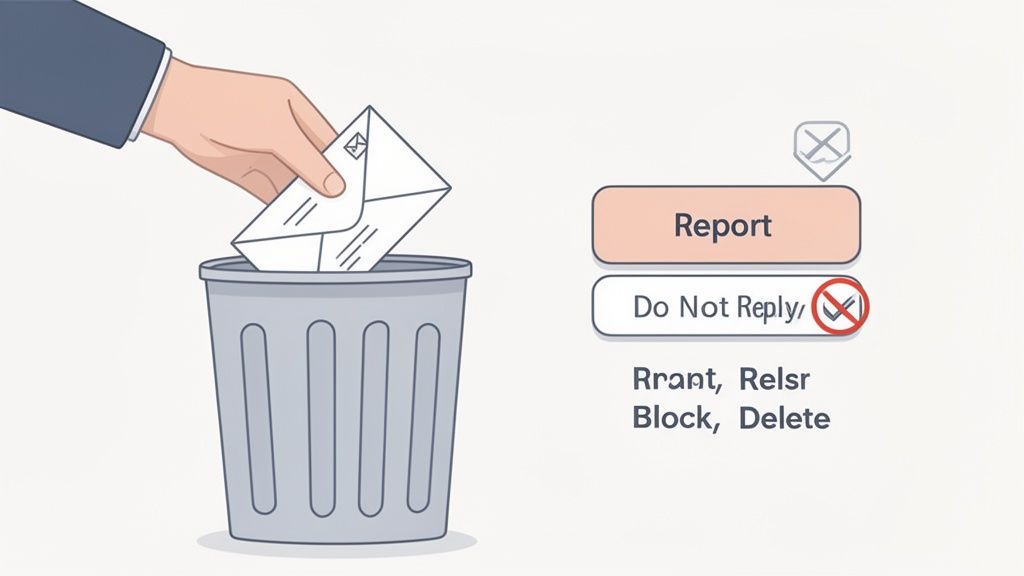
The number one rule, and it's a big one, is to never reply. It's so tempting to fire back a quick "unsubscribe" or something less polite, but that's a trap. A reply of any kind signals to the scammer that your email address is live and kicking.
Suddenly, your email becomes a confirmed-active target, making it more valuable. They'll likely sell your address to other spammers, and you can bet your inbox will get a whole lot more crowded.
Your Action Plan for Suspicious Emails
Once you've squashed the urge to reply, the right move is to follow a simple, clean protocol. This routine minimizes your risk and actually helps improve the security filters you and everyone else depend on.
Here’s your game plan:
- Report it as Spam or Phishing. This is the single most powerful action you can take. When you click that "Report Spam" or "Report Phishing" button in Gmail or Outlook, you're not just clearing out your inbox. You're feeding valuable intel back to the email provider, which helps them fine-tune their algorithms to catch similar emails in the future.
- Block the Sender. After you've reported it, block the sender’s address. Sure, spammers cycle through email addresses like they’re disposable gloves, but this guarantees that specific one can never bother you again. Think of it as slowly building a stronger wall around your inbox.
- Delete the Email for Good. Finally, get rid of the message. Don't just move it to the trash, where a misplaced click could still cause trouble. Delete it permanently. The best approach is to do all of this without ever actually opening the email, if you can identify it from the subject line and sender alone.
Even security pros can get fooled by a convincing phishing email when they're tired or in a hurry. We all have those moments. The best defense is a solid, repeatable routine for handling anything that looks even slightly off.
Bolstering Your Long-Term Defenses
Following this simple protocol turns a potential disaster into a minor annoyance. It's all about building smart digital habits that work on autopilot. Moving beyond just spotting junk mail, understanding the various solutions for combating phishing can add another strong layer to your digital security.
If you're looking for automated protection that can take care of these threats before you even see them, an AI-powered tool might be the answer. The Gini Help app, for example, is designed to analyze and block scams before they hit your inbox. You can find it on the Google Play Store and the App Store.
A Few More Questions About Spotting Spam
Even after you get the hang of spotting suspicious emails, a few questions always seem to pop up. Let's clear up some of the most common ones so you can feel completely confident handling whatever lands in your inbox.
Does Replying 'STOP' to a Spam Email Actually Work?
In a word: no. You should never reply to a random spam email, even if you’re just telling them to stop.
Think of it this way: when you reply, you’re basically raising your hand and telling the spammer, "Yes, this email address is active and someone is reading these!" This confirmation makes your email address a more valuable target. It’ll likely get sold to other spammers, and you'll end up with even more junk mail, not less.
The only time it’s safe to hit that "unsubscribe" link is on legitimate newsletters and marketing emails from companies you know and trust—the ones you actually remember signing up for.
What's the Real Difference Between Spam and Phishing?
This is a great question. While both are annoying emails you didn't ask for, their goals are worlds apart.
- Spam is mostly just digital junk mail. Think of it as unsolicited advertising for questionable products or services. It’s annoying, but usually, it's not trying to actively steal from you.
- Phishing is a direct attack. These emails are scams designed to trick you into giving up sensitive information like passwords, bank details, or credit card numbers. They do this by pretending to be a legitimate organization, like your bank, Netflix, or even the IRS.
So, while all phishing emails are technically a type of spam, not all spam is phishing. The key distinction is the malicious intent—phishing is all about identity theft and financial fraud.
My Spam Filter Is Pretty Good, so Why Does Some Stuff Still Slip Through?
Scammers are constantly playing a high-stakes game of cat and mouse with email providers. They're incredibly clever and always evolving their tactics to sneak past the filters.
They might send emails from thousands of different throwaway domains, hide malicious text inside images to fool scanners, or use tricky misspellings (like "PayPaI" with a capital 'i') that your brain might not catch at first glance. If you want a deeper dive, you can learn more about why some messages are flagged as potential spam.
This is exactly why staying vigilant is so important. The scammers are always looking for a new way in, which is why even the best filters can't be 100% foolproof on their own.
"I've received a gazillion similar phishes before that I've identified early, so what was different about this one? Tiredness was a major factor... we all have moments of weakness and if the phish times just perfectly with that, well, here we are."
Can My Computer Get a Virus Just From Opening a Spam Email?
Thankfully, it's pretty unlikely these days. Most modern email clients, like Gmail or Microsoft Outlook, have security features that prevent malicious scripts from running automatically just because you opened an email.
The real danger kicks in when you interact with the email's content. The risk comes from:
- Clicking a suspicious link
- Downloading and opening an infected attachment
- Enabling images in the email (which can sometimes contain trackers or trigger harmful code)
Your safest bet? If an email looks even slightly off, just delete it. Don't even bother opening it.
For total peace of mind, let an expert handle the threat detection for you. Gini Help uses advanced AI to screen your emails, calls, and texts, stopping scams before they can ever reach you.
Protect yourself and your family by downloading the Gini Help app from the Google Play Store or the Apple App Store.