How to Detect Phishing in Emails, Texts, and Calls
By Josh C.
Kaspersky's anti-phishing systems blocked 554,002,207 attempts to follow phishing links in 2025. That scale changes the question from “Would I fall for an obvious fake email?” to “What should I check every time a message, call, QR code, or social-media contact asks me to act?” (Kaspersky's 2025 phishing report)
Phishing works by making a risky action feel reasonable. The message may appear to come from your bank, a delivery company, a family member, or a colleague. It may ask you to click, sign in, share a code, move money, or call a number. Learning how to detect phishing means looking past appearances and verifying the request through a separate, trusted channel.
Why Phishing Is Getting Harder to Spot
Phishing is no longer limited to clumsy emails. The Anti-Phishing Working Group recorded 1,003,924 phishing attacks in the first quarter of 2025 and 1,069,681 in the second quarter, a 10.1% increase from Q1 to Q2. It also recorded 425,808 attacks in June 2026, the highest monthly total since April 2023.
The same pressure tactic now appears in email, text messages, social platforms, QR codes, and phone calls. A scammer may send a polished email, place a QR code on a fake notice, or call while pretending to be from a bank. The channel changes, but the aim stays the same: make an unexpected request feel familiar and urgent.
Polished writing isn't proof of safety
Spelling mistakes, strange grammar, and awkward formatting can still reveal a scam. Clean writing provides much less reassurance, however. AI-generated phishing emails reached 56% of reported threats in December 2025 and stayed high into 2026, according to Hoxhunt's phishing trends report.
A professional-looking email may still contain a harmful link. A convincing caller may still be impersonating a bank. A message using your name may still be trying to collect a password, payment detail, or authentication code.
The request and its context deserve more attention than the message's appearance. Ask yourself:
- Was this request expected? You may know the company but have no reason to receive this particular message.
- Does the action make sense? A bank should not require you to disclose a one-time code to “protect” your account.
- Is the sender applying pressure? Urgency leaves less time to notice what feels wrong.
- Can you verify it independently? Contact the organization through its official app, website, or phone number, not through the message.
Practical rule: Familiar branding shows who the message claims to represent. It does not confirm who sent it.
Security tools also examine unusual behavior and surrounding context instead of relying only on fixed warning lists. How anomaly detection systems identify unusual activity explains this approach. For everyday users, the same idea is straightforward: judge the request, timing, and requested action, not just the quality of the writing. This habit is especially useful when helping an adult over 50 assess a call, QR code, social-media message, or email that looks completely genuine.
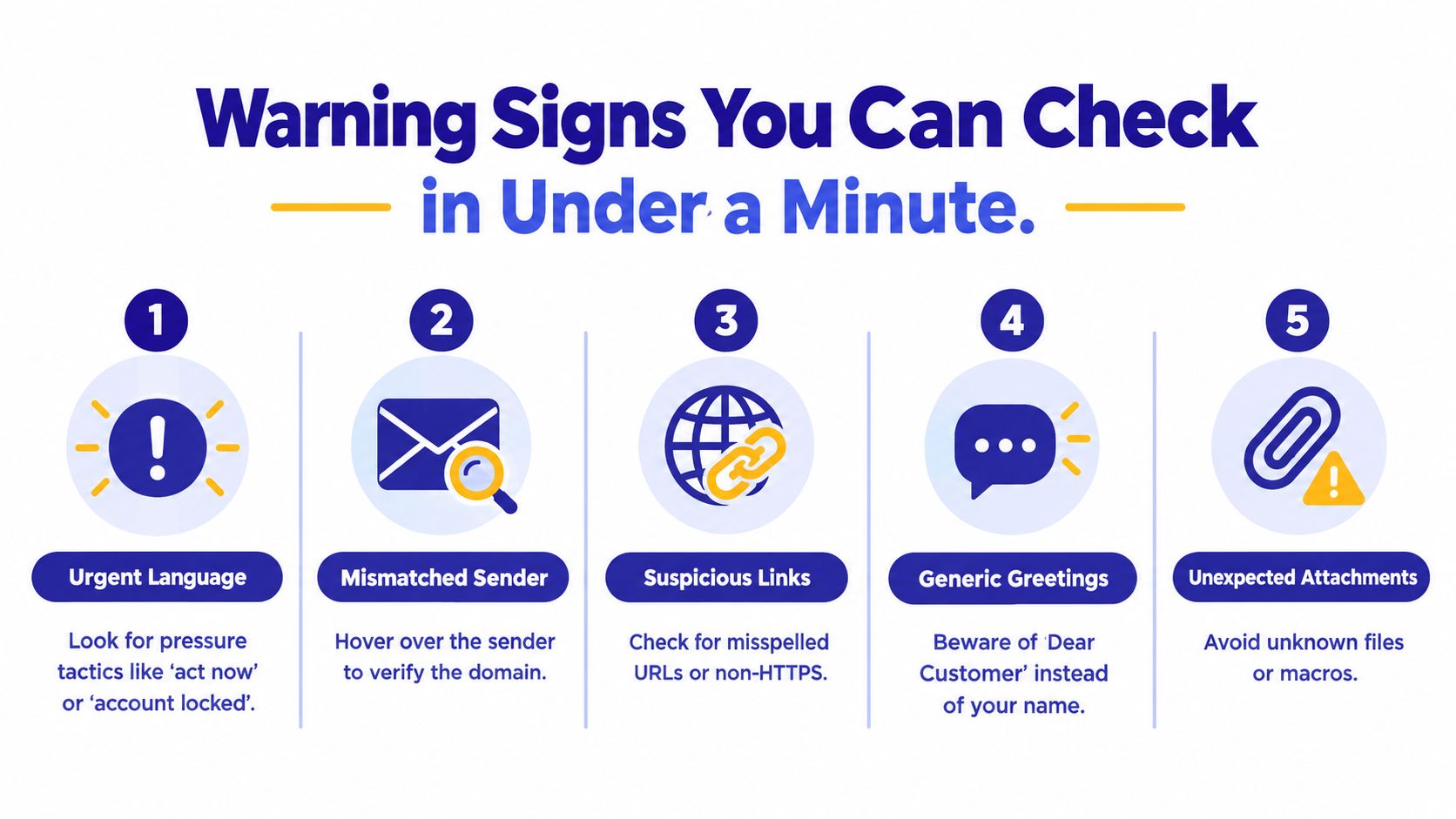
Warning Signs You Can Check in Under a Minute
You don't need technical expertise to inspect a suspicious message. Before clicking, replying, downloading an attachment, or calling a number, pause and run a short check based on the warning signs identified by CISA's phishing guidance.
Start with the request
Urgency is a control tactic. “Act now,” “your account is locked,” or “payment failed” pushes you toward action before verification. A real problem may need attention, but you can still open the official app or contact the organization separately.
Sensitive information deserves extra suspicion. Be cautious if a message asks for a password, authentication code, bank details, identity information, or payment. A request for information isn't automatically fraudulent, but an unexpected request should never be answered from the message itself.
Generic greetings reduce trust. “Dear Valued Customer” or “Dear Customer” can indicate a mass message, especially when the sender claims to have an important personal matter. A personalized greeting doesn't make a message safe, but a generic one can be a useful warning sign.
Inspect the sender and destination
On a computer, hover over a link without clicking. Your email app should display the destination, often near the bottom of the window. Look for a domain that imitates the actual organization, an unexpected website, a shortened link, or a spelling difference that is easy to miss.
On a phone, tap the sender's name or profile details to expand the full address. A display name such as “Your Bank” can hide an unrelated address. Don't trust the visible name alone.
A link can also look familiar while leading somewhere else. If the message says “Review your delivery,” open the delivery company's official app or type its known website into your browser instead.
Use a sixty-second routine
- Pause. Don't click or reply while feeling rushed.
- Read the request. Identify exactly what the sender wants.
- Expand the sender. Check the full email address or phone number.
- Inspect the link. Hover on desktop, or avoid opening it on mobile.
- Verify elsewhere. Use an official app, website, or independently found phone number.
If one check feels wrong, stop. You don't need to prove that a message is malicious before refusing to act.
Here's a short video that demonstrates common phishing clues and safe inspection habits:
Spotting Phishing Beyond the Inbox
A delivery text arrives while you're walking. It says your package couldn't be delivered and includes a rescheduling link. The message may use the delivery company's name and a familiar logo, but you weren't expecting a delivery, and the link asks for a small payment or card confirmation. Don't open it. Check your order through the retailer's official app instead.
QR codes create a similar trap. A notice in a parking area may claim you have an unpaid ticket and show a QR code for payment. Because the destination isn't visible until you scan it, the code bypasses the glance you might give an ordinary web address. Treat an unexpected QR code like an unknown link, especially when it combines a deadline with a payment request.
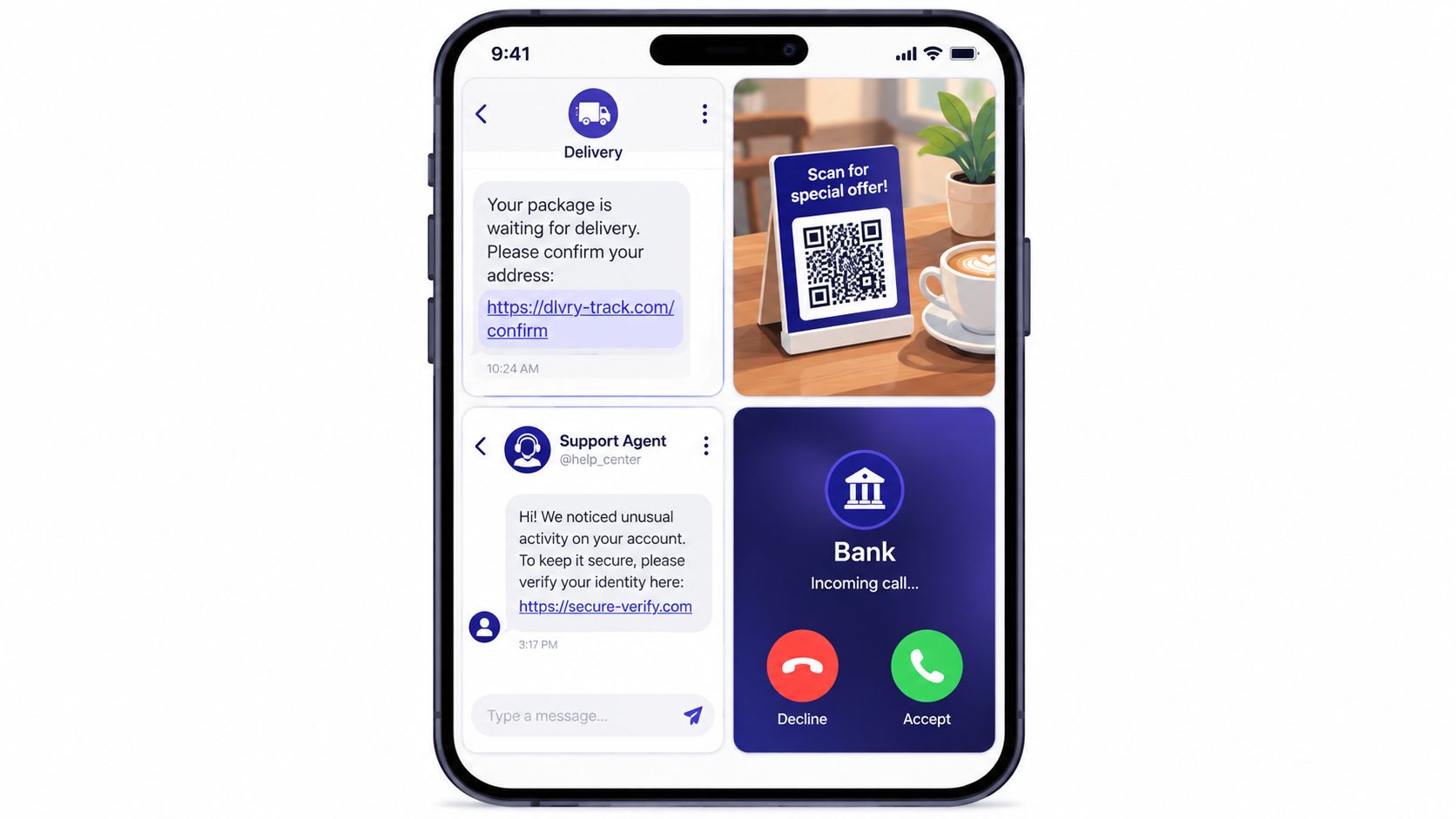
The channel changes, the pressure doesn't
Phishing attacks rose 13.8% in early 2026, and Microsoft reported that QR-code phishing more than doubled in Q1 2026, becoming the fastest-growing vector. (APWG's Q1 2026 trends report) These messages are harder to inspect on a small screen, and people often trust a notification because it appears inside a familiar app.
Social media adds another layer. Someone may send a direct message about an investment, a prize, a marketplace purchase, or an account problem. After you respond, they may move the conversation to text or ask you to take a phone call. The change of channel doesn't make the request more genuine. It can make the scam harder to trace and easier to personalize.
Phone calls use voice and emotion instead of visible links. A caller may claim to be from your bank and say that fraud is happening on your account. They may ask you to confirm details, read out a code, or move funds while they “secure” your money. The safest response is to end the call and contact the bank through the number on its official website, app, or card.
For more examples of messages that use this pattern, see this guide to SMS phishing attacks. The key question is always the same: did you initiate this contact, and can you verify it without using the contact details provided?
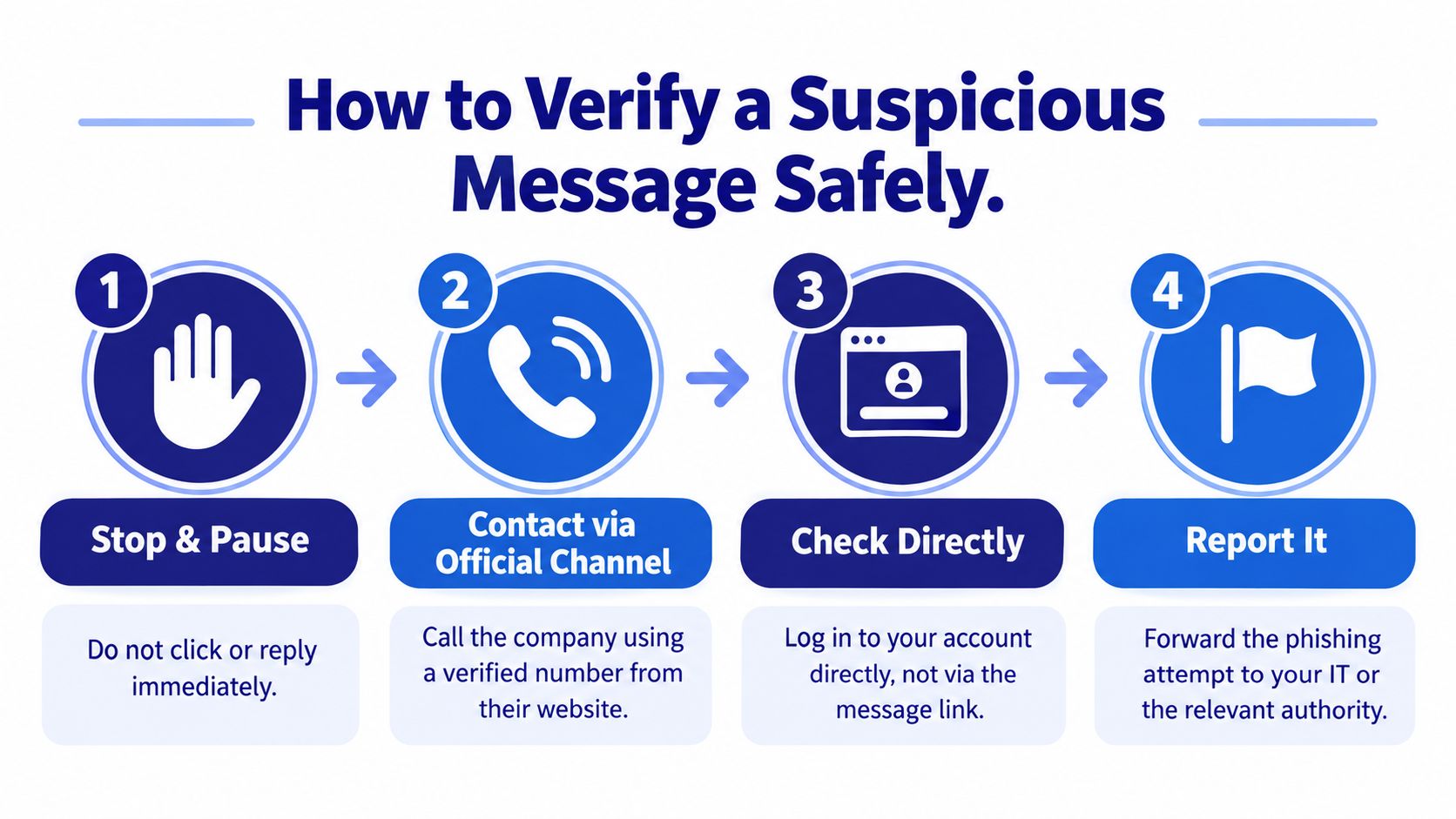
How to Verify a Suspicious Message Safely
The safest rule is simple: never verify an incoming request through the incoming message. If an email tells you to click, close it. If a caller asks you to act, hang up. If a text gives you a number to call, don't use that number.
Follow the pause, separate, verify routine
- Stop and pause. Don't click, reply, scan, download, or share a code.
- Close the conversation. End the call or leave the message unopened.
- Find the official channel independently. Type the organization's website yourself, open its official app, or use a trusted number from a bank card or previous statement.
- Ask whether the request is real. Describe the situation without repeating sensitive information.
- Check the account directly. Sign in through the official app or website, not through the message link.
- Report the attempt. Use the email provider, phone service, workplace IT team, or relevant authority.
A caller who claims to be from a government agency, bank, or technology company doesn't get an exception. Hang up and start a new contact through an official source. Don't assume that caller ID proves identity, because the displayed number may be manipulated.
Protect adults 50 and older from pressure
The FTC warns that scammers pressure older adults to move money to a so-called “safe” place. Its advice is direct: never transfer money because of an unexpected call or message. Hang up and independently call the organization back. (FTC guidance on safe-account scams)
Caregivers can agree on a simple family script:
“We don't move money or share codes during an unexpected call. We'll end the conversation and call the official number together.”
If a parent receives an unusual request, avoid blame. Ask what happened, save the message or number, and help verify it. Shame can make people hide a mistake, while calm support makes it more likely they'll report a problem quickly.
For an additional check on an unfamiliar caller, use a phone number checker, but treat any lookup as one signal rather than final proof. Independent contact with the organization remains the decisive step.
What to Do After You Spot Phishing
If you recognize the scam before interacting, don't reply. Use your email provider's built-in report-phishing option, report a suspicious text through your carrier's spam-reporting process, block the sender, and delete the message. Reporting helps providers identify campaigns, even when you personally avoided harm.
A message that reached you can still help attackers target someone else. Reporting creates a record and may help improve filters for other people, including relatives who may not recognize the same pattern.
If you clicked or shared information
Act quickly, but don't panic.
- Entered a password? Change it immediately through the genuine website or app. Change it anywhere else you reused it.
- Shared an authentication code? Contact the account provider through an official channel and explain exactly what happened.
- Provided bank details or sent money? Call the bank or payment provider immediately using a trusted number.
- Downloaded a file? Disconnect from sensitive accounts if appropriate, run your device's security tools, and ask a qualified technician or workplace IT team for help.
- Lost control of an account? Use the provider's account-recovery process and review recent activity.
- Experienced a scam? Report it to the FTC and keep copies of messages, phone numbers, receipts, and dates.
Older adults face particular danger from impersonation calls. The FTC reported that reports of scammers stealing tens or even hundreds of thousands of dollars from older adults increased more than four-fold, and older adults reported far higher losses on scams that started with a phone call. (FTC data on impersonation scams)
Help without adding shame
A caregiver can say, “Let's secure this together,” rather than “How could you believe that?” First preserve evidence, then contact the relevant bank or provider, change credentials, and report the incident. Don't continue communicating with the scammer while trying to recover funds or an account.
Everyday Habits and Tools That Stop Scammers
Prevention becomes easier when it is routine. Open your bank's official app instead of following a message link, update your phone and apps, enable two-factor authentication where available, and never share a one-time code with an unexpected caller. Pause whenever someone demands immediate action. Consistent habits matter because phishing attempts continue across email, texts, calls, QR codes, and social media.
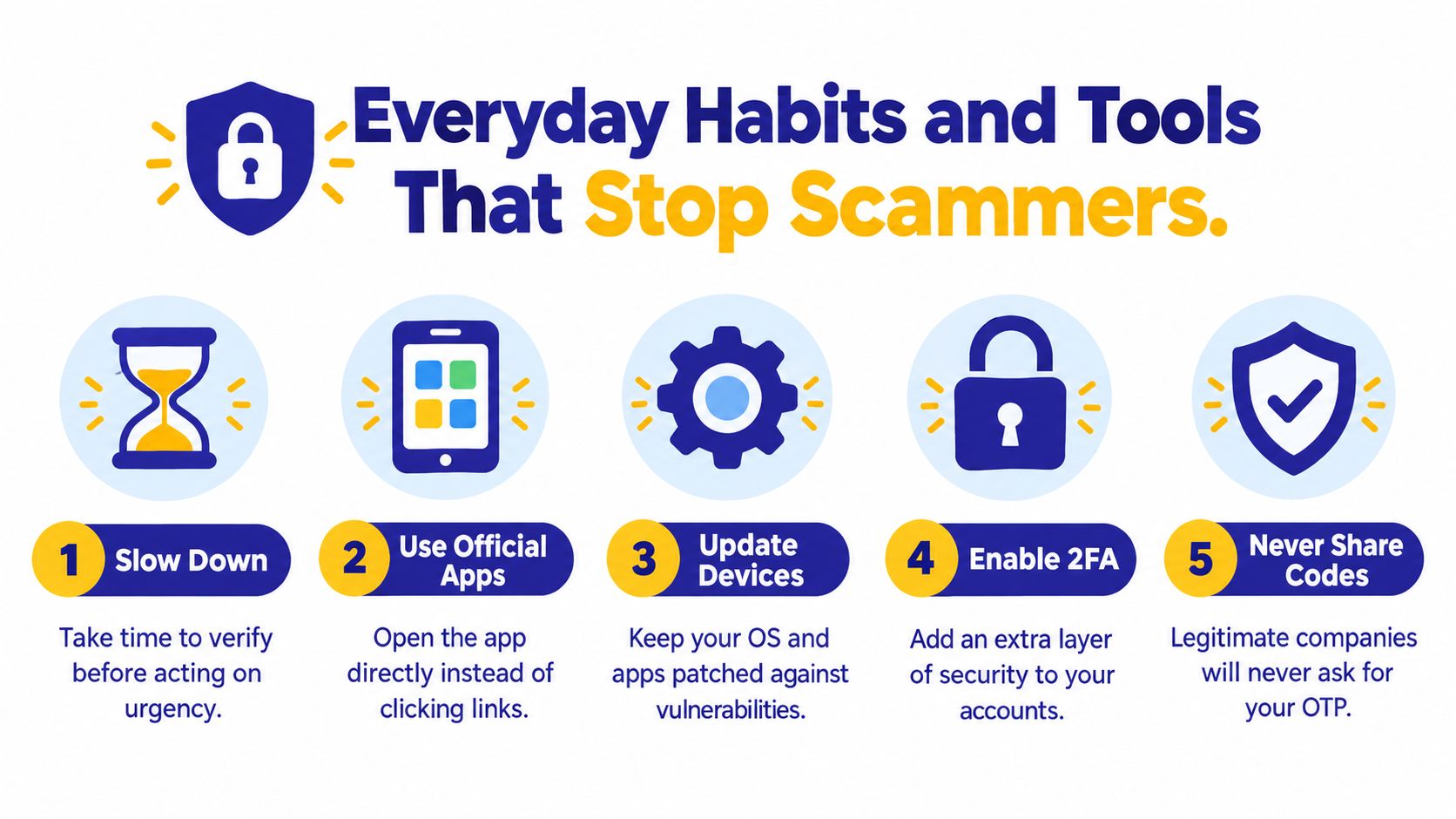
Build a safety net for daily use
Tools that screen several channels can add another check. Gini Help screens calls, texts, and email in one app. Its AI answers unknown calls first, assesses whether a call appears legitimate or threatening, and can connect legitimate calls. Live Call Analysis provides warnings during calls you answer, while a family plan can share threat information among members.
Caregivers can also apply this verification habit when helping someone buy a used phone. The smart UK shopper iPhone guide offers practical advice for checking devices and sellers.
You can download Gini Help from Google Play or the App Store. The key habit is pause, verify through an independent channel, and never let urgency make the decision for you.
Gini Help screens calls, texts, and emails for phishing and scam signals, with AI-assisted call screening and Live Call Analysis for calls you answer. Visit Gini Help to explore its tools for handling unexpected requests. (Kaspersky's 2025 phishing report)