SMS Phishing Attacks Explained and How to Stop Them
By Josh C.
You're checking your phone when a message appears: “Your package is on hold. Confirm your address now.” The sender name looks familiar, the timing feels possible, and the link is only one tap away. A different day might bring a text about a bank account, an unpaid toll, or a security code you didn't request.
That moment is where SMS phishing attacks, also called smishing, take advantage of ordinary habits. Text messages feel personal and immediate, so people often react before they stop to verify the sender. Older adults may face extra pressure when a message appears to involve money, health services, deliveries, or an account they rely on, while caregivers may need a simple process for helping without creating panic.
Introduction to SMS Phishing Attacks and Why They Matter Now
Smishing has become a serious fraud problem, not merely an annoyance caused by unwanted texts. The U.S. Federal Trade Commission reported that consumers lost $470 million to scams that began with text messages in 2024, an amount more than five times the amount reported in 2020. The FTC also reported that the share of text-scam reports involving an actual monetary loss rose from 5% in 2020 to 11% in 2024. You can review the agency's findings in its 2024 text-scam loss report.
The danger comes from the combination of speed, trust, and convenience. A fraudulent text can arrive while you're driving, shopping, caring for someone, or waiting for an appointment. It may imitate a company you use and ask you to solve a problem immediately. The attacker doesn't need to convince you for a long time. They only need you to tap, call, reply, or share one sensitive detail.
Current threat reporting shows that SMS is part of a wider fraud system. The Anti-Phishing Working Group reported 3.8 million phishing attacks in calendar year 2025, compared with 3.76 million in 2024, and reported that phishing delivered through social media and SMS rose from 15.4% to 17.3% quarter over quarter in the fourth quarter of 2025. Those figures appear in APWG's 2025 year-in-review coverage.
A calm rule for every unexpected text: You never have to solve an account problem through the message that announced it.
This guide focuses on practical protection. You'll learn what smishing is, how campaigns operate, why mobile devices make these messages persuasive, how to recognize common examples, and what to do if you've already tapped a link or shared information. The goal isn't to make you afraid of every text. It's to give you a small routine that works even when a message feels urgent.
What SMS Phishing Is and How It Differs From Other Scams
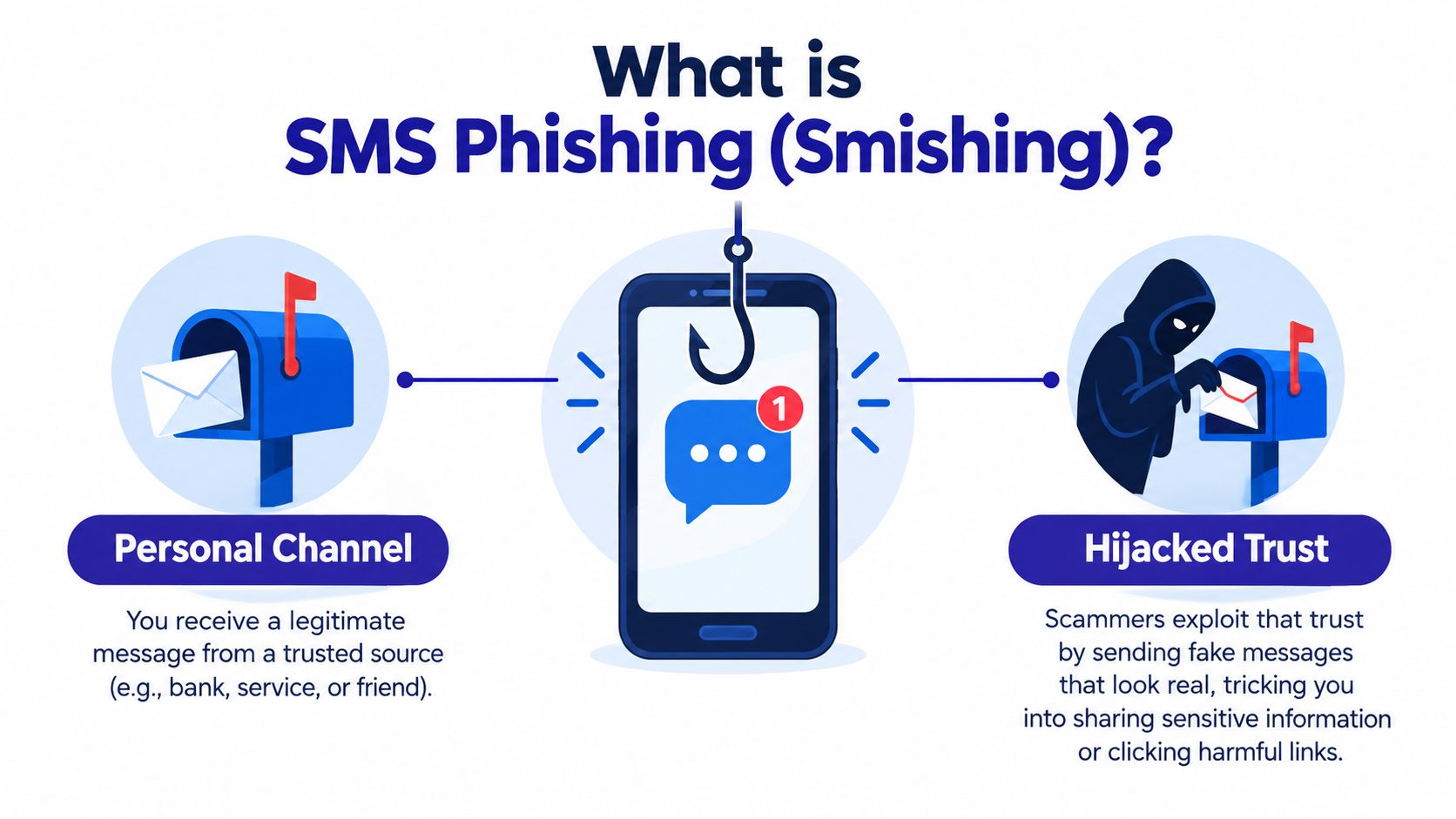
SMS is a direct communication channel. Friends, family members, doctors, delivery companies, banks, and schools may all contact you through it. Smishing abuses that familiarity by placing a fraudulent message inside a space you already treat as personal.
Think of your phone as a mailbox. Most letters arrive through ordinary routes, but an attacker slips in a convincing notice that looks like it came from your bank. The envelope may use a familiar logo, the wording may sound official, and the notice may warn that something will happen unless you respond. The mailbox is real. The letter is not.
Email phishing uses email inboxes, where people often expect newsletters, work messages, attachments, and promotional mail. Voice phishing, or vishing, uses a phone conversation to create pressure and obtain information. Smishing uses the compact, always-available nature of text messaging. It can also push you into another channel, such as a phone call or a fake website.
What the attacker wants
A suspicious text usually aims to move you toward one of several outcomes:
- Credential theft: A fake sign-in page collects a username, password, or account details.
- Financial theft: A message directs you to make a payment or provide card and banking information.
- Malware delivery: A link or attachment attempts to place harmful software on the device.
- Conversation control: A reply confirms that your number is active and begins a longer social-engineering exchange.
Smishing doesn't have to contain a bad link. A request to call a number, reply with a code, or confirm personal details can be the first step. If you want to understand how criminals tailor messages to particular people, this guide to how spear phishing works provides useful context.
Four useful ways to understand smishing
A 2026 review organizes SMS phishing research around four areas: how users perceive and respond, how attackers design and execute campaigns, what defenses researchers propose, and which datasets support investigation. That framework is described in the 2026 review of SMS phishing and defenses.
For everyday protection, those four lenses become simple questions:
- People: Why did the message feel believable?
- Design: What trick, link, sender identity, or conversation did the attacker use?
- Defense: Which phone settings, verification habits, and screening tools can interrupt the attempt?
- Evidence: What repeated messages, links, or infrastructure can help identify the wider campaign?
You don't need technical knowledge to use this model. If a text creates urgency, asks for secrets, and prevents you from verifying through a known channel, treat it as unsafe until proven otherwise.
How SMS Phishing Attacks Work Behind the Scenes
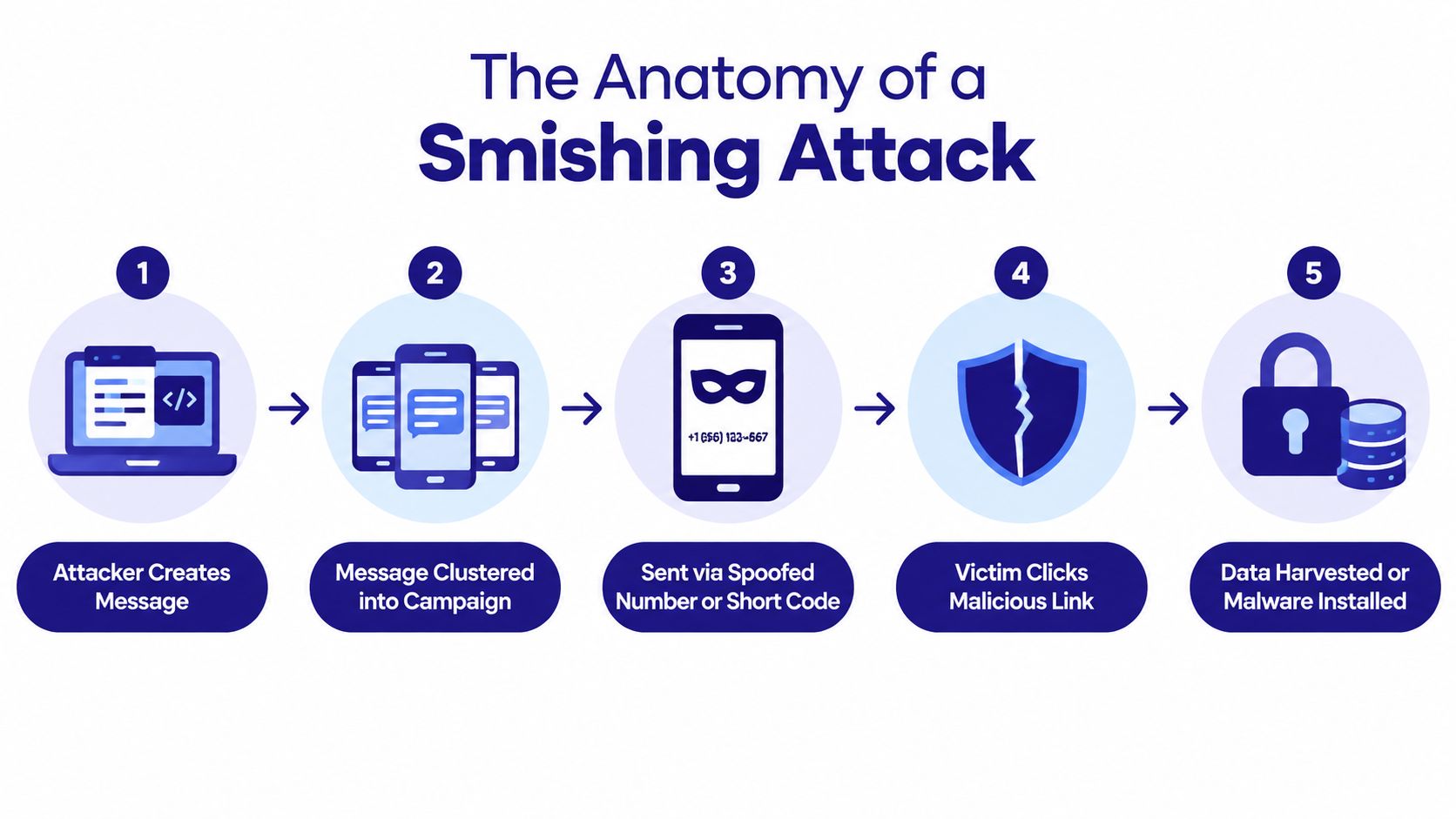
A smishing campaign often works more like a production line than a single criminal sending one bad text. Someone prepares a believable message, distributes it through changing numbers or services, directs recipients to a fraudulent destination, and collects the information that follows.
Research from the University of Florida and North Carolina State University illustrates the scale of this pattern. Researchers extracted 67,991 phishing messages from more than 200 million SMS messages posted across 11 public web SMS gateways. They grouped the messages into 35,128 campaigns based on nearly identical content and linked them into more than 600 distinct operations through shared infrastructure. The findings are summarized by NC State's study overview.
The campaign flow
- A message is prepared. The wording may imitate a delivery service, bank, government office, employer, or account provider.
- Similar messages are reused. Attackers adjust names, dates, or links while keeping the core template.
- Numbers or sender details change. A blocked number can be replaced, so stopping one sender doesn't stop the operation.
- The recipient is redirected. The text may lead to a fake login page, payment form, phone number, or conversation.
- Information is harvested. The attacker may collect credentials, payment details, verification codes, or other personal information.
This is why infrastructure correlation and repeated-template detection matter. Blocking one telephone number is like removing one flyer from a community noticeboard while the same person keeps printing copies. A broader defense looks for recurring wording, destinations, sender behavior, and connected services. Organizations exploring automated protection can also review resources on SMB cybersecurity automation.
Smishing can also become a cross-channel sequence. A text may create concern, a caller may pretend to help, and a follow-up message may request a code or payment. APWG reported that telephone-based fraud, combining vishing and smishing, increased 15% from the fourth quarter of 2025 to the first quarter of 2026 in its Q1 2026 trends report.
The handoff between channels matters because it can make each step appear to confirm the last one. A caregiver should therefore ask not only, “Did you receive a suspicious text?” but also, “Did anyone call, message, or ask for a code afterward?” For background on filtering unwanted messages, see how spam blockers work.
Real Examples of SMS Phishing Messages You Might Receive
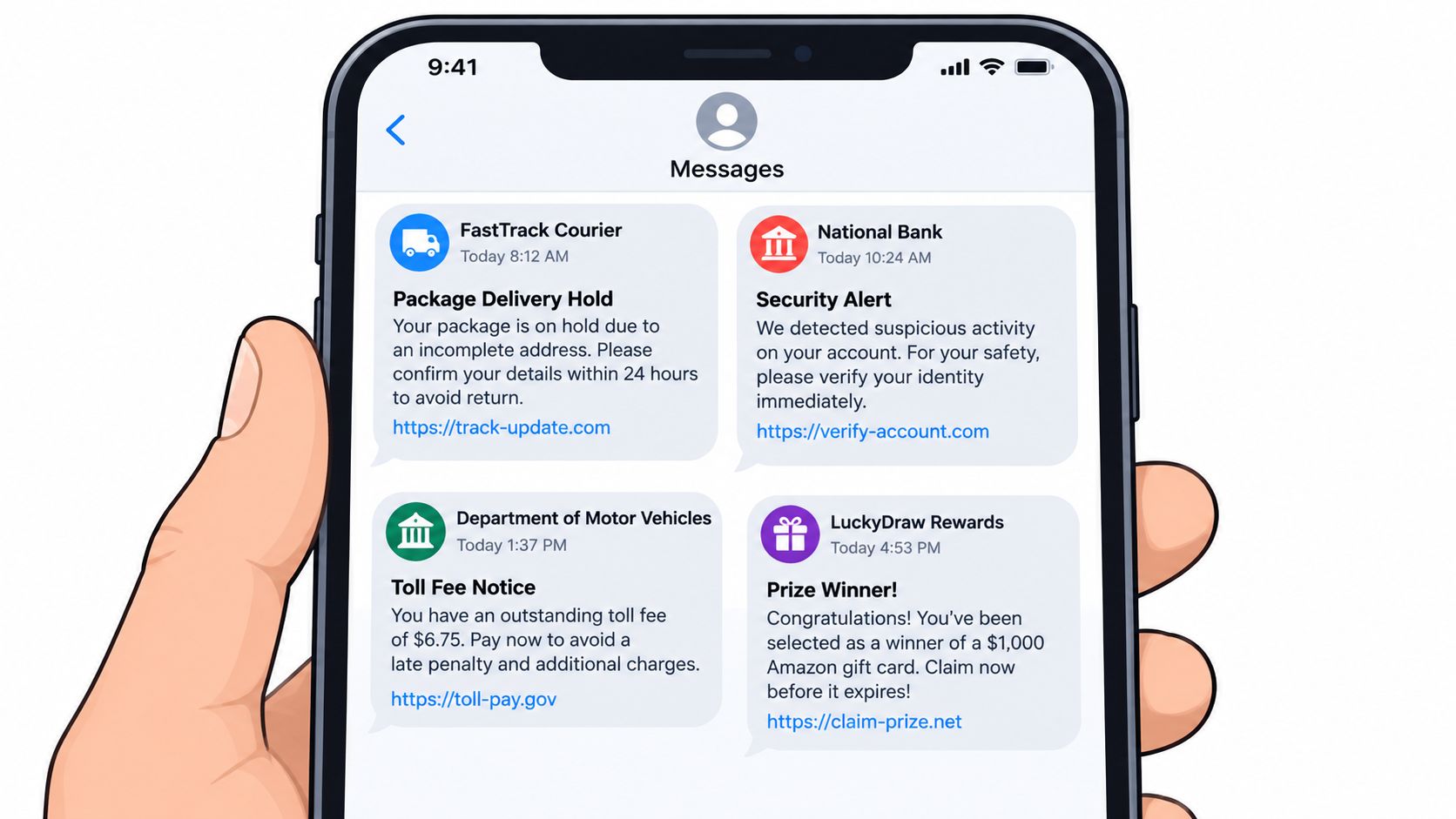
The wording changes constantly, but the pressure pattern often stays familiar. Read each example as a pattern to recognize, not as a script to memorize.
“Your delivery is paused because the address is incomplete. Confirm your information now: [short link].”
Notice the trap: The message creates a small problem and offers a quick fix. A shortened link hides the destination, and the request for an address may lead to payment or identity questions. If you're expecting a package, open the retailer's official app or type the company's known website yourself.
“Your bank account has been locked. Verify your identity immediately by visiting [link].”
Notice the trap: “Locked” and “immediately” are designed to make you act before thinking. Your bank may send legitimate alerts, but you don't need to use the link in an unexpected text. Call the number on your bank card or sign in through the official app.
“Unpaid road toll detected. Pay today to avoid additional action: [link].”
Notice the trap: A government-sounding fee combines authority with a deadline. Don't reply with your license details, card number, or other information. Find the transportation agency's official website independently and check for a notice there.
“You've been selected for a reward. Confirm your account and claim your prize.”
Notice the trap: A prize message asks you to prove eligibility by submitting information. Legitimate rewards have identifiable terms and a verifiable organization. Unexpected prizes that require immediate payment or personal details are unsafe.
The request matters more than the logo
Scammers can copy logos, names, colors, and familiar phrases. The more useful question is, what does the sender want you to do? Tapping a link, calling an unfamiliar number, replying with a code, paying a fee, or entering a password all deserve independent verification.
A request for a verification code deserves special care because the code may help someone enter an account you own. This explanation of a verification code text message can help families discuss why codes shouldn't be shared with unexpected callers or texters.
Save suspicious messages if you need them for reporting, but don't interact with links or phone numbers inside them. Mark the message as junk or spam using your phone's built-in option, then contact the supposed organization through a trusted route.
Who Attackers Target and Why Text Scams Succeed on Mobile
Attackers target attention, not only demographics. Older adults, busy professionals, people managing finances for a household, and anyone handling unfamiliar services may receive messages that exploit responsibilities they already take seriously. Caregivers can help by creating a shared expectation that unusual texts will be checked together rather than answered under pressure.
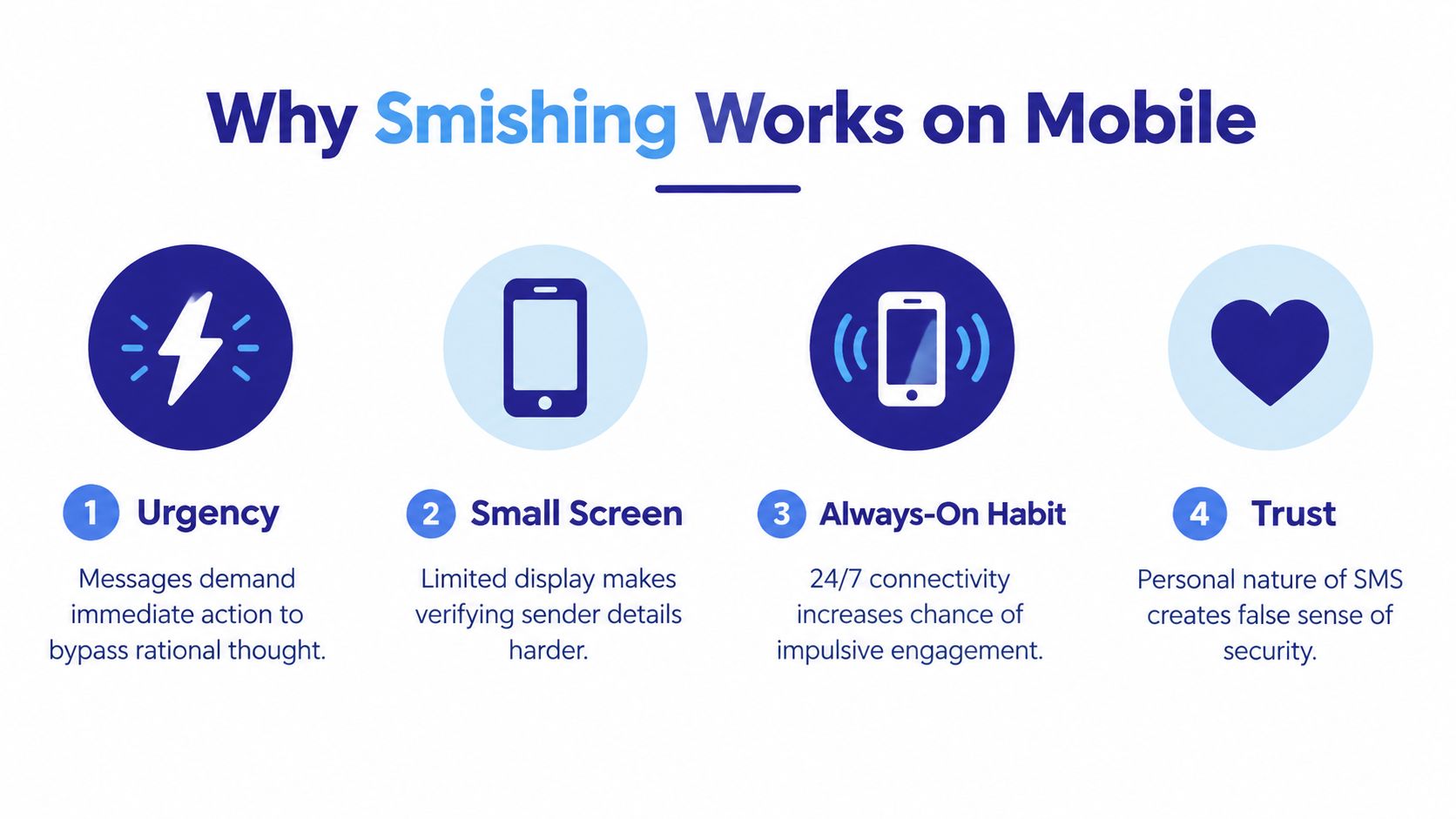
Mobile devices amplify persuasion in several ways. The screen is small, so sender details and web addresses can be difficult to inspect. Notifications appear alongside genuine family conversations, and people often check them while distracted. A message that would seem questionable on a large computer screen may feel more credible when it arrives during a busy day.
Why the channel changes behavior
Urgency shortens the time available for careful judgment. A warning about a package, bank account, toll, or medical appointment gives the recipient a reason to act before verifying. The personal nature of SMS adds another layer of trust, even when the sender is unknown.
Recent threat reporting supports the view that attackers are investing heavily in mobile and telephone-based deception. APWG reported that smishing increased 40% from the first quarter to the second quarter of 2026, while vishing rose 20% during the same period. The figures are from APWG's Q2 2026 trends report.
Independent reporting on Verizon DBIR 2026 data described phone-centric simulations with a median click rate of 2% for phone-based lures compared with 1.4% for email, a 40% higher success rate. The same report discussed Zimperium's 2025 global mobile threat report, which found that smishing represented over two-thirds of observed mobile phishing attempts and rose more than 22%. Those figures and their context appear in Keepnet Labs' phishing trends summary.
A special concern for older adults and caregivers
Older adults may be targeted with messages involving retirement accounts, health-related services, deliveries, taxes, or family emergencies. The problem isn't a lack of intelligence. Attackers build scenarios around trust, responsibility, and fear of missing something important.
Use a family rule that removes embarrassment from the process: any urgent message involving money, passwords, codes, or account access gets a second opinion. A caregiver can ask the recipient to forward the text without clicking anything, then help verify it through an official app, a printed statement, or a known phone number.
How to Detect Prevent and Respond to SMS Phishing Step by Step
A reliable response has three jobs: spot the warning signs, stop the interaction, and respond safely. Keeping those jobs separate helps you avoid trying to investigate a suspicious message while you're still emotionally reacting to it.
Spot the warning signs
Look for a combination of signals rather than one imperfect clue:
- Unexpected contact: You weren't waiting for a delivery, payment notice, or account alert.
- Pressure: The message demands immediate action or threatens a consequence.
- Hidden destination: The link is shortened, misspelled, or difficult to read.
- Sensitive request: It asks for a password, payment details, identity information, or a verification code.
- Unfamiliar callback: It tells you to call a number that isn't saved in your contacts or printed on an official statement.
A polished message can still be fraudulent. Grammar and logos aren't proof of authenticity.
Stop before you verify
Don't tap the link, reply, call the number, download an attachment, or share a code. Instead, close the message and contact the organization using a known route, such as its official app, a card in your wallet, a statement, or a website you enter manually. Guidance on best practices for SMS authentication can help organizations and families think carefully about how text-based verification should be handled.
For a simple daily routine, use this checklist:
- Pause: Put the phone down for a moment.
- Name the request: Is it asking for money, access, or personal information?
- Use a separate channel: Verify without using the text's link or number.
- Report and delete: Mark the message as junk after preserving details if a report is needed.
You can also review practical settings and habits in this guide to stop spam texts.
Respond if you already interacted
If you tapped a link but didn't enter information, close the page and avoid downloading anything. If you entered a password, change it through the official service, choose a unique replacement, and review account activity. If you shared a payment detail, contact the financial institution using a trusted number and ask what protective steps it recommends.
If you gave someone a verification code, tell the affected service immediately. Ask a trusted family member to stay with you while you secure the account. Fast, calm action is more useful than self-blame.
Staying Protected and Getting Help When You Need It
The most useful way to think about smishing is as a connected campaign ecosystem. Attackers can combine texts, calls, websites, and ongoing conversations, while changing phone numbers and adapting their wording. A single blocking rule may miss the next step, so protection works better when it combines careful habits, independent verification, device controls, and screening technology.
Families can make this easier without taking away someone's independence. Agree on a simple phrase such as “pause and check,” and use it whenever a message involves money, account access, urgency, or secrecy. Caregivers should focus on the action, not blame. Asking “How can we verify this?” keeps the conversation practical.
AI-powered screening can add another layer by analyzing unknown messages and calls in real time. Gini Help is one option that screens calls, texts, and emails in one app, including suspicious SMS messages and live analysis during calls you answer. It should complement, not replace, independent verification and secure account practices.
Download the Gini Help app on Google Play or get it from the App Store. Set it up with a family member if that makes the process easier, then practice the pause, verify, report routine before an urgent message arrives.
You don't need to identify every new scam variant. You only need to recognize the pressure, refuse the requested path, and verify through a trusted one.
Gini Help screens calls, texts, and emails to help identify suspicious communications before they lead you into a scam, and it can provide live analysis when you answer an unfamiliar call. Visit Gini Help to learn how its multi-channel protection can support safer phone use for you and the people you care for.