Fake Shopping Websites: How to Spot and Stop Them
By Josh C.
6.4 million UK shoppers had lost money after buying from a scam connected to a fake online advert, according to National Trading Standards. The trap didn't necessarily begin with an obviously suspicious website. It began with an advert that persuaded someone to visit one.
Fake shopping websites exploit ordinary habits: following a sale, comparing prices, or checking a delivery message. For shoppers and caregivers, the safest approach isn't to judge how professional a page looks. It's to verify who controls the address, where the payment goes, and what to do immediately if money or sensitive information has already been shared.
What Fake Shopping Websites Are Built to Do
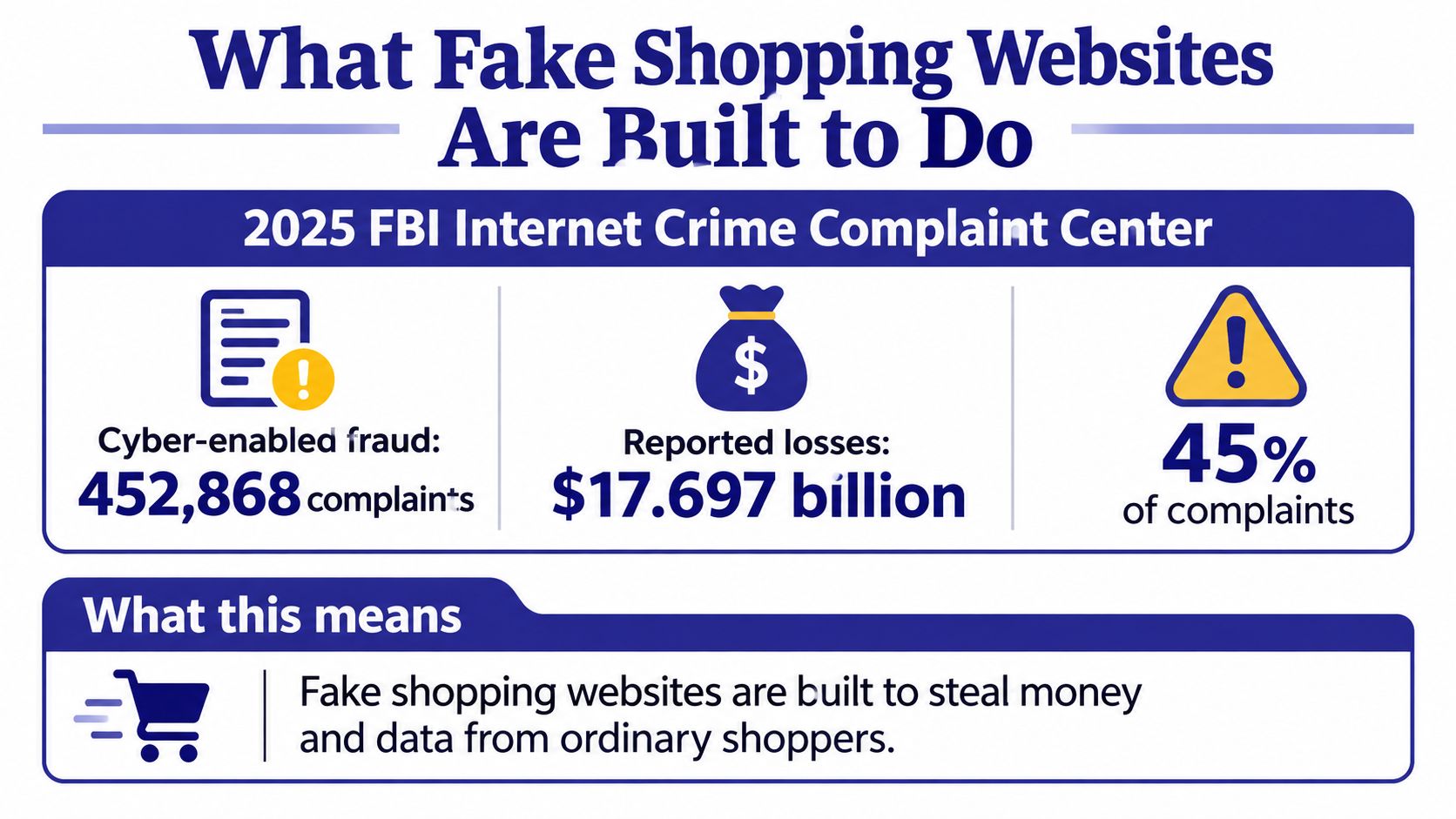
In the United States, the FBI's 2025 Internet Crime Complaint Center report recorded 452,868 cyber-enabled fraud complaints and $17.697 billion in reported losses, representing 45% of complaints but approximately 85% of total reported losses; its separate non-payment or non-delivery category accounted for $503 million. That last category includes fake stores and sellers who take payment without supplying goods, rather than fake shopping websites alone.
These are complaint-based totals, not a complete count of everyone harmed. People who never filed a complaint aren't included, so the figures leave out unreported losses.
The infographic puts the broader fraud picture in context.
A familiar awning doesn't identify the seller
A fake shopping website is a fraudulent storefront made to resemble a retailer, marketplace, or payment brand so someone will pay or disclose information. Think of a pop-up stall operating under a famous shop's awning. The sign looks familiar, but it doesn't prove the person taking payment works for that business.
Say a shopper finds the exact kitchen appliance they've been looking for. The page has manufacturer photographs, delivery promises, customer reviews, and a working checkout. After payment, an order confirmation arrives, making the purchase feel settled.
But an automated receipt proves only that someone collected the order details. It doesn't establish that the seller has stock, a warehouse, or any intention of shipping.
What the operator wants
The shopper can face several different outcomes:
- Nothing arrives. The seller takes the money and stops answering.
- A cheap copy arrives. A parcel creates the appearance of fulfillment, but the contents aren't what was advertised.
- Personal details are captured. The operator collects the card number, billing address, password, or a requested bank code for another attempt.
A purchase can therefore become more than a dispute over missing goods. The original transaction may give criminals information they can use to impersonate the shopper or make a later approach sound convincing.
For caregivers, this is a reason to make checking an unfamiliar shop a shared household task, not a test of someone's technical ability. Keep the comparison table below available before anyone reaches checkout.
How Fake Stores Reach Ordinary Shoppers
Seasonal sales give scammers a reason to rush shoppers. Fake Amazon websites increased 232% and fake eBay pages increased 525% in October 2025 compared with September, according to De Montfort University's shopping-scam guidance. These figures show how quickly fake storefronts can multiply around a busy shopping period.
A shopper's path from a phone screen to a fraudulent checkout can look entirely routine.
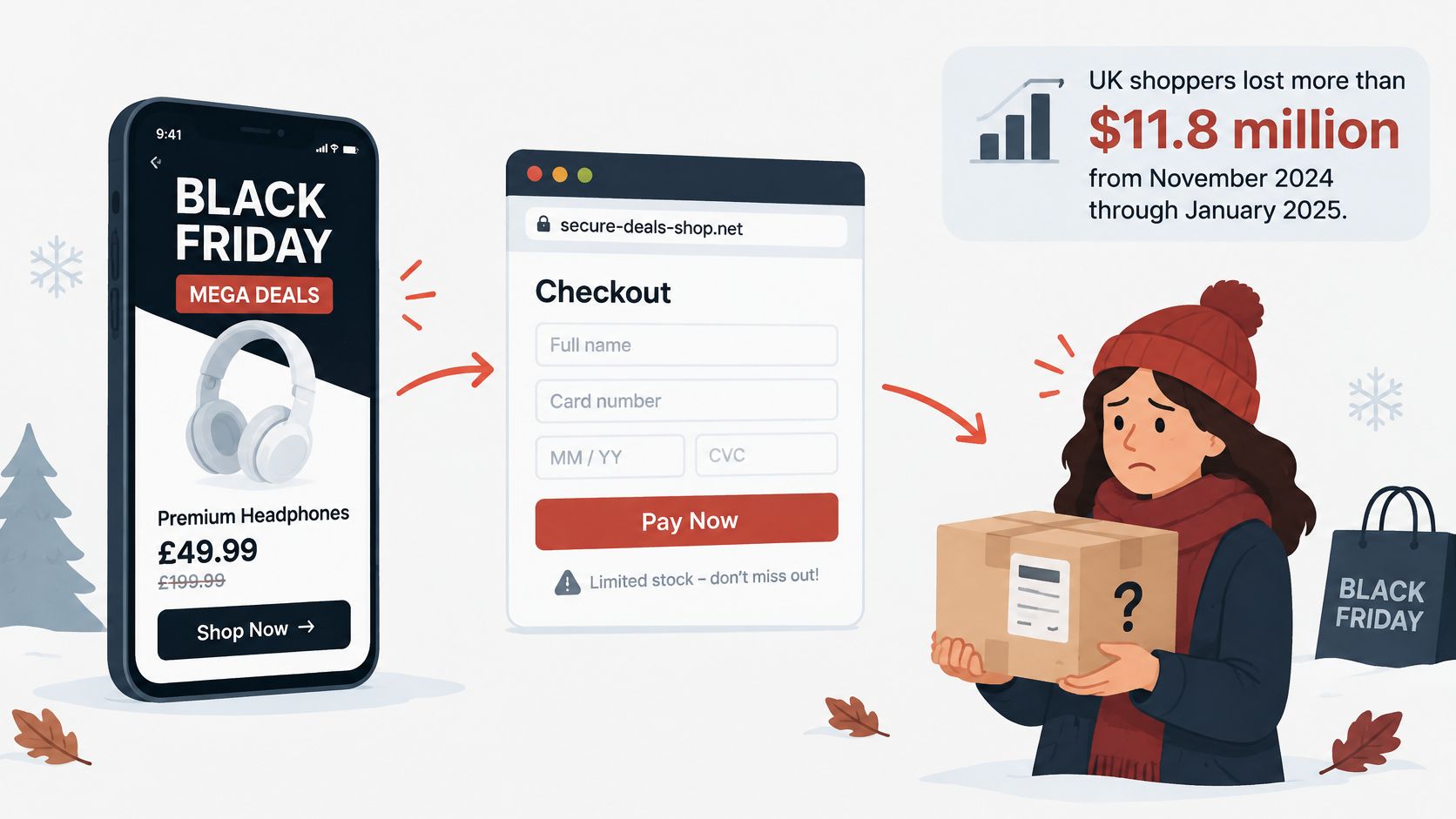
The sponsored sale
A sponsored post shows a familiar marketplace logo and a tempting offer. The item appears available, a countdown urges the shopper to act, and the checkout resembles one they've used before. A small difference in the web address, perhaps an extra word or altered spelling, may be the clearest warning.
Scammers can copy product photos, customer-service language, and checkout layouts. An established brand's sale may give an advert a believable story, but the logo does not prove that the seller is genuine. Paid placement is not an endorsement. An explanation of when approved ads send misleading traffic helps show why an advert appearing on a familiar platform is not enough to trust its destination.
The order-problem message
A different shopper receives a text saying a delivery address needs correcting. They are expecting a parcel, so the message feels relevant. Its link opens a copied tracking page that asks for personal details or a payment to release the package.
This scam does not start with a bargain. It uses an interruption to an existing order to make a link seem ordinary. Learning how to detect phishing can help shoppers recognize that pressure and check a message before following its instructions.
Use the video below to start a household conversation about suspicious approaches.
Practical rule: Check an unfamiliar sale link shared by a relative as carefully as one sent by a stranger. Trust in the sender does not confirm that the destination is safe.
Grammar and dramatic discounts are weak tests: AI-polished clones can look convincing, and paid ads can lead shoppers to misleading pages. Verify the domain and payment route through a source outside the advert or message. If money or a verification code has already been sent, act the same day by contacting the relevant bank or service through its official channel. A delivery warning or countdown is a prompt to pause, not a reason to skip checks.
Verify a Shop Before You Pay
Concern about convincing storefronts is widespread: a 2026 TrustedSite consumer survey found that 96% of shoppers worried about unfamiliar sites, 94% about AI-created fake businesses, and 91% about AI-generated product reviews. The same article cites reporting that at least one in five fake stores were linked to ads on major platforms and 74% used AI-generated content.
Good grammar, glossy photographs, and enthusiastic reviews aren't reliable permission to pay. AI-polished clones can supply all of them, so use checks that lead outside the page the seller controls.
False comforts versus better store checks
| Check | False comfort | Better test |
|---|---|---|
| Web address | Brand name with an extra word, hyphen, or odd ending | Match every character to the retailer's own site |
| Domain age | A finished-looking shop registered days or weeks ago | Treat a very new domain as unproven |
| Price and urgency | Deep discount plus a countdown or low-stock banner | Compare the price on the brand's own page |
| Padlock or HTTPS | A secure-connection icon at checkout | Read it as encryption only, not as proof of a real merchant |
| Reviews | Polished, similar praise and AI-written product blurbs | Look for the retailer in news or a trusted directory, not on the same site |
| Business identity | No street address, or only a contact form | Require a company name you can find off the shop |
| Payment | Wire, crypto, gift card, or a checkout that leaves the brand | Use a card that can be disputed |
| How you arrived | Ad, social post, or delivery text on a major platform | Leave the ad and search the brand yourself |
Treat an unexplained detail as a warning. As a conservative household rule, stop if two checks fail, rather than trying to balance suspicious evidence against attractive photographs. That's a practical stopping rule, not a scientific score or a guarantee that passing the table makes a store legitimate.
A padlock proves the connection is private, not that the merchant is honest.
A shared-screen routine
Sit together with the address bar visible. A caregiver should explain what each check means while the shopper remains involved, rather than taking over the device and making the decision alone.
Close the advert, text, or email without following its link. Start outside the message so the sender doesn't choose your route to the retailer.
Find the retailer independently. Type the brand name into a fresh search, looking past sponsored results, or open a bookmark saved from an earlier genuine order. Search results still need checking, but an independent route gives you something to compare with the advertised page.
Compare the address character by character. Read the whole domain, including its ending after the dot, rather than stopping when you recognize the brand name. An extra word isn't proof of fraud, but it means you haven't established that you're on the retailer's own site.
Check the registration history. Use an ICANN registration lookup or a WHOIS lookup to find the domain's creation date. For household purchases, treat a storefront registered this month as unproven and choose an established alternative rather than making its first payment yourself.
Find the business somewhere else. Look for a company name and street address in an independent directory, business register, or established public listing. A copied address on the shop itself isn't independent confirmation.
Read the return and dispute procedures. Identify who accepts returns, where goods must go, and how you would challenge a failed order. Walk away if a contact form or messaging app is the only meaningful route and you can't establish who operates the business.
Keep payment disputable. Choose a credit card with a dispute process, and don't send a wire, cryptocurrency, or gift-card payment to an unfamiliar seller. A request to move payment away from an established marketplace removes another useful safeguard.
Interrupt requests for banking secrets. If a caller or text asks for a one-time code, account number, or immediate transfer, stop the conversation and call the number printed on your card. Don't use a replacement number supplied in the message.
Understand what the checks can't tell you
A new domain can belong to an honest new business. An older domain can be taken over or repurposed, and privacy-protected registration details aren't proof of wrongdoing. Domain history is supporting evidence, not a verdict.
Likewise, many legitimate retailers use a separate payment processor. The useful question isn't whether the address changes, but whether the destination and merchant identity make sense. If checkout unexpectedly names an unrelated individual or asks you to send money manually, leave without entering payment details.
Reviews need the same care. Search the business name with terms such as complaints, returns, and scam, then read beyond the ratings. No search results doesn't establish guilt, but it also doesn't establish a track record.
Use product expertise without mistaking it for seller verification
For an unfamiliar luxury purchase, learn what you're buying before judging the offer. A guide such as Heritage Timepieces' vintage chronograph picks can help you identify models and features to investigate. It cannot authenticate a separate seller displaying similar photographs.
Compare the exact item, not just a recognizable brand. Condition, included accessories, model details, and the seller's identity all matter when deciding whether an offer is plausible.
The same distinction applies inside a familiar marketplace app. The platform may be genuine while an individual listing or seller is fraudulent, so check the seller's name and history and keep payment within the platform's intended checkout.
Caregivers can make this easier by reading questions aloud: Who is selling this? Where would a return go? Who receives the payment? If the answers don't hold together, don't type the card number, even when every photograph looks perfect.
How to Keep Cards and Personal Data Safer
Protecting yourself also means limiting what an unfamiliar shop can collect. For a new online seller, prefer a credit card over a debit card where practical. A credit-card dispute concerns borrowed credit rather than money already removed from the household's bank balance, although recovery still depends on the circumstances and applicable terms.
Don't save your card with a shop you've just met, and check separately whether the browser offers to remember it. Declining those options avoids leaving reusable payment details available for later purchases on that device or account.
Keep shopping separate from essential accounts
Use a unique store password, ideally created and saved by a password manager. Never reuse the password that protects your email, because email access can allow someone to reset passwords elsewhere.
A separate email address used for orders can also make shopping messages easier to recognize. Keep its recovery details current, and review unexpected password-reset messages without following their links.
Saving payment details on a shared, unlocked device can be like leaving a spare key under the mat. Convenience needs a boundary.
Treat a one-time bank or card code as a key. Depending on its purpose, it may approve a payment, authorize a new device, or help someone access an account. Don't dictate it to a shop, courier, or unexpected caller; read the accompanying message before using it in a banking process you started yourself.
Agree on household boundaries
For a parent's phone or a shared family card, make the safeguards predictable rather than punitive:
- Disable one-tap purchases. Keep a deliberate confirmation step between browsing and spending.
- Agree on a code rule. No relative will request a banking verification code by text.
- Review new payees together. Make a weekly check part of ordinary household administration, with the account holder's consent.
- Separate business spending. Small-business buyers should use the designated company card and keep order records accessible to whoever reconciles transactions.
Our safer online shopping guidance can help turn these choices into a repeatable routine. These habits reduce exposure, but they don't replace calling the bank when a suspicious payment has already gone through.
What to Do If You Already Paid a Fake Store
Move quickly, even if the store has stopped loading. A 2026 Malwarebytes analysis reported that 70% of fake stores were seen only once, 40% were less than 90 days old when first reported, and 85% disappeared within two weeks.
A dead website doesn't end the incident. The lasting exposure may be your payment details, a reused password, or information that makes a follow-up call convincing. Act the same day, and prioritize securing the account before trying to get an explanation from the seller.
First move after a fake store takes something
| What was exposed | First action | Why it cannot wait |
|---|---|---|
| Credit or debit card | Call the issuer, dispute the charge, and request a new number | Someone may reuse the card while you're waiting |
| Bank transfer | Tell the bank immediately that it was a purchase scam and ask about recall or recovery | Authorized transfers can be harder to reverse |
| Reused password | Change the store and email passwords and add a second sign-in check | Someone may try the same credentials on other accounts |
| One-time code or account number | Treat the account as exposed, contact the bank, and watch for new payees | A code may authorize access or a transaction |
| Missing or counterfeit goods | Keep screenshots, emails, and photos, then report the seller | The seller may remove the evidence |
Call the number on the back of your card or use the bank's established app. Explain exactly what happened, including whether you entered a code, installed anything, or approved a transfer. Ask about transaction monitoring and replacement credentials; don't assume a refund request alone secures the account.
Preserve evidence and limit further access
Save the full address bar, product listing, checkout details, confirmation email, payment record, and any messages. For counterfeit goods, photograph the item and packaging, and ask the issuer what evidence it needs before returning anything.
Report the site to the card issuer, the platform that displayed the advert, and the appropriate national cybercrime reporting service, such as IC3 in the United States. Our guide to recovering money from a scammer can help you organize the recovery steps without assuming reimbursement is guaranteed.
If the shop persuaded you to download software, stop using the affected device for banking until it's checked. Guidance on Windows and Mac cleanup with 247TechTeam is relevant to that separate device-security problem, not a substitute for contacting your bank.
- Secure reused accounts. Change matching passwords elsewhere and review active sessions.
- Address identity exposure. If you submitted identity documents, contact the relevant issuer and consider your country's identity-fraud protections.
- Expect a second approach. A caller may pose as a bank employee or refund agent using details from the order.
If a caller asks for money, passwords, or urgent action, independently check the request before acting. End the call and contact the organization through a route you already trust.
A Next Step for Shoppers and Caregivers
Choose a household rule today: no checkout directly from an advert, and any unexpected request for a banking code gets an independent call to the number on the card. A short rule people can remember is more useful during a hurried purchase than a long warning nobody opens.
For caregivers, agree on the rule with the person you're supporting. Ask permission before changing phone settings, and practice with an ordinary shopping message so checking doesn't feel like a punishment after something goes wrong.
Add support where suspicious messages arrive
Gini Help is a scam-protection app for phones, developed with older adults and vulnerable users in mind. Our email protection flags suspicious senders, fake links, and urgent payment requests and explains the risks in plain language. Our text filtering moves scam texts into a separate folder, including fake delivery alerts, prize scams, and phishing links.
That support can help with the messages that lead people toward fake shopping websites. Some scams can still get through, so an important payment or password request still needs independent verification, even when no warning appears.
Download Gini Help on Google Play or the App Store, and set it up together on the phone used for shopping messages.
Household agreement: If a store fails the address or payment test, nobody in the family pays it.
Gini Help offers text and email scam screening to help spot suspicious links and payment requests before they lead to a fraudulent checkout. Visit Gini Help to explore protection for yourself or a family member, then agree on who you'll call whenever a shopping message needs an independent check.