How Does Filtering Work? Calls, Texts and Email in 2026
By Josh C.
You're halfway through dinner when the phone lights up. An unknown number. A text about a package you don't remember ordering. Maybe a bank email that wants you to verify a payment before the evening is over. You don't have time to play detective, and you also don't want a real call from the clinic to disappear.
That's the everyday problem behind how does filtering work. A filter isn't a bouncer with a perfect memory of every bad actor. It's a sorter making a fast call from incomplete clues, then living with the mistakes. Catch more scams and you'll also hold more real messages. Let more messages through and a convincing impersonator gets a clear path to you.
The useful question isn't whether a filter is on. It's which mistake would cost you more, and whether the setting on each channel matches that answer.
How a Filter Decides in Three Steps
Say an unknown number calls at 4 p.m. Before you know who it is, the phone can ring, hold the call, or warn you. The filter never sees intent. It only sees clues, then sorts.
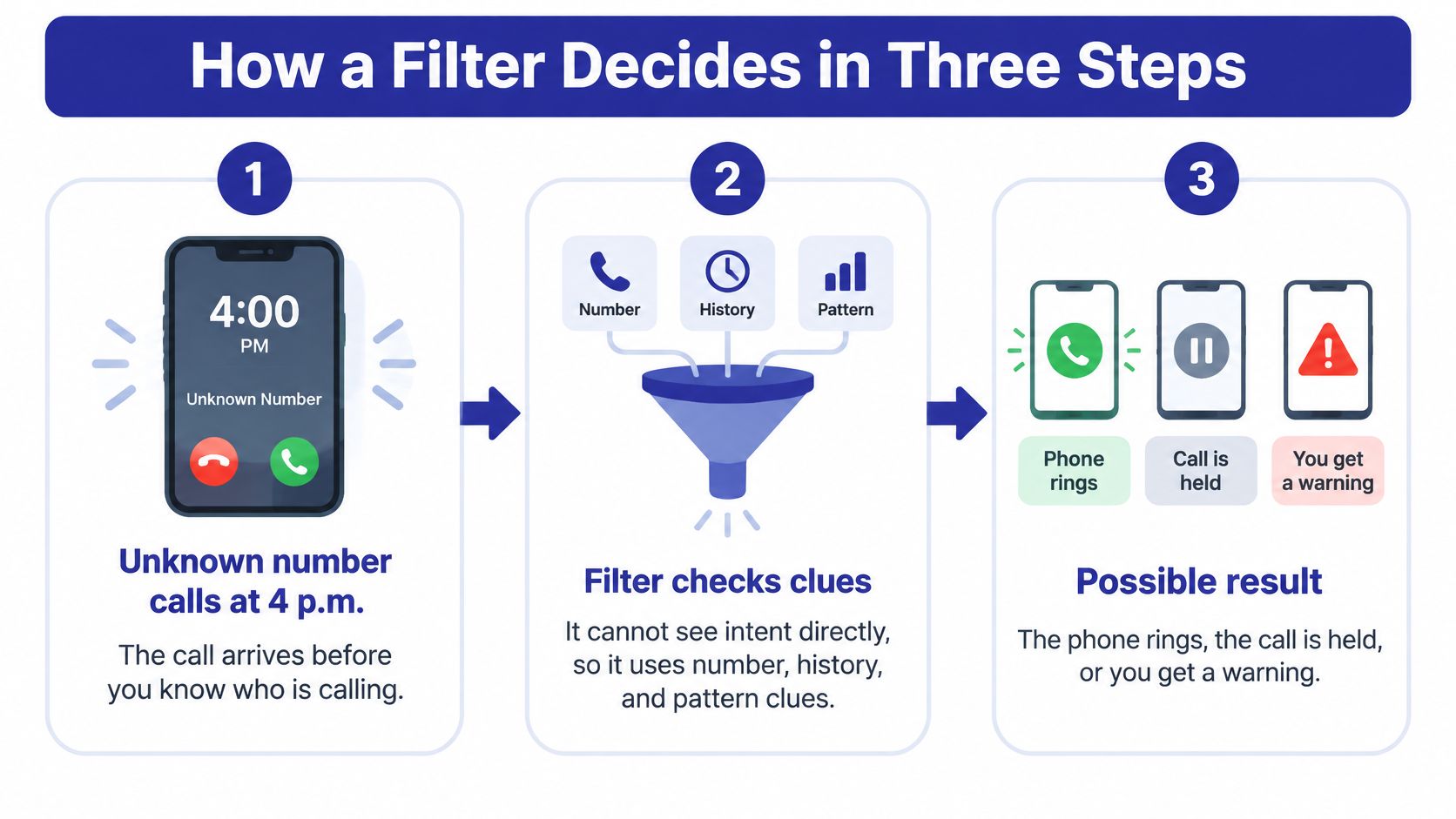
Think of an airport metal detector. It alarms on anything that looks suspicious. A second check then clears the belt buckle and stops the item that matters. A call filter works the same way, in three steps.
- Observe. It collects what it can see: caller ID, sender history, wording, links, and the conversation so far.
- Estimate. It turns those clues into a risk score, a number for how likely the item is unwanted.
- Apply a threshold. It compares that score with a cutoff and routes the item to allow, hold for review, warn, or block.
Four outcomes from one uncertain decision
Signal-detection theory treats this as a statistical decision under uncertainty. The system observes noisy input, estimates whether a real signal is present, and applies a threshold. That produces four outcomes, and the trade-off is unavoidable. Lowering the threshold catches more unwanted items and also flags more legitimate ones. Raising it cuts false alarms and lets more real threats through. Blocking a legitimate emergency call can hurt more than allowing one unwanted call. An email security system may block more aggressively when a malicious message costs more.
| Outcome | What Happened | Call Example | Text Example |
|---|---|---|---|
| Hit | Scam correctly caught | Robocall pitching a fake warranty is held back | Fake delivery alert moves to a spam folder |
| Miss | Scam let through | Impersonator on a fresh number reaches your phone | Phishing text with no obvious keyword lands in the inbox |
| False alarm | Legitimate message flagged | Doctor's office call from an unknown number is held | Real bank fraud alert is sent to quarantine |
| Correct rejection | Harmless item correctly left alone | Known family member rings through | Appointment reminder arrives normally |
The same logic shows up anywhere a business must allow, review, or stop an action. If you sell subscriptions, evaluating abuse prevention for subscription products is the same choice: a false block can cut off a paying customer, and a miss can let a stolen card through.
Name the outcome that worries you most. That answer, not a generic "strict" or "lenient" label, is what should set your filter.
The Threshold Trade-Off Behind Every Filter
The threshold is the single dial the whole system turns. Every filter has to set it somewhere, and there is no neutral position.
Turn the dial down and more scams are caught. More real calls and texts get flagged too. Turn it up and ordinary messages get through, along with more scams. A missed bank-impersonation call can drain savings. A blocked call from a doctor's office, or from an emergency number, can delay care that matters. Both errors are real, which is why the setting should follow the cost of each one rather than a preference for "strict" or "lenient."
Why a high accuracy number can still fail you
Accuracy flatters filters that handle ordinary mail well and still miss the rare, expensive scam. A review of email filtering says performance should be judged with precision and recall, not accuracy alone. Recall is how much unwanted content is intercepted. Precision is how often items labeled unwanted really are unwanted. Lowering the threshold generally improves recall and can raise false positives. Raising it protects legitimate traffic and misses more threats. In one comparison of spam filtering on social-media text, decision trees reached 97.02% accuracy and 98.83% precision, while logistic regression reached 99.89% recall. One model was better at staying quiet. The other was better at catching almost everything. Neither figure tells you which to deploy until you know what a miss costs.
Reported scores only mean something when the test corpus and its spam rate are known. A set that is mostly spam makes any filter look sharp, and a set with few scams hides misses. A receiver operating characteristic (ROC) curve plots how detection and false alarms move together as that dial turns, which is why two filters can look identical on a headline number and behave nothing alike on your traffic. If you want the mechanics of the score itself, how a risk score is built is the place to start.
Replace one cutoff with three tiers.
| Threshold Setting | Scams Caught | Legitimate Messages Flagged | Best Fit |
|---|---|---|---|
| Low threshold | Higher hit rate | More false alarms | Unknown callers asking for money or account details |
| High threshold | Fewer scams caught | Fewer false alarms | Contacts where a blocked call is costly, such as medical or emergency numbers |
| Staged, hold for review | Uncertain items caught for review | Few blocked outright | Mid-confidence messages that deserve a warning instead of silent deletion |
Practical rule: Ask which error would hurt you more, then check whether the setting matches that answer.
Database and Signature Filters and Their Blind Spots
The oldest filter is a list. Known bad numbers, domains, and links are checked before the phone rings or the inbox fills. It's fast, cheap to run, and it rarely flags a legitimate contact that isn't on the list. Signature matching adds a second pass. The filter recognizes a known phrase, a shortened link, or a repeated template. A catalog of words that can flag email spam is that kind of list: useful against copy that has already been reported, silent against a rewrite.
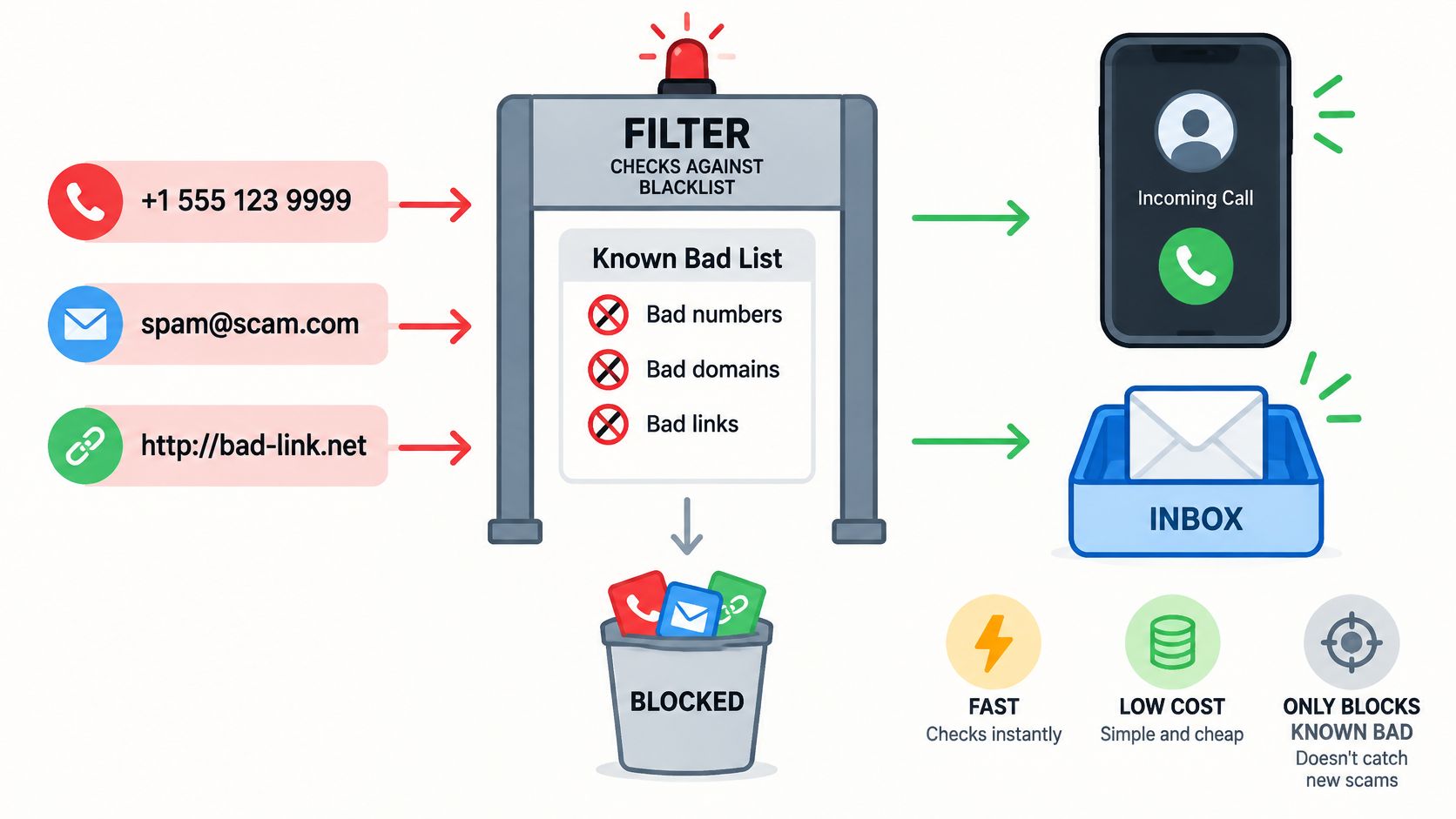
Where a fixed list falls behind
A fraudster who rotates to a fresh number every day stays one step ahead of the list. Someone who claims to be a bank or a government agency can use a number that has never been reported. Spoofing lets the caller display a trusted number, so the list entry can point at the wrong party. Change the number and tweak the wording, and the signature no longer matches, even though the behavior is identical.
That gap is large in current fraud reports. The Federal Trade Commission reported that consumers lost $3.5 billion to imposter scams in 2025, nearly three times the amount reported in 2020, and that nearly one in three fraud reports concerned an imposter scam. Business impersonators caused about $1 billion in reported losses. A database of known spam numbers can't keep up with a scam that keeps the story and changes the number.
| Approach | Basis for Decision | Strength | Weakness |
|---|---|---|---|
| Database and signature | Known bad numbers, domains, links and message templates | Fast, cheap, rarely flags unlisted real contacts | Misses new numbers, spoofed caller IDs and reworded scams |
| Real-time AI conversation analysis | Identity claims, urgency, payment and code requests, conversational context | Catches new numbers and convincing impersonation as the call unfolds | Needs more processing and can misread unusual legitimate calls |
Number reputation still matters as a first, cheap check. Reputation-based filtering is worth understanding for that reason. What it can't see is the claim, the rush, and the ask for money. Those are behavioral signals, not entries on a list.
How Real-Time AI Reads a Live Conversation
An unknown number rings. Before your phone rings, the screen answers and asks who is calling and why. You stay out of it until there is a reason to join.
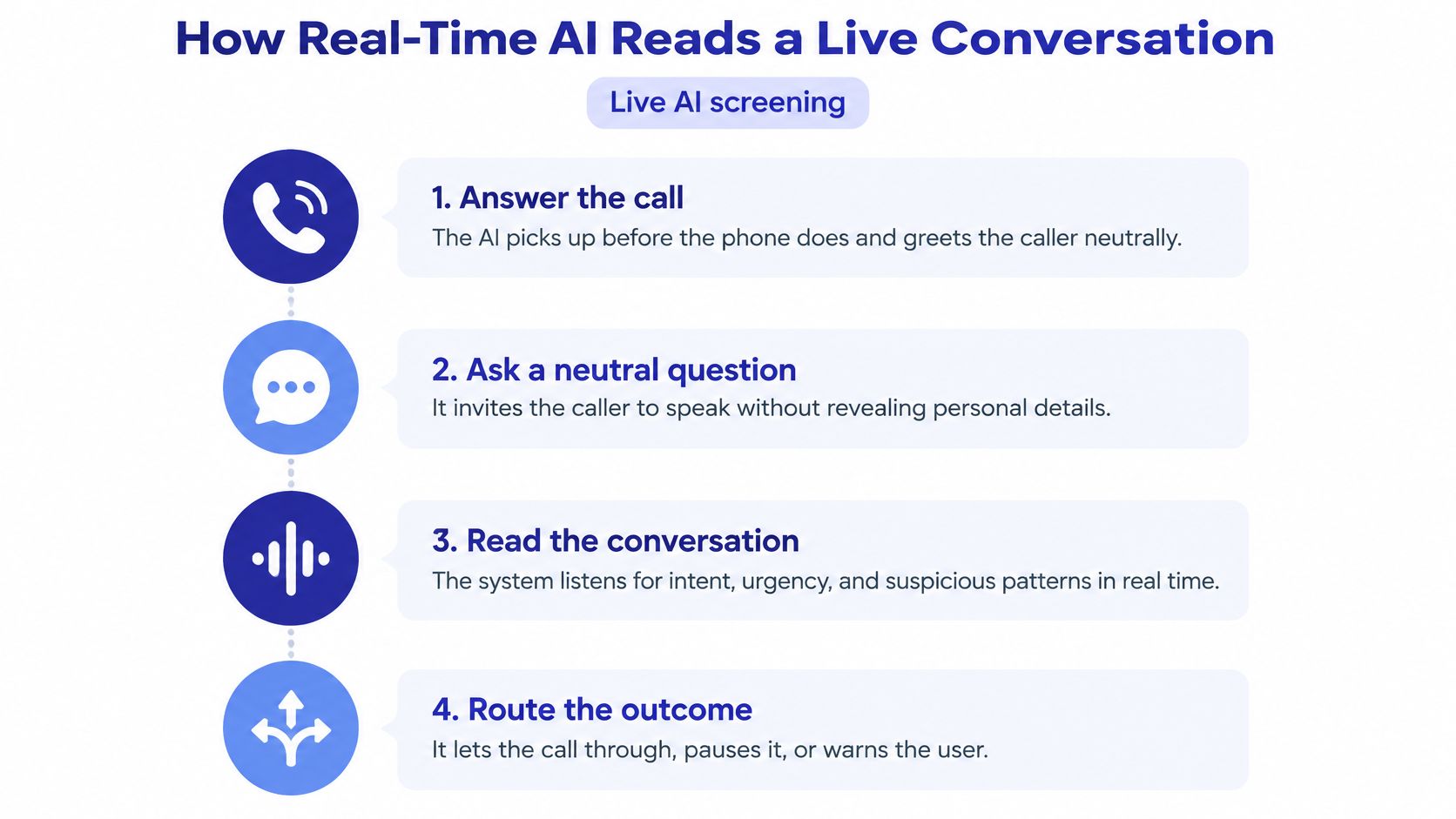
- Answer and greet. The screen picks up the call, and the conversation begins without you in it.
- Ask who and why. A real clinic, school, or delivery driver can usually say both in one sentence.
- Score the answers. Each reply updates the risk estimate. Signals include an identity that doesn't match the claimed organization, urgency, a push to move money, a demand for secrecy, or a request for a code or password.
- Route the call. Connect it, hold it, warn you, or block it.
A caller who gives a vague reason and then pushes for a transfer climbs toward a block. A caller who names a real appointment and passes the check stays low, and the phone rings. Every step carries the same trade-off the earlier thresholds did: set the bar too high and a genuine contractor lands in voicemail, set it too low and a patient impostor gets through.
From keyword odds to the meaning of a call
Jason Rennie's iFile, released in 1996, was the first known mail filter to use a Bayesian classifier. The first scholarly paper on Bayesian spam filtering followed in 1998. The method estimates the probability of "spam" or "threat" against the probability of "legitimate," then acts when the result crosses a threshold. It learns patterns instead of trusting only previously identified senders. Large language models extend that idea from keywords to the meaning of a live conversation. Quality still depends on training data, the features chosen, and calibration, because an unusual real call can resemble an attack, and a polished attack can imitate a normal one.
Gini answers calls from unknown numbers, asks who is calling and why, and rings you through when the call is real. Email runs on a separate trigger: the inbox is checked only once you connect it, so nothing is read from an account you haven't linked. On a call that should reach you, you hear a brief handoff, not an interrogation. The caller has already given a name and a reason, and your phone rings with that context attached.
What the listener scores, line by line, is conversation analysis: claims, pressure, and requests, not a famous spam phrase.
A short demo of that handoff is easier to trust once you've heard the pacing.
Filtering Calls, Texts and Email Differently
Each channel leaks different clues, so a sensible filter checks different things. Reading them as three separate problems is how cross-channel scams get through.
| Channel | Signals Checked | Common Scam | Control to Use |
|---|---|---|---|
| Phone calls | Caller ID, call pattern, conversation content | Impersonated bank or government agency | Let unknown callers be screened before the phone rings |
| Text messages | Links, sender identity, urgent wording | Fake delivery alert or prize link | Do not tap links; confirm through the official app or website |
| Sender domain, links, payment requests | Phishing and business email compromise | Verify any payment change by calling a known number |
The scam that changes channels midstream
A text tells you to call a "support" number. An email is followed by a spoofed phone call that repeats the same story. If each channel is scored alone, neither piece looks complete. Together they do.
The FBI's 2025 Internet Crime Report identified phishing and spoofing among the most frequently reported cyber-enabled crimes. It recorded about 453,000 cyber-enabled fraud complaints with reported losses exceeding $17.7 billion. Artificial-intelligence-related complaints generated nearly $893 million in losses across 22,364 complaints. Attackers can use generated wording and spoofed identities to slip past a keyword list or a reputation list. Matching a new message against earlier patterns is a similarity problem, and the vector data fundamentals from tekRESCUE are a plain explanation of how those comparisons get stored and searched.
On email, the useful checks are the sender domain, the links, and any urgent payment request. We check a customer's email only if that inbox is connected. Supported mail includes Gmail, Outlook, and Yahoo. On texts, a suspicious message can be held for review instead of deleted, so a real fraud alert from your bank isn't gone forever.
Treat any request for payment, a code, or secrecy as a signal, whichever app it arrived in.
Limits of Filtering and Recovering a Held Message
Filtering reduces unwanted contact. It cannot identify every scam, and it cannot guarantee that every caller is safe. We don't block every unwanted call. In one customer's account, a small number got through, mostly in the first weeks. That isn't a slogan. It's the limit you should plan around.
Good systems don't pretend the choice is yes or no. High-confidence threats are blocked. Uncertain items are held or shown with a warning. Trusted contacts pass. The FCC says providers may block calls that are highly likely to be illegal and, when you opt in, calls from numbers outside a contact list. It also requires providers to block certain illegal robotexts. Analytics-based blocking makes a wrong hold more likely, which is why you need a way to see the decision and reverse it.
When a real call is the one that gets held
This matters most if you, or a parent, depend on unfamiliar numbers. A new doctor's line, a pharmacy, a bank fraud desk, or a caregiver may not be in the contact list. FTC analysis published in 2025 found that reports from people aged 60 and over who lost at least $10,000 to impersonation scams increased more than fourfold from 2020 to 2024. Reported losses above $100,000 rose eightfold, from $55 million in 2020 to $445 million in 2024. A tighter screen is reasonable. A silent delete is not.
If something real was held, recover it in this order.
- Check the held or quarantine folder before you assume the message is gone.
- Confirm the sender through a number or site you already trust, not through a link in the message.
- Add a real contact to the trusted list so the next call or text passes.
- Report the misclassification so the system can learn from that specific miss.
A held real message is a tuning problem. It is not proof that the filter failed, and it is not a reason to turn protection off.
Set Up Layered Protection This Week
You don't need a new theory. You need a setup that matches the error you fear most.
- List the channels that matter for you or for a relative: calls, texts, email, or all three.
- Connect the inbox if email is part of the risk. Scanning doesn't run until that connection exists.
- Set trusted contacts so family, doctors, and banks pass without delay. Every plan includes an allow list, where trusted contacts skip screening, and a block list for callers you never want again.
- Pick the tier that matches your biggest fear. Block high-confidence scams. Hold mid-confidence messages with a warning. Pass trusted contacts.
- Review the activity history once a week. See what was held, and fix any real message that landed in the wrong place.
Family coverage gives each person their own screening under one subscription: calls on their phone, their email watched, and their texts filtered. You can watch a live demo of a spam call being blocked in the browser before you sign up.
Gini Help is one way to put those steps on a phone. Download it on Google Play or the App Store. The best setting is still the one that matches the cost of the mistake you most want to avoid.
Gini Help screens unknown calls before your phone rings, holds suspicious texts for review, and flags risky email once you connect an inbox. That is filtering with a visible hold, not a silent blocklist, so a real clinic call can be recovered and a fresh impersonator doesn't get a free pass. Visit Gini Help to watch a live demo and set the tier that matches the error you fear most.