Phone Scam Protection: What to Do in 2026
By Josh C.
Older adults reported approximately $2.4 billion in fraud losses to the Federal Trade Commission in 2024, up from about $600 million in 2020, according to the FTC press release on its annual older adults report. That rise doesn't mean you should stop answering the phone. It means the first conversation shouldn't happen with you.
Good phone scam protection follows one order. Verify first, then connect. Let screening ask who is calling and why. A doctor, delivery driver, or grandchild can answer that question. A scammer who needs you startled and talking usually can't get the same advantage from a screening layer. You stay reachable without giving a stranger your voice, your name, or a chance to rush you.
What to Do the Moment an Unknown Call Hits
Don't decide whether a caller sounds honest. Decide where the conversation happens. If you don't recognize the number, let screening or voicemail take it, then read or listen to the reason at your own pace.
That pause removes the scammer's main tool, which is speed. A real clinic can leave an appointment time. A real bank can wait for you to call the number printed on your card. A caller who insists you must stay on this exact call is telling you something important.
Your first move for the calls people actually get
| Contact | First move | Never do |
|---|---|---|
| Unknown number | Let screening or voicemail take it | Answer and confirm your name, address, or account |
| Bank, IRS, Medicare, or tech support | Hang up and call the number on your card, statement, or the agency site | Stay on the line or use the callback number they give |
| Request for a verification code | Stop; assume the code is the target | Read any texted or emailed code aloud |
| Relative or friend in trouble | Hang up and call that person on a number you already saved | Wire money, buy gift cards, or send crypto |
| Prize, toll, or delivery text | Open the real app or account yourself | Tap the link or call the number in the message |
Say a voice claims your bank account is frozen. You don't argue, and you don't ask for a badge number to test them. You hang up, find your debit card, and call the number on the back. If the warning was real, the bank will know. If it wasn't, you've lost a minute, not your savings.
Say a text says a package can't be delivered. Don't tap it. Open the store or carrier app you already use and check the order there. You're checking the same claim, but on a door you opened yourself.
Practical rule: Verify on a number or site you chose, then talk. Never verify using contact details the caller gave you.
Why the pause matters so much for older adults
The FTC Older Adults Report for 2024 recorded more than 6.5 million consumer reports in 2024, including over 2.6 million fraud reports, and 421,031 fraud reports from people aged 60 and older, approximately 36% of fraud reports that included age information. Older adults reported nearly $2.4 billion in total fraud losses in 2024, up from about $1.9 billion in 2023.
Phone contact hit the oldest adults hardest. Adults aged 80 and above reported substantially more losses from scams that began with a phone call than from other contact methods. Among older adults who lost at least $10,000 to business or government impersonation scams in 2024, 41% identified a phone call as the initial contact, compared with 15% for online advertisements or pop-ups and 13% for email.
There's a reassuring number in the same picture. 74% of older-adult fraud reports did not indicate a financial loss. Many attempts end when someone pauses, hangs up, or checks somewhere else. You're not trying to outtalk a professional liar. You're moving the first exchange off your own line, so a legitimate caller can still identify themselves and a suspicious one never reaches you mid-sentence.
If you answer by mistake, you haven't failed. Say, "I'll call back on the number I have," and hang up. You don't owe a stranger politeness, proof, or an explanation.
How to Set Call Text and Email Screening
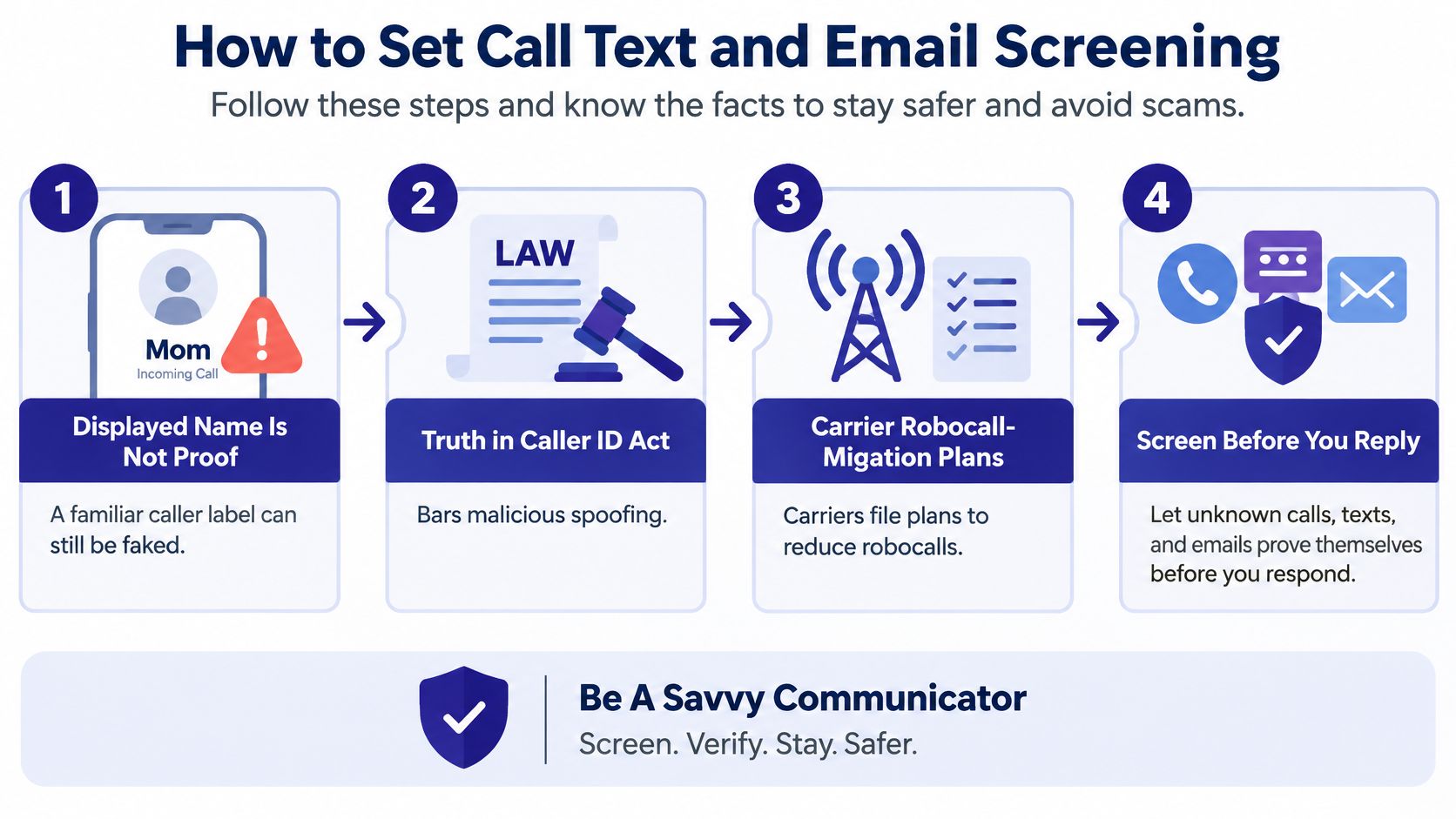
A familiar name on your screen isn't proof. The FCC guidance on unwanted communications explains that Section 227(e) of the Truth in Caller ID Act prohibits causing a false or misleading caller-ID display when it's done with intent to defraud, cause harm, or wrongfully obtain something of value, and voice-service providers must certify their illegal-robocall mitigation efforts in the Robocall Mitigation Database. Those rules matter, but they don't make every displayed number trustworthy.
That's why screening has to check intent, not just a label. The setup below takes a few minutes per device. Do it once, then teach everyone in the household what a silenced call means.
The flow below shows the order to think in before you reply to anything unfamiliar.
Tap by tap setup
- On iPhone, silence unknown callers. Open Settings, then Phone, then turn on Silence Unknown Callers. Saved contacts and numbers you've recently called still ring. Others go to voicemail, where a pharmacy or clinic can still leave details.
- On Android, turn on spam protection. Open the Phone app and its spam and caller-ID settings. On a Pixel, turn on Call Screen so the phone asks who is calling before you speak. You read the answer and decide.
- Filter texts from unknown senders. On iPhone Messages, turn on Filter Unknown Senders. In Google Messages, turn on spam protection. Filtered texts sit in a separate folder you can check later, so a real appointment code isn't deleted, but a fake delivery link isn't in your main inbox either.
- Leave email warnings on. In Gmail or Outlook, keep scam and phishing warnings enabled and don't turn off labels for external senders. Those banners are easy to ignore once you're used to them, so treat any urgent payment request as a stop sign even without a banner.
- Save the numbers you'll trust for callbacks. Add your bank, card issuer, doctor, pharmacy, utility, and closest family members from statements, cards, and official letters, not from a caller's message. When in doubt, you call only these.
- Check what screening held, once a day. Pick a calm time, perhaps after lunch, and review voicemail and filtered texts. A silenced call isn't a deleted call. It's a call that waited until you were ready.
The same job on each platform
| Job | iPhone | Android | What still gets through |
|---|---|---|---|
| Stop unknown rings | Silence Unknown Callers under Settings, Phone | Spam protection in the Phone app; Call Screen on Pixel | Saved contacts, recent calls you placed, and voicemail |
| Hold scam texts | Filter Unknown Senders in Messages | Spam protection in Google Messages | Messages from known contacts in the main inbox |
| See intent first | Live Voicemail on supported models | Call Screen asks who is calling | You decide after you hear or read the reason |
| Do not trust the label | Any caller ID can be spoofed | Any caller ID can be spoofed | Only a callback on a number you already saved |
| Watch the inbox | Built-in Mail scam cues plus a connected scanner | Same, if the inbox is linked | Mail you open yourself from a known sender |
A common worry is missing a doctor who calls from a switchboard number you haven't saved. Screening handles that better than blocking because the caller can state the clinic name and reason, or leave voicemail. Save the clinic's outgoing number after that first legitimate contact, and it'll ring normally next time.
Screening cuts noise. It can't promise every remaining caller is safe. A person can still get through and tell a convincing story, which is why the callback habit still matters after the settings are on.
Signals That a Live Call Is Turning into a Scam
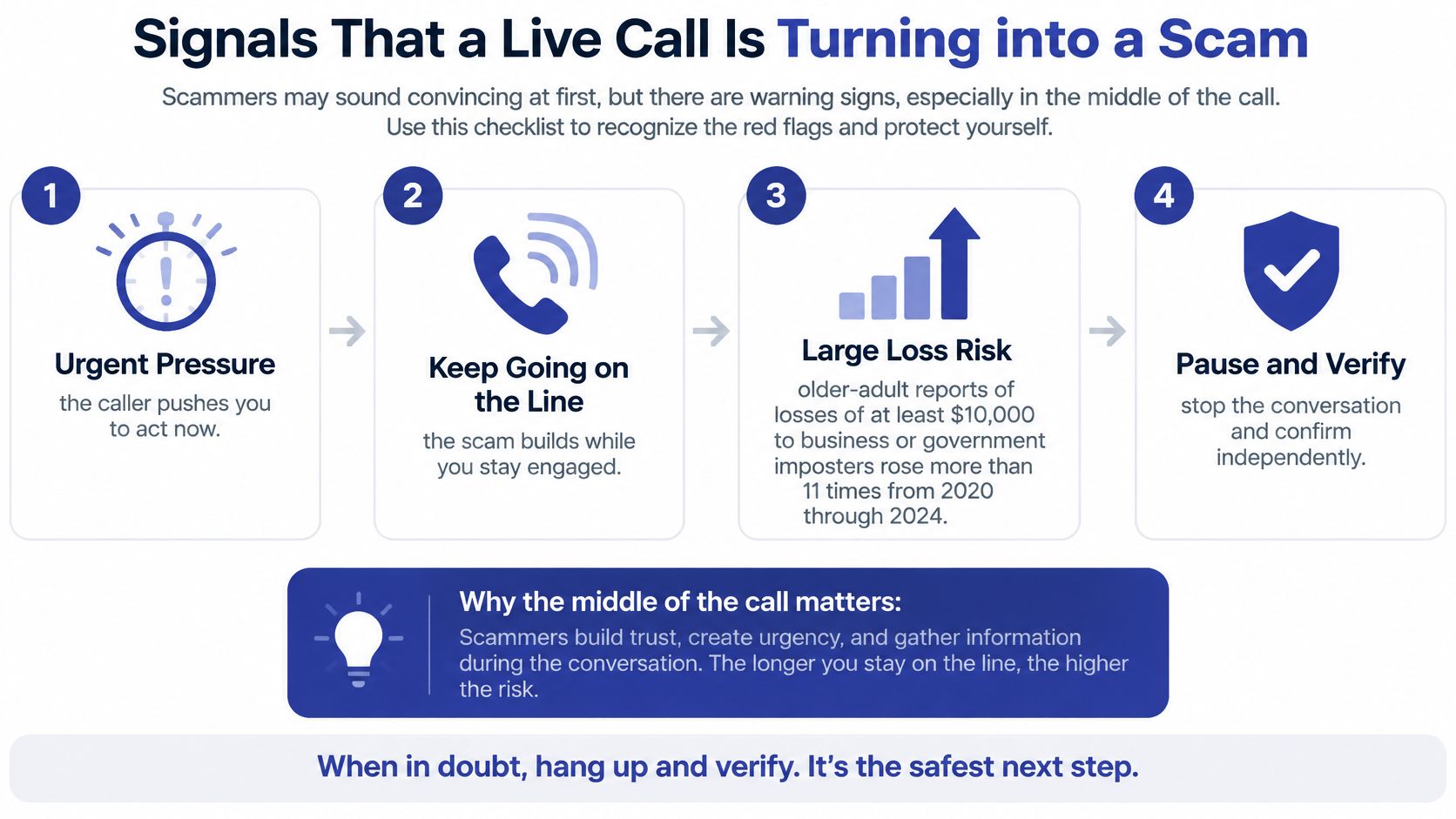
A caller asks for a code, account details, or an immediate payment. Those requests are signals to stop and check before you act. A caller's tone or displayed number can't prove who they are. Learn how caller ID spoofing works, and treat the number on your screen as a clue, not proof.
Scammers often try to keep you on the line so you can't check the story with someone else. Your task is simpler: notice when the caller shifts from giving information to demanding action, then end the call and verify the request through a number you already trust.
Lines that mean hang up
- “Read me the code we just sent.” A verification code can help someone access your account. Don't share it with a caller.
- “Confirm your account and routing number.” Don't give financial details to someone who called you unexpectedly.
- “Your account is frozen” or “you'll be arrested.” Threats can make it hard to think clearly. Hang up and check the claim independently.
- “Move money to a safe account.” Don't transfer money or buy gift cards or cryptocurrency because a caller tells you to.
- “Don't call your bank or your family.” Secrecy is a reason to stop. End the call and talk to someone you trust.
Code. Payment. Urgent action. If a caller asks for any of these, pause and verify before acting.
Suppose someone claiming to represent Medicare asks you to confirm details to keep your coverage active. Say, “I'll call the number on my card.” If the caller pressures or threatens you to keep you on the line, hang up. Then contact Medicare using a number you already trust.
Gini Help's Live Scam Detection listens during eligible calls from unknown numbers and warns you if a caller uses tactics such as asking for a verification code or account number, or pressuring you to act right away. A warning is a reason to pause, not a verdict. Hang up and independently check the request before taking action.
The short video below shows how pressure builds during a live scam call and where to break it.
What the loss trend looks like
| Measure | 2020 | 2024 |
|---|---|---|
| Older-adult fraud losses reported to FTC | roughly $600 million | nearly $2.4 billion |
These totals give a sense of the scale, but they don't tell you whether a particular caller is legitimate. Screening can decide whether an unknown caller reaches you, so medical, family, and delivery calls can be screened before the first exchange happens on your own line. Screening can reduce unwanted calls, but it can't identify every scam or guarantee every caller is safe. Verify important requests independently.
What to Do After You Shared Money or a Code
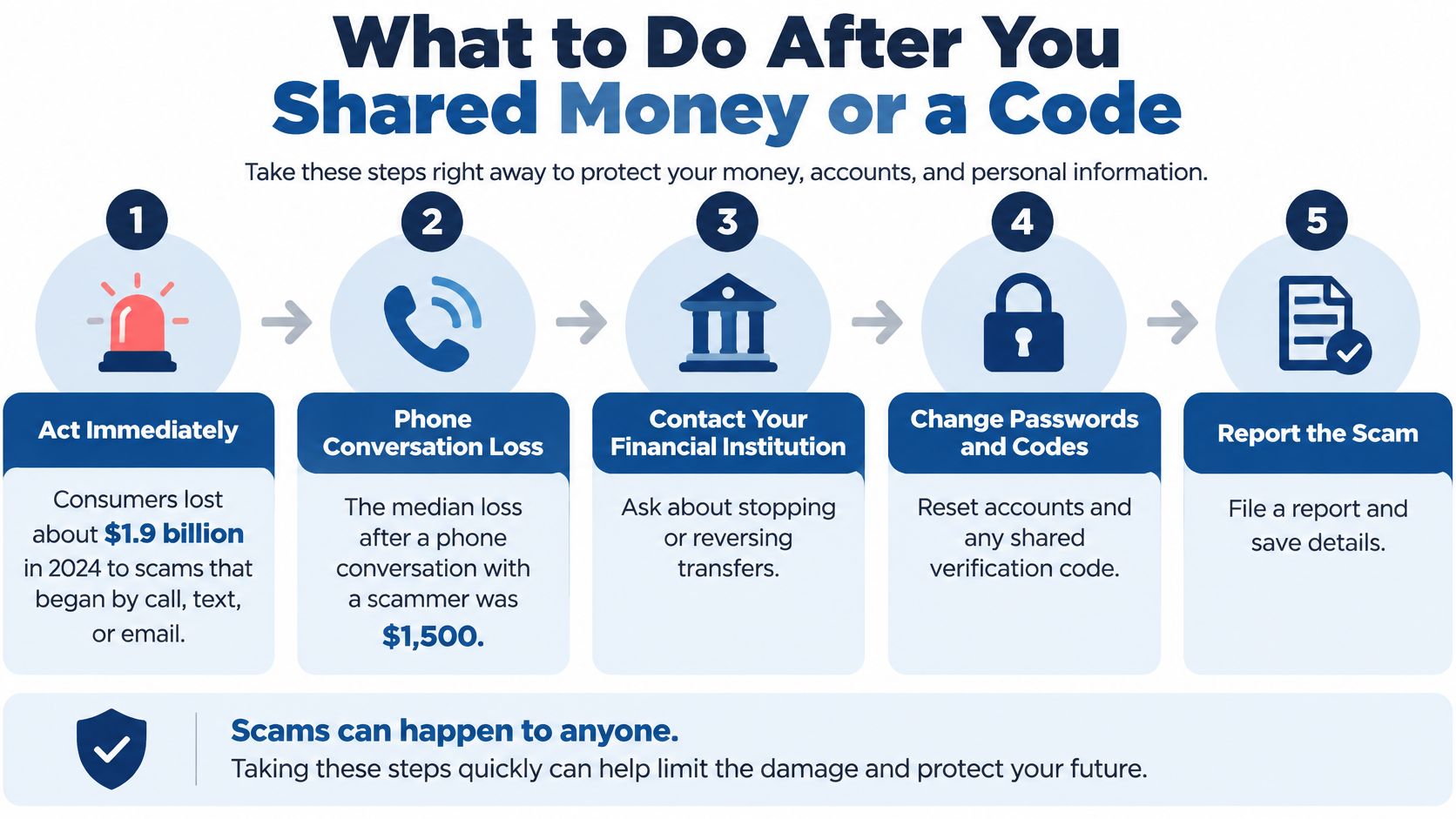
Act the same day, and don't wait because you feel embarrassed. The FTC summary of top scams in 2024 reported that consumers lost approximately $1.9 billion in 2024 to scams initiated through calls, texts, or emails, and the median loss for people who interacted with a scammer by phone was $1,500. The FTC also reported that people aged 60 and above lost more than $159 million to tech-support scams in 2024, and they were more than five times as likely as adults aged 18 to 59 to report losing money to such scams in 2023.
A lot of careful people are in those numbers. Imposter scams work because the caller poses as a bank, agency, tech company, or relative and gives you no quiet moment to think. Speed now matters more than replaying how it happened.
These steps are ordered by what can still stop money or lock an account.
Do these steps in order
- Hang up and send nothing else. Don't stay on to demand a refund or explain that you've figured it out. Every extra minute gives the caller another chance to redirect you.
- If you read a code aloud, secure that account. From a device you control, change the password and sign out other sessions if the account offers that option. Do the same anywhere you reused that password.
- Call the bank, card issuer, or transfer service. Use the number on your card or statement and ask for a fraud hold. Say exactly how money left, whether by wire, gift card, crypto, or payment app, because the recovery path differs for each.
- If you gave remote access, disconnect that computer. Turn off Wi-Fi or unplug the network cable before the next login. Don't use it for banking until someone you trust has checked it.
- Tell one trusted family member today. Say what you shared and what you've already called. A second person can sit with you through hold music, write down reference numbers, and notice follow-up scams that pretend to be recovery help.
- Report it and keep the details. File at ReportFraud.ftc.gov and keep the number the impostor used, plus dates, amounts, and any names they gave. Saving a screenshot of a text helps, but don't tap its links to investigate.
- Protect your credit if personal data was shared. Place a fraud alert or credit freeze if you gave identifying information that could open accounts in your name.
Steps one through five are same-day actions. Reporting and credit protection can follow over the next few days if you're exhausted, but don't let them drift indefinitely.
For a fuller walkthrough you can keep open while you make calls, see our step-by-step guide on what to do after being scammed. Print it if paper feels calmer than switching between screens.
Some scams can still get through screening tools, so important requests should be independently verified even after a loss. That isn't a judgment on the person who answered. Scammers rotate numbers quickly, and a live, well-rehearsed story can reach someone on a tired or distracted day. What protects you next time is a faster exit, not shame about this time.
Habits That Keep Caregivers and Households Safer
68% of U.S. adults reported receiving scam phone calls at least weekly in 2025, according to a Pew Research Center survey. A routine is easier to remember than a warning you heard once. Agree on a few household steps while everyone is calm, so each person knows what to do when a call feels unusual.
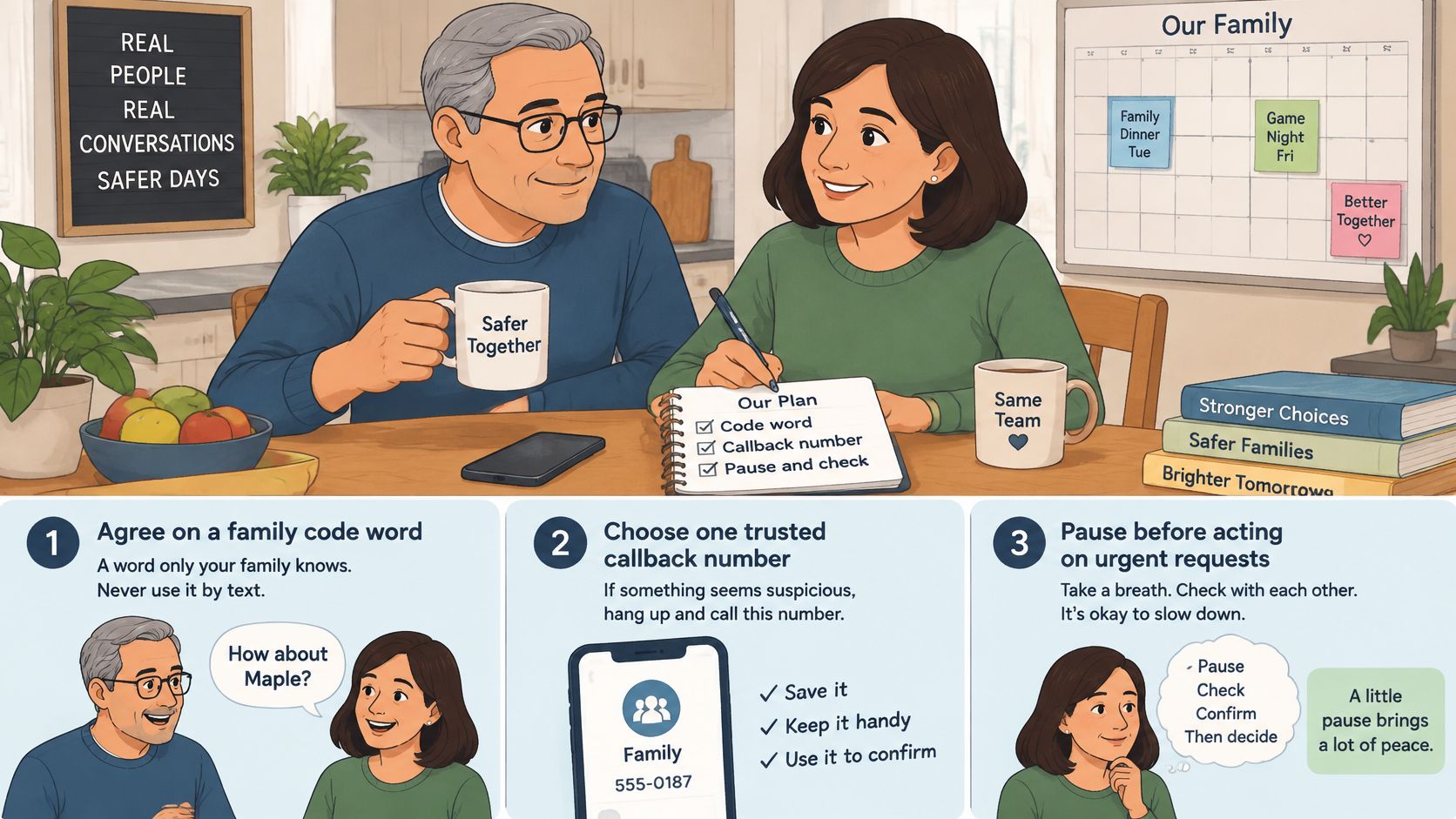
The photo below captures the right setting for this work, a calm planning conversation, not a lecture after a scare.
Set these up this week
- Agree on a family code word. Choose a word you would not normally use in a text, such as the name of a childhood street. If someone calls claiming a grandchild is in trouble, ask for the word. If they cannot provide it, do not send money. Call the grandchild using their saved number.
- Choose one callback owner. Decide who will help return calls about bank, Medicare, and utility matters. For example, if your mother receives a billing threat, she can hang up and call you. Then call the utility together using the number on a paper bill.
- Set a time to review screened calls. A short check on Sunday or during a regular visit can help you spot a legitimate clinic message. Save real callers' numbers as you confirm them.
- Agree that new helpers must be checked. Someone posing as a lawyer, courier, or hospital worker may claim a relative asked for help. Do not move money based on that call. Contact the relative through a saved number first.
- Keep the bank's official number on paper. Copy it from the back of the bank card and keep it near the phone. That way, no one has to search for it while under pressure.
Household routines should also account for why people avoid unfamiliar calls. A survey of more than 12,000 consumers across six countries found that 86% do not answer unfamiliar calls, while 41% let them go to voicemail and 28% reject them, according to Telecom Reseller's coverage of consumer trust. Avoiding every unknown number can mean missing calls from doctors, delivery services, schools, or employers.
Screening offers another option: an unknown caller is asked who they are before the call reaches the person. That helps preserve access to legitimate callers while keeping the first exchange off your loved one's own line. Put the code word, callback owner, and check-in time in a written family protection plan everyone can find.
Tools can miss a call, so agree on how to respond if someone answers and feels unsure. Family members can also talk about support needs, including when to start the in-home care conversation. A calm, shared plan gives everyone a place to start.
Set Up Screening and Get Help
Start with what your phone already offers, because it's free and immediate. Turn on Silence Unknown Callers on iPhone, or spam protection and Call Screen on Android. Filter unknown text senders. Save your trusted callback numbers. For many households, that alone turns a dozen daily interruptions into a short list you review when you choose.
Then notice what built-in filters still ask of you. Many rely on databases of known spam numbers, and scammers evade those lists by rotating numbers. A filter can label a call as likely spam, but it often can't ask a new caller who they are and why they're calling. That first question is where verify first, then connect becomes practical.
Add a screening layer when unknown calls remain the problem
When unwanted calls and scam protection are the main concern, Gini Help adds a layer before your phone rings. Unlike call blockers that only check a database of known spam numbers, it answers unknown calls itself, asks who is calling and why, and only lets real people through to your phone. A medical office or family member calling from a new number can state their reason and connect. Spam callers who won't identify themselves don't ring you at all.
That distinction matters for older adults who can't ignore every unfamiliar number. You're not choosing between safety and access. The screening layer holds the first conversation, withholds your attention and personal details, and passes through callers who give a legitimate reason according to your setup.
On eligible plans, Live Scam Detection is available with the required setup. It keeps listening after a call you answered and warns you during the call if it turns dangerous, such as when someone asks for a verification code or an account number or pressures you to act right now. Treat that warning the same way you'd treat your own unease. It's a reason to pause and check, not proof by itself.
Be clear about the limit. Screening reduces unwanted calls but cannot identify every scam or guarantee that every caller is safe. Features depend on the plan you select, and text filtering and warnings depend on your phone platform. Your callback rule still applies to any request involving money, codes, or passwords, no matter how a caller reached you.
Put it on the phone that gets the calls
Download the app on the device that receives the unknown calls, not just on a caregiver's phone. You can get it on Google Play or from the App Store. Set it up together if you're helping a parent, then make a test call from an unsaved number so everyone sees what screening sounds like and what a passed-through call looks like.
Finish with the paper backup. Write the bank's real number on a card and keep it beside the phone or charging spot. Add the family callback owner's name under it. Technology handles the first ring, and that card handles the anxious moment when a person needs to know exactly who to call next.
You don't have to do everything today. Turn on one phone setting, save three trusted numbers, and agree on the hang-up phrase. Each layer you add makes the next scam call less likely to reach a person, and easier to leave if it does.
If unknown callers are still reaching you or someone you love, Gini Help can answer and screen them before your phone rings, so legitimate medical, family, and delivery calls connect while suspected scams are stopped. Visit us to set up screening on the phone that needs it, learn how live warnings work on eligible plans, and put verify first, then connect into practice today.