Phishing Vishing and Smishing Are Examples: 2026 Guide
By Josh C.
Phishing, vishing, and smishing are examples of the same social-engineering trick delivered by email, phone call, and text message, and the communication channel is what separates them. No matter which screen lights up, the person contacting you wants the same outcome: to push you into sharing a password, reading out a verification code, or approving a payment before you pause to check.
Maybe your morning started with a text warning that a parcel couldn't be delivered without a small fee. Ten minutes later, an email claiming to come from your bank asks you to verify a suspicious charge, and by lunch your phone rings with a caller ID matching a local branch. Most advice treats those moments as three separate cyber threats, yet modern scammers routinely run them as one coordinated play. Learning how the same con changes shape across your inbox, voicemail, and messaging app makes spotting it much simpler.
Phishing, Vishing and Smishing at a Glance
At their core, phishing, vishing, and smishing are examples of social engineering, which means manipulating a person into taking an unsafe action such as entering a password, authorizing a wire transfer, or sharing a one-time security code. The delivery channel is the only structural boundary between the three terms. Phishing travels through email, social media, and cloned websites; vishing (voice phishing) relies on live phone calls, voicemails, and AI-generated audio; and smishing (SMS phishing) arrives through text messages and mobile chat apps.
Across every channel, the attacker's playbook stays identical: manufacture urgency, impersonate a trusted authority, and rush you past your usual caution. Seeing the three formats side by side makes that overlap obvious.
| Type | Main channel | Typical lure | Example |
|---|---|---|---|
| Phishing | Email, websites, social media, fake login pages | Account alert, invoice, password reset | Fake bank email linking to a copy of the login page |
| Vishing | Phone calls, voicemail, AI-generated voices | Fraud department call, tech support, government impersonation | Caller says your card is compromised and asks for the one-time code |
| Smishing | SMS, iMessage, messaging apps | Delivery fee, prize, toll notice, locked account | Text saying a parcel is held until a small fee is paid through a link |
Why Criminals Move Across Channels
Attackers don't pick one favorite medium and stay there. According to the Anti-Phishing Working Group Q4 2024 trends report, global phishing volume reached 963,994 attacks in Q1 2024, 877,536 in Q2, and 932,923 in Q3, while vishing incidents jumped by more than 28% and smishing incidents climbed by more than 22% from Q2 to Q3 2024. In the first quarter alone, social-media platforms accounted for 37.4% of observed phishing attacks and banking-related lures accounted for 9.8%, confirming that both everyday accounts and financial logins stay under steady fire.
The financial toll shows why treating these alerts as harmless spam is risky. The FBI's 2025 Internet Crime Report announcement logged 1,008,597 cyber-enabled crime complaints and nearly $21 billion in reported losses, with phishing and spoofing ranking among the most frequently reported categories. Organizations looking to stop phishing attacks at work, as CloudOrbis Inc. outlines in its prevention guidance, face the same reality households do: guarding email alone leaves phones and text threads wide open.
First rule of defense: Identify the channel first so you know what tricks fit that screen, then judge the request itself rather than the logo or caller ID.
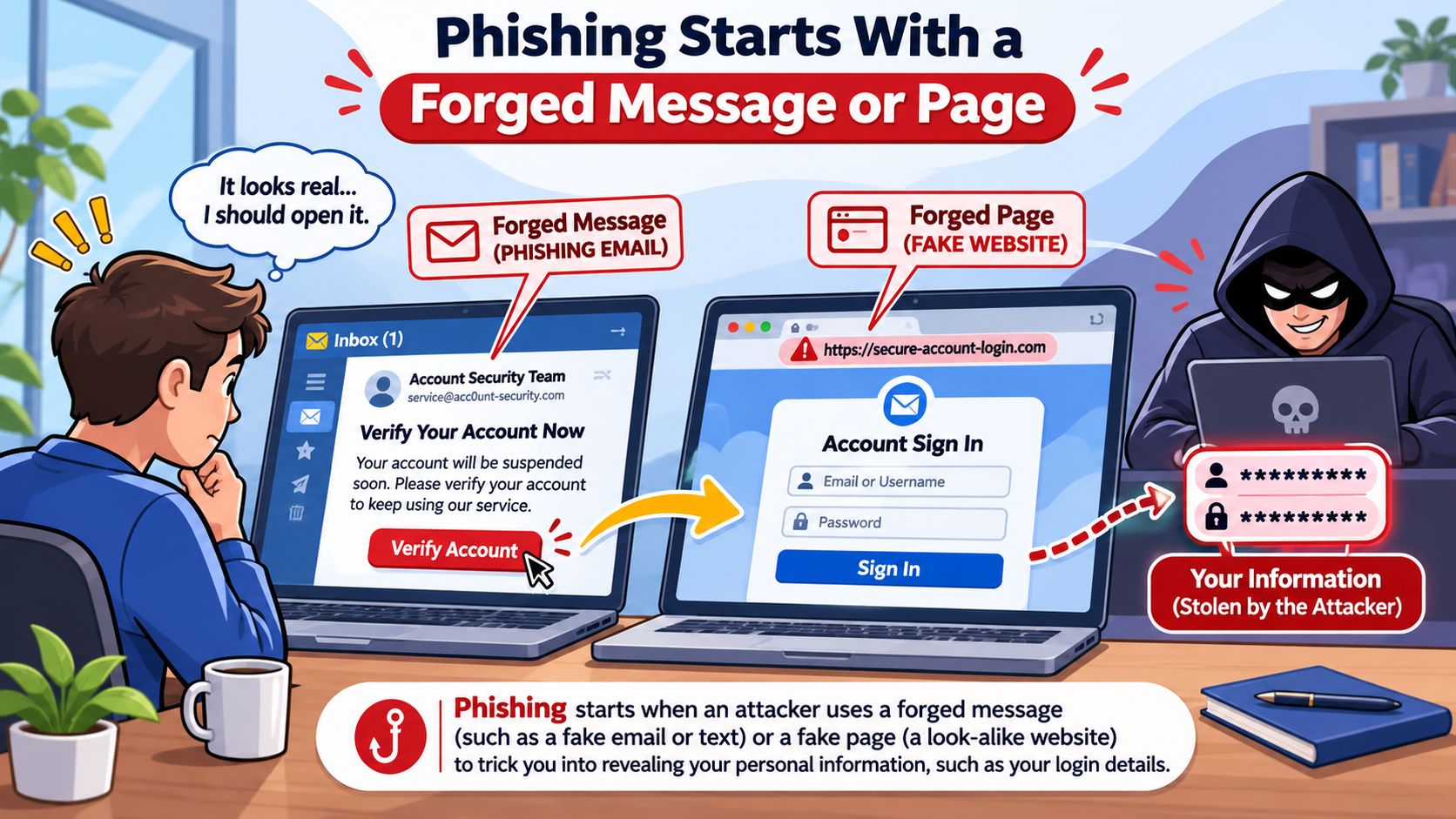
Phishing Starts With a Forged Message or Page
Think of a phishing email as a forged letter printed on real-looking letterhead. It carries the right bank colors, mimics the exact tone of a fraud alert, and gives you a deadline that feels impossible to ignore.
Say you open your inbox at 8:15 a.m. to an urgent alert claiming a large debit card purchase was just approved in another city. A blue "Cancel Transaction" button sits right beneath the warning. Clicking it opens a web page that looks identical to your bank's sign-in portal, complete with the familiar font and padlock icon in the browser bar.
When you type your username and password into that fake page, the site doesn't reject them. Instead, the criminal's server relays your credentials to your real bank in the background, triggering a real one-time verification code to your phone. The fake page then asks you to enter that code to "confirm cancellation," handing the attacker both your password and your second factor in real time while you stare at a spinning loading wheel.
Two Other Email Traps That Catch Careful Readers
Bank alerts aren't the only disguises in an inbox, and phishing paired with convincing pretexts remains a leading entry point for real-world account takeovers. Two other variations catch people who think they'd never click a banking warning:
- Fake document-sharing notices: An email mimicking Microsoft OneDrive, Google Drive, or DocuSign tells you a coworker or attorney shared a contract. Clicking "Open Document" sends you to a look-alike login form designed to harvest your email password so the attacker can read your inbox and reset other accounts.
- Altered supplier invoices: In workplaces and small businesses, an attacker either spoofs a vendor's domain or breaks into an existing email thread and sends a fresh PDF invoice with updated routing numbers. Because the project name and dollar figure match real work, accounting teams often pay before realizing the bank details changed.
Three Telltale Signs to Check Before You Click
Learning how to detect fake emails comes down to inspecting the mechanics behind the message rather than trusting its design.
- A sender address that misses the authentic domain: A display name can say "Chase Fraud Desk," yet tapping the sender field may reveal a Gmail address or a look-alike domain such as
chase-alerts-verify.com. - A link destination that disagrees with its label: Hovering your mouse over a button on a computer (or pressing and holding a link on a phone without opening it) reveals the actual web address waiting underneath.
- A demand to sign in through an emailed link: Genuine banks and cloud services let you handle alerts by closing the email, opening your own bookmark or official mobile app, and checking notifications inside your account.
Vishing Turns a Phone Call Into a Live Script
If phishing is a forged letter, a vishing caller is an actor reading from a live script who rewrites the next line the second you push back. An email sits still while you examine it, giving you time to check the sender field. A live voice fills the silence, sounds calm and sympathetic, and steers you away from every doubt you raise.
Consider how a typical bank impersonation call unfolds. Your phone rings, the display shows your bank's name, and a polite representative says someone just tried to wire money from your checking account. You hesitate and ask why they can't block the transfer themselves.
The caller never loses patience. They explain that federal security rules require your verbal confirmation before locking the account, and they tell you a six-digit code is arriving by text right now. Read it back, they promise, and the charge disappears. In reality, that code is your bank's password-reset prompt, and reading it aloud hands over control of your account while you believe you're protecting it.
With AI-generated voice cloning, callers can even mimic a familiar executive, a tech-support supervisor, or a relative's cadence after scraping a short clip of public audio.
How Voice Scams Target Both Homes and Offices
Personal banking calls are only one branch of vishing. Impersonated tech-support callers claim your Windows PC or Mac is broadcasting malware, then talk you into installing legitimate remote-access software such as AnyDesk or TeamViewer so they can "clean the machine" while opening your browser passwords. Government impersonators take the opposite tone, posing as tax officials or court clerks who threaten immediate arrest or frozen accounts unless you settle a fake fine over the phone.
Businesses face equally targeted voice campaigns. In a September 2025 FBI cybersecurity advisory, federal investigators warned that threat groups tracked as UNC6040 and UNC6395 had used voice phishing since October 2024 to compromise corporate Salesforce environments. Rather than asking employees for passwords directly, callers talked workers into opening Salesforce's connected-app setup page and approving a malicious application, which then granted sweeping access to organizational data for theft and extortion.
Any unsolicited phone call that asks you to read out a one-time code, approve a connected app, install remote-access software, or move money is a vishing attempt until you prove otherwise through an independent callback.
Smishing Uses Texts Built to Trigger Quick Taps
A smishing text works like a flyer slipped under your front door, except it lands directly on the screen you check all day and hides its real destination behind a compressed link. Text messages feel personal and immediate, and criminals design them to take advantage of how quickly people react on a smartphone.
The numbers explain why text-based fraud has exploded. The FBI's 2024 Internet Crime Report cites Federal Trade Commission figures showing U.S. consumers lost $470 million to scams that started with text messages in 2024, more than five times the total reported in 2020, with the FTC warning that underreporting means actual losses are substantially higher. Mobile screens make those lures harder to resist: Verizon's 2026 DBIR executive summary reports that phishing simulations using mobile-centric vectors, including voice and text messaging, achieved a median successful-click rate 40% higher than email-based simulations.
Why does a phone screen trip up people who spot email spam easily? Small displays truncate web addresses so you rarely see the full domain, notification banners interrupt whatever you're doing, and shortened URLs route straight into mobile-optimized payment or login pages. Analyzing 22,052 real-world incidents and 12,195 confirmed breaches, Verizon's 2025 Data Breach Investigations Report found social engineering among the three dominant breach patterns, with phishing and pretexting leading social actions as SMS links funnel users directly to credential-harvesting pages. The same Verizon simulation data offers encouraging news: recently trained users reported simulated phishing at roughly 21% compared with a 5% baseline, proving that reporting suspicious messages acts as a real defensive control.
Four Common Text Lures and What Each Requests
Most smishing messages recycle a handful of everyday errands so you tap before thinking. Building solid text message security habits starts with recognizing what each lure wants from you.
| Lure | Sample text | What it asks for |
|---|---|---|
| Delivery fee | Your parcel is held; pay a small fee through the link | Card number and billing details |
| Prize or reward | You have won a gift card; claim before midnight | Name, address and payment for shipping |
| Account lock | Your account was locked; verify now | Login details and one-time code |
| Unpaid toll | Your toll balance is overdue; pay today through the link to avoid a late fee | Card number and expiry date |
Notice the pattern across every row: each story changes, yet every link asks you to hand over card details, login credentials, or a verification code. The requested data itself is your earliest clue that the text isn't genuine.
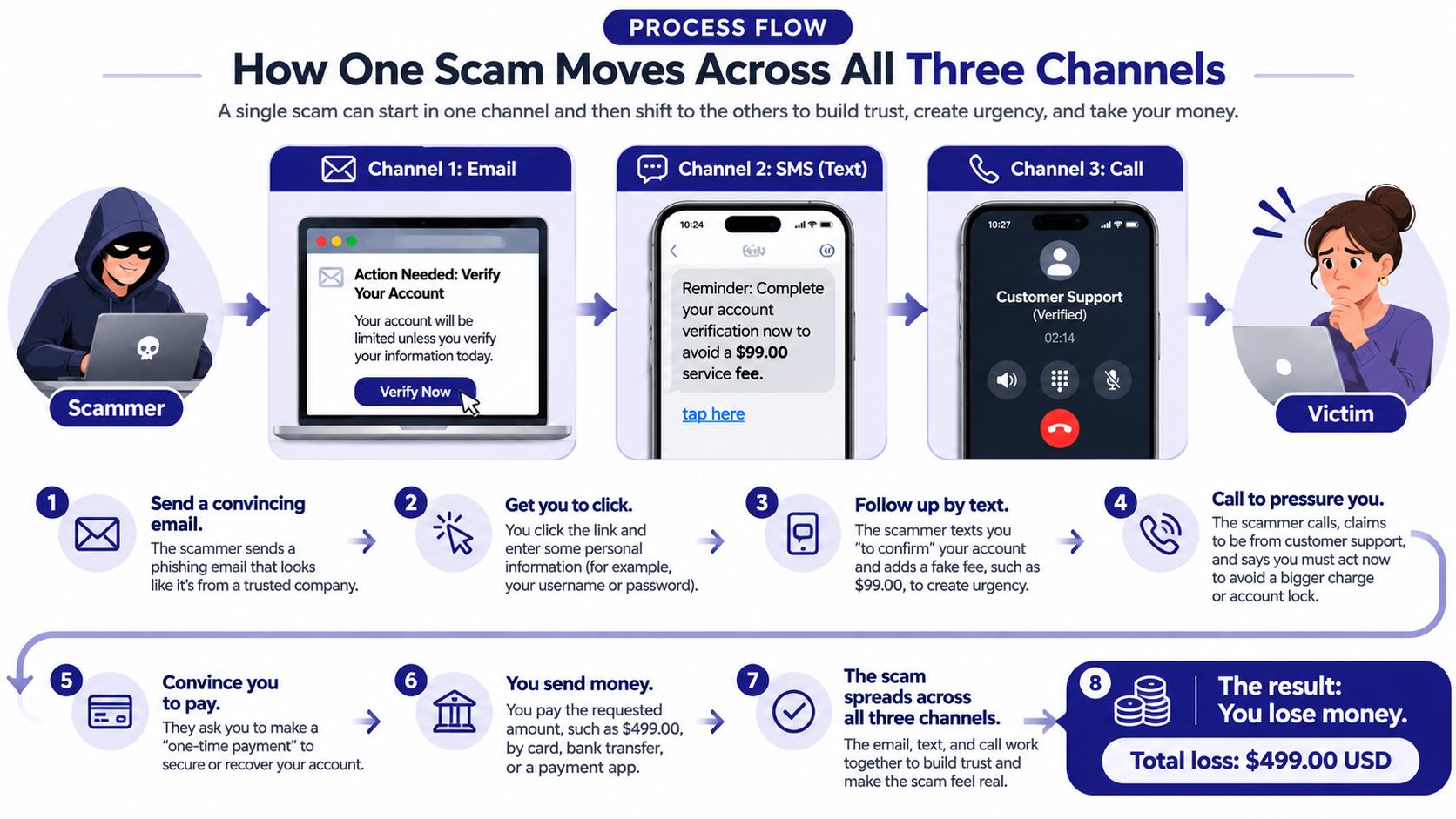
How One Scam Moves Across All Three Channels
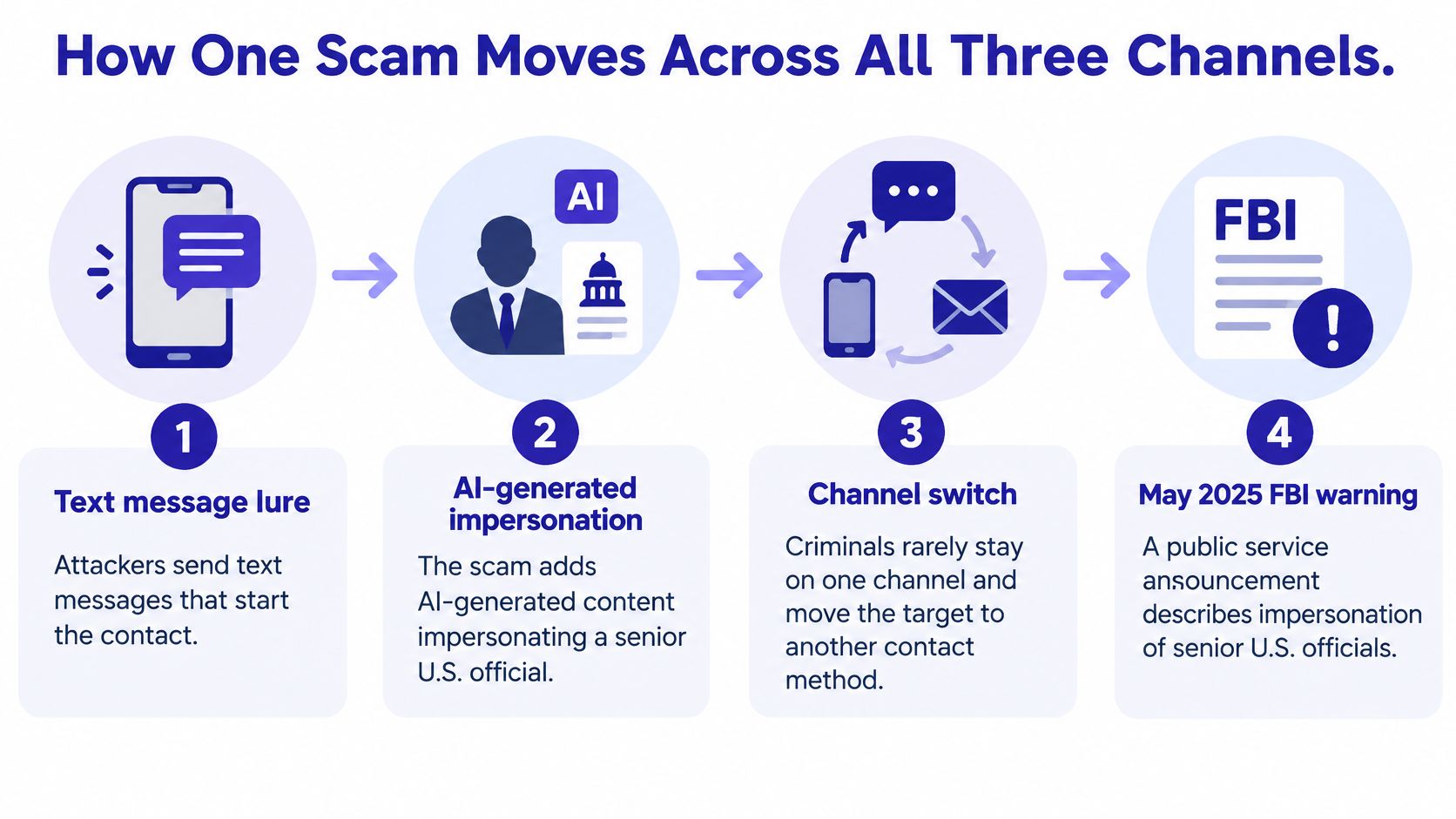
Vocabulary lists often make phishing, vishing, and smishing sound like separate lanes on a highway. In real fraud campaigns, criminals hop between all three channels in a single afternoon because each medium covers the weakness of the last one.
A real federal warning illustrates how smoothly those handoffs work. In a May 2025 FBI public service announcement, investigators alerted the public to an active campaign in which criminals impersonated senior U.S. officials using both text messages and AI-generated voice messages, explicitly identifying the texts as smishing and the voice recordings as vishing. Attackers started by building rapport over familiar channels, then guided victims onto a secondary messaging platform where they delivered malware or sent links to attacker-controlled websites built to harvest usernames and passwords.
Older adults face disproportionate risk when scams jump from a screen to a phone call. According to an FTC report on protecting older adults, fraud losses reported by people aged 60 and over climbed from about $600 million in 2020 to approximately $3 billion in 2025, a fivefold increase, with the agency noting in 2025 that many scams targeting retirees' savings still rely on a phone call even when the initial contact begins online.
Four Stages of a Cross-Channel Attack
Instead of trying to memorize isolated buzzwords, track the sequence of events. A combined scam typically progresses through four clear stages:
| Stage | Typical channel | What happens |
|---|---|---|
| Initial lure | Text or email | Urgent alert from a trusted name |
| Trust building | Voice call, possibly AI-generated | Caller confirms details and reassures |
| Capture | Link or secondary messaging app | Fake login page or malicious download |
| Cash out | Phone or payment request | Verification code read aloud or transfer made |
Imagine tapping a fake bank text link, closing the page because it felt odd, and then receiving a reassuring call five minutes later from someone claiming to be the fraud team checking on that exact alert. That isn't two separate events or a lucky coincidence. It's one connected scam shifting channels to borrow credibility, which means every new contact in the chain needs its own independent check.
Common Misconceptions That Leave People Exposed
Outdated advice creates false confidence. According to the FBI's 2025 Internet Crime Report, investigators received 191,561 phishing and spoofing complaints representing roughly $215.8 million in reported losses, and AI-assisted tools now let those campaigns produce fluent, personalized lures that adjust to each target. Advice that worked five years ago leaves real blind spots today, and each belief below shares the same hidden flaw: it assumes the scam stays in one channel, which is exactly the assumption a chained attack exploits.
Four Myths Scammers Count On
Myth: Bad spelling and clumsy grammar give scams away. Years ago, broken phrasing flagged mass-mailed fraud immediately. Today's AI-assisted tools draft spotless emails and personalized texts that mirror corporate phrasing, reference real local toll agencies, and respond smoothly when you reply with a question. Clean writing no longer signals a clean sender.
Myth: A familiar caller ID or sender name proves the message is real. Phone numbers and email display names are easy to spoof, and organized crews rotate through fresh numbers faster than static blocklists can keep up. A fixed blocklist misses brand-new numbers launching an active campaign, so recognizing a bank's number on your screen tells you nothing about who placed the call.
Myth: Smishing only happens inside a basic SMS text app. The term grew out of SMS, yet attackers deliver the same shortened links and urgent pretexts through iMessage, WhatsApp, RCS, and social messaging apps. Any chat app on your phone can route you to a mobile-sized clone of a banking or delivery page, so watching only your SMS inbox leaves every other channel unguarded.
Myth: Reading more carefully is enough to stop text scams. Texts are usually opened and read within seconds of arriving, which means the urgent hook lands before careful thinking even starts. Careful reading still helps, and a practiced pause plus the habit of checking through a second channel protects you far better than trusting your gut in the first three seconds.
A balanced filter matters: Cranking call or message blocking to maximum settings can accidentally silence legitimate doctor's offices, pharmacies, or school alerts, so pairing smart pre-contact screening with human verification works far better than blind blocking alone.
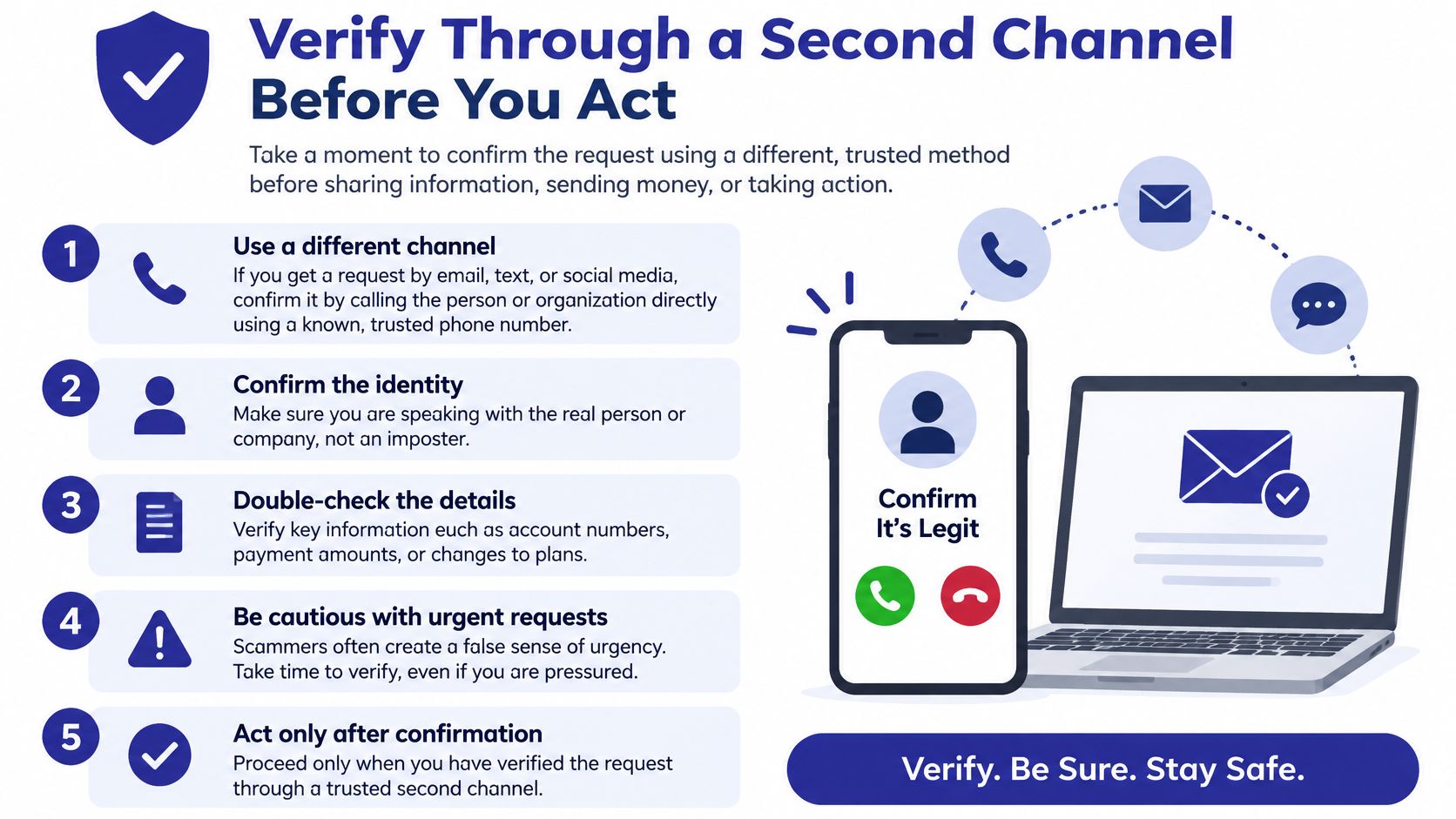
Verify Through a Second Channel Before You Act
Whenever an email, text, or caller creates a countdown clock, treat urgency itself as a stop sign. If a caller asks for money, passwords, or immediate action, independently check the request before doing anything.
Five Steps to Check Any Urgent Request
- Pause before you respond: Put the phone down or step away from your inbox for sixty seconds. Legitimate banks, delivery carriers, and government offices won't punish you for taking a minute to verify a notice.
- Never share codes, passwords, or payments on an unsolicited contact: One-time verification codes exist to confirm your login when you initiate it, never to prove your identity to someone who called or texted you first.
- Hang up and dial an official number yourself: Close the text or end the call, then flip over your debit card or type the organization's official website into your browser. Following reliable caller verification steps breaks the scammer's control of the channel immediately.
- Keep away from links in unexpected texts: If a parcel notice or toll alert looks plausible, open the carrier's official app or check your real toll account directly instead of tapping the embedded URL.
- Bring in a trusted family member on money requests: Before wiring funds, buying gift cards, or moving savings to a "protected" account, describe the situation out loud to a spouse, adult child, or close friend. Hearing the story from outside the pressure breaks the spell almost instantly.
If you spot a scam attempt, report it to the FTC or submit a complaint to the FBI's Internet Crime Complaint Center. Even when you didn't lose money, reporting the phone number, sender domain, and text lure helps investigators link cross-channel operations and protect the next person on the list.
Pairing Technology With Independent Verification
Automated tools can cut down the noise dramatically, though it's important to stay realistic about their limits. Screening reduces unwanted calls, yet it can't identify every scam or guarantee that every caller is safe. Because some scams can still get through, important requests should always be independently verified.
For an extra layer of protection across every channel, our support team at Gini Help assists with call screening, email protection, and SMS safety, and Live Scam Detection on eligible Plus plans keeps listening after a call is answered to warn you if someone pressures you for a verification code or account number. You can download the Gini Help app on Google Play or get Gini Help on the Apple App Store to screen suspicious calls, texts, and emails before they catch you off guard.
Because modern scammers move fluidly across email, phone calls, and text messages, protecting only one inbox leaves the other doors open. Gini Help brings AI-powered call screening, inbox phishing warnings, and SMS scam filtering together in one place so fewer fraudulent messages and calls ever reach you in the first place. Explore how multi-channel protection works for you and your family by visiting Gini Help.