Amazon Phishing Report: How to Spot and Report Scams
By Josh C.
Use Amazon.com/ReportAScam if you're an Amazon customer, or email reportascam@amazon.com with the suspicious message attached if you're not a customer. Report suspicious Amazon calls and texts to ReportFraud.ftc.gov as well.
You may be staring at an order confirmation for something you never bought, with a cancellation link and a warning to act immediately. You don't need to resolve that claim with the sender. Preserve what arrived, choose the right reporting destination, and check your account independently.
Where to Report an Amazon Phishing Message
Match your reporting channel to your customer status and the type of communication you received.
| Who is reporting | Where to report | What to send | Why it matters |
|---|---|---|---|
| Amazon customers | Amazon.com/ReportAScam | Use the self-service reporting tool and describe the message | Routes the report through Amazon's own tool |
| Noncustomers | reportascam@amazon.com | Attach the suspicious message as a file | Attachment helps Amazon track the report |
| Suspicious Amazon phone calls or SMS | ReportFraud.ftc.gov | Describe the call or text and include the number | Adds the report to the U.S. FTC's fraud records |
These destinations follow Amazon's phishing and impersonation reporting guidance, which also recommends attaching suspicious communications and avoiding interaction with their links, attachments, or supplied phone numbers.
Choose the destination before preparing the report
Amazon customers should use the self-service reporting tool. Open a fresh browser window and type the address yourself. Don't use a reporting button inside the suspicious message, even if the page looks convincing.
Noncustomers should use the reporting email address. You don't need to create an Amazon account just because someone sent you a fake Amazon notice. For an email, use your mail program's Forward as attachment or Download message option when available, then attach the saved message to a new email.
Attaching an email isn't the same as opening a file that the suspected scammer sent you. You're saving the communication itself, not inspecting an invoice, document, or program inside it. If your mail app makes that difficult, preserve what you can without experimenting with suspicious files.
Calls and texts also belong with the FTC
For suspicious phone calls and SMS messages, submit an FTC report in addition to notifying Amazon. Amazon receives information about misuse of its identity, while the regulator receives a record of the suspected fraud. Neither submission replaces an urgent call to your bank if money has already moved.
Before submitting, make a short incident note:
- Arrival details: Record the date, time, sender address, or displayed phone number.
- Main claim: Describe the message as a fake refund request, unauthorized order notice, or account warning.
- Requested action: Note whether the sender wanted a login, payment, callback, or information.
Ready-to-send check: You should be able to name the reporting destination and identify the message file or other evidence you'll provide.
Don't delay a useful report because you can't retrieve every technical detail. An accurate description with the original communication is more useful than an elaborate explanation built on guesses.
Spot the Four Amazon Phishing Patterns
An unfamiliar order notice can make you want to cancel the purchase immediately. A refund message creates the opposite pressure: respond now or supposedly lose money. Treat both as claims to check, not instructions to follow.
The important distinction is between the story and the requested action. Order, refund, delivery, and account problems are the stories. The action the sender demands gives you a more useful security test.
Amazon's scam-identification rules flag four recurring tactics: false urgency, personal or financial information requests, payments outside Amazon, and gift-card requests.
| Pattern | What the message typically says | Amazon's rule to check it |
|---|---|---|
| False urgency | Your account will be closed or your order cancelled unless you act now | Treat urgency itself as a warning sign |
| Personal or financial information requests | Verify your password, card number, or bank details | Amazon's rules flag requests for personal or financial information |
| Payment outside Amazon | Pay through another website or make a bank transfer | Legitimate payments are completed only in the Amazon app, on Amazon's website, or in an Amazon physical store |
| Gift-card requests | Buy gift cards and send the numbers, claim codes, or PINs | Amazon warns that scammers may ask for gift-card numbers, claim codes, or PINs |
The visual below shows the familiar stories scammers use to introduce those demands.
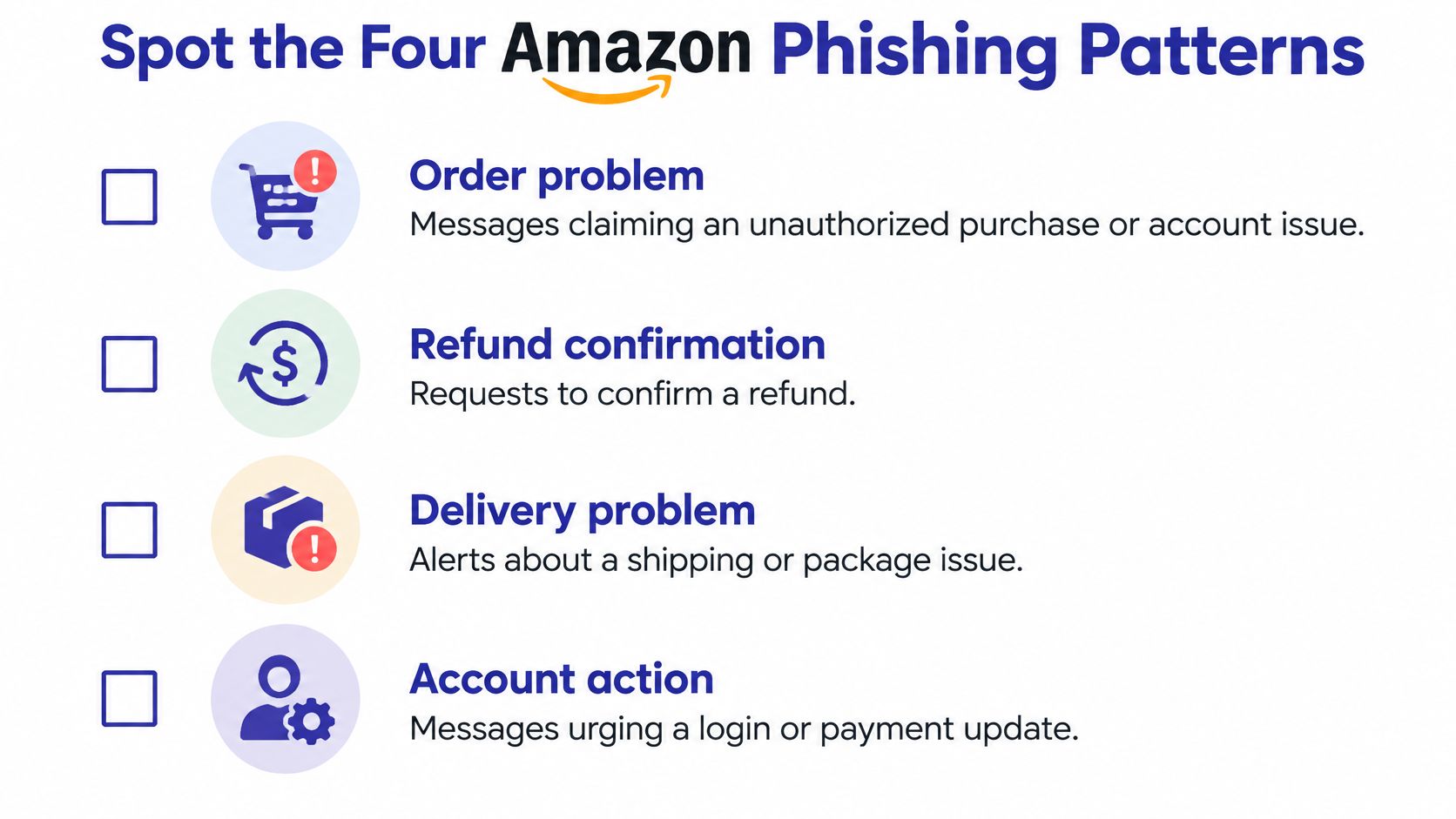
Check the action, not the branding
Amazon says it won't call and ask you to make a payment or bank transfer through another website. A logo, polished layout, or recognizable caller name doesn't override that rule.
Open the Amazon app yourself and inspect your orders or account. If a caller asks for money, passwords, or urgent action, independently check the request before acting. Don't stay on the line while the caller directs your verification.
Delivery claims deserve the same separation between message and action. Our guide to package delivery scams explains how to assess suspicious shipping notices, while the Nutmeg Technologies guide to phishing scams offers broader context for recognizing impersonation across message types.
Warning signs that justify an immediate report
- Password demands: Someone asks you to disclose your sign-in password.
- One-time code requests: A caller or message asks you to read back or send a verification code.
- Remote-access instructions: Someone wants you to install software, share your screen, or let them control your device.
- Off-platform payment: The sender directs you to another payment website, a bank transfer, or gift cards.
Code requests and remote-access instructions are particularly serious because they can enable account or payment takeover. You don't need to prove who operates the scam before reporting it.
How to Report Amazon Phishing Step by Step
Handle the report as a short administrative task, not a conversation with the sender. If you're upset, ask someone you trust to sit with you while you preserve the message and submit the details.
This visual summarizes the safe sequence.
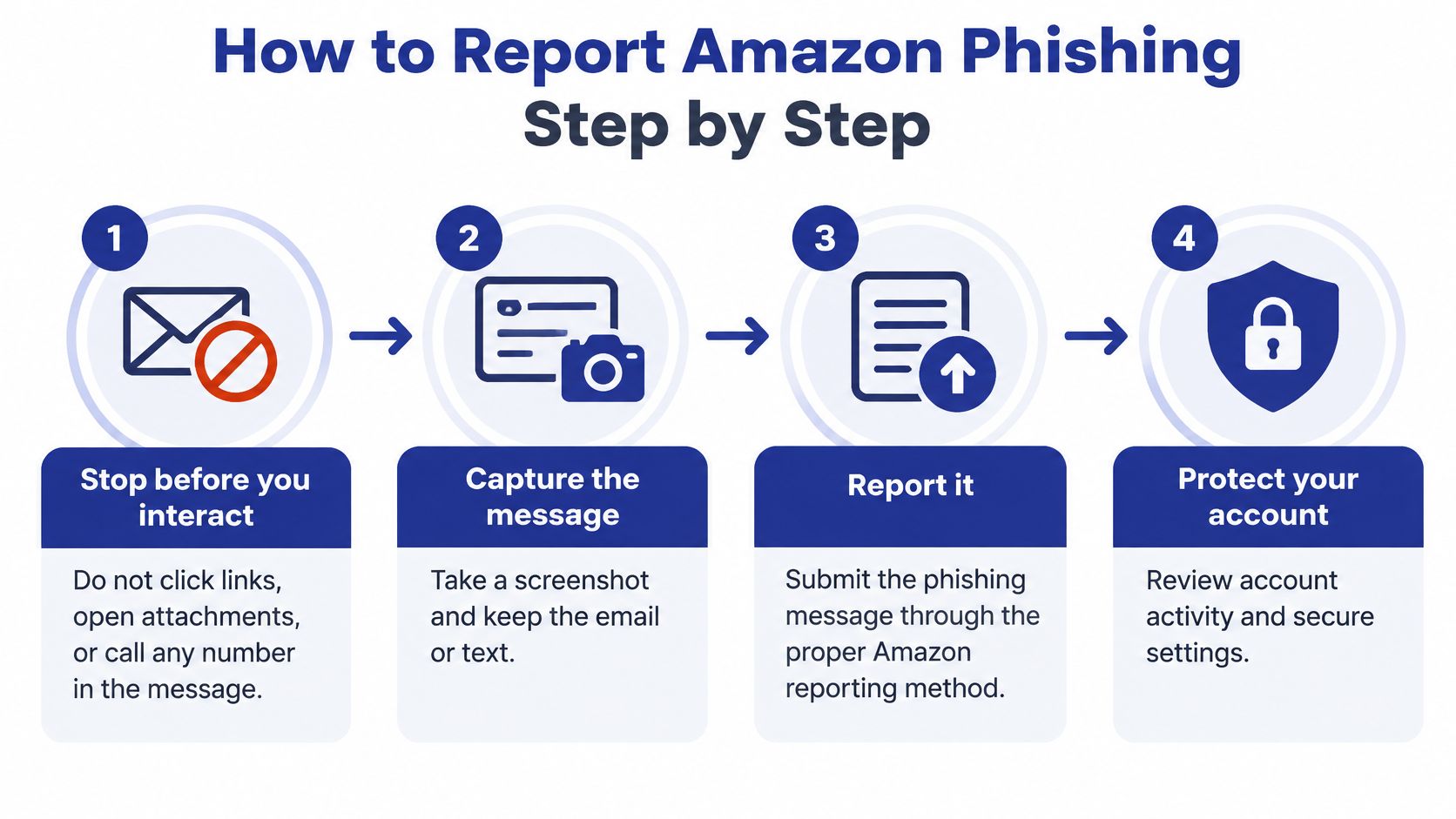
Stop, preserve, and submit
Stop before interacting. Don't click links, open the sender's attachments, reply, or call a number in the communication. If you're already speaking to someone, end the call rather than asking them to prove their identity.
Capture what arrived. Take a screenshot and retain the original email or text. Note the sender address or displayed number, date, and time. For a call, write a brief summary while you remember the wording, especially any payment or device-access instructions.
Use the channel matched to your situation. Follow the customer or noncustomer route in the reporting table. Attach the original message where the channel allows or requests it. Don't paste passwords, live verification codes, or complete card details into your explanation.
Submit the phone or text report to the FTC. Include what the caller or text claimed, the number displayed, and what you were asked to do. Describe that number as the displayed number, not a verified identity. Don't call it back to investigate.
A report doesn't require you to inspect a suspicious website or discover the scammer's real name. Record what you received and what happened. If you're unsure whether an action completed, say that rather than guessing.
Contain exposure and keep the record
Protect anything you disclosed. After preserving the evidence, block the sender. If you entered or shared a password, change it through the genuine service. If you disclosed card or bank information, contact your bank or card issuer immediately using its app or the number printed on your card. Don't wait for a reporting acknowledgment before dealing with financial exposure.
Save submission confirmations. Keep any acknowledgment, reference number, and a copy of your report in the same folder as the message. If no confirmation is offered, note the submission date and reporting channel. Keep the original communication until your report and evidence folder are complete.
Reporting a message and stopping a payment are separate jobs. A fraud report doesn't tell your bank to block a card or attempt a payment recovery.
If you clicked but didn't enter anything, describe that accurately. Clicking alone doesn't establish that someone accessed your account, but downloads, permissions, or information you supplied need separate attention.
For a video companion to the reporting process, use the player below.
A complete Amazon phishing report leaves a clear record: the destination used, evidence supplied, actions you took, and any confirmation received. Finish by opening your account independently and checking whether the message corresponds to activity you recognize.
Evidence Worth Gathering and Why Reports Count
Keep the original communication, a readable screenshot, and a short incident note together. For email, preserve full headers when your mail program offers a “Show original,” “View source,” or similar option. Headers retain routing and sender information that a cropped screenshot doesn't show.
Build a useful evidence folder
- Original message: Save the email as its own file, including headers where possible.
- Readable screenshots: Include the sender, subject, date, time, and visible link text without opening the destination.
- Requested action: Record the amount requested and the type of information sought, without reproducing secret codes.
- Payment records: If you paid, retain the receipt, relevant statement entry, payment time, and bank case reference.
Keep originals unchanged. If a copy needs redaction for sharing with a helper, preserve the unedited version separately and avoid circulating unnecessary financial information.
The original email and its headers provide a different kind of evidence from a screenshot.
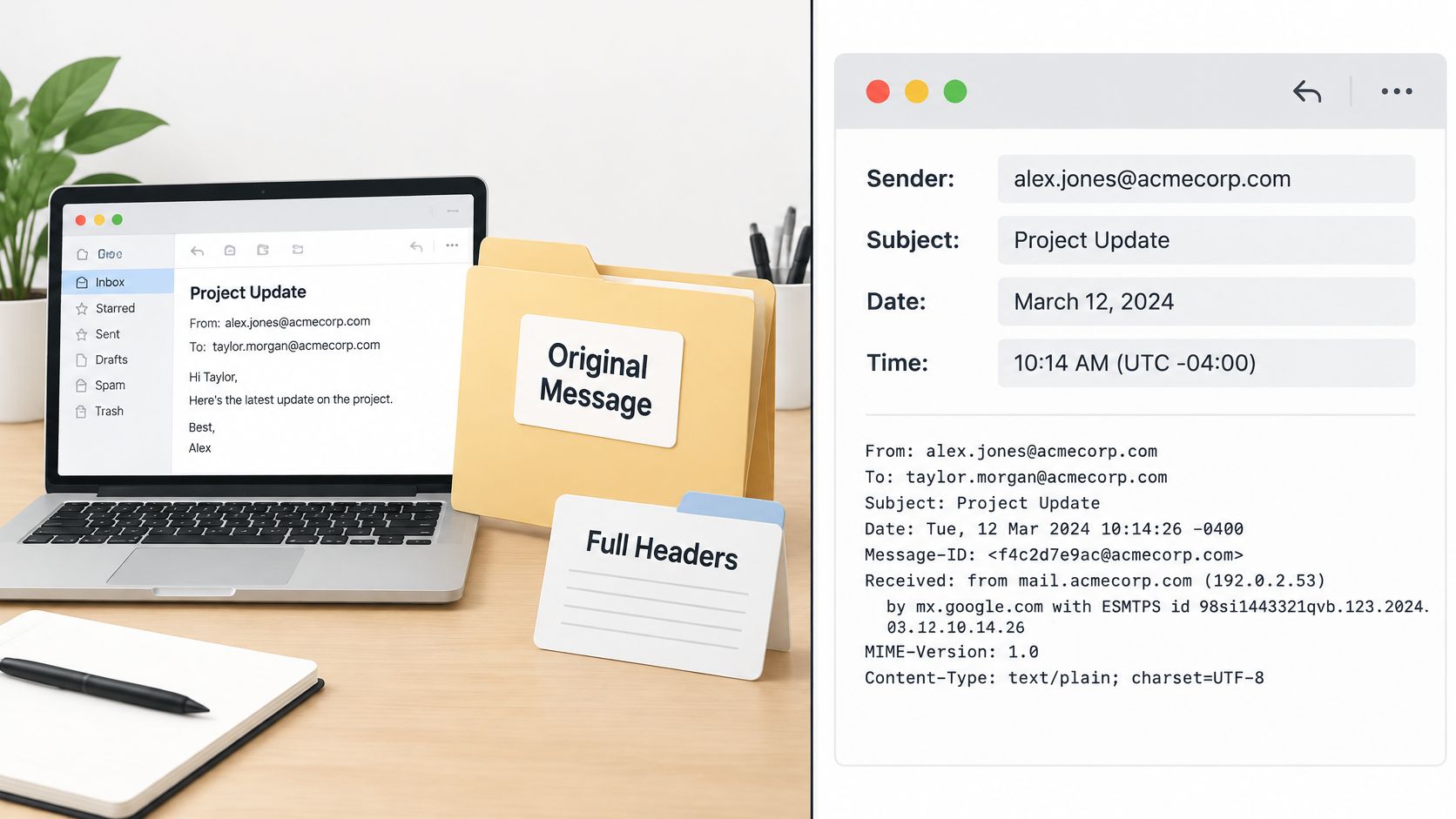
Reports document a wider problem
The FTC's Amazon impersonation analysis recorded approximately 96,000 consumers reporting that they were targeted from July 2020 through June 2021, nearly 6,000 reporting monetary losses, and a median individual loss of $1,000. Those are reported incidents, not a count of every attempt.
The stakes are especially important for caregivers: Amazon's scam-prevention guidance cites FTC findings that consumers aged 60 and over were more than four times as likely as younger consumers to report losing money in that dataset, with median reported losses of $1,500 versus $814. These historical figures describe reported harm, not an individual reader's likelihood of becoming a victim.
If you're helping an older relative, assemble the records with their permission and explain your role when reporting on their behalf. Use a secure shared folder rather than forwarding sensitive evidence through a large family group chat.
Our guide on how to report a scammer can help organize incidents involving other impersonated organizations. Your job is to preserve an accurate account, not build a criminal case yourself.
Copy-Ready Report Templates and Examples
Suppose you receive a text claiming that a $389 Amazon order is about to ship, with a link to cancel it, but you never placed that order. That's a hypothetical example, not evidence of an actual purchase. Check your account independently, then report the text using only facts you can confirm.
Replace the bracketed fields below and delete anything that doesn't apply. Don't claim you avoided clicking if you did click. Accurate exposure details matter more than making the incident sound tidy.
Email template for a noncustomer
To: reportascam@amazon.com
Subject: Suspected Amazon phishing message attached
I received a message claiming to be from Amazon on [date] at [time and time zone].
Sender address or displayed number: [sender].
The message claimed [brief description] and asked me to [requested action].
I [did not click or respond / clicked a link / supplied information, described by type only]. I'm not an Amazon customer.
I've attached [the original email file / a screenshot of the text] for review.
Use this when you don't have an Amazon account. For suspicious email, attach the message itself rather than relying only on copied text.
Phone or text template for the FTC
I received a suspected Amazon impersonation [call/text] on [date] at [time and time zone].
Displayed number: [number].
The caller or message claimed [claim] and requested [action].
I [ended the call / did not respond / clicked / shared information]. The information shared was [type only, not the actual password or code].
Money sent, if any: [amount and payment method]. I have retained [screenshots, call log, receipts, or other records].
Use this wording in the FTC form's description field. Follow the form's available fields for evidence rather than assuming it accepts attachments.
Amazon customer self-service template
Date and time received: [date, time, time zone].
Sender address or displayed number: [sender].
Message type: [email, text, or call].
Claim and requested action: [short factual description].
My response: [what you did and whether you disclosed information].
Account check: [relevant activity found / no matching activity found / not yet checked].
Evidence available: [original email, screenshot, call log, or receipt].
Use this in the customer reporting tool, adapting it to the fields displayed. Keep facts in the same order so you don't lose track while switching between the form and your evidence.
Note for a relative or caregiver
I received a suspicious message claiming to be from Amazon. Please help me preserve the original and report it without opening its links or attachments.
I [did/did not] share information or send money. If financial information was exposed, please help me call my bank using its official app or my card.
Short, factual reports are easier to review than long accounts of every suspicion. Include the original message when supported, but don't delay urgent financial protection while polishing your wording.
Report the Message and Protect Your Account
An Amazon phishing report alerts the appropriate team, but it doesn't secure an exposed account for you. Open the Amazon app directly and review your orders, returns, and account settings for changes you didn't request.
Look beyond unfamiliar purchases. Check delivery addresses, payment methods, and account contact information. If something is wrong, contact customer service from inside the genuine app or website, not through the suspicious communication.
Use your account screen, rather than the sender's instructions, to review activity.
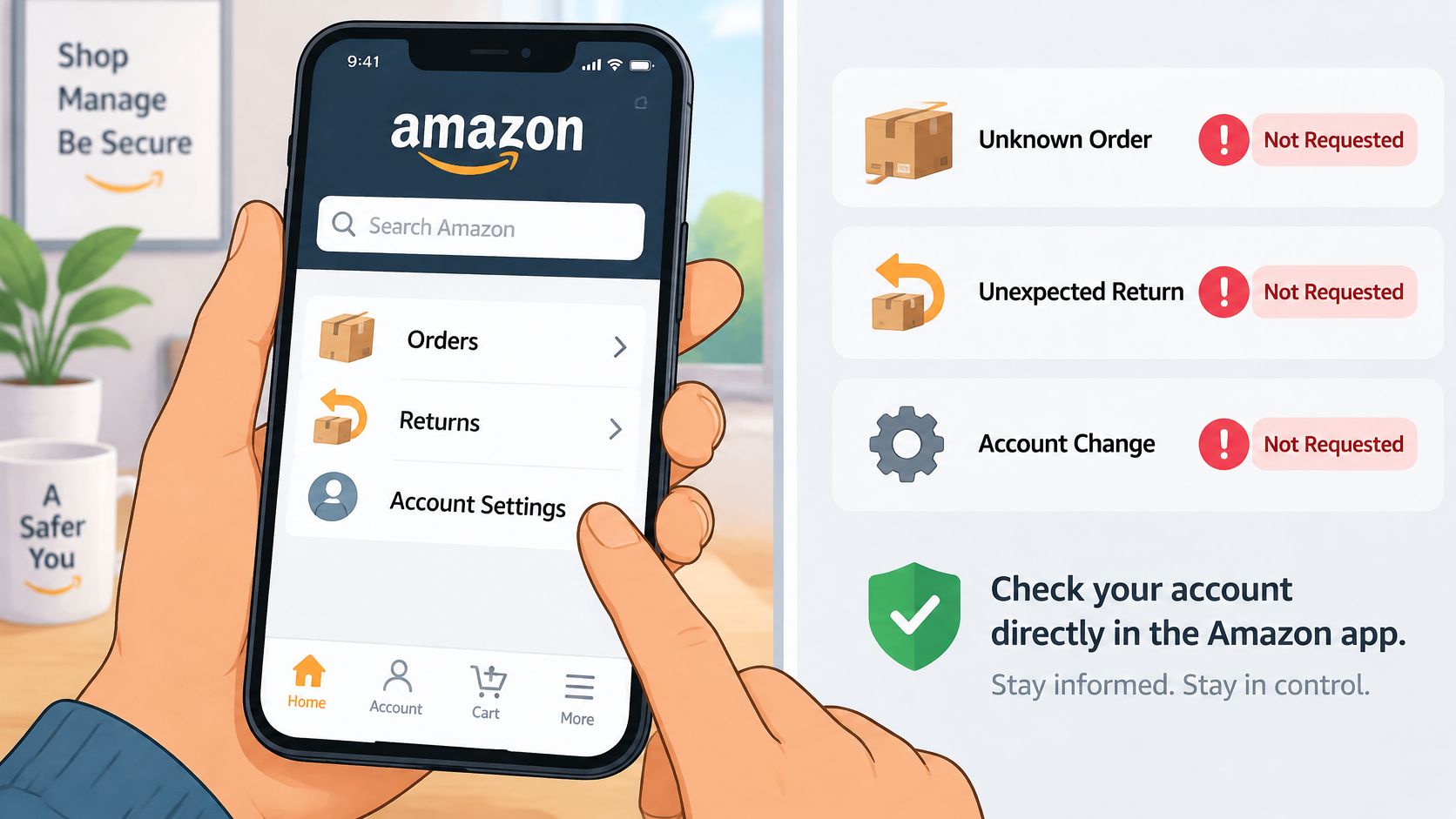
Match the recovery action to the exposure
- Shared password: Set a unique replacement. Change it on other accounts where you reused it, prioritizing your email account.
- Shared verification code: Review account security and contact genuine support if access or account details changed.
- Exposed payment information: Follow your bank or card issuer's instructions about blocking, replacing, or monitoring the payment method.
- Installed remote-access software: Disconnect the affected device from the internet and use a different trusted device for urgent banking or password changes. Get technical help to remove the software and review access.
Turn on two-step verification in your Amazon account if it's available to you. That adds a sign-in safeguard, but it isn't permission to share codes with someone who calls claiming to help.
Seller accounts need attention to business access and disbursement settings as well as shopping activity. LA Law Group, APLC's guide to restore compromised seller account access provides additional context for that distinct recovery problem. For broader personal recovery tasks, use our guide on what to do after being scammed.
Add protection without handing over judgment
For people receiving repeated suspicious calls, texts, or emails, especially older adults and caregivers, consider downloading Gini Help on Google Play or the Apple App Store. With a supported inbox connected, we scan for phishing emails and warn users before they click dangerous links.
No app can catch every scam. Independently verify important requests, even when you haven't received a warning.
Keep your response proportionate. A message you ignored calls for preservation and reporting; disclosed credentials, device access, or money require active recovery. Never send a payment, gift-card code, or verification code because an unsolicited message demands it.
Gini Help offers call, text, and email scam protection to help you pause before engaging with suspicious Amazon messages. Visit Gini Help to explore protection for yourself or a family member, and report the message you've already received through the appropriate official channel.