Facebook Scams Messages: How to Spot and Stop Them
By Josh C.
You're scrolling Facebook after dinner when a Messenger note arrives from a cousin you haven't spoken to in months. She says she's locked out of her account, needs a code sent to your phone, and asks you not to call because she's in a meeting. The photo looks right, the name looks right, and you want to help. That feeling, familiar and a little urgent, is exactly what scammers count on. You don't need to judge whether her writing sounds normal. You need one habit: treat every unexpected request as something to verify through a separate channel you already trust, before you reply, click, or pay.
Spot a Scam Message in Under a Minute
Say a message arrives that looks ordinary at first. It uses your name, mentions a recent post, and asks you to confirm something quickly. Don't start by studying spelling or tone. Check what the message wants you to do, because Facebook scams messages almost always push for a code, a password, money, or a move away from the original chat.
Seven signals to check first
| Red flag | What it looks like | What to do |
|---|---|---|
| Urgent deadline | Account will be disabled within 24 hours | Stop, don't click, check Settings directly |
| Login or verification code request | Sender asks you to send a code just texted to you | Never share it; refuse |
| Upfront payment or gift cards | Pay a fee or buy gift cards before shipping | Don't pay; report the account |
| New profile with few mutual friends | Friendly stranger with a recent account | Verify through a known channel before replying |
| Guaranteed investment returns | Expert promises fixed monthly profit | Ignore; check the platform independently |
| Move to another app | Let's continue on WhatsApp or Telegram | Treat as an escalation signal; stay put |
| Request for secrecy | Don't tell your family about this | Stop and talk to a family member |
Urgency works because it shortens your thinking time. A code request works because the code is meant for you alone, and sharing it can hand over your account. Upfront payment, gift cards, and moving apps all pull you away from records and protections that might help you later. Secrecy matters too, since a second person often spots what pressure hides.
Meta warns that legitimate correspondence won't ask for passwords, Social Security numbers, or credit-card information through suspicious messages. If you're learning the basics, our guide to detecting phishing attempts walks through the same pause and check approach for email. Teams that train staff to spot odd requests can also learn from a detection guide for social care teams, which focuses on noticing behavior that doesn't fit the usual pattern.
Three-question check: Did I ask for this? Does it want money, a code, or a password? Can I confirm it through a channel I already know?
If the answer to the last question is no, you don't have enough to act. Waiting is a valid response.
The Main Types of Facebook Scam Messages
A message in Messenger, a group, or Marketplace may begin as a friendly tip, a tempting offer, or a warning about your account. The wording can vary, but the useful question is the same: what does the sender want you to do, and can you verify that request somewhere else?
The FTC social media spotlight for 2025 reported that Americans lost $2.1 billion to scams that started on social media during 2025. Nearly 30% of people who reported losing money to a scam that year said it began on social media. Facebook was associated with more reported monetary loss than any other social network. Reported losses do not capture every attempted scam.
This visual summarizes common message types and the requests they may lead to.
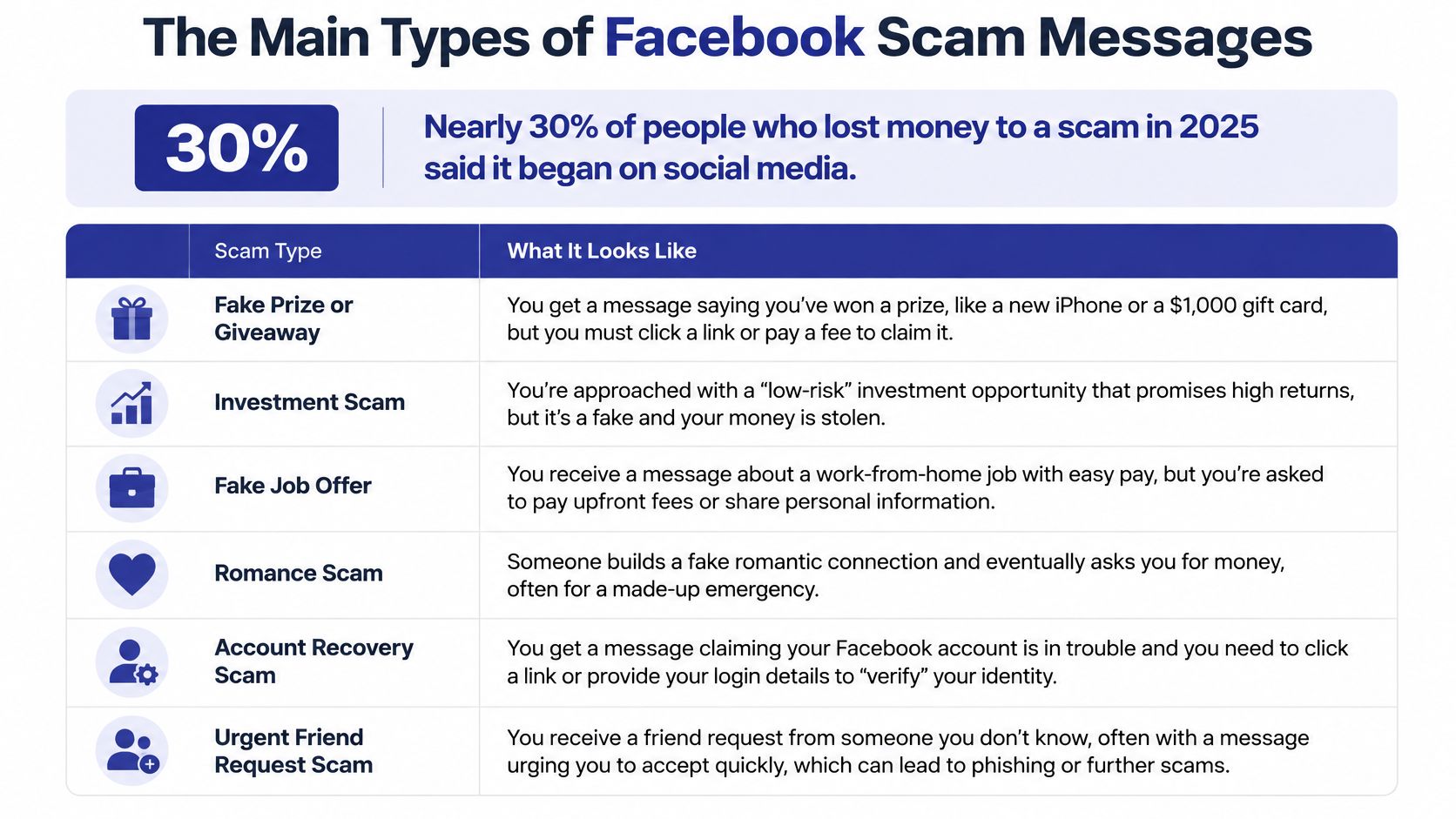
What each type wants from you
| Scam type | Typical opening message | Scammer goal | Reported pattern |
|---|---|---|---|
| Investment | Trading expert shares a profit tip | Deposits into a fake platform | Investment pitches appear in social-media scam reports |
| Romance | Friendly stranger starts a chat | Money for an emergency | Romance-scam reports include cases that began on social media |
| Shopping | Unusually cheap item in a group or listing | Advance payment, no delivery | Advance payment for undelivered goods |
| Account takeover | Support says the account will be banned | Login details and codes | Recurring pattern described by Meta |
| Celebrity bait | Famous name offers a giveaway | Payment or personal information | Campaigns described by Meta |
| Fake job | Remote job that requires training fees | Upfront fees | Fee charged before real work begins |
An investment pitch may start with profit screenshots and a helpful mentor. A romance scam may build closeness before introducing a medical bill, travel problem, or customs fee. Shopping scams use unusually low prices to encourage quick payment. Fake support and celebrity accounts borrow authority; fake jobs appeal to hopes of earning money.
When a conversation turns toward payment or personal information, don't decide whether it is genuine from the profile, spelling, or friendly tone. Contact the person or organization through a separate channel you already trust. A familiar name or profile can be used by someone else.
Watch this short explainer to see how a friendly opening can lead to a payment request.
A conversation can also change direction. A romance chat may turn into an investment pitch, or a giveaway may lead to a request for bank details. Treat each new request as something to verify independently before acting.
Why Facebook Messages Are So Convincing
A suspicious email feels like mail from a stranger. A Facebook message feels more like a note passed by a familiar neighbor at your gate. You see a face, a name, mutual friends, and old photos before you read a word, so the apparent identity does much of the persuading for the sender.
Trust hijacking in plain terms
Scammers impersonate friends, relatives, customer-support agents, or local businesses. Then they add urgency around an emergency, a suspended account, a prize, or a payment. The FTC spring roundup on impersonation scams reported that, among 2023 fraud reports identifying a social platform, Facebook was named in 51% of cases, compared with 22% for Instagram. That reach matters because your guard is lower inside a social space you use for family news.
One compromised account makes the problem spread. If a scammer takes over your friend's profile, they can message everyone on that friend list as someone trusted. Each reply gives them more personal detail, and each new takeover gives them another familiar face to hide behind.
Newer fakes are harder to judge by feel. A profile can carry a plausible photo, smooth writing, and a detail copied from a public post. Voices and images can be fabricated too, so a message that sounds right isn't proof. Messenger warnings for new contacts help, but they can't follow the conversation when it moves to a phone call, email, text, or payment app.
A familiar profile shows you a name and photo. It doesn't prove who is typing.
That's why verification has to happen outside the message. Call the number already saved in your phone, open the business website you typed yourself, or ask in person. Don't reply to prove identity, don't use the link provided, and don't accept a voice note as confirmation when money or codes are involved.
Real Scam Messages and How They Unfold
Most scams don't begin with anything dramatic. They begin with a request that sounds small, reasonable, and easy to finish before you think twice.
The fake support warning
A message from "Facebook Support" says your account will be deleted unless you appeal today. You tap the link, see a familiar login screen, and enter your username, password, and two-factor code. The page is a look-alike, and the scammer now has what they need.
- Red flags: A deadline, a login link inside a message, and a request for a code.
- Stopping point: Close the message and open Facebook yourself to look for a matching notice in Settings.
The celebrity giveaway
A post from a well-known public figure says you've been selected for a cash giveaway. A follow-up message asks for a small processing payment by instant transfer so the prize can be released. Meta's guidance on investment and payment scams describes celebrity-bait scams in which criminals impersonate public figures to persuade victims to send money or provide information, and notes Messenger may warn when a contact asks for an instant-payment method.
- Red flags: An unexpected prize, a fee to receive money, and pressure to pay through a hard-to-reverse method.
- Stopping point: Refuse any fee. A real prize doesn't need your payment first.
The friendly investment mentor
An older adult gets a kind message from someone in a hobby group. Over several chats, the new friend recommends an investment app with guaranteed monthly returns. Two small payouts arrive, which builds confidence. Then the app says a larger deposit is required to allow withdrawals.
- Red flags: Guaranteed returns, early payouts that encourage a bigger deposit, and a withdrawal blocked until you pay more.
- Stopping point: Before the first deposit, ask a bank, licensed adviser, or family member to check the platform independently.
Each story looks reasonable at the first message. The danger builds in the second and third steps, when urgency replaces curiosity and payment replaces conversation.
How to Secure Your Account After a Scam Click
If you clicked a link or entered account details, work through these steps on a device you trust. The goal is to stop further access and check what may already have happened. Meta's help policy on phishing and account security explains that stolen usernames, passwords, or two-factor authentication codes can let attackers control an account, contact friends, or run fraudulent ads.
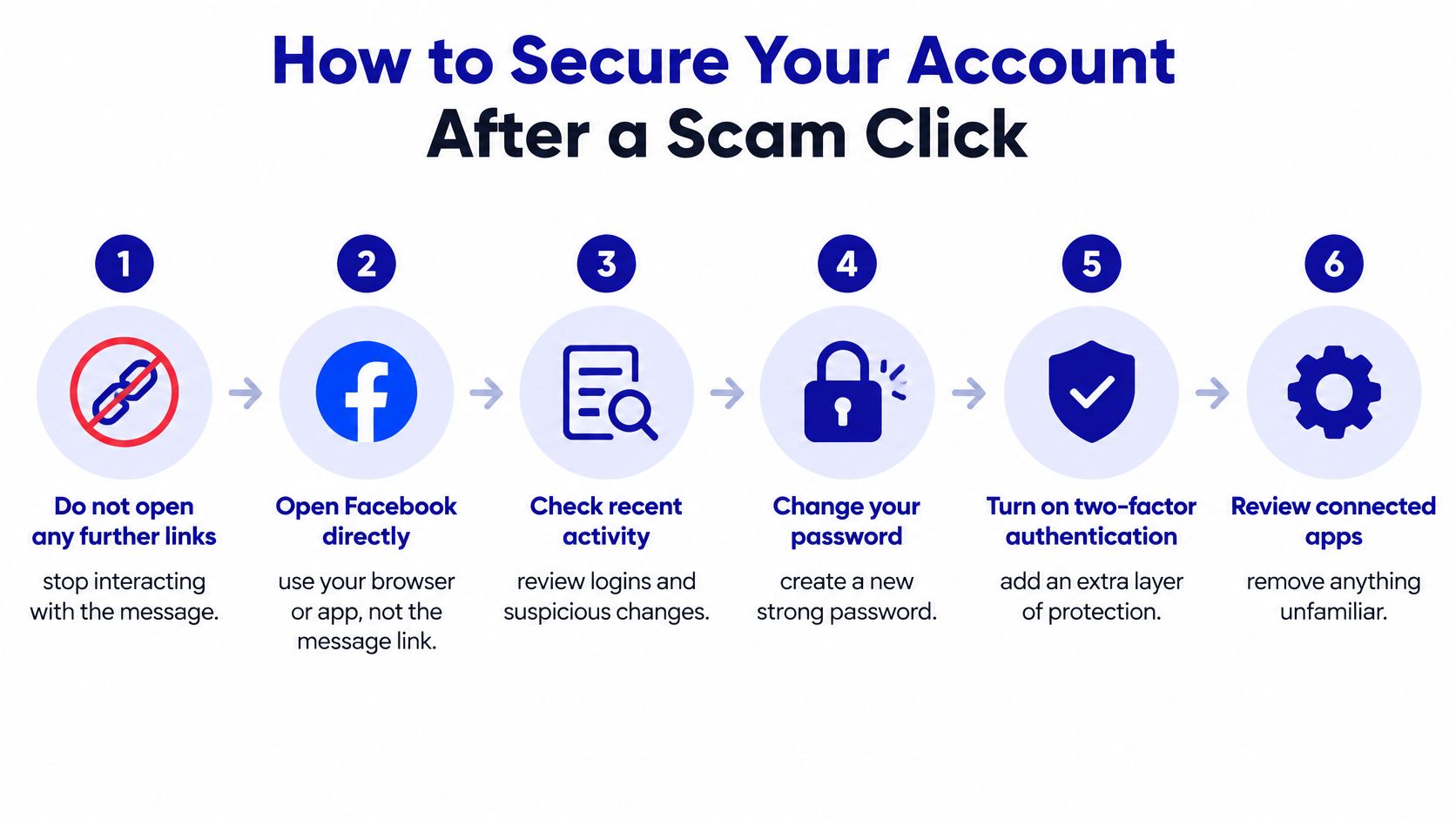
Recovery steps in order
- Stop interacting: Don't open more links from the message. A follow-up page may ask for additional details.
- Open Facebook directly: Use the app or type the address yourself. Check account security notices in Settings rather than trusting a warning shown on the linked page.
- Change your password: If you entered it on the page, reset it through Facebook. This prevents the stolen password from being reused.
- Sign out unknown sessions: End unfamiliar sessions in security settings to close access that may still be active.
- Turn on two-factor authentication: Add a second check at login to make sign-ins harder if your password is exposed again.
- Warn your friends separately: Call or text close contacts if your account may have sent suspicious messages. A familiar profile can still be under someone else's control.
- Check money accounts: If you shared payment details, review bank and card statements, then call the provider about unfamiliar activity.
A password-reset link in the scam message may lead to another fake page. Start from the Facebook app or type the address yourself. If money left your account or you're locked out, follow these steps for what to do after being scammed.
You're in a safer position when no unknown devices remain logged in, your new password works, and a two-factor method is active. Keep screenshots of anything suspicious before deleting messages. For another account-security question, privacy for authentication platform users explains what data an authentication provider should and should not collect.
Protecting Older Adults From Message Scams
If you're helping a parent or older relative, start with agreement, not warnings. The strongest household rule is simple: no money, gift card, code, or password is sent because of a Facebook or Messenger message alone. That one pause stops most attacks before payment or account takeover.
Why investment messages need special care
The FTC report on older consumers found that, in 2024, older adults filed more loss reports and reported greater aggregate losses from fraud that began on social media than from fraud arriving through any other contact method. It also found social media was the most frequently identified contact method for older-adult investment-scam reports. So an unsolicited message offering investment education, guaranteed returns, or help recovering lost money deserves immediate suspicion, however patient it sounds.
Build a pause-and-call habit around a number already saved in the phone. Practise one short line together so it feels natural under pressure:
"I will check with my family and call you back."
That sentence buys time without arguing. A legitimate caller can wait. A scammer usually pushes back, and that pushback tells you enough.
Set up a shared family group where suspicious messages get forwarded before any reply. Review Facebook security settings together once a month, checking logged-in devices, recovery email, and two-factor authentication. Our guide on how scammers trick seniors online gives caregivers more conversation starters that don't feel like lectures. Gini Help was founded to protect seniors and vulnerable adults from internet scams, and this family-first approach reflects that purpose: respect the person's independence, and make checking easy.
Block, Report and Verify Before You Act
When a message fails your check, end the contact and leave a record. You don't owe the sender an explanation, and arguing only confirms that your account responds.
This is the moment to slow down, save what you received, and use Facebook's own reporting tools.
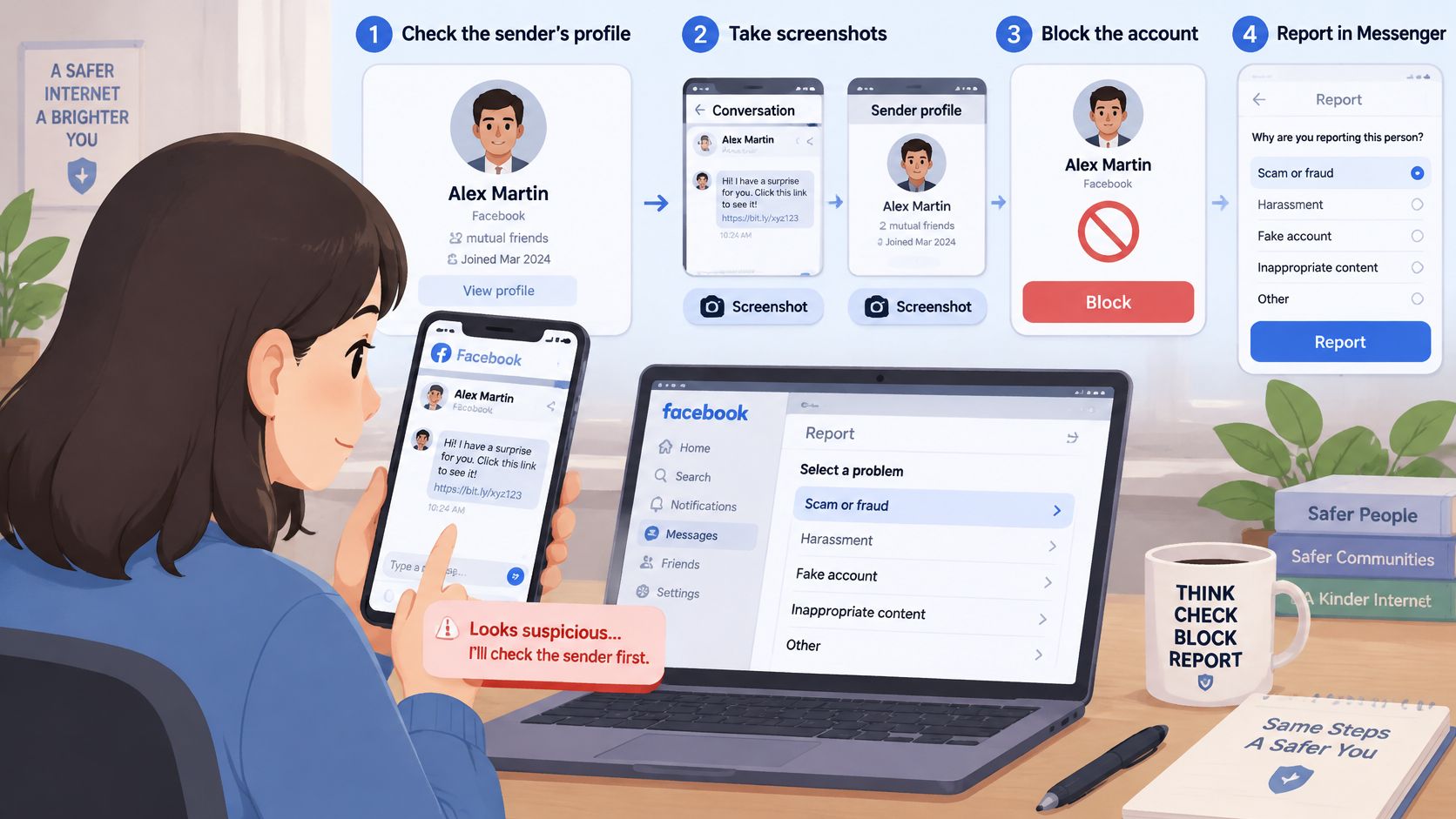
Reporting steps that help
- Screenshot first: Save the message, profile name, photo, and any payment request, then block the account so it can't keep messaging you.
- Report in Messenger: Use the report option and choose the category that fits, such as investment, romance, impersonation, or payment fraud.
- Call your bank if money moved: Contact your bank or payment provider immediately, because fast payments are hard to reverse and speed gives you the best chance.
- File an official report: In the United States, report fraud to the Federal Trade Commission. Elsewhere, use your national consumer agency.
- Stay silent after blocking: Don't confront the sender from another account. Silence ends the contact.
Platform tools are improving, but they aren't a substitute for your check. Meta's March 2026 update on new anti-scam tools said advanced Messenger scam detection was rolling out to additional countries and can warn you when a new contact's chat matches common scam patterns, then recommend blocking or reporting. Meta also said it was testing Facebook warnings for suspicious friend requests when an account has few mutual friends or indicates a different country location.
Verify outside the message, every time
For any request involving money, a password, or urgent action, independently check the request before acting. Use a phone number, website, or app you already knew, never the contact details inside the message. Screening tools reduce risk, but some scams can still get through, so important requests should be independently verified.
You can add an optional layer across other channels where these scams often continue. Our email protection flags suspicious emails for fake links, suspicious senders, and urgent payment requests, and explains the risks in plain language. Our text filtering moves scam texts into a separate folder. If you'd like that extra screening, download the app on Google Play for Android or from the App Store for iPhone.
Finish with three actions today. Check your Messenger security settings for unknown devices. Turn on two-factor authentication if it isn't on. Agree on your household verification rule with the people most likely to get a message in your name. Those steps take minutes, and they make the next convincing message much less powerful.
Facebook messages can pull a scam into your texts, email, and calls, so Gini Help screens those channels and explains suspicious requests in plain language before you act. It won't replace your separate-channel check, but it can give you and your family an earlier pause when pressure builds. Visit Gini Help to see how the protection works and choose the setup that fits your household.