How to Block Cell Phone Number When Calling (2026)
By Josh C.
You've just answered a call from an unfamiliar local number. The caller claimed to be from your bank, asked for a verification code, and hung up when you challenged them. You blocked the number, but another call arrived minutes later from a different number. That's the point many phone guides miss: blocking a cell phone number can stop one caller, but it doesn't automatically stop the operation behind the call.
The phrase “how to block cell phone number when calling” also causes confusion because “block” can mean hiding your own number, stopping a specific caller, or silencing unknown callers generally. Choose the wrong setting and you may either keep receiving unwanted calls or accidentally hide your number from a doctor, school, delivery driver, or family member.
Three Meanings of Block and Why It Matters
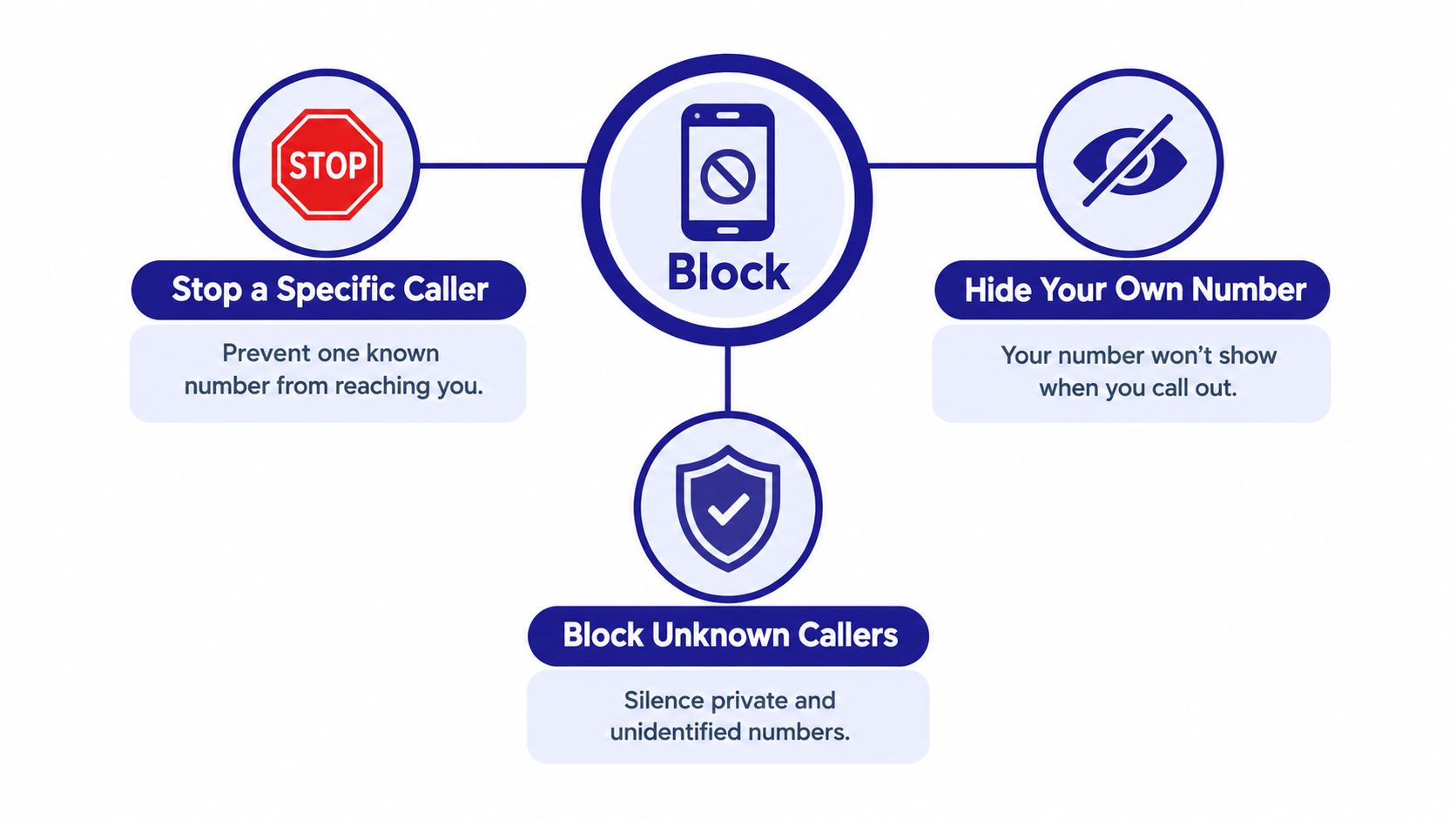
There are three separate phone controls hiding behind the word block:
- Block a specific incoming caller. This prevents one known number from reaching your attention in the usual way.
- Hide your own caller ID. This keeps your number from appearing when you call someone else.
- Block or silence unknown callers. This applies broadly to private or unidentified calls and can affect legitimate callers you haven't saved.
The first option is the right answer when one person, business, or repeat nuisance number keeps calling. The second is a privacy setting for outgoing calls. The third is a screening choice, and it carries the greatest risk of missing an important call.
The volume of unwanted calling explains why this distinction matters. The Federal Trade Commission's FY2024 National Do Not Call Registry data recorded approximately 1.1 million robocall complaints, compared with more than 3.4 million in FY2021, a reduction of roughly 68% over three years. Yet complaints about unwanted calls still exceeded 2 million in FY2024.
The decision rule is simple:
If one known number is bothering you, block that number. If you want privacy when calling out, hide your caller ID. If you want broad protection from private callers, use unknown-caller screening, but expect some legitimate calls to be affected.
None of these settings verifies identity. A scammer can spoof a caller ID, rotate numbers, or appear to call from a familiar local area code. Treat blocking as nuisance control, not proof that a caller is safe.
Blocking a Number on iPhone Step by Step
For a known unwanted caller, iPhone's native block is quick and reliable for that displayed number. Open the Phone app, select Recents, find the call, and tap the number's Info button. Scroll down and choose Block Caller, then confirm.
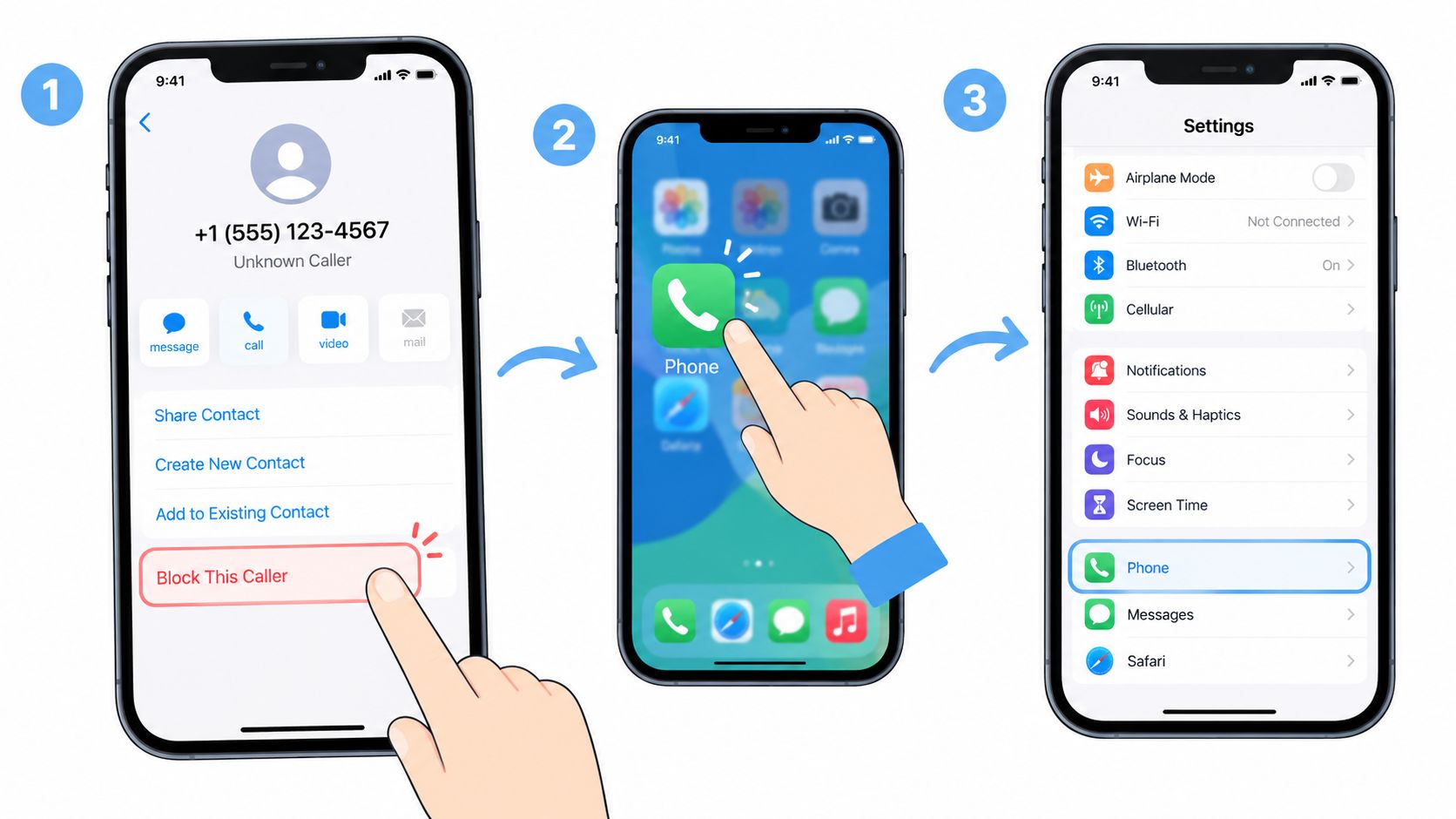
You can also add a number directly through Settings. Open Settings, choose Privacy & Security, tap Blocked Contacts, select Add Blocked Contact, and choose the person or number. This method suits a contact already saved in your address book, while the Recents method is faster for a fresh nuisance call.
Apple's behavior after blocking is easy to misunderstand. A blocked contact is blocked across Apple devices signed into the same Apple Account. Blocked messages aren't delivered and the caller isn't notified, but the caller may still leave voicemail without generating a notification, as explained in Apple's blocked contacts guidance.
That means you should preserve evidence before deleting it. Save a suspicious voicemail, note the displayed number and time, and report the call separately to your carrier or the appropriate regulator. Blocking removes the immediate interruption, but reporting helps providers identify patterns that a single handset can't see.
The following video shows the iPhone blocking workflow in context:
Avoid these common mistakes:
- Don't confuse blocking with silencing unknown callers. Silence features affect a much wider group than one selected number.
- Don't assume the organization is blocked. A caller can use another number or falsify caller ID.
- Don't delete evidence first. Keep voicemails or messages if the call involved threats, payment requests, account access, or impersonation.
- Don't forget shared Apple Accounts. Blocking can apply across connected Apple devices, so check which devices use the same account.
Blocking a Number on Android Step by Step
On Android, the clearest instructions apply to the Phone by Google app. To block a known caller, open Phone, select the call from your history, tap More, and choose Block / report spam. This blocks that displayed number and can also send useful information to Google's spam-detection system.
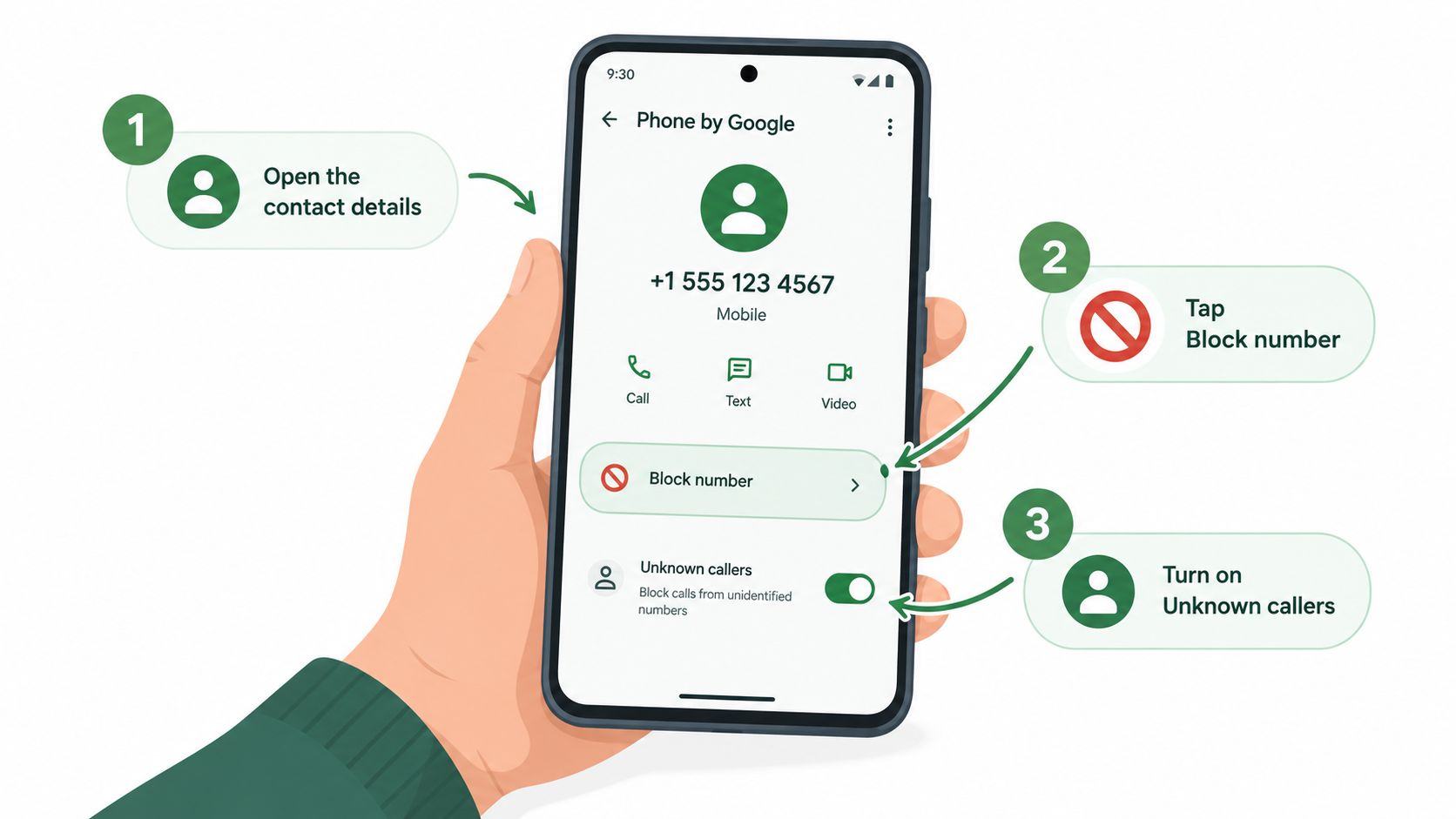
For private or unidentified callers, open Phone, tap More, choose Settings, select Blocked numbers, and enable Unknown. In Google's terminology, this blocks private or unidentified calls while still allowing calls from unsaved numbers that display an actual number. That distinction matters. An unsaved doctor's office or courier can still ring through if the number is visible.
Android's official Phone app guidance also makes clear that per-number blocking is deterministic for that number only. A displayed number gets blocked, but a caller who changes or spoofs the displayed number can still reach you.
Choose the narrow setting first
Use individual blocking when you still need calls from unfamiliar numbers. Choose the Unknown setting only when private calls are causing enough trouble to justify the trade-off. Medical offices, schools, delivery services, and small businesses may call from numbers you haven't stored, so broad filtering can create its own problems.
Android's platform-level BlockedNumberProvider supports restrictions across calls, SMS, and MMS beginning with Android 7.0, but menus and carrier behavior vary by device and region. Samsung, Motorola, and other manufacturers may label the controls differently, so don't assume a menu from one Android phone will match another.
After changing the setting, test it with a non-contact number before relying on it. Then review your blocked list periodically:
- Check important contacts: Make sure a medical office, school, employer, or family member wasn't added accidentally.
- Review voicemail: A blocked caller may still leave evidence or a message depending on the device and carrier.
- Remove outdated entries: Old blocks can hide legitimate callbacks if a number has been reassigned.
- Report suspicious calls: Blocking removes the immediate nuisance, while reporting helps your carrier investigate repeated abuse.
Carrier Tools and Third-Party Call Screening
Handset blocking works best after you've identified the caller. Carrier-level filtering is more useful when unwanted calls arrive from numbers you've never seen before. Providers can use network signals, complaint data, and caller authentication to label or intercept suspicious traffic before it reaches the phone.
The results can be meaningful for people who receive persistent nuisance calls. In a National Trading Standards project involving potentially vulnerable residents, participants received an average of 23 scam or nuisance calls per month, while trial call-blocking units blocked 98,701 calls, more than 99% of identified unwanted calls, according to the Ofcom and ICO nuisance-calls action plan.
That evidence supports a layered approach, not endless manual blocking. Carrier tools can catch patterns across many customers, while your phone's native controls give you direct control over specific numbers.
Blocking Approaches Compared
| Approach | Best for | Main limit |
|---|---|---|
| Phone-level number blocking | One repeat caller or known nuisance number | It usually applies only to the displayed number |
| Carrier spam filtering | Broad robocall and suspected scam reduction | Legitimate calls can be mislabeled, and spoofing can evade some systems |
| Unknown-caller screening | People who rarely need calls from private numbers | It may suppress doctors, schools, couriers, or other legitimate callers |
| AI call screening | Households facing rotating scam identities or protecting a vulnerable family member | It adds another service layer and still requires sensible decisions about suspicious requests |
Dedicated screening services take a different approach from a static block list. Gini Help answers unknown calls first, assesses the caller through a dynamic conversation, and forwards calls it identifies as legitimate. It also provides protection across calls, texts, and email, with live analysis for calls you do answer. Read more about the distinction between static blocking and active screening in this guide to call screening services.
My recommendation is practical. Start with your carrier's spam controls, keep native blocking for known repeat callers, and add active screening when someone in the household receives constant calls, struggles to judge urgency, or has already been targeted by impersonation scams. Don't expect any database or app to identify every threat perfectly. The goal is to make scammers work harder while preserving a clear path for legitimate callers.
Hiding Your Own Number When You Call Out
If your goal is to stop the person you're calling from seeing your number, you don't want Block Caller. You want caller-ID suppression. That setting affects outgoing calls and has nothing to do with preventing incoming calls.
On a current iPhone, open Settings, select Apps, choose Phone, tap Show My Caller ID, and turn it off. Apple states that the recipient won't see your phone number when this setting is disabled. If the option is missing or dimmed, your carrier controls the feature, so you'll need to contact the carrier, as described in Apple's caller-ID instructions.
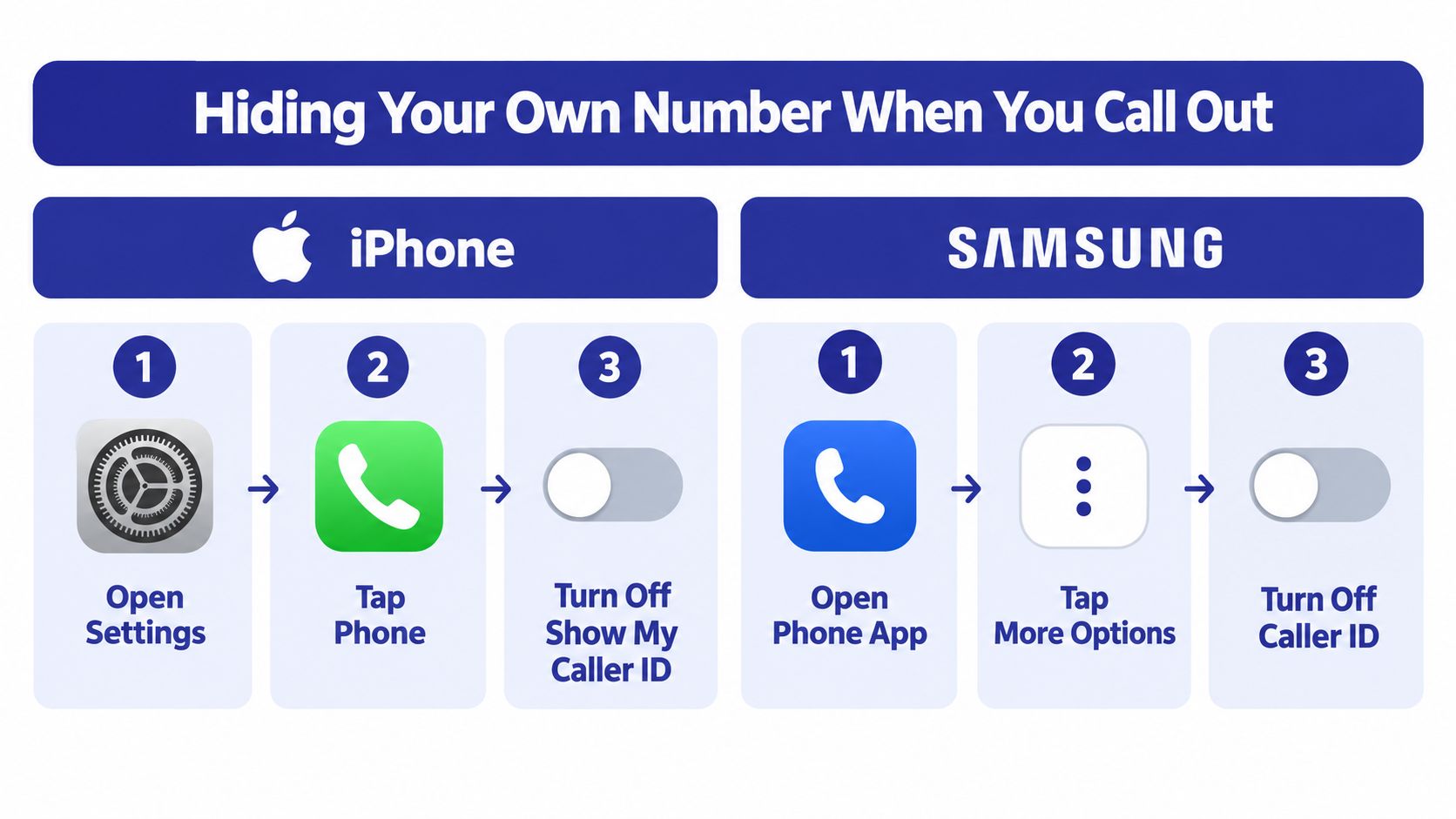
On a Samsung Galaxy phone, open the Phone app, tap the three-dot More options menu, select Settings, choose Supplementary services, and tap Show your caller ID. Samsung provides Network default, Never, and Always. Choose Never to hide the number, but remember that the carrier or country may restrict the feature. Samsung documents the relevant settings in its caller-ID support page.
This is legal caller-ID suppression, not spoofing. Suppression sends no displayed number, while spoofing falsifies the caller-ID information shown to the recipient. Recipients and carriers may reject calls without a displayed number, and some people automatically ignore “Private” or “Unknown” calls because scammers use those labels.
The privacy trade-off is significant. A doctor may call from a personal mobile while displaying an office number, a lawful caller-ID substitution recognized by the FCC. If you hide your number permanently, that legitimate call may look less trustworthy or fail to connect. For a broader explanation of how to mask your caller ID, compare the setting with your carrier's rules before making it your default. You can also review caller-ID privacy options if your goal is to separate personal and business calls.
Use hidden caller ID selectively. It's sensible when returning a call to an unfamiliar business or protecting a personal number, but it's a poor default for contacting schools, healthcare providers, employers, or relatives who may reject unidentified calls.
Why Blocking One Number Rarely Stops a Scam
A local-looking number proves almost nothing. It may belong to an innocent person, a business whose identity was copied, or nobody connected to the caller. The FCC's guidance on spoofing and unwanted robocalls warns that caller ID can be falsified. Our guide to caller ID spoofing scams explains how scammers use that technique, so blocking the displayed number may punish the wrong person while leaving the scammer free to call again under another identity.
A single-number block can stop repeat calls from that number, but it cannot identify the person behind a falsified or constantly changing caller ID.
Ofcom's policy response shows the scale of the problem. In July 2025, the UK regulator proposed withholding caller ID from calls that appear to use a UK mobile number while originating abroad unless the number can be verified. That proposal addresses overseas routing, roaming, and falsified identity, problems a static block list cannot solve.
The financial risk is not theoretical
The FTC reported that, from 2020 through 2024, reports from adults aged 60 and over who lost at least $10,000 to impersonation scams increased more than fourfold. Reported losses above $100,000 rose from $55 million to $445 million over the same period, according to the FTC's impersonation-scam data.
Blocking still earns a place in your response. It stops repeat contact from a known number and gives you control over interruptions. Pair it with carrier filtering, voicemail screening, and a firm rule: an unexpected caller must never pressure you to send money, share a password, read an access code, or install remote-control software.
Practical rule: Treat the caller's behavior as evidence. Treat the displayed number as a label.
Smart Habits and Final Takeaways
A blocked number is a useful first move, not a complete defense. Save suspicious voicemails before deleting them, report persistent calls to your carrier and the FTC where appropriate, and avoid returning unexpected calls because the number looks local or familiar.
Screening voicemail is safer than answering every unknown call. A legitimate caller can usually identify themselves, explain why they called, and provide a reliable way to call back. A scammer creates urgency, discourages independent verification, or demands money and account access before you have time to think.
Use this short operating routine:
- For one repeat caller: Block the number through your iPhone or Android call history.
- For private callers: Enable unknown-caller blocking only after considering the legitimate calls you might miss.
- For your own privacy: Turn off caller ID when calling out, then restore it before contacting people who may reject anonymous calls.
- For rotating scam numbers: Add carrier filtering or active call screening instead of manually blocking every new number.
- For a vulnerable relative: Configure the phone together, test the settings, and create a rule that money or access requests require a separate callback to a trusted number.
The stakes are particularly serious for older adults. The FTC reported that people aged 60 and over lost approximately $2.4 billion to fraud in 2024, compared with about $600 million in 2020. People aged 80 and over reported median losses above $1,600, according to the FTC's 2025 report on protecting older consumers.
Remember the three meanings. Blocking an incoming caller stops a selected displayed number. Hiding your caller ID conceals your number when you call someone else. Blocking unknown callers casts a wider net and can silence legitimate contacts. Once you know which problem you're solving, the right setting becomes straightforward.
For protection across calls, texts, and email, consider downloading Gini Help on Google Play or the App Store. It can screen unknown callers before they reach you and provide live analysis when you answer a suspicious call.
Gini Help screens unknown calls, texts, and emails, helping identify suspicious contacts before they interrupt you or reach a vulnerable family member. Visit Gini Help to add active screening alongside your phone's native blocking controls.