Phishing Email Cyber Security: How to Spot and Stop Them
By Josh C.
28% of the breaches Microsoft investigated in 2025 began with a phishing email or a social engineering message, ahead of the 18% that started with an unpatched web asset and the 12% that began with an exposed remote service, according to the Microsoft Digital Defense Report 2025.
That ranking says something useful. Attackers keep choosing the human door because it's cheaper than finding a software flaw, and because one distracted minute is enough. A message doesn't have to fool you for a week. It has to fool you for about eleven seconds.
So the advice that treats fraud as a writing-quality test misses the point. Grammar checks worked when scams were written by hand in a second language. They fail when a fluent model drafts the message. What still works is process: check the sender, refuse to click, verify through a channel you picked yourself. That's the shape of good phishing email cyber security, and it's what follows here.
Red Flags That Reveal a Phishing Email
Start with the checks, not the story. The table below holds seven signals you can verify in under a minute, and each one comes with the specific action that confirms or dismisses it.
| Red flag | What it looks like | How to check it |
|---|---|---|
| Mismatched sender | Name says your bank, but the address is a lookalike domain | Open the full sender address and compare it with the official domain |
| Urgent deadline | Account closed in 24 hours or invoice overdue today | Pause and confirm through a number or app you already use |
| Hidden link | Link text shows one site, hover preview shows another | Type the known website address yourself instead of clicking |
| Sensitive request | Asks for a password, verification code, card or bank details | Legitimate providers don't ask for codes by email, so verify by phone |
| Unexpected attachment | Document asks you to enable macros or sign in to view it | Open the file only after confirming the sender through another channel |
| Reply-to mismatch | Reply address differs from the sender address | Check the message header before replying |
| Generic greeting | Dear customer instead of your name | Treat as one signal only, since fluent emails can still be fake |
No single row proves fraud. A real retailer does send "Dear customer" mailouts, and a bank's regional brand can legitimately sit on an unfamiliar subdomain. What carries weight is clustering.
When several flags line up
Two flags on one message is a pause. Three or more is a stop, even if each one alone looks harmless. Attackers know you've been taught to hunt for one dramatic error, so they spread their risk across small ones.
Check links before attachments. URLs appear in malicious emails about four times as often as attachments, according to a 2025 roundup of phishing statistics, so the link is the likelier weapon. On a phone you can't hover, so long-press the link to preview the destination, or skip the preview entirely and go to the site yourself.
A hijacked mailbox also hurts everyone you know, because the next round of messages arrives from your address with your reputation attached. Teams that run their own outbound mail can set outbound send limits and approvals so a compromised account can't blast an entire address book before anyone notices.
Practical rule: three or more flags means you don't click, don't reply and don't pay. You verify the message through a channel you already trust.
How Phishing Emails Work From Lure to Loss
Phishing is named after fishing because the sequence really does match. Something attractive dangles on the surface, a hook sits inside it, and the catch happens when the target commits. Walk the sequence once and the scattered advice starts to connect.
Here's the flow in one picture.
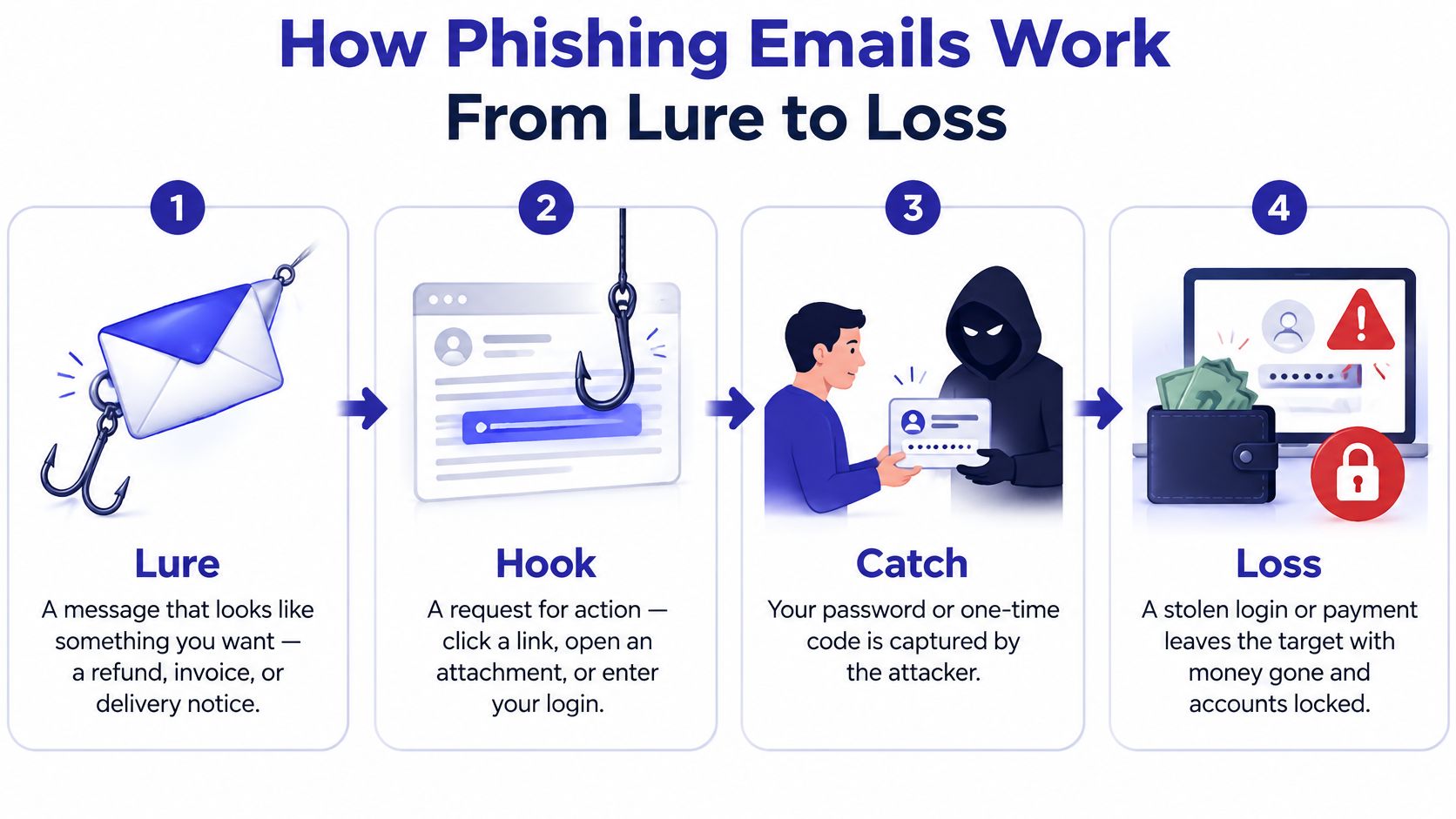
The lure is a message wearing a costume you already trust: your bank, a delivery firm, the tax agency, a colleague with a shared document. The hook is the request, which is almost always small. Click this. Confirm that. Read this code back to me.
The capture happens at the fake page or on the phone. The page records what you type, or the attacker takes the one-time code you read aloud and uses it inside the legitimate login window. The exploit is what the attacker does with the door you opened, and the mailbox is the prize because it holds stored messages, contacts, documents and password-reset links for everything else.
The scale behind that sequence is worth seeing plainly.
| Quarter 2025 | Phishing attacks observed | Change |
|---|---|---|
| Q1 2025 | 1,003,924 | Highest quarterly total since late 2023 |
| Q2 2025 | 1,130,393 | Up 12.6% from Q1, the peak of 2025 |
| Q3 2025 | 892,494 | About 21% below the Q2 peak |
The APWG quarterly trends report recorded 1,003,924 attacks in the first quarter of 2025, rising to 1,130,393 in the second and falling to 892,494 in the third. Those are incidents reported by members and the public, not a full census. SaaS and webmail was the most targeted sector in the third quarter at 21.2% of recorded attacks. Because that chain runs through a live link, security teams that want to see how a scanning layer checks a destination before the page loads can read this explanation of how Purple Shield blocks phishing lookups.
Volume swings by a fifth from quarter to quarter. A blocklist built in January is a snapshot of a moving target.
Why Polished Emails Still Fool People
The advice many of us learned was to hunt for bad grammar, strange phrasing, and clumsy logos. That check now points the wrong way. Generative tools write fluent, personalized prose at industrial scale, so a clean sentence is no longer evidence that the sender is real.
A polished lure works like a well-printed fake parking ticket. The typeface looks official, the layout is tidy, and nothing is misspelled. You still should not pay it until the city's own system shows the ticket. Phishing is that kind of problem: a process to verify, not a typo to spot.
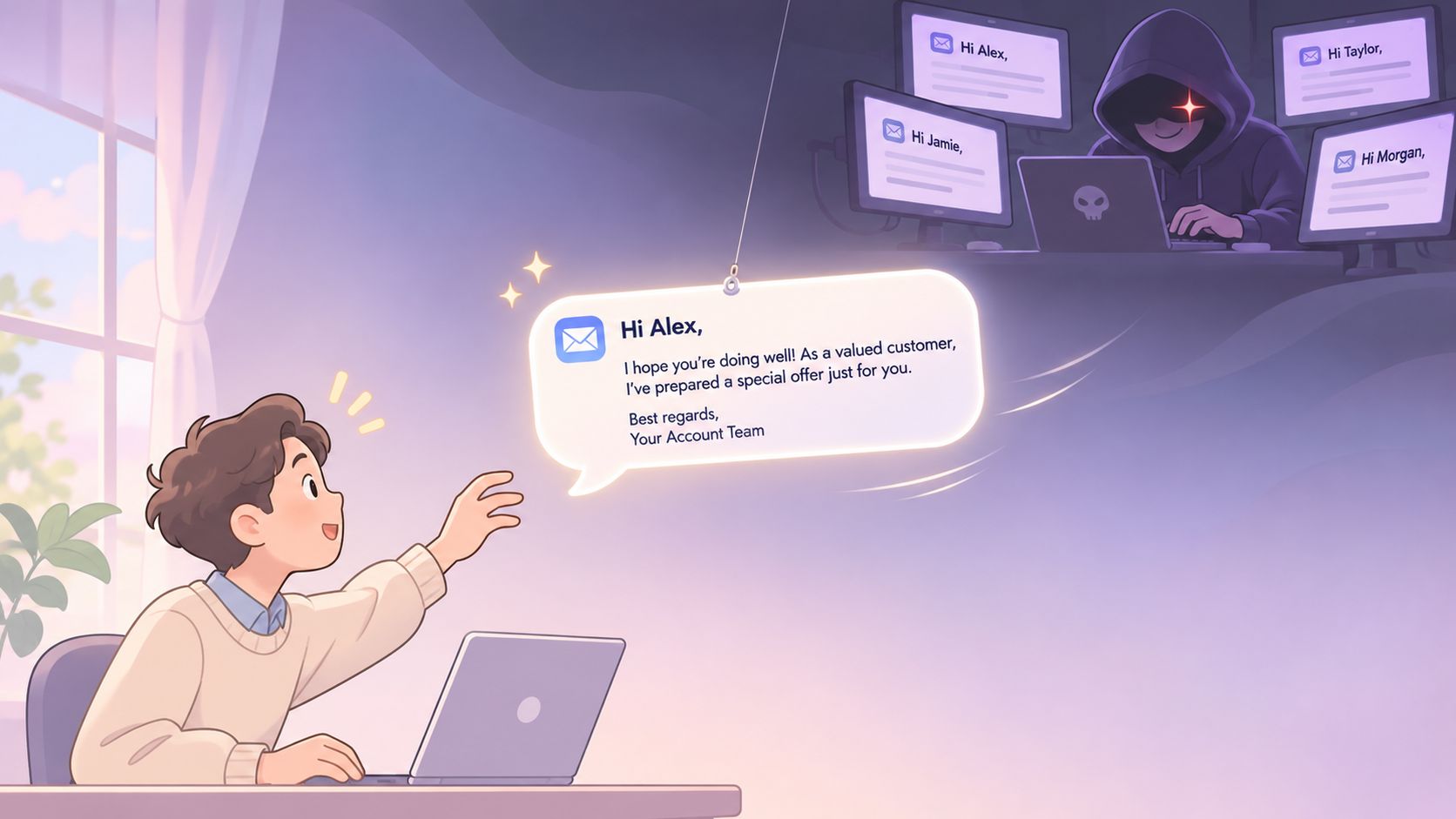
Between meetings, a message often gets only a few seconds. In that window, a correct logo and smooth wording feel like proof. They are not. Automated writing can match a brand's tone closely enough that appearance-based checks fail, while the risk sits in the link or in what the message asks you to do. The mail does not need to be perfect. It only needs to be good enough to earn a click.
Stop grading the writing and run the procedure:
- Never use the link for anything sensitive. Open the official app or type the known domain yourself.
- Verify unexpected requests out of band. Call the number on your statement, not the one in the message.
- Inspect the sender domain and reply path. The display name is free to fake. The domain is harder to fake.
- Report suspicious messages even after you clicked. Early reporting limits the damage.
- Treat one-time codes as cash. Nobody legitimate needs yours read aloud.
A bank alert can arrive with the right logo, the right last four digits, no typo, a clean layout, and a button to confirm a pending transfer. Nothing in the writing gives you a flaw to catch. Open the banking app yourself. If no transfer is waiting there, the email was the lure, and you never needed the button.
Business Email Compromise and Payment Requests
More than $6.3 billion was transferred through business email compromise scams during 2024, based on FBI complaint data cited in the Verizon 2025 DBIR finance snapshot, and the median amount taken from a victim was about $50,000.
The mechanic needs no malware at all. An attacker impersonates an executive, a supplier or a payment contact, then persuades someone with authority to move money or redirect an invoice. Generative AI makes that easier, since official-sounding messages from a "director" or "official" no longer require a careful writer.
The requests to slow down
| Request type | Risk level | Verify by |
|---|---|---|
| Change of supplier bank account | High | Call the supplier on a number from your existing records |
| Urgent wire or payment from an executive | High | Confirm directly with the executive by phone or in person |
| Gift card or prize payment | High | Stop; no legitimate payment requires gift cards |
| Password or verification code request | High | Never share it; contact the service through its official app |
| Account security alert | Medium | Sign in through the official app or typed website address |
| Invoice with a new payee | Medium | Compare against your purchase order and confirm with a known contact |
| Routine receipt | Low | Match the amount and merchant against your account record |
The rule underneath the table is simple. Confirm through a trusted channel, meaning a number from your own records, and never by replying to the email. A reply only reaches the person who wrote it, and that person wants your money.
Small organizations carry extra exposure here, because one compromised mailbox can reach every customer and supplier at once. The same reasoning behind reducing ransomware risk for SMEs applies to payment fraud: limit what a single account can authorize, and require a second person on anything unusual. Vendor impersonation is its own pattern with its own tells, covered in this guide to vendor fraud prevention.
Urgency and secrecy are the attacker's two tools. Slow the transaction down and both stop working.
Protecting Older Adults and Caregivers From High-Value Scams
A bank fraud alert that looks exactly like an authentic message. An investment pitch promising a fast return. A government office threatening arrest over unpaid tax. A grandchild stranded without money for a fare. Those four schemes carry the heaviest losses for older adults, and not one of them depends on bad spelling.
The numbers show the asymmetry. Adults aged 60 and over filed 48,064 phishing or spoofing complaints and reported approximately $77.0 million in losses in 2025, which works out to about $1,602 per complaint against roughly $1,128 overall, based on FBI complaint data summarized in this phishing statistics analysis.
Why the losses run higher
The vulnerability isn't a lack of technical literacy. It's the combination of trust, urgency, isolation and larger transaction values. Someone managing a retirement account has more to move than someone with a checking balance, and a scammer who reaches a person during a lonely afternoon gets a conversation as well as a click.
For caregivers, agree on a household rule in advance, while nothing is at stake: no unexpected payment goes out without a second trusted adult hearing about it. The rule protects the relationship too, because it removes the judgment from the moment of pressure.
A script that doesn't sting: "I got a message like that last month and I called the bank directly instead. Can we do that together right now?"
Underreporting is common, and shame drives it. A person who reports within the hour gets their bank, email account and identity protections moving while the trail is warm, so make speaking up early the praised outcome rather than the embarrassing one. More on that in this guide to online safety for seniors.
One line covers a lot of ground: if a caller asks for money, passwords or urgent action, check the request independently before acting.
What to Do in the First Hour After a Phishing Click
Clicking is not the failure. Staying quiet for a day is. The first hour is when sessions can still be cut off and passwords still matter, so work down this list in order.
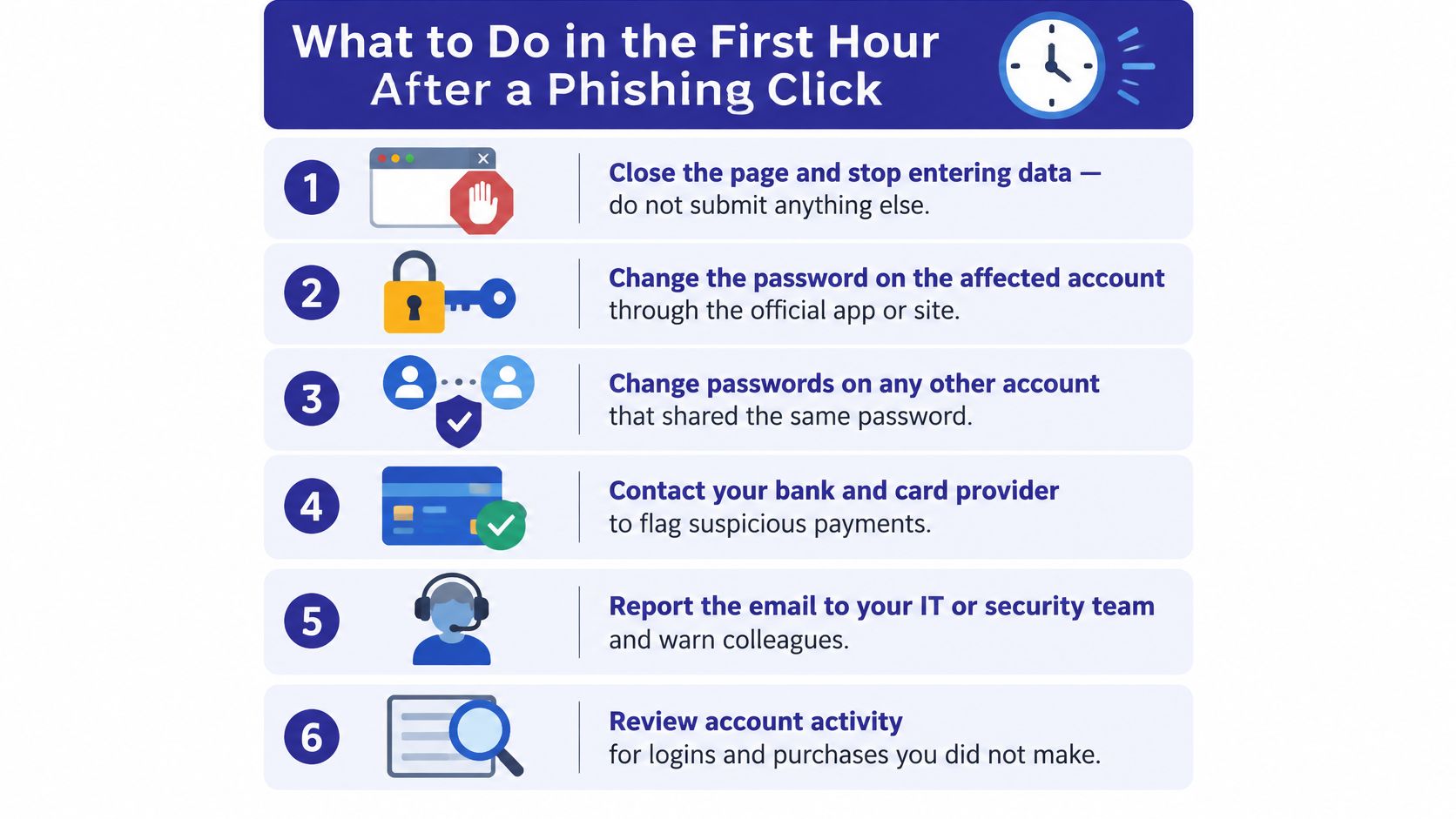
- Close the page and stop typing. If you haven't submitted the form yet, you may still be fine.
- Change the password on the affected account through the official app or site, then change it anywhere you reused the same one.
- Turn on multi-factor authentication for email and banking, using an app rather than text messages where you can.
- Check forwarding rules and sent items for messages you didn't write. Attackers set silent forwarding so they keep reading after you recover the account.
- Call your bank or card provider if payment details went in, and ask for a transaction review rather than waiting for a statement.
- Report the message to your email provider and to your national fraud service, and tell the company being impersonated.
- Watch for the follow-up. Recovery scams arrive within days, offering to retrieve your money for a fee.
Reporting isn't paperwork. Phishing and spoofing was the FBI Internet Crime Complaint Center's most reported cybercrime category in 2025, with 191,561 complaints and about $215.8 million in reported losses, up from roughly $70.0 million in 2024, according to the FBI's 2025 IC3 report.
Outside the United States, the same step applies with different names: your country's consumer fraud agency or police cybercrime unit, plus your email provider's phishing or abuse address. A full walkthrough of the recovery sequence sits in this guide on what to do after clicking a link in a phishing email.
If you'd rather watch the sequence than read it, this walkthrough covers the same ground.
Confirm Every Unexpected Request Before You Act
One rule covers almost every case, and it doesn't care how the message is written.
The rule: any unexpected request for money, a password, a verification code or immediate action gets confirmed through a channel you choose, never through the message that delivered it.
Apply it in three moves. Name the request using the table above, so you know whether you're looking at a bank change, a wire, a code or a receipt. Reach the sender another way, using a phone number or app from your own records rather than a link or reply button. Act only after the independent check confirms it, and treat silence as a no.
That's why the rule survives AI-written fraud. It judges the process, not the prose, and the process doesn't change when the grammar improves. Verizon's 2025 Data Breach Investigations Report executive summary, which analyzed 12,195 breaches across 139 countries, found the human element involved in approximately 60% of them, with social actions such as phishing and pretexting as major contributors.
Gini Help scans your inbox for phishing emails and warns you before you click a dangerous link once you connect a supported inbox, and the same app screens texts and calls so a fake delivery notice or prize message lands in a separate folder instead of your main view. Screening lowers the number of attempts that reach you. It doesn't remove the risk, since some scams can still get through and call screening can't identify every caller as safe, which is exactly why the independent check stays in place.
You can install it from Google Play or the App Store.
Before you act on any unexpected message, ask one question: could I confirm this without the link or the reply button inside it?
Phishing works because it arrives looking like a normal Tuesday, and Gini Help gives you one more layer between that message and your money: it flags suspicious emails in Gmail, Outlook or Yahoo, filters scam texts into quarantine, and warns you mid-call when someone starts asking for a code or a payment. Connect your inbox and you'll see risk labels in plain language on the messages that look off. Visit Gini Help to set it up, then make the independent phone call your habit rather than your fallback.