What to Do if Scammer Has Your Phone Number: 2026 Guide
By Josh C.
Your phone rings at 8:40 on a Tuesday morning. The voice on the other end already knows your name, your number, and the last four digits of an account you barely use. Or nothing happens at all except this: a friend forwards a screenshot of a missed call from your number, placed at 2am while you were asleep. Both moments land the same way, with a jolt of what do they have?
The honest answer is narrower than the panic suggests. A stranger with your number can reach you, imitate you, and try to talk you into things. That's a communication problem. It becomes an account problem only if someone uses the number to intercept a verification code, and that needs a second move against your carrier or your logins.
The distinction that decides everything else: a phone number opens conversations, not vaults. Vaults need a second key, and you hold that one.
Most advice on what to do if a scammer has your phone number skips that distinction and jumps straight to changing the number. That's the one step that's usually premature and occasionally harmful.
Triage the Sign and Contain the Number
A neighbor sees your number on caller ID while you are asleep. Or a caller quotes part of an account number and waits for you to fill in the rest. Neither event proves anyone has accessed your accounts. The first is consistent with caller-ID spoofing; the second may be an attempt to use information about you to build trust. Treat each as a signal to check, not proof of an account takeover.
In 2024, the Federal Trade Commission's Consumer Sentinel Network received more than 6.47 million consumer reports, including 845,806 reports classified as imposter scams. About 22% of those imposter-scam reports included a reported monetary loss, totaling approximately $2.95 billion. A number can start the conversation, but the theft often depends on what happens next: someone impersonates a bank, court, or utility and pressures you to share information or act quickly.
A phone number can help a scammer reach or impersonate you. It does not, by itself, give them access to your accounts. Keep caller-ID spoofing separate from a SIM swap or account takeover: spoofing changes what appears on someone's screen, while a SIM swap or port-out involves your mobile service. That distinction helps you choose a response without changing your number unnecessarily.
Match the sign to the row
Find the sign that matches what you noticed, then take the action in that row. The goal is to quiet unwanted contact without overlooking signs that your mobile service or an account may be under attack.
| Sign | Likely meaning | First action |
|---|---|---|
| Calls or texts from your own number reach strangers | Caller-ID spoofing | Don't reply or call back; check for other signs before changing account settings |
| Password-reset codes you didn't request | Someone may be trying to access an account | Secure the account through its official app or website |
| Sudden loss of cellular service | Possible SIM swap or port-out | Contact your carrier using a verified number |
| Carrier notice of a SIM or port-out change | Possible unauthorized number-transfer activity | Contact your carrier and ask it to review the change |
| A caller quotes your account or bank details | Information may have been exposed or may be used to gain your trust | Hang up and contact the institution through its official number |
Five containment steps, in this order
Stop engaging. Don't reply to suspicious texts, press keypad prompts, or share passwords, account numbers, Social Security numbers, PINs, or one-time codes. Even if the caller knows your date of birth, that does not make the request legitimate. If someone asks for money, passwords, or urgent action, check the request independently before doing anything.
Block and report the displayed number inside your phone. Blocking stops calls and texts from that line and feeds your device's spam filtering. The caller may switch to another number, but blocking can reduce repeat contact from the one you identified.
Verify the caller's claim independently. If someone says they are from your bank, a government agency, or a retailer, hang up and use the number on your card, statement, or the organization's official website. A caller-supplied number is not an independent check.
Where call screening fits: Gini Help answers calls from unknown numbers, asks who is calling and why, and rings you through when the call is real. Screening can reduce unwanted calls, but it cannot identify every scam or guarantee that every caller is safe. Check important requests independently.
Save the evidence before deleting anything. Record the displayed number, date, time and time zone, message text, voicemail, and what the caller asked you to do. FCC guidance on caller ID spoofing advises against calling unknown numbers back or confronting the caller, and recommends keeping relevant details such as dates, displayed numbers, messages, lawful recordings, and payment information.
Keep your number for now unless there is a concrete reason to move it. Changing numbers does not necessarily stop spoofed calls, since the displayed number is not proof that calls are coming through your SIM. A number change can also interrupt account recovery if services send codes to that line. Decide about changing it after you have assessed what happened.
What contained looks like
The immediate disturbance has eased, and you have a record of the contact in order: dates, times, messages, and any requests for money or information. If the calls continue, those details give you a clear account of what happened.
How to Lock Down Your Carrier and Logins
The step people skip is the one that matters most: the call to the carrier. Blocking a caller and changing a password both feel like action, and neither stops a number-porting attack. Only your carrier can freeze the line.
Work through this in order, because each step protects the one after it.
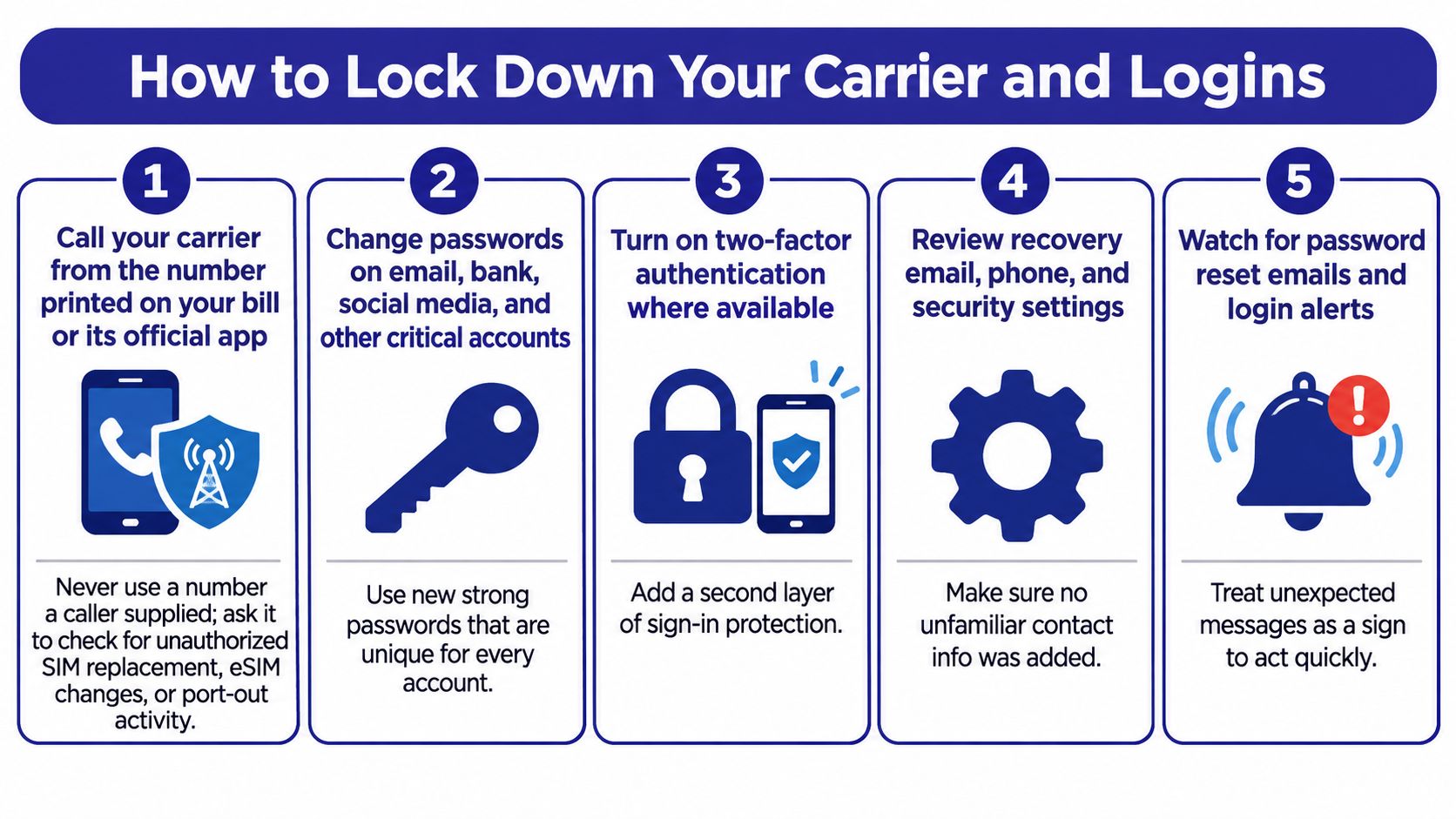
Call your carrier from a number you already have. Use the number printed on your bill or in its official app, never one a caller read aloud to you. Ask it to check for unauthorized SIM replacement, eSIM activation, port-out requests, call forwarding, and recent account changes. Forwarding is the quiet one, since a forwarding rule copies your calls and texts elsewhere without touching your SIM at all, so it's worth knowing how to disable forwarding on your line before you ever need to.
Ask for an account PIN and a port-out lock. CISA's mobile communications guidance treats the carrier PIN as a control for sensitive operations such as number porting, and recommends combining it with multifactor authentication. Set both, and keep the PIN in your password manager rather than a note on the phone.
Change your primary email password first. The inbox is the reset key for everything else. Changing banking passwords while the email account is still exposed is like locking the back door with the front door swinging open.
Review sessions, recovery details, and forwarding rules. Clear active sessions on email, banking, cloud, and social accounts, then check recovery phone numbers, forwarding rules, and connected devices. Anything you don't recognize gets removed, not investigated later.
Move off SMS codes. Where a service supports an authenticator app or hardware security key, switch to it. Control of your number is enough to trigger a password reset, so the code arriving by text is the weakest link in the chain. How a SIM swap unfolds step by step shows exactly how that transfer turns a phone number into account access.
Never read a one-time code to anyone. Not to a caller who knows your name, not to a "technician" who says the code is for their records. No legitimate organization asks for it.
The loss figures explain why the carrier call comes first. The FBI reported that Americans lost more than $26 million to SIM-swap scams in 2024, down from nearly $49 million in 2023, according to AARP's explanation of the scheme. Those attacks run through the carrier, so that's where the lock belongs.
Your checklist before you close the call: carrier confirmed no transfer, PIN saved, email password changed, unfamiliar sessions cleared.
Keep or Change Your Number Without Breaking Recovery
Here's the decision rule in one sentence. Keep the number for carrier records and account recovery, move high-value accounts onto authenticator apps or passkeys, and change the number only if your carrier can't restore control or harassment continues after carrier steps and filters.
| Situation | Keep the number | Change the number |
|---|---|---|
| Spoofed robocall texts only | Yes, block and report them | Not needed |
| A caller claims your identity, no account changes | Yes, secure accounts first | Not needed |
| Loss of service or a port-out notice | Yes, restore through the carrier | Only if the carrier can't restore control |
| Number exposed in a data breach | Yes, add a carrier PIN and move accounts off SMS | Only if the carrier can't lock the line |
| Harassment continues after carrier steps | Yes, use filters and reports first | Consider it after carrier and filter steps fail |
| Number is the recovery method for banking | Yes, keep it and add an authenticator app | Not recommended without updating every account |
Changing a number is expensive in ways the panic hides. Bank alerts stop arriving. A hospital's records desk keeps the old digits. The family member who coordinates care calls a line that's dead. Every two-factor setup tied to SMS needs rebuilding, and the compromised email address and reused password that created the original problem are exactly as they were.
There's also a timing reason to wait. The FCC notes that scammers rotate numbers constantly, so spoofing of your number may stop within hours, which makes changing it immediately often unnecessary and can create account-recovery problems of its own, as the FCC's guide to stopping unwanted robocalls and texts explains.
What upgrades the risk is a transfer, not a call. The FBI's 2025 IC3 report describes criminals moving victims' phone service onto devices they control, which means possession of the number can be operationally more serious than a stream of spam calls, per the FBI's 2025 Internet Crime Report.
Three questions before you port out: has service actually been lost, has the carrier confirmed a transfer, and is this number the recovery method for anything important? One yes changes the plan. Three noes mean you keep the number and finish the security work.
Warn Your Contacts and Report the Calls
If your number is being spoofed, the people who trust you are the easiest target. A text from your number asking a niece to send a gift card code, or a call to a neighbour saying you're stranded and need money, carries the weight of your name. Warn them before a stranger does.
Send something short to family members, neighbours, and anyone who has a payment arrangement with you:
Message to send: My number may be spoofed. If you get a message from me asking for money, gift cards, or a verification code, it isn't me. Call me on the number you already have in your contacts before you do anything.
Tell your bank and anyone who holds a standing payment arrangement with you, since impersonation aimed at them looks like you authorizing a transfer.
Reporting serves two purposes: it creates an official record for you, and it helps regulators connect repeated campaigns. In an FCC complaint, choose unwanted calls or texts, then the category "my own number is being spoofed," as the FCC's consumer guide to spoofing sets out. Misleading caller ID transmitted with intent to defraud is prohibited under the Truth in Caller ID Act, and illegal spoofing can carry penalties of up to $10,000 per violation.
Give the form detail, not a summary. The FCC's unwanted communications enforcement page asks for:
- The number that received the call or text, not just the one that placed it.
- The caller-ID name and number displayed on your screen.
- The date and time, including the time zone where you can.
- Your contact information and phone type, meaning landline or wireless.
- International numbers in the Additional Information field if they display outside the standard North American format.
Four reports worth filing this week: your carrier's fraud desk, an FCC complaint, an FTC report for the fraud attempt, and a police report if money or identity details changed hands. When you're unsure which agency handles what, how to report a scammer without wasting the report walks through the routing.
Recover From Follow-Up Fraud and Monitor for 30 Days
Read this before anything else. Anyone who contacts you offering to recover money for an upfront fee, remote access to your device, gift cards, cryptocurrency, or your banking credentials is running a second scam. The FBI's IC3 report identifies these recovery scams by name, and they work because the first loss leaves people willing to pay for a way out.
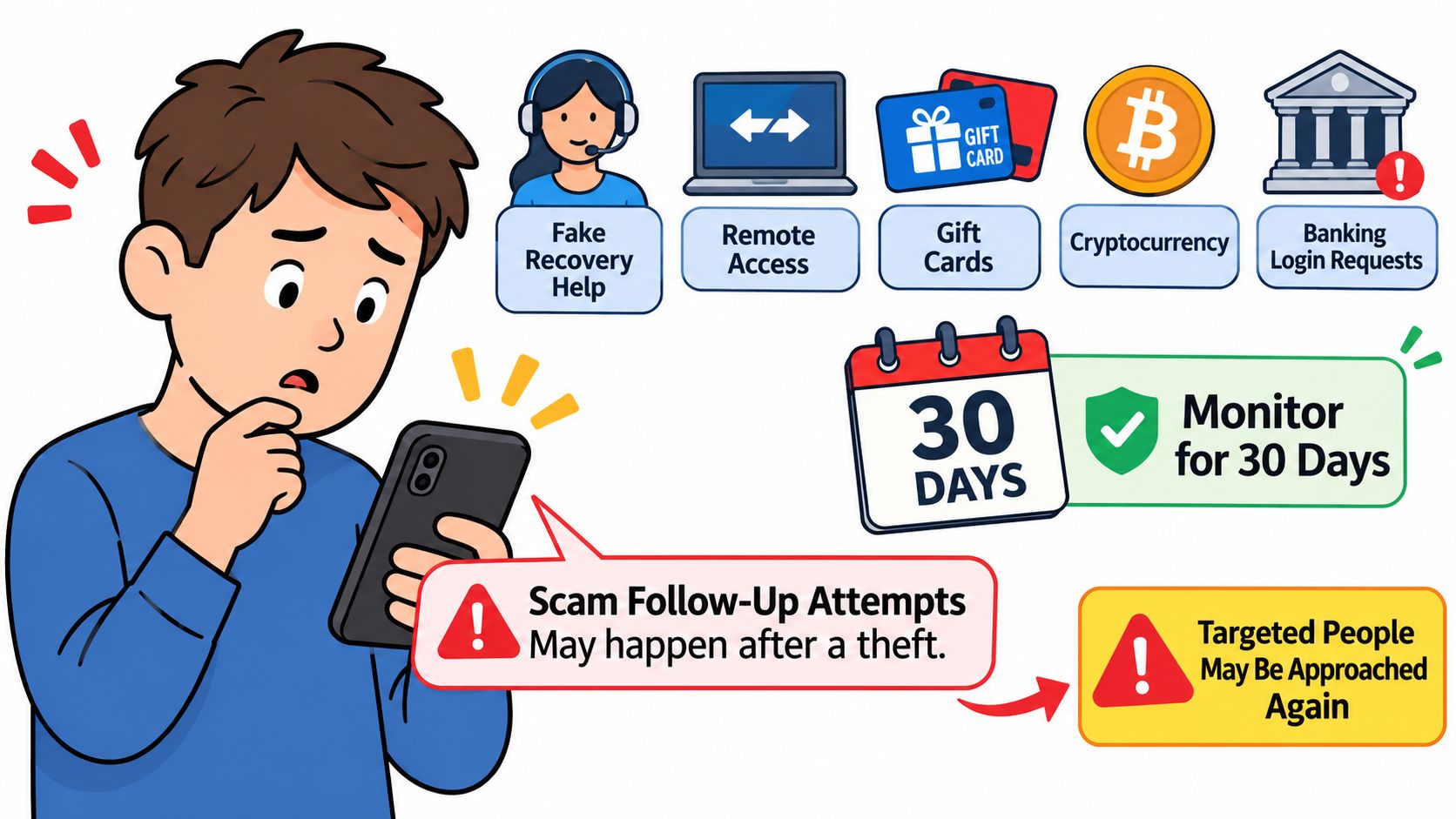
Separate exposure from loss, because the two need different work. If you gave out only your number, or spoke with a caller and sent nothing, preserve the call logs, texts, voicemails, and caller-ID details, then contact your carrier and any affected institution through numbers you looked up yourself. Replace reused passwords, review email-forwarding rules and active sessions, and warn close contacts.
If money moved, sequence beats speed on everything else:
- Call the bank or payment provider now and request a recall or freeze on the transfer. This is the only step where minutes change the outcome.
- Report to the national fraud authority and to police, so the record exists while details are fresh.
- Place a fraud alert or credit freeze if you shared identity data such as a Social Security number or date of birth.
Then run a thirty-day watch, because quiet fraud surfaces slowly. Check daily for password-reset emails you didn't trigger, new device or sign-in alerts, unfamiliar multi-factor prompts, sudden loss of service, bank transactions you don't recognize, and mail about accounts you never opened.
The harm here is growing fast. The FBI reported more than 201,000 complaints from people over 60 in 2025, with losses exceeding $7.7 billion, as complaints rose 37% and losses 59% from 2024, per the FBI's account of scams targeting older adults. Phone-first scams are where that money goes.
Three signs the situation is closed: no new alerts for thirty days, every password replaced with a unique one, and the carrier PIN in place.
Set Up Protection Before the Next Call
The gap that remains after all of this is the first thirty seconds of the next unknown call, when a convincing voice starts talking before you've decided whether to trust it. That's a screening problem, and it's the one worth solving before the next ring.
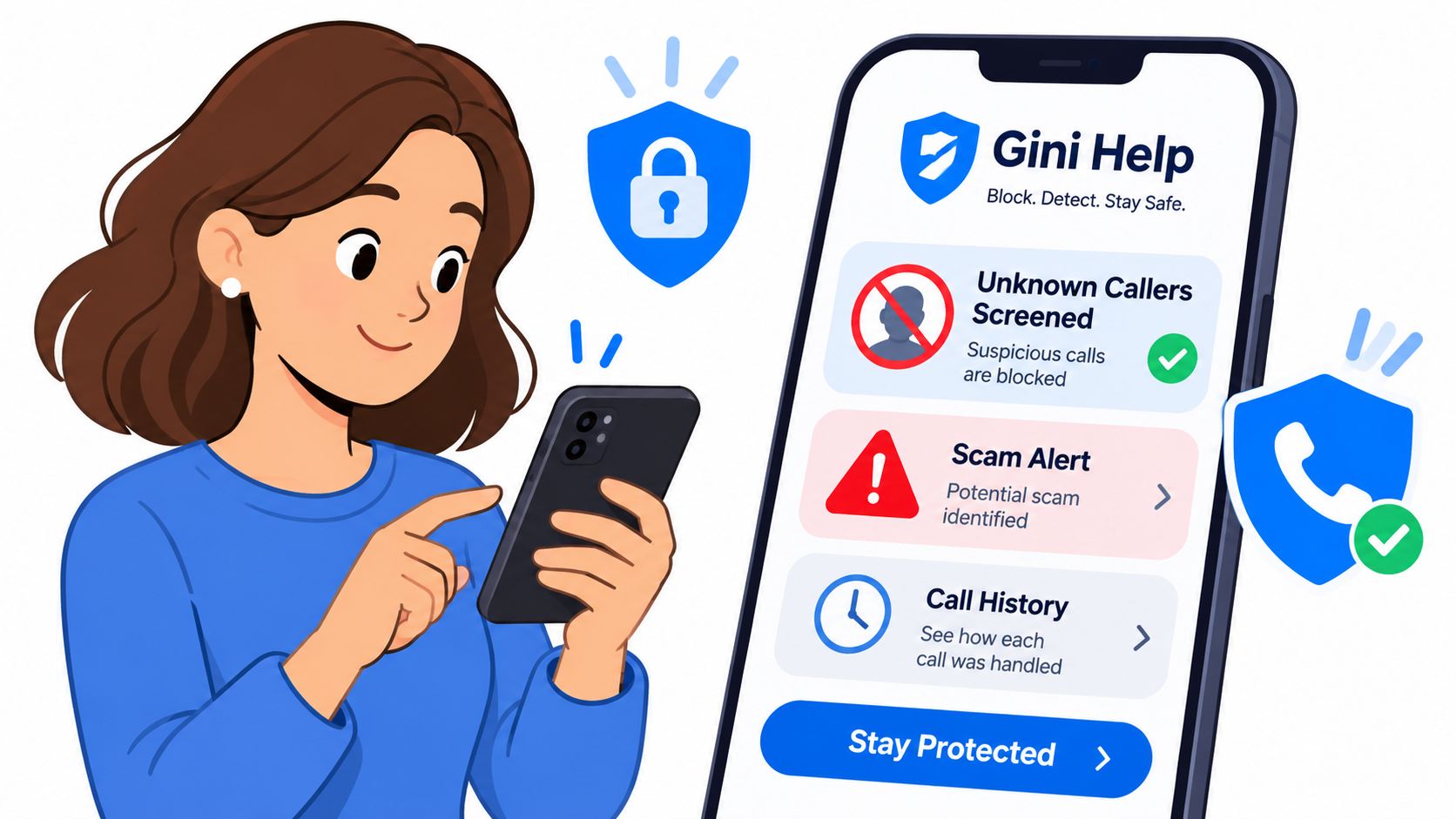
Gini Help is a mobile app that screens unknown callers, helps you spot scams, and shows how each call was handled. It answers calls from unknown numbers itself, asks who is calling and why, and lets real callers through to your phone, so the calls that reach you have already survived a question.
Live Scam Detection keeps listening after you answer and warns you mid-call when someone asks for a verification code or account number, or pushes you to act right now. It's included in Premium Plus, Premium Plus + Home Phone, and Family Plus, and not in Premium or Family. Text filtering moves scam texts and fake delivery alerts into a separate folder, and email protection flags fake links and urgent payment requests once you connect a supported inbox. You can watch a live demo in the browser before signing up.
Reducing how many lists carry your number is the other half. Opting out of data brokers removes your details from the directories that get scraped, bought, and resold.
Screening reduces unwanted contact but can't guarantee that every caller is safe, so a request for money, passwords, or immediate action still gets an independent check before you act on it.
Download Gini Help from Google Play or the App Store, then confirm whether your plan includes Live Scam Detection so you know what protection is currently active. Once the app is installed, finish the carrier PIN step if you haven't already, since screening handles the calls and only your carrier can stop a port-out.
A stranger with your number is a nuisance you can outlast. A stranger with your number and your carrier account is a different problem, and Gini Help is built for the first while you close the door on the second. It answers unknown callers before your phone rings, flags the tactics that show up mid-conversation, and keeps a record of how each call was handled, so the next unfamiliar voice meets a screening question instead of your full attention. Visit Gini Help to see the plans and start the free trial.