Cash App Scam Warning Signs and What to Do
By Josh C.
A convincing message can still be a scam. Cash App says an in-app warning has helped block more than $2 billion in potential peer-to-peer scam payments since 2020. The warning matters because a payment can leave after someone persuades you to approve it yourself.
That is different from a criminal taking over your account. One scammer may build trust, then pressure you to send money. Another may try to get a sign-in code so they can access your account. The response depends on which happened, and the chance of recovering a payment may differ.
Focus on the requested action, not just whether a message looks genuine. Logos and case numbers can be copied. A request to send money or share a sign-in code deserves an independent check before you act.
Requests Cash App Will Never Make
Cash App states clearly what its support team will never request: a sign-in code, your PIN or login details, your Social Security number, a payment or purchase, a test transaction, a remote-access application, or money to claim a payment. Behavior is the part a scammer can't fake. Logos, fonts, and case numbers are all copyable, so judge the request, not the branding.
| Request | Why it is a warning sign | What to do |
|---|---|---|
| Sign-in code | Support never asks for a code sent to your phone | Don't share it. End the contact. |
| PIN or password | Support never asks for your PIN or login details | Don't enter it on any site or in any call |
| Social Security number | Not needed to resolve account problems | Refuse, then contact support through the app |
| Payment or purchase | Support never asks you to pay to fix or verify an account | Send nothing |
| Test transaction | Legitimate support doesn't run tests with your money | Refuse and report the message |
| Remote-access app install | Support never asks you to install software that controls your phone | Don't install, and disconnect if it's already installed |
| Money to claim a payment | There's no legitimate process that requires sending money to receive funds | Send nothing |
| Payment to join a giveaway or survey | Legitimate giveaways don't require a payment, login, or PIN | Ignore and report the offer |
Why the request matters more than the logo
Every row in that table describes something a criminal needs and something Cash App already has on its own side of the screen. Support can see your account activity without your password. Support can verify your identity without your Social Security number. When someone claiming to be support asks for any of it, they're asking you to hand over the keys to a door they should already be able to open from the inside.
Two rows sound helpful rather than dangerous, which is exactly why they work. A "test transaction" feels like a diagnostic, and it isn't. A payment to "claim" funds inverts the whole idea of a transfer: you pay first and hope, which isn't how money arrives.
The rule to apply today: if a message matches even one row in that table, stop. Send nothing, reply with no codes, and reach support only from inside the app or the official help center, never from a phone number or link the message supplied.
Cash App's account-safety guidance spells out the same list, including the detail that customer support will never request funds from a customer. That single sentence kills a whole family of scripts at once.
The Four Signals and the Two-Signal Rule
A Cash App scam warning isn't proof that a payment is fraudulent. It's a signal that the person across from you is using pressure instead of reason, and that's a reason to stop and check rather than a verdict to argue with. Cash App's guide to spotting scams names four indicators worth knowing by heart.
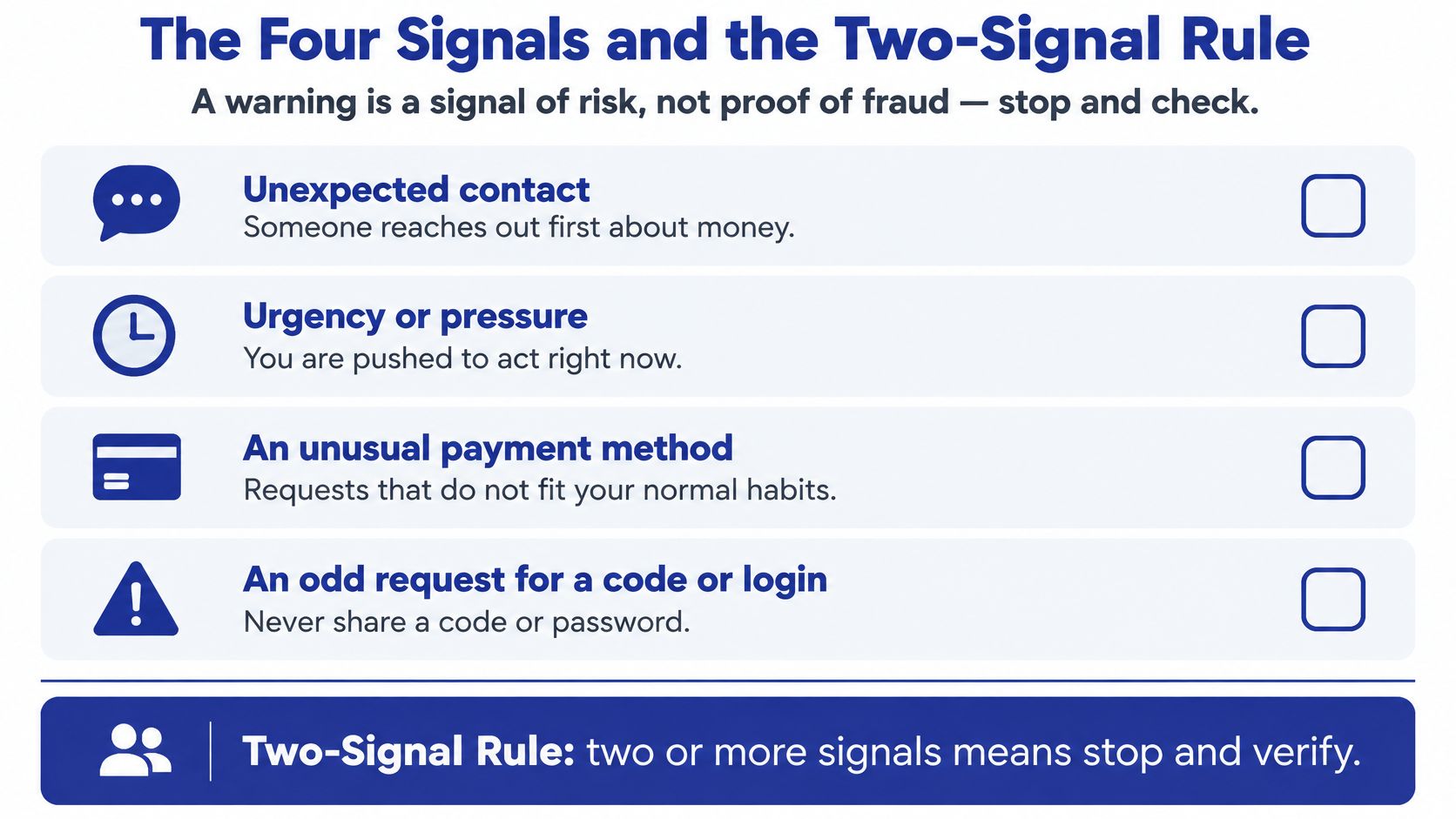
The four aren't a random checklist. They arrive in a sequence, and each one makes the next easier to accept. An unsolicited message opens the conversation, urgency switches off your instinct to verify, an unusual payment method slips past your normal expectations, and a request for personal data finishes the job by handing over the account itself.
| Signal | What it looks like | What to do |
|---|---|---|
| Unexpected contact | A text, call, email, or social post you didn't start | Don't use the number or link inside it |
| Urgency or pressure | A frozen-account threat or a demand to pay or reply now | Pause and verify on your own |
| Unusual payment request | A test payment, money to claim funds, or a recipient you don't know | Send nothing until the recipient checks out |
| Request for personal information | A sign-in code, PIN, password, or Social Security number | Don't share it, and open support in the app |
The two-signal rule is the practical part. When two or more signals show up together, stop, verify the requester through a channel you already trust, and never use the contact details in the suspicious message. One signal can be coincidence. Two is a pattern.
Say a text arrives saying your account is frozen and you need to send $25 to a verification address to restore access. That's unexpected contact, urgency, and an unusual payment request in a single message. You don't argue with it or ask it questions. You open Cash App yourself and look.
Cash App also recommends turning on transaction notifications and new-device alerts. Those aren't prevention tools, they're early detection: they tell you the moment something happens on your account that you didn't do.
If a caller asks for money, passwords, or urgent action, check the request yourself, through a channel you already trust, before you do anything.
Named Scam Tactics Targeting Cash App Users
Money flipping is the tactic that still catches people who know better. A social-media account promises to multiply your funds if you send an initial payment, and the pitch usually comes with screenshots of other people's supposed payouts. Cash App says the fraudster accepts the money and never returns the promised amount. The turning point is the moment you consider sending the first dollar.
The fake software glitch looks technical, which makes it feel urgent. A message claims Cash App has a bug and sends you to an outside website to download a corrected version. Enter your login details there and you've handed the scammer your account and the funds inside it, as Cash App's trending-scams guidance describes.
The compromised-account call is the most common one. Someone posing as support says your account is under attack and asks for the code you just received, or asks you to move money to a "secure" account. There's no secure holding account, and the code they want is the one that stops them.
The giveaway or survey fee asks for a payment, a login, or a PIN to release a prize. Cash App states that legitimate channels won't require any of those to take part in a giveaway or survey. A prize that costs money to collect isn't a prize.
Each script works because it converts a strange request into a normal-looking step, then adds a clock. The fake bank text that imitates a fraud alert uses exactly the same opening move, and our breakdown of fake bank text messages walks through that version line by line. The scripts also travel across borders: if you send money internationally as well, this guide to protecting your cross-border transfers covers how the same pressure tactics show up in remittances.
None of these tactics requires you to do anything clever. Refuse and report. That's the entire defense.
Telling a Tricked Payment From a Stolen Account
A stolen account means someone moved your money without you. A tricked payment means you moved it yourself after someone lied to you. The first is unauthorized access. The second looks authorized on the record, and that record is what makes recovery so much harder.
The difference matters because the routes diverge immediately. Peer-to-peer apps generally offer less recourse than credit cards, as Consumer Reports notes, and Cash App warns that fraudulent or accidental cryptocurrency transactions may be irreversible (Cash App help center). A payment you confirmed after a persuasive phone call sits outside most of the protections people assume they have.
| Situation | Key evidence | First step |
|---|---|---|
| Account accessed without your approval | Unknown transfers in the Activity tab; new-device alerts | Change your Cash PIN, log out other devices, report unauthorized access |
| You approved a transfer after being deceived | Messages, call records, the recipient's $cashtag or phone number | Select the payment in Activity, choose Report an issue, and save your evidence |
| Fake support contacted you | Unsolicited call or message asking for codes or payment | Stop the contact and use only in-app or official help center support |
| Cash Card or card details exposed | Card missing, or details shared with a caller | Lock the Cash Card in the app |
Evidence to save in both cases
Keep the messages, call records, exact $cashtag, phone number or email you sent to, and the time of every event. Screenshot them before they disappear. That includes the text carrying the code request, since a fake verification message is one of the most common openers, and our guide to verification code text message scams shows how to read one. This matters more than expected: in January 2025 the Consumer Financial Protection Bureau alleged that Cash App failed to properly investigate unauthorized-transaction disputes and misrepresented how well it protected users, which is why a documented timeline is worth more than a frustrated phone call (CFPB announcement).
One more distinction that trips people up. A government complaint is not automatically a reimbursement claim. Eligibility and payment depend on the enforcement process and on how the individual case is handled, so file your own report rather than waiting for a settlement to find you.
Systems that stop account takeover at the login step, like the approach described in how MANDATE stops token theft, exist because stolen sessions are the quiet half of this problem. If you didn't start the payment, treat it as unauthorized access. If you did, treat it as deception, and report it the same day.
How to Respond Right After a Suspicious Payment
What you do in the first ten minutes shapes most of the outcome, and none of it requires technical skill. Work through the steps below in order, and don't skip the dull ones, because the dull ones are what shorten the window a criminal has to move money onward.
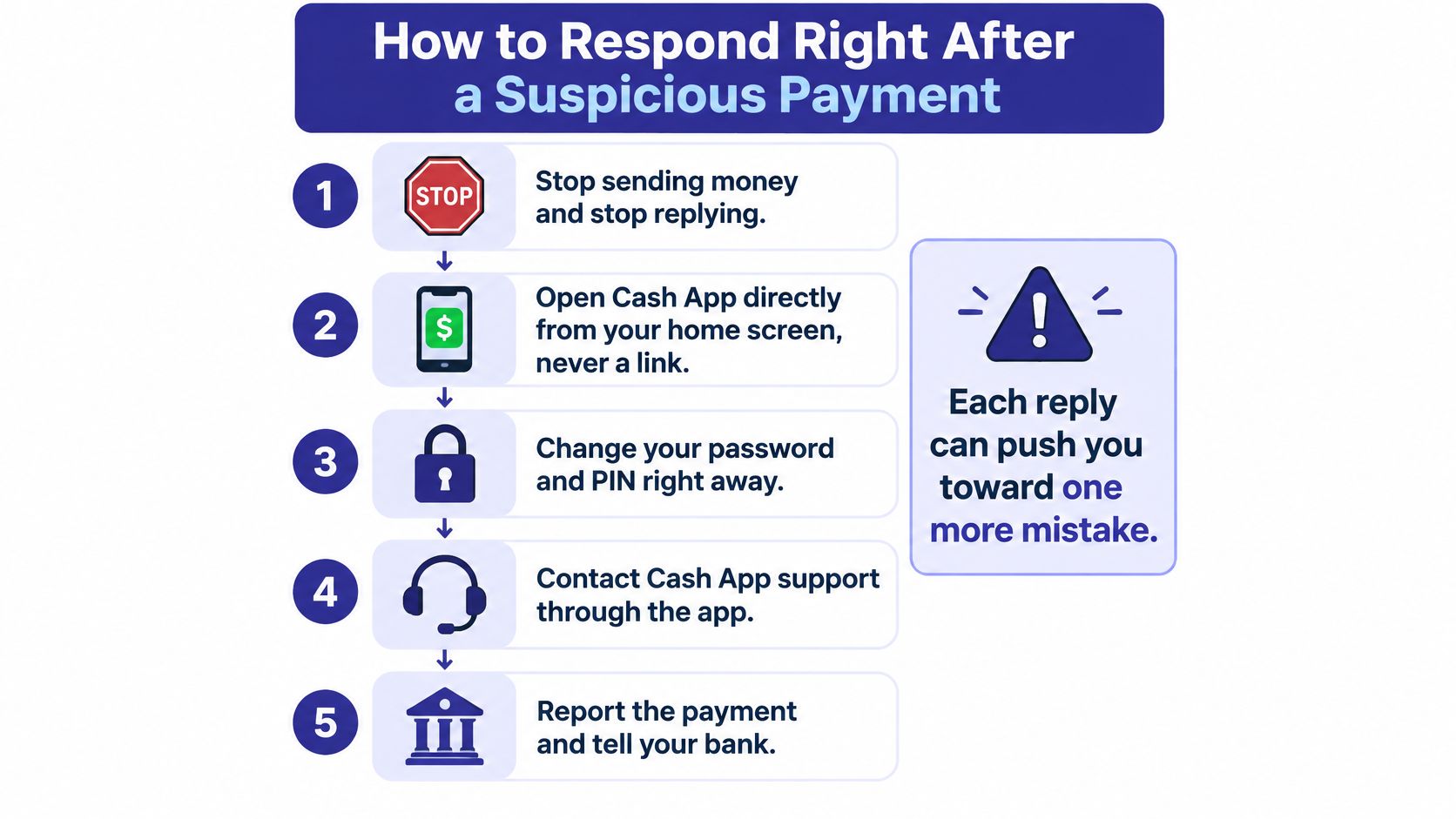
- Stop sending money and stop replying. Every extra message gives the other person another chance to adjust the story and another chance for you to slip. The conversation is the attack surface, so close it.
- Open Cash App from your home screen, never from a link. A link in a text can lead to a page built to look exactly like the app and to capture whatever you type. The app already on your phone is legitimate.
- Report the payment. Open the Activity tab, select the payment, choose "Report an issue," and follow the prompts. Cash App states that Cash App-to-Cash App payments are instant and usually cannot be canceled after they're sent, so speed is the point (Cash App support).
- Change your Cash PIN and log out other devices. A criminal holding an open session keeps it until you end it. Changing the PIN cuts off access you can't see.
- Turn on Security Lock with a PIN, fingerprint, or face scan, so the account can't be opened without you present.
- Lock the Cash Card if the card or its details may have been exposed. A locked card can't be used while you sort out what happened.
- Save everything. Screenshots of the messages, call logs, the recipient's name and $cashtag. If a linked bank card or account was involved, call that institution using the number printed on your card, not one from the message.
The most common mistake isn't missing a step. It's going back to the original message for a phone number or a link, which restarts the same trap with the same person. If you're now trying to get funds back, this guide to how to recover money from a scammer covers what to file and in what order.
For a walkthrough of the same sequence, this short video covers the response step by step.
Why Cash App Scam Warnings Matter in 2026
Scammers can exploit a gap between needing help and finding a trustworthy way to get it. In a January 2025 enforcement action, the Consumer Financial Protection Bureau found that Block, Cash App's operator, had failed for years to provide effective customer service, including live telephone agents. The agency said that this gap contributed to fake customer-service phone lines used by scammers to steal consumers' information (CFPB enforcement action). It also found that Block did not take timely and effective measures to prevent, detect, limit, and address fraud, and that disputes under federal electronic-fund-transfer rules were not properly investigated. The order required at least $75 million in consumer redress.
What the complaint history adds
The CFPB action concerned how a company handled fraud and customer service. The FTC's broader data offers a separate measure of the harm: in 2023, the median reported loss involving payment apps or services was $380 (FTC data spotlight on scams). A median is the midpoint of reported losses, so it shows that losses can be significant even when they are not life-changing.
Cash App said that, as of November 2024, more than 20,000 customers had received reimbursements for verified scams, and 90 percent were fully compensated (Cash App's account of its scam response). Those figures describe verified scams and reimbursements, not a guarantee that every payment can be recovered.
The practical lesson is about the route to help. A missing or hard-to-reach support channel can send a worried user searching, where a fake support number may appear convincing. Treat unexpected contact from someone claiming to be Cash App support with care, and verify it through a channel you already trust.
Verify Every Request Before You Send Money
Every unexpected request for money, a code, or a login gets checked through a channel you already trust before you act. Five checks cover nearly all of it.
- Read the recipient's displayed name and ask whether it matches the person or business you think you're paying.
- Re-read the $cashtag character by character. Lookalike spellings are chosen to survive a glance, not a second look.
- Match the phone number or email on the payment screen to a contact already in your phone. One typo can send an instant Cash App-to-Cash App payment that usually can't be canceled.
- Treat the in-app payment warning as a stop, not a formality. Cash App said that feature had helped prevent more than $2 billion in potential peer-to-peer scam payments since its launch in August 2020 (Cash App).
- Open support only from the app or the official help center, never from a number or link that arrived in the message you're unsure about.
That last check is where Gini Help fits as an extra layer, not a replacement. Gini Help screens unknown calls, texts, and emails before they reach you, and Live Scam Detection keeps listening after you answer, warning you mid-call when someone asks for a verification code or account number or pushes you to act right now. A risk warning is a reason to pause and check, not a reason to relax. Some scams still get through, so the five checks above remain the standard.
You can download it from Google Play or the App Store, then turn on Live Scam Detection on an eligible plan.
A wrong number, a fake fraud alert, or a caller claiming your Cash App account is frozen usually reaches you before any payment does, and that's the moment worth protecting. Gini Help screens unknown calls and texts so scam scripts don't get a hearing, and Live Scam Detection warns you during a call when someone starts asking for codes, account numbers, or immediate action. Visit Gini Help to see how it fits alongside the checks you've just read.